
使用IDEA详解Spring中依赖注入的类型(上)
使用IDEA详解Spring中依赖注入的类型(上)
在Spring中实现IoC容器的方法是依赖注入,依赖注入的作用是在使用Spring框架创建对象时动态地将其所依赖的对象(例如属性值)注入Bean组件中。
Spring框架的依赖注入通常有两种实现方式,一种是使用构造方法注入,另一种是使用属性的setter方法注入。
使用构造方法注入
Spring框架可以采用Java反射机制,通过构造方法完成依赖注入。
创建项目及导入Maven模块过程请看《使用IDEA开发Spring入门程序》,在这就不赘述了。在这继续前面的项目,按照下面的步骤补充:
创建entity包,创建Person类
package entity;

public class Person {

    private String name;

    private String sex;

    public Person() {

        System.out.println("无参构造调用了...");

    }

    public Person(String name, String sex) {

        this.name = name;

        this.sex = sex;

    }

    public String getName() {

        return name;

    }

    public void setName(String name) {

        this.name = name;

    }

    public String getSex() {

        return sex;

    }

    public void setSex(String sex) {

        this.sex = sex;

    }

}

复制代码
构造方法注入方式一
编写配置文件
配置文件的具体代码如下:
<?xml version="1.0" encoding="UTF-8"?>

<beans xmlns="http://www.springframework.org/schema/beans"

       xmlns:xsi="http://www.w3.org/2001/XMLSchema-instance"

       xsi:schemaLocation="http://www.springframework.org/schema/beans

       http://www.springframework.org/schema/beans/spring-beans.xsd">

    <!--将指定类TestDaoImpl配置给Spring,即注册一个TestDaoImpl对象,让Spring创建其实例-->

    <!--

    一个Bean标签可以注册一个组件(对象、类)

    class:写要注册的组件的全类名

    id:这个对象的唯一标识

    -->

    <bean id="test" class="dao.TestDaoImpl"/>

    <bean id="person1" class="entity.Person"/>

    <!--使用构造方法注入-->

    <bean id="person2" class="entity.Person">

        <!--使用有参构造器进行创建对象并赋值-->

        <!-- public Person(String name, String sex) {

        this.name = name;

        this.sex = sex;

    }-->

        <constructor-arg name="name" value="泰斗贤若如"></constructor-arg>

        <constructor-arg name="sex" value="男"></constructor-arg>

    </bean>

</beans>

复制代码
在测试类TestDemo中测试
package test;

import dao.TestDao;

import entity.Person;

import org.junit.jupiter.api.Test;

import org.springframework.beans.factory.BeanFactory;

import org.springframework.beans.factory.xml.XmlBeanFactory;

import org.springframework.context.ApplicationContext;

import org.springframework.context.support.ClassPathXmlApplicationContext;

import org.springframework.context.support.FileSystemXmlApplicationContext;

import org.springframework.core.io.FileSystemResource;

public class TestDemo {

    @Test

    public void test4(){

        //初始化spring容器ApplicationContext,加载配置文件

        ApplicationContext applicationContext = new ClassPathXmlApplicationContext("applicationContext.xml");

        //通过容器获取test实例

        Person person2 =(Person) applicationContext.getBean("person2");

        System.out.println("姓名:"+person2.getName()+";"+"性别:"+person2.getSex());

    }

}

复制代码
测试结果
构造方法注入方式二
编写配置文件
<?xml version="1.0" encoding="UTF-8"?>

<beans xmlns="http://www.springframework.org/schema/beans"

       xmlns:xsi="http://www.w3.org/2001/XMLSchema-instance"

       xsi:schemaLocation="http://www.springframework.org/schema/beans

       http://www.springframework.org/schema/beans/spring-beans.xsd">

    <!--将指定类TestDaoImpl配置给Spring,即注册一个TestDaoImpl对象,让Spring创建其实例-->

    <!--

    一个Bean标签可以注册一个组件(对象、类)

    class:写要注册的组件的全类名

    id:这个对象的唯一标识

    -->

    <bean id="test" class="dao.TestDaoImpl"/>

    <bean id="person1" class="entity.Person"/>

    <!--使用构造方法注入-->

    <bean id="person2" class="entity.Person">

        <!--使用有参构造器进行创建对象并赋值-->

        <!-- public Person(String name, String sex) {

        this.name = name;

        this.sex = sex;

    }-->

        <constructor-arg name="name" value="泰斗贤若如"></constructor-arg>

        <constructor-arg name="sex" value="男"></constructor-arg>

    </bean>

    <!--可以省略name属性,严格按照构造器参数的位置赋值-->

    <bean id="person3" class="entity.Person">

        <!--使用有参构造器进行创建对象并赋值-->

        <!-- public Person(String name, String sex) {

        this.name = name;

        this.sex = sex;

    }-->

        <constructor-arg value="泰斗贤若如"></constructor-arg>

        <constructor-arg value="男"></constructor-arg>

    </bean>

</beans>

复制代码
在测试类TestDemo中测试
package test;

import dao.TestDao;

import entity.Person;

import org.junit.jupiter.api.Test;

import org.springframework.beans.factory.BeanFactory;

import org.springframework.beans.factory.xml.XmlBeanFactory;

import org.springframework.context.ApplicationContext;

import org.springframework.context.support.ClassPathXmlApplicationContext;

import org.springframework.context.support.FileSystemXmlApplicationContext;

import org.springframework.core.io.FileSystemResource;

public class TestDemo {

    @Test

    public void test5(){

        //初始化spring容器ApplicationContext,加载配置文件

        ApplicationContext applicationContext = new ClassPathXmlApplicationContext("applicationContext.xml");

        //通过容器获取test实例

        Person person3 =(Person) applicationContext.getBean("person3");

        System.out.println("姓名:"+person3.getName()+";"+"性别:"+person3.getSex());

    }

}

复制代码
测试结果
需要注意的是,如果使用这种方法,要严格按照构造器参数的位置赋值,如果不这样赋值,当然也不会报错,但会造成赋值错乱,比如会把姓名赋值成性别,这当然是我们不愿意看到的,如果你非不按要求赋值(有点极端,皮一下),有种方法可以避免你赋值错乱,请看下面代码:
编写配置文件
<?xml version="1.0" encoding="UTF-8"?>

<beans xmlns="http://www.springframework.org/schema/beans"

       xmlns:xsi="http://www.w3.org/2001/XMLSchema-instance"

       xsi:schemaLocation="http://www.springframework.org/schema/beans

       http://www.springframework.org/schema/beans/spring-beans.xsd">

    <!--将指定类TestDaoImpl配置给Spring,即注册一个TestDaoImpl对象,让Spring创建其实例-->

    <!--

    一个Bean标签可以注册一个组件(对象、类)

    class:写要注册的组件的全类名

    id:这个对象的唯一标识

    -->

    <bean id="test" class="dao.TestDaoImpl"/>

    <bean id="person1" class="entity.Person"/>

    <!--使用构造方法注入-->

    <bean id="person2" class="entity.Person">

        <!--使用有参构造器进行创建对象并赋值-->

        <!-- public Person(String name, String sex) {

        this.name = name;

        this.sex = sex;

    }-->

        <constructor-arg name="name" value="泰斗贤若如"></constructor-arg>

        <constructor-arg name="sex" value="男"></constructor-arg>

    </bean>

    <!--可以省略name属性,严格按照构造器参数的位置赋值-->

    <bean id="person3" class="entity.Person">

        <!--使用有参构造器进行创建对象并赋值-->

        <!-- public Person(String name, String sex) {

        this.name = name;

        this.sex = sex;

    }-->

        <constructor-arg value="泰斗贤若如"></constructor-arg>

        <constructor-arg value="男"></constructor-arg>

    </bean>

    <bean id="person4" class="entity.Person">

        <!--使用有参构造器进行创建对象并赋值-->

        <!-- public Person(String name, String sex) {

        this.name = name;

        this.sex = sex;

    }-->

        <!--index="1",为参数指定索引,从0开始-->

        <constructor-arg value="男" index="1"></constructor-arg>

        <constructor-arg value="泰斗贤若如" ></constructor-arg>

    </bean>

</beans>

复制代码
在测试类TestDemo中测试
package test;

import dao.TestDao;

import entity.Person;

import org.junit.jupiter.api.Test;

import org.springframework.beans.factory.BeanFactory;

import org.springframework.beans.factory.xml.XmlBeanFactory;

import org.springframework.context.ApplicationContext;

import org.springframework.context.support.ClassPathXmlApplicationContext;

import org.springframework.context.support.FileSystemXmlApplicationContext;

import org.springframework.core.io.FileSystemResource;

public class TestDemo {

    @Test

    public void test5(){

        //初始化spring容器ApplicationContext,加载配置文件

        ApplicationContext applicationContext = new ClassPathXmlApplicationContext("applicationContext.xml");

        //通过容器获取test实例

        Person person4 =(Person) applicationContext.getBean("person4");

        System.out.println("姓名:"+person4.getName()+";"+"性别:"+person4.getSex());

    }

}

复制代码
测试结果
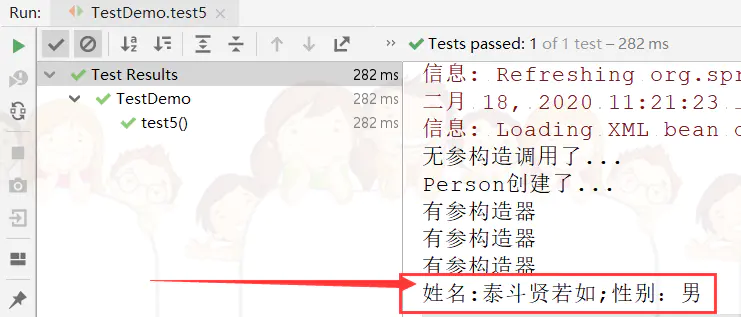
不要以为这样就完了,我在想,如果出现重载的情况,该如何办?且看我向下分解:
将entity包下的Person类修改如下
package entity;

public class Person {

    private String name;

    private String sex;

    private Integer age;

    private String email;

    public Person() {

        System.out.println("无参构造调用了...");

        System.out.println("Person创建了...");

    }

    public Person(String name, String sex) {

        this.name = name;

        this.sex = sex;

        System.out.println("有参构造器");

    }

    public Person(String name, String sex, Integer age) {

        this.name = name;

        this.sex = sex;

        this.age = age;

    }

    public Person(String name, String sex, String email) {

        this.name = name;

        this.sex = sex;

        this.email = email;

    }

    public String getName() {

        return name;

    }

    public void setName(String name) {

        this.name = name;

    }

    public String getSex() {

        return sex;

    }

    public void setSex(String sex) {

        this.sex = sex;

    }

    public Integer getAge() {

        return age;

    }

    public void setAge(Integer age) {

        this.age = age;

    }

    public String getEmail() {

        return email;

    }

    public void setEmail(String email) {

        this.email = email;

    }

}

复制代码
编写配置文件
<?xml version="1.0" encoding="UTF-8"?>

<beans xmlns="http://www.springframework.org/schema/beans"

       xmlns:xsi="http://www.w3.org/2001/XMLSchema-instance"

       xsi:schemaLocation="http://www.springframework.org/schema/beans

       http://www.springframework.org/schema/beans/spring-beans.xsd">

    <!--将指定类TestDaoImpl配置给Spring,即注册一个TestDaoImpl对象,让Spring创建其实例-->

    <!--

    一个Bean标签可以注册一个组件(对象、类)

    class:写要注册的组件的全类名

    id:这个对象的唯一标识

    -->

    <bean id="test" class="dao.TestDaoImpl"/>

    <bean id="person1" class="entity.Person"/>

    <!--使用构造方法注入-->

    <bean id="person2" class="entity.Person">

        <!--使用有参构造器进行创建对象并赋值-->

        <!-- public Person(String name, String sex) {

        this.name = name;

        this.sex = sex;

    }-->

        <constructor-arg name="name" value="泰斗贤若如"></constructor-arg>

        <constructor-arg name="sex" value="男"></constructor-arg>

    </bean>

    <!--可以省略name属性,严格按照构造器参数的位置赋值-->

    <bean id="person3" class="entity.Person">

        <!--使用有参构造器进行创建对象并赋值-->

        <!-- public Person(String name, String sex) {

        this.name = name;

        this.sex = sex;

    }-->

        <constructor-arg value="泰斗贤若如"></constructor-arg>

        <constructor-arg value="男"></constructor-arg>

    </bean>

    <bean id="person4" class="entity.Person">

        <!--使用有参构造器进行创建对象并赋值-->

        <!-- public Person(String name, String sex) {

        this.name = name;

        this.sex = sex;

    }-->

        <!--index="1",为参数指定索引,从0开始-->

        <constructor-arg value="男" index="1"></constructor-arg>

        <constructor-arg value="泰斗贤若如" ></constructor-arg>

    </bean>

    <bean id="person5" class="entity.Person">

        <!--使用有参构造器进行创建对象并赋值-->

        <!--public Person(String name, String sex, Integer age) {

        this.name = name;

        this.sex = sex;

        this.age = age;

    }

            public Person(String name, String sex, String email) {

        this.name = name;

        this.sex = sex;

        this.email = email;

    } -->

        <!--重载的情况下type可以指定参数的类型-->

        <constructor-arg value="男" index="1"></constructor-arg>

        <constructor-arg value="泰斗贤若如" index="0"></constructor-arg>

        <constructor-arg value="22" index="2" type="java.lang.Integer"></constructor-arg>

    </bean>

</beans>

复制代码
在测试类TestDemo中测试
package test;

import dao.TestDao;

import entity.Person;

import org.junit.jupiter.api.Test;

import org.springframework.beans.factory.BeanFactory;

import org.springframework.beans.factory.xml.XmlBeanFactory;

import org.springframework.context.ApplicationContext;

import org.springframework.context.support.ClassPathXmlApplicationContext;

import org.springframework.context.support.FileSystemXmlApplicationContext;

import org.springframework.core.io.FileSystemResource;

public class TestDemo {

    @Test

    public void test6(){

        //初始化spring容器ApplicationContext,加载配置文件

        ApplicationContext applicationContext = new ClassPathXmlApplicationContext("applicationContext.xml");

        //通过容器获取test实例

        Person person5 =(Person) applicationContext.getBean("person5");

        System.out.println("姓名:"+person5.getName()+";"+"性别:"+person5.getSex()+";"+"年龄:"+person5.getAge());

    }

}

复制代码
测试结果
不过话又说过来了,明明name能搞定的事情弄这么复杂干嘛,所以常用的还是方式一
使用属性的setter方法注入
这部分放到下一篇讲解吧,篇幅有点多了,请持续关注!
使用IDEA详解Spring中依赖注入的类型(上)的更多相关文章
- 用IDEA详解Spring中的IoC和DI(挺透彻的,点进来看看吧)
用IDEA详解Spring中的IoC和DI 一.Spring IoC的基本概念 控制反转(IoC)是一个比较抽象的概念,它主要用来消减计算机程序的耦合问题,是Spring框架的核心.依赖注入(DI)是 ...
- 详解Spring中Bean的作用域与生命周期
摘要:在利用Spring进行IOC配置时,关于bean的配置和使用一直都是比较重要的一部分,同时如何合理的使用和创建bean对象,也是小伙伴们在学习和使用Spring时需要注意的部分,所以这一篇文章我 ...
- Spring中依赖注入的四种方式
在Spring容器中为一个bean配置依赖注入有三种方式: · 使用属性的setter方法注入 这是最常用的方式: · 使用构造器注入: · 使用Filed注入(用于注解方式). 使用属性的sett ...
- spring中依赖注入
理解依赖注入:参考https://blog.csdn.net/taijianyu/article/details/2338311 一.依赖注入让bean与bean之间以配置文件组织在一起,而不是以硬编 ...
- spring中依赖注入与aop讲解
一.依赖注入 这个属于IOC依赖注入,也叫控制反转,IOC是说类的实例由容器产生,而不是我们用new的方式创建实例,控制端发生了改变所以叫控制反转. 1 2 3 4 5 6 7 8 9 10 11 1 ...
- 【Spring】详解Spring中Bean的加载
之前写过bean的解析,这篇来讲讲bean的加载,加载要比bean的解析复杂些,该文之前在小编原文中有发表过,要看原文的可以直接点击原文查看,从之前的例子开始,Spring中加载一个bean的方式: ...
- Spring点滴七:Spring中依赖注入(Dependency Injection:DI)
Spring机制中主要有两种依赖注入:Constructor-based Dependency Injection(基于构造方法依赖注入) 和 Setter-based Dependency Inje ...
- 详解Spring中的Profile
前言 由于在项目中使用Maven打包部署的时候,经常由于配置参数过多(比如Nginx服务器的信息.ZooKeeper的信息.数据库连接.Redis服务器地址等),导致实际现网的配置参数与测试服务器参数 ...
- Spring中依赖注入的使用和配置
使用方法1: //在执行此实例化的时候就会完成所有注入 ClassPathXmlApplicationContext ctx = new ClassPathXmlApplicationContext( ...
随机推荐
- 【转】8 个效果惊人的 WebGL/JavaScript 演示
英文原文:9 IMPRESSIVE WEBGL JAVASCRIPT EFFECT SHOWCASE,翻译:iteye WebGL 是一种 3D 绘图标准,这种绘图技术标准允许把 JavaScript ...
- OOP之重载
PHP中的重载指的是动态的创建属性与方法,是通过魔术方法来实现的. 属性的重载通过调用类中的__set,__get,__isset,__unset方法来分别实现对不存在属性的赋值.读取.判断属性是否设 ...
- 低功耗蓝牙(BLE)——概念
1. 种类 单模蓝牙:仅支持传统蓝牙和BLE(低功耗蓝牙)中的一种: 双模蓝牙:同时支持传统蓝牙和BLE(低功耗蓝牙). 2. 部署方案 3. 节点类型 根据蓝牙协议不同的协议层有不同的角色 1. S ...
- dfs 序 欧拉序
推荐博客 :https://www.cnblogs.com/stxy-ferryman/p/7741970.html DFS序其实就是一棵树顺次访问的结点的顺序,例如下面这棵树 它的 dfs 序就是 ...
- CAS是什么
CAS是什么? 比较并交换 例子1: public class ABADemo1 { public static void main(String[] args) { AtomicInteger at ...
- 开源导入导出库Magicodes.IE 导出教程
要点 导出特性 如何导出Excel表头 如何导出数据.如何进行数据的切割.如何使用筛选器 导出特性 ExporterAttribute Name: 名称(当前Sheet 名称) HeaderFontS ...
- redis 5种类型
redis可以不严谨的看成: redis: { name: value, name: value, } value的数据类型: 1.字典 2.列表 3.字符串 4.集合 5.有序集合 注意: redi ...
- 跨源请求cors和jsonp
0.产生跨域的原因 浏览器的同源策略 什么是浏览器的同源策略? src开发 ajax禁止 解决方法 jsonp 通过src绕过浏览器的同源策略 缺点:只发送GET请求 cors 通过设置相应头 分类 ...
- Postman 的替代品来了
Postwoman 一个开源.免费.快速.漂亮的 API 构建器,可以替代 Postman. 这个名字起得挺有意思,感觉像 Postman 的媳妇. Postwoman 的诞生过程: 它的作者是一个全 ...
- elasticsearch(lucene)索引数据过程
倒排索引存储-分段存储(lucene的功能)在lucene中:lucene index包含了若干个segment在elasticsearch中:index包含了若干主从shard,shard包干了若干 ...