
Building Ethereum private chain on CentOS
golang安装
yum install golang
查看版本
go version
安装以太坊源代码
Building Geth (command line client)
Clone the repository to a directory of your choosing:
git clone https://github.com/ethereum/go-ethereum
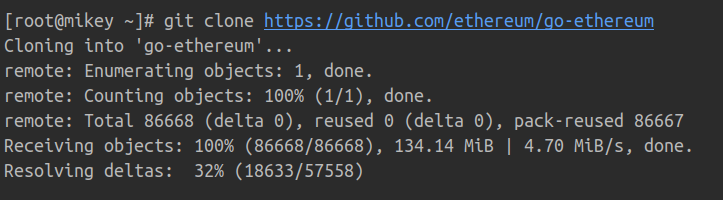
Install latest distribution of Go if you don't have it already.
Building geth requires Go and C compilers to be installed:
sudo apt-get install -y build-essential
Finally, build the geth program using the following command.
cd go-ethereum

make geth
由于firewall原因无法下载go相关库请使用代理
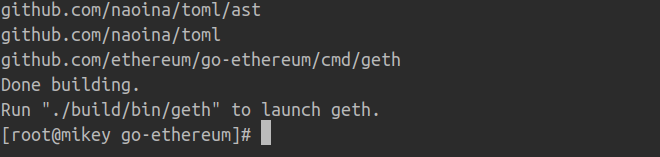
You can now run build/bin/geth to start your node.
golang <3
创世区块文件的准备
创建账号:
./geth --datadir /eth/data account new

在go-ethereum/build/bin目录下创建init.json的文本文件,内容如下:
{

  "config": {

    "chainId": 666,

    "homesteadBlock": 0,

    "eip150Block": 0,

    "eip150Hash": "0x0000000000000000000000000000000000000000000000000000000000000000",

    "eip155Block": 0,

    "eip158Block": 0,

    "byzantiumBlock": 0,

    "constantinopleBlock": 0,

    "petersburgBlock": 0,

    "istanbulBlock": 0,

    "ethash": {}

  },

  "nonce": "0x0",

  "timestamp": "0x5ddf8f3e",

  "extraData": "0x0000000000000000000000000000000000000000000000000000000000000000",

  "gasLimit": "0x47b760",

  "difficulty": "0x00002",

  "mixHash": "0x0000000000000000000000000000000000000000000000000000000000000000",

  "coinbase": "0x0000000000000000000000000000000000000000",

  "alloc": { }

  },

  "number": "0x0",

  "gasUsed": "0x0",

  "parentHash": "0x0000000000000000000000000000000000000000000000000000000000000000"

}
创世区块初始化
在go-ethereum/build/bin目录下执行以下命令以完成创世区块的创建:
./geth --datadir "/app/chain" init init.json
注意:上面命令中--datadir后面的 /app/chain可以任意指定,无需提前创建,但是一定要保证有足够的磁盘空间。init.json是我们在上一步创建的文件,注意文件名要一致。执行完成后,将会出现类似以下信息:

启动以太坊
仍然在go-ethereum/build/bin目录下执行,执行的命令是:
./geth --rpc --rpccorsdomain "*" --datadir "/eth/data" --port "30303" --rpcapi "db,eth,net,web3" --networkid 100000 console

到目前为止,我们的私有链就搭建成功了。下一次,我们会介绍账户创建,挖矿,转账等操作。
Building Ethereum private chain on CentOS的更多相关文章
- My tool chain in CentOS 7
- Git Client SmartGit http://www.linuxlinks.com/article/20120129035558195/GitClients.html candidates ...
- ethereum/EIPs-155 Simple replay attack protection 35,36
EIP 155:重放攻击保护——防止了在一个以太坊链上的交易被重复广播到另外一条链. 在看椭圆曲线时有提到,与r.s.v中的v相关 不同的共有链定义不同的chainId, 防止同一笔交易在不同的共有链 ...
- 设计模式之——Chain of Responsibility
Chain of Responsibility模式又叫做责任链模式,是将多个对象组成一条职责链,然后按照职责链上的顺序一个一个的找出是谁来负责处理. 这个模式很简单,下面就是一个实例程序,有六个处理器 ...
- List of CentOS Mirrors
From:https://www.centos.org/download/mirrors/ CentOS welcomes new mirror sites. If you are consideri ...
- EOS 资源汇总
EOS 资源汇总 A curated list of EOS Ecosystem by [SuperONE](https://superone.io/) EOS 主网 超级节点 https:/ ...
- ethereumjs/ethereumjs-common-1-简介
为了了解ethereumjs/ethereumjs-block-3-代码的使用需要了解的一个模块 https://github.com/ethereumjs/ethereumjs-common Com ...
- Openssl oscp命令
一.简介 ocsp,在线证书状态命,能够执行很多OCSP的任务,可以被用于打印请求文件和响应文件, 二.语法 openssl ocsp [-out file] [-issuer file] [-cer ...
- Openssl s_client命令
一.简介 s_client为一个SSL/TLS客户端程序,与s_server对应,它不仅能与s_server进行通信,也能与任何使用ssl协议的其他服务程序进行通信 二.语法 openssl s_cl ...
- Openssl s_server命令
一.简介 s_server是openssl提供的一个SSL服务程序.使用此程序前,需要生成各种证书.本命令可以用来测试ssl客户端,比如各种浏览器的https协议支持 二.语法 openssl s_s ...
随机推荐
- Codeforces Round #601 (Div. 2) E1 Send Boxes to Alice (Easy Version)
#include <bits/stdc++.h> using namespace std; typedef long long ll; ; int a[N]; int n; bool pr ...
- Learn from Niu 2020.1.21
1. 你一定要看计算机领域的文章. 如果你是看一堆应用,你最终还是会不知道怎么做. 从计算机到energy是降维打击, 当你学习了计算机的hot skill,再去做应用很容易. 2. 搞研究的思路: ...
- DM642学习:CMD、GEL文件
在建立ccs工程的时候,cmd文件和gel文件非常重要,如不能配置好会出现一些莫名其妙的问题. 1. CMD文件: 不同的DSP芯片内集成的存储器大小各异,但其配置方式是类似的.大家可通过查阅DSP芯 ...
- servlet中doGet()和doPost()的用法
转自:https://blog.csdn.net/qq_38963960/article/details/79468182 1.servlet中doGet()和doPost()的用法 一般来说我们是用 ...
- el-popover 点击input框出现table表,可点击选中,可拼音检索完回车选中
<template> <card> <el-popover placement="right" width="400" trigg ...
- Python爬取微博热搜以及链接
基本操作,不再详述 直接贴源码(根据当前时间创建文件): import requests from bs4 import BeautifulSoup import time def input_to_ ...
- webpack4.41.0配置四(热替换)
每次修改都要去编译,这个操作比较繁琐.所以我们希望编译过程是自动化的,而且页面的更新也是自动化的.所以需要使用这个热替换 1.首先安装webpack-dev-server:npm install w ...
- Sliding Window POJ - 2823 单调队列模板题
Sliding Window POJ - 2823 单调队列模板题 题意 给出一个数列 并且给出一个数m 问每个连续的m中的最小\最大值是多少,并输出 思路 使用单调队列来写,拿最小值来举例 要求区间 ...
- HTML学习(11)表格
HTML表格由<table>标签定义,下面是一个2行3列的表格: <table> <tr> <td>11</td> <td>12 ...
- Redis 配置文件杂项。
protected-mode -----------------保护模式 redis3.2版本后新增protected-mode配置,默认是yes,即开启.设置外部网络连接redis服务,设置方式如下 ...