
mysql 5.7 enable binlog
0. precondition
a) install mysql 5.7, for detail please refer my blog post.
1. login mysql and check the variables to see if the binlog has been enabled.
mysql -h 127.0.0.1 -uroot -proot

show variables like '%log_bin%';

we can see, the log_bin is disabled.
2. Turn on mysql log_bin
sudo vim /etc/mysql/conf.d/mysql.cnf
add the following config segment at the end of the file
# ----------------------------------------------

# Enable the binlog for replication & CDC

# ----------------------------------------------

# Enable binary replication log and set the prefix, expiration, and log format.

# The prefix is arbitrary, expiration can be short for integration tests but would

# be longer on a production system. Row-level info is required for ingest to work.

# Server ID is required, but this will vary on production systems

server-id         =

log_bin           = /var/lib/mysql/mysql-bin

expire_logs_days  =

binlog_format     = row
#Mysql Packet Size may need to be re-configured. MySQL may have, by default, a ridiculously low allowable packet size.
#To increase it, you’ll need to have the property max_allowed_packet set to a higher number, say 1024M.

max_allowed_packet=1024M
this configration means:
a) the server id is unique for each server, an is required for log_bin capture, it should be a numeric number equal or greater than 0, in my instance I set it to 223344, this number should be unique in the whole cluster. seems it's a good idea to set it as the ip
address number of the machine install. I fact I have do this in my real production enviroment.
b) the path of the log_bin, this is required to define the storage location fo the log_bin.
c) the log_bin retention time, in my case, I set it to 3 days.
d. the bin_log format, we should define it as row.
The whole definition file in my case is:
# For advice on how to change settings please see

# http://dev.mysql.com/doc/refman/5.7/en/server-configuration-defaults.html

[mysqld]

#

# Remove leading # and set to the amount of RAM for the most important data

# cache in MySQL. Start at % of total RAM for dedicated server, else %.

# innodb_buffer_pool_size = 128M

#

# Remove leading # to turn on a very important data integrity option: logging

# changes to the binary log between backups.

# log_bin

#

# Remove leading # to set options mainly useful for reporting servers.

# The server defaults are faster for transactions and fast SELECTs.

# Adjust sizes as needed, experiment to find the optimal values.

# join_buffer_size = 128M

# sort_buffer_size = 2M

# read_rnd_buffer_size = 2M

skip-host-cache

skip-name-resolve

#datadir=/var/lib/mysql

#socket=/var/lib/mysql/mysql.sock

#secure-file-priv=/var/lib/mysql-files

user=mysql

# Disabling symbolic-links is recommended to prevent assorted security risks

symbolic-links=

#log-error=/var/log/mysqld.log

#pid-file=/var/run/mysqld/mysqld.pid

# ----------------------------------------------

# Enable the binlog for replication & CDC

# ----------------------------------------------

# Enable binary replication log and set the prefix, expiration, and log format.

# The prefix is arbitrary, expiration can be short for integration tests but would

# be longer on a production system. Row-level info is required for ingest to work.

# Server ID is required, but this will vary on production systems

server-id         =

log_bin           = /var/lib/mysql/mysql-bin

expire_logs_days  =

binlog_format     = row

#Mysql Packet Size may need to be re-configured. MySQL may have, by default, a ridiculously low allowable packet size.

#To increase it, you’ll need to have the property max_allowed_packet set to a higher number, say 1024M.

max_allowed_packet=1024M

#set default charactor set to utf-

character-set-server=utf8

collation-server=utf8_unicode_ci
3. restart mysql service
systemctl restart mysql
after the mysql restarted, we use the command
show variables like '%log_bin%';
and we should found the log_bin is turned on now: log_bin | ON

then we go to file system, and can fould like this :
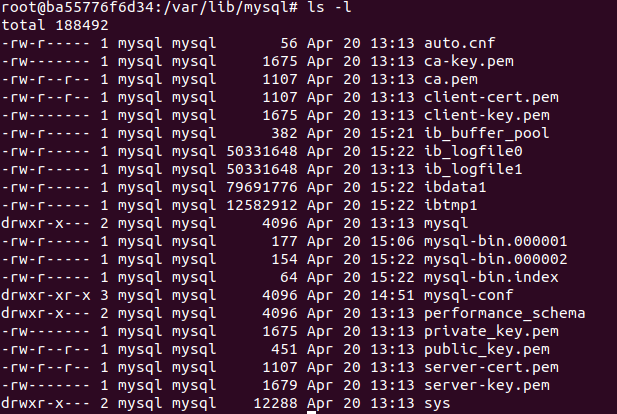
the log bin files are just there now!
-rw-r----- 1 mysql mysql 177 Apr 20 15:06 mysql-bin.000001
-rw-r----- 1 mysql mysql 154 Apr 20 15:22 mysql-bin.000002
-rw-r----- 1 mysql mysql 64 Apr 20 15:22 mysql-bin.index
In order to read mysql binlog, we need to grant the mysql user the following permissions:
SELECTRELOADSHOW DATABASESREPLICATION SLAVEREPLICATION CLIENT
The first three privileges are required when reading a consistent snapshot of the databases. The last two privileges allow the database to read the server’s binlog that is normally used for MySQL replication.
you can see the permmission for the user by execute the following command in mysql terminal.
show grants for cdc-user ; -- cdc-user is the user name I used to do cdc synchronization.
the output is
--------------------------+

| Grants for cdc-user@%                                                                                                                                           |

+--------------------------------------------------------------------------------------------------------------------------------------------------------------------+

| GRANT RELOAD, PROCESS, ALTER, REPLICATION SLAVE, REPLICATION CLIENT ON *.* TO 'cdc-user'@'%' IDENTIFIED BY PASSWORD '*C8C6BD45F62159406C6E0587C42BDE28FFA5F973' |

| GRANT SELECT, LOCK TABLES, SHOW VIEW ON `inventory`.* TO 'cdc-user'@'%'                                                                                         |

| GRANT SELECT ON `mysql`.`help_relation` TO 'cdc-user'@'%'                                                                                                       |

| GRANT SELECT ON `mysql`.`time_zone_leap_second` TO 'cdc-user'@'%'                                                                                               |

| GRANT SELECT ON `mysql`.`time_zone_name` TO 'cdc-user'@'%'                                                                                                      |

| GRANT SELECT ON `mysql`.`proc` TO 'cdc-user'@'%'                                                                                                                |

| GRANT SELECT ON `mysql`.`general_log` TO 'cdc-user'@'%'                                                                                                         |

| GRANT SELECT ON `mysql`.`slow_log` TO 'cdc-user'@'%'                                                                                                            |

| GRANT SELECT ON `mysql`.`func` TO 'cdc-user'@'%'                                                                                                                |

| GRANT SELECT ON `mysql`.`help_topic` TO 'cdc-user'@'%'                                                                                                          |

| GRANT SELECT ON `mysql`.`time_zone_transition_type` TO 'cdc-user'@'%'                                                                                           |

| GRANT SELECT ON `mysql`.`event` TO 'cdc-user'@'%'                                                                                                               |

| GRANT SELECT ON `mysql`.`time_zone_transition` TO 'cdc-user'@'%'                                                                                                |

| GRANT SELECT ON `mysql`.`time_zone` TO 'cdc-user'@'%'                                                                                                           |

| GRANT SELECT ON `mysql`.`help_keyword` TO 'cdc-user'@'%'                                                                                                        |

| GRANT SELECT ON `mysql`.`help_category` TO 'cdc-user'@'%'                                                                                                       |

+--------------------------------------------------------------------------------------------------------------------------------------------------------------------+
this indicate the user also need select permission for mysql database.
Notes: every time we restart the mysql server instance, it will call flush logs and then create a new binlog file.
mysql 5.7 enable binlog的更多相关文章
- MySQL Q&A 解析binlog的两个问题
MySQL Q&A 解析binlog的两个问题 博客分类: MySQL mysqlbinlog字符集解析binlog格式 连续碰到两个同学问类似的问题,必须要记录一下. 问题: 一个作 ...
- mysql之 innobackupex备份+binlog日志的完全恢复【转】
前言: MySQL的完全恢复,我们可以借助于完整的 备份+binlog 来将数据库恢复到故障点. 备份可以是热备与逻辑备份(mysqldump),只要备份与binlog是完整的,都可以实现完全恢复. ...
- MySQL 之 mysqlbinlog解析binlog乱码问题解密
发现mysql库的binlog日志出来都是乱码,如下所示: BINLOG ’ IXZqVhNIAAAALQAAAGcBAAAAAHoAAAAAAAEABHRlc3QAAno0AAEDAABUOcnY ...
- mysql中删除binlog的方法?mysql中如何删除binlog?
需求描述: 在mysql中如何删除binlog,因为随着数据库的运行,mysql中产生的binlog会越来越大,有可能把磁盘撑爆了,所以记录下删除 binlog的方法. 操作过程: 1.通过系统参数控 ...
- MySQL redo log 与 binlog 的区别
MySQL redo log 与 binlog 的区别 什么是redo log 什么是binlog redo log与binlog的区别 1. 什么是redo log? redo log又称重做日志文 ...
- MySQL 5.7 - 通过 BINLOG 恢复数据
日常开发,运维中,经常会出现误删数据的情况.误删数据的类型大致可分为以下几类: 使用 delete 误删行 使用 drop table 或 truncate table 误删表 使用 drop dat ...
- mysql小白系列_04 binlog(未完)
mysql打开.查看.清理binlog 1.开启日志 log_bin=/var/lib/mysql/mysql-bin mysql> show variables like '%log_bin% ...
- Mysql 数据恢复流程 基于binlog redolog undolog
注:文中有个易混淆的地方 sql事务,即每次数据库操作生成的事务,这个事务trx_id只在undolog里存储,同时undolog维护了此事务是否完成的状态. 日志持久化事务,为了保证redolog和 ...
- mysql的DISABLE/ENABLE KEYS
有一个表 tbl1 的结构如下: CREATE TABLE `tbl1` ( `id` int(10) unsigned NOT NULL auto_increment, `name` char(20 ...
随机推荐
- 如何引入iconfont图标与Element-UI组件
一.iconfont图标 iconfont方便又好用,介绍一下如何在vue项目中引入iconfont 1.进入iconfont官网 www.iconfont.cn 2.登录自己账户 3.选择图标后下载 ...
- java-15习题
通过键盘分别输入年份.月份.日把它存储到日期时间对象中,然后计算1000天以后的日期并输出. import java.util.Calendar; import java.util.Scanner; ...
- C语言中的二维数组
1.二维数组的定义和引用 一. 数据类型 数组名[常量表达式1][常量表达式2]; (1)假如有个二维数组array[n][m],则行下标的取值范围0~n-1 (2)列下标的取值范围0~m-1 (3) ...
- 实验六 CC2530平台上P2P通信的TinyOS编程
实验六 CC2530平台上P2P通信的TinyOS编程 实验目的: 加深和巩固学生对于TinyOS编程方法的理解和掌握 让学生初步的掌握射频通信TinyOS编程方法 学生通过本实验应理解TinyOS中 ...
- access数据库之cookie注入
本来今天想写post注入的,但这几天正好看到chookie的注入的视频.就先写一下这个.大家对于我说的get post cookie注入可能会认为SQL注入就这几种方式.这概念是错的.Get post ...
- 解题报告 『宝藏(Prim思想 + 访问顺序随机)』
原题地址 本以为不过是一道Prim算法模版题,但貌似只能得45分,虽然对我这种蒟蒻来说已经够了. 然而同机房大佬表示可以用模拟退火A了此题,遂习之,终无所获. 然而机缘巧合之下习得了另一种随机算法,于 ...
- Python之PIL库的运用、GIF处理h
一.PIL库简介 PIL(Python Image Library)库是Python语言的第三方库,它支持图像存储.显示和处理,它能够处理几乎所有图片格式,可以完成对图像的缩放.剪裁.折叠以及像图片添 ...
- 2018-2019-2 20165313 Exp2 后门原理与实践
实践基础问题回答 (1)例举你能想到的一个后门进入到你系统中的可能方式? 应用程序设定后门,用户安装后,后门就可以进入.例如课堂上讲到的百度. (2)例举你知道的后门如何启动起来(win及linux) ...
- 例:三位老师对某次数学竞赛进行了预测,他们的预测如下: 甲:学生A得了第一名,学生B得第三名。 乙:学生C得了第一名,学生D得第四名。 丙:学生D得了第二名,学生A得第三名。 结果表明,他们都说对了一半,说错了一半,并且无并列名次,输出A、B、C和D各自的名次。
public class demo { public static void main(String[] args) { int a,b,c,d;//代表四个学生 boolean x1,x2,x3;/ ...
- python------mysql API
参考引用博客:http://www.cnblogs.com/wupeiqi/articles/5713330.html ifconfig是linux中用于显示或配置网络设备(网络接口卡)的命令,英文全 ...