
FPGA學習筆記(肆)--- Star Test Bench Template Writer
上一篇testbench我自己也沒怎麽搞懂,再來一篇學習特權同學的方法。
課程:Lesson 7 BJ EPM240学习板实验1——分频计数实验
鏈接:https://www.youtube.com/edit?o=U&video_id=YbNEKMLUCyI (科學上網)
前奏:創建工程,蜂鳴器code,引脚配置,編譯,等等忽略
module fp_verilog(clk, rst_n, fm);

    input clk;//時鐘信號,50Mhz

    input rst_n;//復位信號,低電平有效

    output fm;//蜂鳴器

    //assign fm = 1'b0; //測試蜂鳴器是否正常

    reg[:] cnt;//位數越小越明顯,我因爲設置大了,simulation了半天

    always @(posedge clk or negedge rst_n)

        if(!rst_n) cnt <= 'd0;

        else cnt <= cnt + 'b1;

    assign fm = cnt[];

endmodule

開始:Processing ---> Start ---> Star Test Bench Template Writer 注:可能messages框會説未生成 xxx.vt,導致無法完成下一步。 解決方法:Assignments ---> setting ---> Simulation ---> Tool name ---> ModelSim-Altera
然後:打開生成文檔,修改code 注:我所添加的code已經加粗,其餘請對比修改。
// Copyright (C) 2017  Intel Corporation. All rights reserved.

// Your use of Intel Corporation's design tools, logic functions

// and other software and tools, and its AMPP partner logic

// functions, and any output files from any of the foregoing

// (including device programming or simulation files), and any

// associated documentation or information are expressly subject

// to the terms and conditions of the Intel Program License

// Subscription Agreement, the Intel Quartus Prime License Agreement,

// the Intel MegaCore Function License Agreement, or other

// applicable license agreement, including, without limitation,

// that your use is for the sole purpose of programming logic

// devices manufactured by Intel and sold by Intel or its

// authorized distributors.  Please refer to the applicable

// agreement for further details.

// *****************************************************************************

// This file contains a Verilog test bench template that is freely editable to

// suit user's needs .Comments are provided in each section to help the user

// fill out necessary details.

// *****************************************************************************

// Generated on "08/07/2017 22:03:54"

// Verilog Test Bench template for design : fp_verilog

//

// Simulation tool : ModelSim (Verilog)

//

`timescale  us/  us //

module fp_verilog_vlg_tst();

// constants

// general purpose registers

reg eachvec;

// test vector input registers

reg clk;

reg rst_n;

// wires

wire fm;

// assign statements (if any)

fp_verilog i1 (

// port map - connection between master ports and signals/registers

    .clk(clk),

    .fm(fm),

    .rst_n(rst_n)

);

initial

begin

// code that executes only once  只执行一次的代码

// insert code here --> begin   在这里插入代码 - >开始

    clk = ;

    forever #5 clk = ~clk;

// --> end

$display("Running testbench");

end

initial

  begin

      rst_n = ; #1000; rst_n = 1;

      #;

      $stop;

  end

//                            always

//                            // optional sensitivity list   可选灵敏度列表

//                            // @(event1 or event2 or .... eventn)

//                            begin

//                            // code executes for every event on sensitivity list   敏感性列表中的每个事件执行代码

//                            // insert code here --> begin 在这里插入代码 - >开始

//

//                            @eachvec;

//                            // --> end

//                            end

endmodule
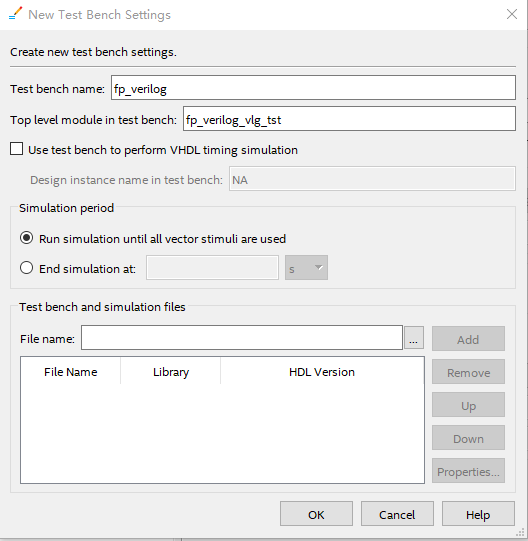
其次:Assignments ---> setting ---> Simulation ---> NativeLink settings ---> Compile test bench ---> Test Benchs ---> New ---> 如圖 且添加剛才的文件
最後:Tools ---> Run Simulation Tool ---> RTL Simulation
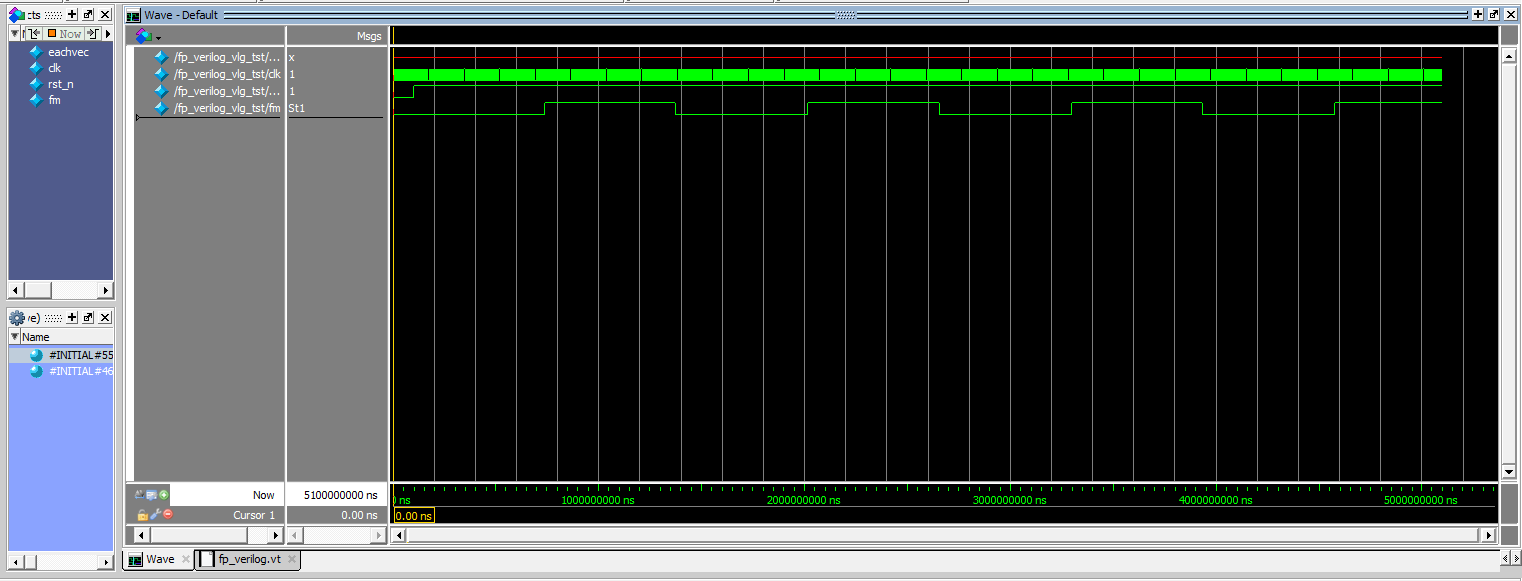
證明自己有多懶 (●'◡'●) :http://convert-units.info/time/microsecond/3000
FPGA學習筆記(肆)--- Star Test Bench Template Writer的更多相关文章
- FPGA學習筆記(貳)--- 流水燈
平臺:FPGA黑金开发板 AX301 開發環境:Quartus Prime Version 17.0.0 Build 595 04/25/2017 Standard Edition 引脚配置:鼠標托拉 ...
- [Python學習筆記] 使用xlwings 插入註解 (forked 版本)
到今天為止 xlwings 還沒有插入註解的功能 去原始開發者的 Github Pull Requests 他說之前有人有建議要加入這個功能 但他還沒更新~ 如果需要使用 Python 來插入註解的話 ...
- Java學習筆記(基本語法)
本文件是以學習筆記的概念為基礎,用於自我的複習紀錄,不過也開放各位的概念指證.畢竟學習過程中難免會出現觀念錯誤的問題.也感謝各位的觀念指證. 安裝JDK 在Oracle網站中找自己系統的JDK下載位置 ...
- [DDD]學習筆記 第15章 精煉(Distillation)
核心領域(Core-Domain) 為了使領域模型成為企業真正的資產, 模型中的關鍵核心部份需要足夠靈活和充分利用來創建應用程序的功能; 簡而言之, 核心領域是系統中最有價值的部份. 濃縮模型, 將最 ...
- C# partial 學習筆記
局部類的講解參考:http://blog.csdn.net/susan19890313/article/details/7575204 感謝作者~
- ORACLE 學習筆記
proc 里的 commit等于提交就是你做了insert或者update后,commit后才是真正修改或者插入了数据库中 如果不提交的话,那么这个表就被锁了 CURSOR MYCURSOR is ...
- [Python學習筆記] 使用 selenium 抓取網頁並且雙擊滑鼠 (double click)
一開始使用的時候 看官方文件 以為使用 double_click()即可 但後來出現錯誤 AttributeError: 'WebElement' object has no attribute 'd ...
- [Python學習筆記] 利用 Python在Excel 插入註解
用Python 來處理excel 檔 用過了 openpyxl 還有 pyexcel目前覺得除了讀寫如果還要使用另外的功能 (像是讀取格子裡的公式)可以用 xlwings 他的首頁標題 " ...
- [Python學習筆記] 抓出msg信件檔裡的附件檔案
想要把msg信件檔案的附件抓出來做處理,找到了這個Python 模組 msg-extractor 使用十分容易,但是這個模組是要在terminal裡執行,無法直接打在IDLE的編輯器上 所以稍微做了修 ...
随机推荐
- Spring 框架用到的 9 个设计模式汇总!
1. 简单工厂 又叫做静态工厂方法(StaticFactory Method)模式,但不属于23种GOF设计模式之一. 简单工厂模式的实质是由一个工厂类根据传入的参数,动态决定应该创建哪一个产品类 ...
- k8s创建pod流程
kubernetes 创建Pod 的 工作流: step.1 kubectl 向 k8s api server 发起一个create pod 请求(即我们使用Kubectl敲一个create pod命 ...
- springboot学习随笔(三):Controller参数映射
接上章内容,我们看看浏览器参数如何映射到我们的Controller层 我们新建UserController和User实 User.java package com.example.main; impo ...
- mac eclipse中运行tomcat出现错误:-Djava.endorsed.dirs=D:\Tomcat 9.0\endorsed is not supported
-Djava.endorsed.dirs=D:\Tomcat 9.0\endorsed is not supported. Endorsed standards and standalone APIs ...
- PHP批量保存图片
关于这个问题网上也有回答,我只是把我在工作中用到的代码分解出来,供需要的朋友使用.以下代码都已经经过测试,所以没有任何问题.有问题请加QQ:1127173874 第一部分 数据库表结构 create ...
- pytorch 生成随机数
在使用PyTorch做实验时经常会用到生成随机数Tensor的方法,比如: torch.rand() torch.randn() torch.normal() torch.linespace() 在很 ...
- laravel5.6中jquery+ajax分页
public function shows(Request $request){ $p=$request->get("page"); $page=empty($p)?:$p; ...
- 折腾newifi3 d2笔记
1.忘记密码,恢复出厂 通电开机,等正常运行后,长按RESET大约6~8秒,见所有灯开始一起慢闪,可松手等重启就是出厂状态了,出厂IP是:192.168.99.1 2.免拆机刷breed 首先要打开s ...
- promise.then, setTimeout,await执行顺序问题
promise.then VS setTimeout 在chrome和node环境环境中均输出2, 3, 1, 先输出2没什么好说的,3和1顺序让人有些意外 原因: 有一个事件循环,但是任务队列可以有 ...
- Maven 打包项目 部署到服务器 重启服务 插件
1.maven插件wagon-maven-plugin自动部署远程Linux服务器 (http://xxgblog.com/2015/10/23/wagon-maven-plugin/) <p ...