
Microsoft Azure IoTHub Serials 2 - 如何为android应用添加IoTHub支持
1. 在build.gradle(app)文件的dependencies中添加对以下项的依赖:
'com.microsoft.azure.sdk.iot:iot-device-client:1.5.37'

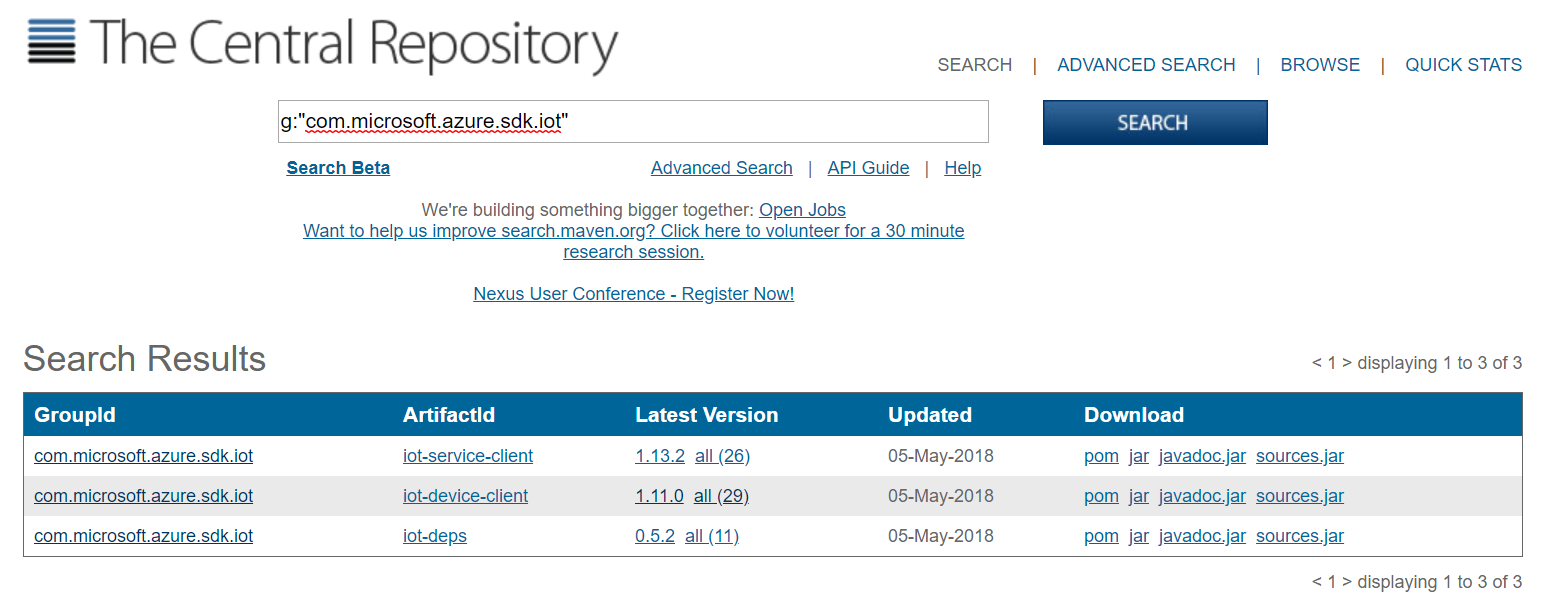
其中后面的1.5.37是版本号,最新的版本可以到这里查:
http://search.maven.org/#search%7Cga%7C1%7Cg%3A%22com.microsoft.azure.sdk.iot%22
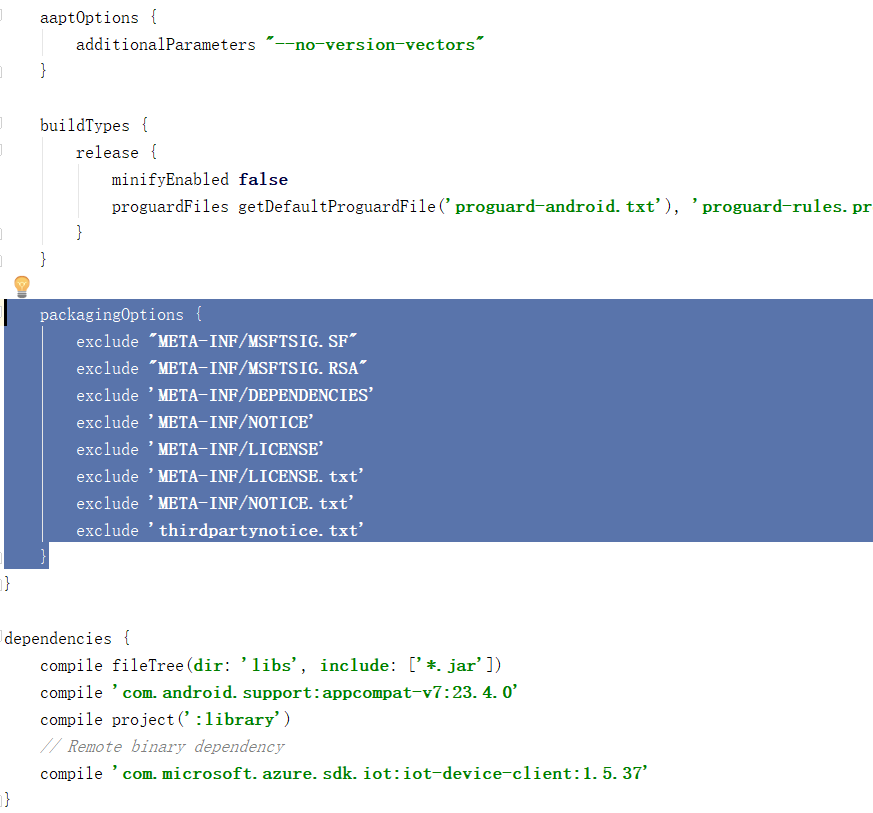
2. 在build.gradle(app)文件的packagingOptions中添加如下内容
packagingOptions {

    exclude "META-INF/MSFTSIG.SF"

    exclude "META-INF/MSFTSIG.RSA"

    exclude 'META-INF/DEPENDENCIES'

    exclude 'META-INF/NOTICE'

    exclude 'META-INF/LICENSE'

    exclude 'META-INF/LICENSE.txt'

    exclude 'META-INF/NOTICE.txt'

    exclude 'thirdpartynotice.txt'

}
如下图所示。
3. 在需要与IoTHub交互的java文件中,引入如下package
//Azure IoTHub packages

import com.microsoft.azure.sdk.iot.device.DeviceClient;

import com.microsoft.azure.sdk.iot.device.IotHubClientProtocol;

import com.microsoft.azure.sdk.iot.device.IotHubEventCallback;

import com.microsoft.azure.sdk.iot.device.IotHubMessageResult;

import com.microsoft.azure.sdk.iot.device.IotHubStatusCode;

import com.microsoft.azure.sdk.iot.device.Message;
4. 添加如下全局的连接字符串
//Azure IoTHub

private final String connString = "HostName=************.azure-devices.net;DeviceId=***********;SharedAccessKey=*********************";

private final String deviceId = "*****************";
5. 在java文件中添加如下3个类(MessageCallbackMqtt、EventCallback、MessageCallback和Counter)的声明
// Our MQTT doesn't support abandon/reject, so we will only display the messaged received

// from IoTHub and return COMPLETE

static class MessageCallbackMqtt implements com.microsoft.azure.sdk.iot.device.MessageCallback

{

    public IotHubMessageResult execute(Message msg, Object context)

    {

        Counter counter = (Counter) context;

        System.out.println(

                "Received message " + counter.toString()

                        + " with content: " + new String(msg.getBytes(), Message.DEFAULT_IOTHUB_MESSAGE_CHARSET));

        counter.increment();

        return IotHubMessageResult.COMPLETE;

    }

}

static class EventCallback implements IotHubEventCallback

{

    public void execute(IotHubStatusCode status, Object context)

    {

        Integer i = (Integer) context;

        System.out.println("IoT Hub responded to message " + i.toString()

                + " with status " + status.name());

    }

}

static class MessageCallback implements com.microsoft.azure.sdk.iot.device.MessageCallback

{

    public IotHubMessageResult execute(Message msg, Object context)

    {

        Counter counter = (Counter) context;

        System.out.println(

                "Received message " + counter.toString()

                        + " with content: " + new String(msg.getBytes(), Message.DEFAULT_IOTHUB_MESSAGE_CHARSET));

        int switchVal = counter.get() % 3;

        IotHubMessageResult res;

        switch (switchVal)

        {

            case 0:

                res = IotHubMessageResult.COMPLETE;

                break;

            case 1:

                res = IotHubMessageResult.ABANDON;

                break;

            case 2:

                res = IotHubMessageResult.REJECT;

                break;

            default:

                // should never happen.

                throw new IllegalStateException("Invalid message result specified.");

        }

        System.out.println("Responding to message " + counter.toString() + " with " + res.name());

        counter.increment();

        return res;

    }

}

/**

 * Used as a counter in the message callback.

 */

static class Counter

{

    int num;

    Counter(int num) {

        this.num = num;

    }

    int get() {

        return this.num;

    }

    void increment() {

        this.num++;

    }

    @Override

    public String toString() {

        return Integer.toString(this.num);

    }

}
6.需要发送数据时,调用以下代码段
private void SendMessage() throws URISyntaxException, IOException

    {

        // Comment/uncomment from lines below to use HTTPS or MQTT protocol

        // IotHubClientProtocol protocol = IotHubClientProtocol.HTTPS;

        IotHubClientProtocol protocol = IotHubClientProtocol.MQTT;

        DeviceClient client = new DeviceClient(connString, protocol);

        try

        {

            client.open();

        } catch (Exception e2)

        {

            System.err.println("Exception while opening IoTHub connection: " + e2.toString());

        }

//发送message填充

            String msgStr = "{\"deviceId\":\"" + deviceId + ",\"PM25\":" + PM25 + ",\"PM10\":" + PM10 + "}";

            try

            {

                Message msg = new Message(msgStr);

                msg.setProperty("PMAlert", PM25 > 100 ? "true" : "false");

                msg.setMessageId(java.util.UUID.randomUUID().toString());

                System.out.println(msgStr);

                EventCallback eventCallback = new EventCallback();

                client.sendEventAsync(msg, eventCallback, null);

            } catch (Exception e)

            {

                System.err.println("Exception while sending event: " + e.getMessage());

            }

            try

            {

                Thread.sleep(2000);

            } catch (InterruptedException e)

            {

                e.printStackTrace();

            }

        client.closeNow();

    }
Microsoft Azure IoTHub Serials 2 - 如何为android应用添加IoTHub支持的更多相关文章
- 为Android设备添加A2SD支持
相信很多用Android设备的用户都有这个问题,内部存储太小导致应用只能装那么几个,虽然rom也有提供移动到sd卡的选项,但是仅仅是移动程序文件到sd卡,并不能解决多少问题,多装几个还是会 ...
- 如何为Myeclipse手工添加dtd支持
一.引言 在MyEclipse中开发三大框架的项目时候经常会写一些配置的xml文件,例如:Struts2的struts.xml和Hibernate的hibernate.cfg.xml.Spring的a ...
- Microsoft Azure Point to Site VPN替代方案
Microsoft Azure提供了Point to Site VPN,但有时候这并不能满足我们的需求,例如:Point to Site VPN是SSTP VPN,只能支持Window客户端拨入,而且 ...
- Microsoft Azure 负载平衡服务
Microsoft Azure 为在其中托管的虚拟机(IaaS) 和云服务(PaaS) 提供负载平衡服务.负载平衡支持应用程序伸缩,并且提供应用程序故障恢复以及其他优势. 可以通过以下方式访问负 ...
- Microsoft Azure IoTHub Serials 1 - 使用Android设备与Azure IoTHub进行交互
Azure IoTHub的目标是为物联网的应用场景提供方便的设备接入,完成消息的发送和接收(C2D和D2C).经过持续不断的努力,目前Azure IoTHub已经支持多种操作系统设备的接入,包括And ...
- 如何使用 Microsoft Azure Media Services 现场直播,(Live Streaming) 直播流媒体系统
不久之前,微软公司宣布了 Microsoft Azure Media Services 实时直播服务 ( Live ) 开始进入技术预览阶段,公开接受用户测试. 而这些实时直播服务其实早已被 NBC ...
- Microsoft Azure 微软云平台系列新品发布
在移动为先,云为先的今天,微软为拥抱云文化的企业提供了技术和工具.利用创新且全面的移动解决方案和开发者工具,微软有独到之处,它帮助所有客户在云为先时代中发现潜在价值. 正如希望加快云创新步伐的你们所期 ...
- 【Microsoft Azure 的1024种玩法】四. 利用Azure Virtual machines 打造个人专属云盘,速度吊打某云盘
[简介] 1.Azure Virtual machines是Azure 提供的多种可缩放按需分配计算资源之一,Nextcloud是一款开源免费的私有云存储网盘项目,可以让你快速便捷地搭建一套属于自己或 ...
- Microsoft Azure Web Sites应用与实践【4】—— Microsoft Azure网站的“后门”
Microsoft Azure Web Sites应用与实践 系列: [1]—— 打造你的第一个Microsoft Azure Website [2]—— 通过本地IIS 远程管理Microsoft ...
随机推荐
- nginx安装与挂载
Linux下添加新硬盘,分区及挂载 http://blog.chinaunix.net/uid-25829053-id-3067619.html vim /etc/fstab /dev vdb1 / ...
- vue全局API
一.Vue.extend() 顾名思义 extend 继承,官方给出的解释是 (使用基础 Vue 构造器,创建一个“子类”.参数是一个包含组件选项的对象.) Vue构造器是指 vue是一个构 ...
- XUbuntu18.04(Bionic河狸)正式发布,系统安装升级记录
XUbuntu18.04(Bionic河狸)正式发布,系统安装升级记录 详细介绍: https://blog.pythonwood.com/2018/04/XUbuntu18.04(Bionic河狸) ...
- html模板导出pdf文件
package com.crc.commonreport.util; import java.awt.Insets; import java.io.ByteArrayOutputStream; imp ...
- MVC Request生命周期(综合总结)
当用户在浏览器输入一个URL地址后,浏览器会发送一个请求到服务器.这时候在服务器上第一个负责处理请求的是IIS.然后IIS再根据请求的URL扩展名将请求分发给不同的处理程序处理. 流程如下: 当请求一 ...
- 微信小程序发送ajax
微信小程序通过 wx.request发送ajax请求 1. GET wx.request({ url: app.globalData.pubSiteUrl + 'user-information/ge ...
- Shell脚本- 单条命令循环执行重复工作
关于shell for循环具体详细说明可参考:http://wiki.jikexueyuan.com/project/linux-command/chap34.html example: 分别在com ...
- 3,fiddler手机端的设置
1,首先设置手机端代理 选择链接的无限网,设置其代理 2,安装手机证书 只有在启动fiddler的时候手机才能够上网, 在浏览器,输入主机ip+fiddler端口的地址 进入后是下边的界面 点击下载证 ...
- NC 自定义项参照设置为查询条件
select * from pub_query_condition where pk_templet in (select id from pub_query_templet where node_c ...
- UI设计之动画—从虚拟到现实
以下内容由摹客团队翻译整理,仅供学习交流,摹客iDoc是支持智能标注和切图的产品协作设计神器. 用户界面设计中的动画一直是这几年热议的话题,尤其活跃在概念动画领域.它为设计师提供创造性实验并推动UI动 ...