
kindedit编辑器和xxs攻击防护(BeautifulSoup)的简单使用
一、kindedit编辑器
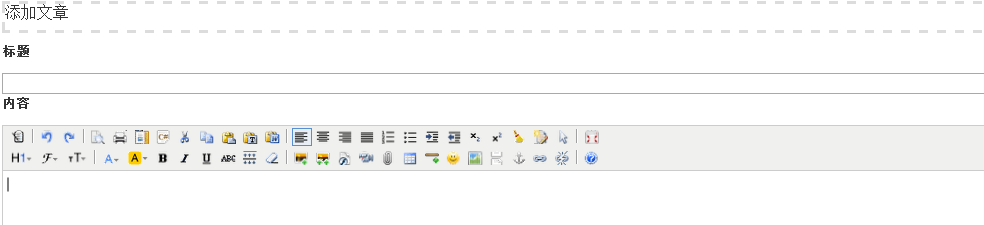
就是上面这样的编辑输入文本的一个编辑器
这也是一个插件。那么怎么用呢?
1、下载:百度kindedit
2、引入:
<script src="/static/kindeditor/kindeditor-all.js"></script>
3、看官方提供的文档
在addarticle.html中
    <script>

        {#        KindEditor编辑器的使用#}

        KindEditor.ready(function (K) {

            window.editor = K.create('#id_content', {

                {#                    width:"1030px"#}

                width: "90%",

                height: "500px",

                resizeType: 0,//编辑器不拉伸

                uploadJson: "/uploadFile/",  //上传图片路径

                {#                    items:['preview', 'print', 'template', 'code', 'cut', 'copy', 'paste', 'plainpaste', 'wordpaste', '|', 'justifyleft', 'justifycenter', 'justifyright', 'justifyfull', 'insertorderedlist', 'insertunorderedlist', 'indent', 'outdent', 'subscript',]#}

                //items:你可以筛选你自己想要的

                extraFileUploadParams: {     #解决forbidden

                    csrfmiddlewaretoken: $("[name='csrfmiddlewaretoken']").val(),

                }

            });

        });

    </script>
当你把编辑器插入好的时候,你看似都可以设置大小,字体变粗等。。但是当你上传图片的时候就会想下面一样
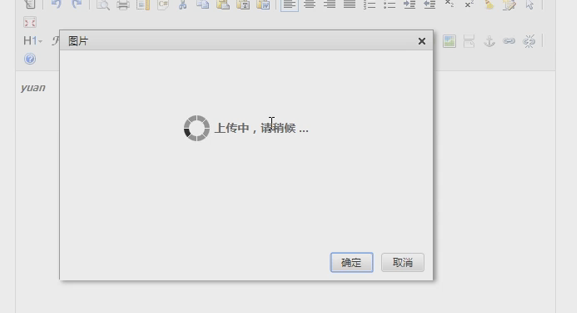
这时候就需要 uploadJson: "/uploadFile/", 这个参数了。
url.py
url(r'^uploadFile/$', views.uploadFile),
views.py
def uploadFile(request):

    '''上传图片路径'''

    print(request.path)  #返回的是当前请求的路径

    print(request.FILES)  #<MultiValueDict: {'imgFile': [<InMemoryUploadedFile: 44643.gif (image/gif)>]}>

    file_obj = request.FILES.get("imgFile")  #得到用户上传的文件对象

    filename = file_obj.name  #那到文件的文件名

    path = os.path.join(settings.MEDIA_ROOT,"upload_article_img",filename) #拼接一个路径吧文件保存进去,一般上传文件的路径保存在media中

    print("======",path)

    with open(path,"wb") as f:#吧文件保存在本地

        for line in file_obj:     #也可以for i in chunks()   不是一行一行的读,而是有具体的大小64*2**10

            f.write(line)


    response = {

        "error":0,

        "url":"/media/upload_article_img/"+filename+"/"   #前端图片文件预览

    }

    return HttpResponse(json.dumps(response))   #需要注意的是上传文件返回的是一个json字符串
二、XSS攻击防护:
BeautifulSoup:是python的一个库,查你想要的数据的,但是只是针对标签字符串。主要用于从网页爬取数据
1、首先需要知道的一些基础知识
<html>

 <head>

  <title>

   The Dormouse's story

  </title>

 </head>

 <body>

  <p class="title">

   <b>

    The Dormouse's story

   </b>

  </p>

  <div id="d1" class="d1">

    <b>

    The Dormouse's story2

    </b></div>

  <p class="story">

   Once upon a time there were three little sisters; and their names were

   <a class="sister0" href="http://example.com/elsie" id="link1">

    Elsie

   </a>

   ,

   <a class="sister1" href="http://example.com/lacie" id="link2">

    Lacie

   </a>

   and

   <a class="sister2" href="http://example.com/tillie" id="link3">

    Tillie

   </a>

   ;

and they lived at the bottom of a well.

  </p>

   <script>alert(1234)</script>

  <p class="story sister2">

   ...

  </p>

 </body>

</html>

"""

# 第一步:实例化对象

from bs4 import BeautifulSoup

soup = BeautifulSoup(html_doc,"html.parser")

# 第二步:美化

print(soup.prettify())

# 第三步:查找标签

print(soup.a)  #只能找到符合条件的第一个标签

print(soup.find("a")) #只能找到符合条件的第一个标签

print(soup.find_all("a"))  #找到所有的a标签

print(soup.a["class"])  #找到a标签的class属性

print(soup.find_all(name="a"))#找所有标签名是a标签的

print(soup.find_all(attrs={"class":"sister1"}))#找属性是class=sister1的

print(soup.find_all(name="a",attrs={"class":"sister1"}))#找a标签并且属性是class=sister1的

# ===========================

for ele_a in soup.find_all("a"):

    print(ele_a.attrs)  #找出a标签的所有的属性

    print(ele_a["href"])  #找出所有的a标签的href属性

    print(ele_a["class"])  #找出所有的a标签的class属性

for ele_a in soup.find_all("a"):

    print(ele_a.attrs)  #找出a标签的所有属性

    del ele_a["class"]  #删除a标签的class属性

#

for ele_a in soup.find_all("a"):

    print(ele_a)  #找出a标签

for ele in soup.find_all():

    if ele.attrs:

        '''如果有属性'''

        if ele.attrs.get("class"):

            '''如果得到class属性'''

            print(ele.attrs)

            del ele["class"]

print(soup)

for ele_a in soup.find_all("script"):    #soup是整个文档对象,循环整个文档的所有的script标签

    print(ele_a.string)  #所有a标签的文本

    print(ele_a.text)    #所有a标签的文本

    ele_a.string.replace_with("//别瞎玩")  #替换a标签的文本

print(soup)
四个对象:
1、comment对象:注释对象
2、Tag标签对象:相当于html中的一个标签对象
3、BeautifulSoup对象:相当于整个文档对象(Dom对象)
4、Navigablefetry文本对象
下面我们来具体应用一下:xss攻击防护。吧一些不安全的给删除或者替换了
def filter_xss(html_str):

    valid_tag_list = ["p", "div", "a", "img", "html", "body", "br", "strong", "b"]    #有效标签列表

    valid_dict = {"img":["src","alt"],"p": ["id", "class"], "div": ["id", "class"]}    #有效属性列表

    from bs4 import BeautifulSoup

    soup = BeautifulSoup(html_str, "html.parser")  # soup  ----->  document

    ######### 改成dict

    for ele in soup.find_all():

        # 过滤非法标签

        if ele.name not in valid_dict:

            ele.decompose()

        # 过滤非法属性

        else:

            attrs = ele.attrs  # p {"id":12,"class":"d1","egon":"dog"}

            l = []

            for k in attrs:

                if k not in valid_dict[ele.name]:

                    l.append(k)

            for i in l:

                del attrs[i]

    print(soup)

    return soup.decode()
kindedit编辑器和xxs攻击防护(BeautifulSoup)的简单使用的更多相关文章
- 局域网ARP攻击防护
通过借助一些安全软件来实现局域网ARP检测及防御功能. A.电脑管家 电脑管家--工具箱--下载ARP防火墙模块 不支持window2003 B.服务器安全狗 Windows版下载:http://fr ...
- 什么是高防服务器?如何搭建DDOS流量攻击防护系统
关于高防服务器的使用以及需求,从以往的联众棋牌到目前发展迅猛的手机APP棋牌,越来越多的游戏行业都在使用高防服务器系统,从2018年1月到11月,国内棋牌运营公司发展到了几百家. 棋牌的玩法模式从之前 ...
- Ddos攻击防护
Ddos攻击防护 首先我们说说ddos攻击方式,记住一句话,这是一个世界级的难题并没有解决办法只能缓解 DDoS(Distributed Denial of Service,分布式拒绝服务)攻击的主要 ...
- (转)网站DDOS攻击防护实战老男孩经验心得分享
网站DDOS攻击防护实战老男孩经验心得分享 原文:http://blog.51cto.com/oldboy/845349
- 几十万学费总结出来的Ddos攻击防护经验!
本人从事网络安全行业十余年年.有十年被骗经验.被骗了很多回(都说能防300G,500G,买完就防不住了),本文当然重点给大家说明,ddos攻击是什么,中小企业如何防护,用到成本等. 言归正传 首先我们 ...
- 爬虫基础库之beautifulsoup的简单使用
beautifulsoup的简单使用 简单来说,Beautiful Soup是python的一个库,最主要的功能是从网页抓取数据.官方解释如下: ''' Beautiful Soup提供一些简单的.p ...
- python3 调用 beautifulSoup 进行简单的网页处理
python3 调用 beautifulSoup 进行简单的网页处理 from bs4 import BeautifulSoup file = open('index.html','r',encodi ...
- Nancy启用跨站攻击防护(CSRF)
什么是CSRF(跨站攻击) 可能很多人已经对CSRF有所了解,就简单的介绍下: CSRF全程是 Cross-Site Request Forgery .大概意思就是在登录用户不知情的情况下,由一个网站 ...
- 企业安全之APT攻击防护
现在针对企业APT[1]攻击越来越多了,企业安全也受到了严重的威胁,由于APT攻击比较隐匿的特性[2],攻击并不能被检测到,所以往往可以在企业内部网络潜伏很长时间. APT的攻击方式多种多样,导致企业 ...
随机推荐
- 第27月第24天 git pull fetch
1. 在进行 pull 操作的同时,其实就是 fetch+merge 的一个过程.我们从 remote 分支中拉取新的更新,然后再合并到本地分支中去. 如果 remote 分支超前于本地分支,并且本地 ...
- jira和svn关联后,不显示Subversion Commits标签或不显示svn提交信息
1.jira的版本是7.3.6 2.不显示Subversion Commits标签或不显示svn提交信息 其实是权限的分配问题 3.管理员登录 找到对应项目的权限管理 4.[评论权限]——[编辑所有评 ...
- 织梦自定义表单ajax提交范例
function add_ajaxmessage(){ var dh = document.getElementById("tel"); //表单验证 if($("#te ...
- java乱码解决方法
String name = request.getParameter("name"); 乱码解决:String name = new String(request.getParam ...
- Python笔记(三)继承和多态、动态语言
一.继承 先定义一个A类 class A(object): def fun(self): print "Run A fun()" 在定义一个B类 class B(A): pass ...
- python(六)列表推导式、字典推导式、集合推导式
转载 https://www.cnblogs.com/tkqasn/p/5977653.html
- L - LCM Walk HDU - 5584 (数论)
题目链接: L - LCM Walk HDU - 5584 题目大意:首先是T组测试样例,然后给你x和y,这个指的是终点.然后问你有多少个起点能走到这个x和y.每一次走的规则是(m1,m2)到(m1+ ...
- nmap 使用总结
nmap 网络探测工具 参考链接: https://nmap.org/man/zh/ http://www.360doc.com/content/18/0127/18/52402560_7255744 ...
- You Only Look Once: Unified, Real-Time Object Detection(翻译)
0 - 摘要 我们提出了YOLO,一种新的物体检测方法.之前的物体检测工作是通过重新使用分类器来进行检测.相反,我们将对象检测抽象为一个回归问题,描述为以空间分隔的边界框和相关的类别概率.一个简单的神 ...
- 小程序学习(冒泡,快速创建文件,以及tarbar)
1.关于小程序的事件冒泡机制 例如: <view catchtap="opp"> <text>当前内容</text> </view> ...