
OpenDayLight——HelloWorld
OpenDayLight——HelloWorld
既然学习OpenDayLight编程这个鬼,就得像学语言一样来一个HelloWorld来试试水,经过几天的折腾,总算成功输出HelloWorld了,这里记录下整个过程以供后续参考。
一、实验环境描述
本次实验是在win7 64位+8G内存环境下实现;java版本为1.8.0_131;maven版本为3.5.0;这些安装过程就不记录了!
二、构建项目
1、执行如下命令构建项目;
mvn archetype:generate -DarchetypeGroupId=org.opendaylight.controller -DarchetypeArtifactId=opendaylight-startup-archetype -DarchetypeRepository=http://nexus.opendaylight.org/content/repositories/opendaylight.release -DarchetypeCatalog=remote -DarchetypeVersion=1.3.0-Carbon

图 1
2、按下回车后,一会屏幕中需要你输入一些如下信息,需要你输入的:
Define value for property 'groupId': org.opendaylight.hello

Define value for property 'artifactId': hello

[INFO] Using property: version = 0.1.0-SNAPSHOT

Define value for property 'package' org.opendaylight.hello: :

Define value for property 'classPrefix' Hello: : hello

Define value for property 'copyright': no

[INFO] Using property: copyrightYear = 2017

Confirm properties configuration:

groupId: org.opendaylight.hello

artifactId: hello

version: 0.1.0-SNAPSHOT

package: org.opendaylight.hello

classPrefix: hello

copyright: No

copyrightYear: 2017

 Y: : Y
如图2所示:
图 2
3、输入完成后,按下回车等待片刻即可出现如下页面,则完成项目框架的生成:
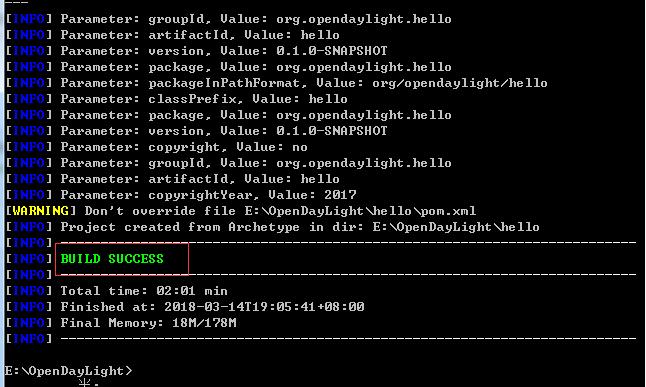
图 3
4、输入如下命令构建项目,命令第一次执行过程很长,笔者需要执行3个小时。执行成功后如图4所示
mvn clean install -DskipTests
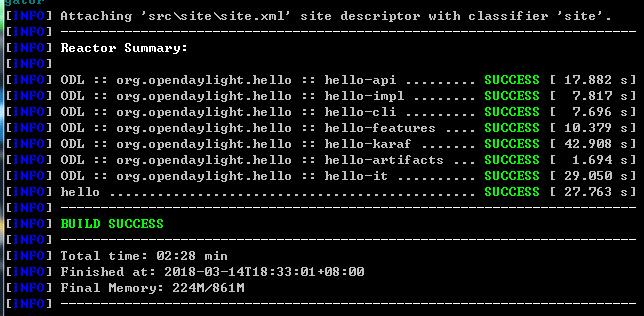
图 4
三、添加HelloWorld RPC API
1、编辑api/src/main/yang/hello.yang文件,增加如下内容:
module hello {

    yang-version 1;

    namespace "urn:opendaylight:params:xml:ns:yang:hello";

    prefix "hello";

    revision "2015-01-05" {

        description "Initial revision of hello model";

    }

    rpc hello-world {

        input {

            leaf name {

                type string;

            }

        }

        output {

            leaf greeting {

                type string;

            }

        }

    }

}
增加完之后执行如下指令,生成相应的接口文件:
mvn clean install -DskipTests
执行成功后,如图5所示:
图 5
修改如上的yang文件后,生成如下几个类
impl/src/main/java/org/opendaylight/hello/impl/helloProvider.java
impl/src/main/resources/org/opendaylight/blueprint/impl-blueprint.xml
api/target/classes/org/opendaylight/yang/gen/v1/urn/opendaylight/params/xml/ns/yang/hello/rev150105/HelloService.java
2、绑定MD-SAL
在impl/src/main/resources/org/opendaylight/blueprint/impl-blueprint.xml中添加如下代码
<?xml version="1.0" encoding="UTF-8"?>

<!-- vi: set et smarttab sw=4 tabstop=4: -->

<!--

Copyright © 2017 no and others. All rights reserved.

This program and the accompanying materials are made available under the

terms of the Eclipse Public License v1.0 which accompanies this distribution,

and is available at http://www.eclipse.org/legal/epl-v10.html

-->

<blueprint xmlns="http://www.osgi.org/xmlns/blueprint/v1.0.0"

  xmlns:odl="http://opendaylight.org/xmlns/blueprint/v1.0.0"

  odl:use-default-for-reference-types="true">

  <reference id="dataBroker"

    interface="org.opendaylight.controller.md.sal.binding.api.DataBroker"

    odl:type="default" />

  <reference id="rpcRegistry"

             interface="org.opendaylight.controller.sal.binding.api.RpcProviderRegistry"/>

  <bean id="provider"

    class="org.opendaylight.hello.impl.helloProvider"

    init-method="init" destroy-method="close">

    <argument ref="dataBroker" />

    <argument ref="rpcRegistry" />

  </bean>

</blueprint>
在impl/src/main/java/org/opendaylight/hello/impl/目录下新建HelloWorldImpl.java文件,代码如下,注释不可省略,否则编译报错:
/*

 * Copyright © 2017 no and others.  All rights reserved.

 *

 * This program and the accompanying materials are made available under the

 * terms of the Eclipse Public License v1.0 which accompanies this distribution,

 * and is available at http://www.eclipse.org/legal/epl-v10.html

 */

package org.opendaylight.hello.impl;

import java.util.concurrent.Future;

import org.opendaylight.yang.gen.v1.urn.opendaylight.params.xml.ns.yang.hello.rev150105.HelloService;

import org.opendaylight.yang.gen.v1.urn.opendaylight.params.xml.ns.yang.hello.rev150105.HelloWorldInput;

import org.opendaylight.yang.gen.v1.urn.opendaylight.params.xml.ns.yang.hello.rev150105.HelloWorldOutput;

import org.opendaylight.yang.gen.v1.urn.opendaylight.params.xml.ns.yang.hello.rev150105.HelloWorldOutputBuilder;

import org.opendaylight.yangtools.yang.common.RpcResult;

import org.opendaylight.yangtools.yang.common.RpcResultBuilder;

public class HelloWorldImpl implements HelloService{

    @Override

    public Future<RpcResult<HelloWorldOutput>> helloWorld(HelloWorldInput input) {

        HelloWorldOutputBuilder helloBuilder = new HelloWorldOutputBuilder();

        helloBuilder.setGreeting("Hello " + input.getName());

        return RpcResultBuilder.success(helloBuilder.build()).buildFuture();

    }

}
在impl/src/main/java/org/opendaylight/hello/impl/目录下修改helloProvider文件,增加如下代码
/*

 * Copyright © 2017 no and others.  All rights reserved.

 *

 * This program and the accompanying materials are made available under the

 * terms of the Eclipse Public License v1.0 which accompanies this distribution,

 * and is available at http://www.eclipse.org/legal/epl-v10.html

 */

package org.opendaylight.hello.impl;

import org.opendaylight.controller.md.sal.binding.api.DataBroker;

import org.opendaylight.controller.sal.binding.api.BindingAwareBroker.RpcRegistration;

import org.opendaylight.controller.sal.binding.api.RpcProviderRegistry;

import org.opendaylight.yang.gen.v1.urn.opendaylight.params.xml.ns.yang.hello.rev150105.HelloService;

import org.slf4j.Logger;

import org.slf4j.LoggerFactory;

public class helloProvider {

    private static final Logger LOG = LoggerFactory.getLogger(helloProvider.class);

    private final DataBroker dataBroker;

    private final RpcProviderRegistry rpcProviderRegistry;

    private RpcRegistration<HelloService> serviceRegistration;

    public helloProvider(final DataBroker dataBroker, RpcProviderRegistry rpcProviderRegistry) {

        this.dataBroker = dataBroker;

        this.rpcProviderRegistry = rpcProviderRegistry;

    }

    /**

     * Method called when the blueprint container is created.

     */

    public void init() {

        serviceRegistration = rpcProviderRegistry.addRpcImplementation(HelloService.class, new HelloWorldImpl());

        LOG.info("helloProvider Session Initiated");

    }

    /**

     * Method called when the blueprint container is destroyed.

     */

    public void close() {

        serviceRegistration.close();

        LOG.info("helloProvider Closed");

    }

}
四、编译及验证
1、执行如下指令,对刚才所修改的代码进行编译
mvn clean install -DskipTests
2、编译完成后,启动OpenDayLight,如图6所示:
F:\OpenDayLight\hello\karaf\target\assembly\bin>karaf
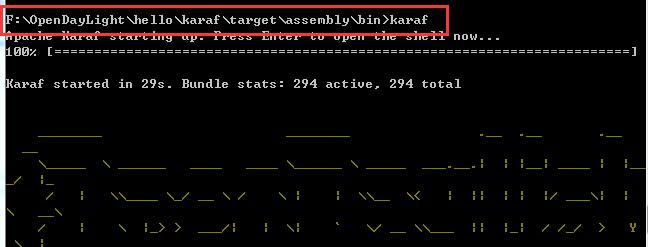
图 6
3、在浏览器中输入如下地址(账号密码:admin\admin)
http://localhost:8181/apidoc/explorer/index.html
显示如图7所示,找到新增的hello
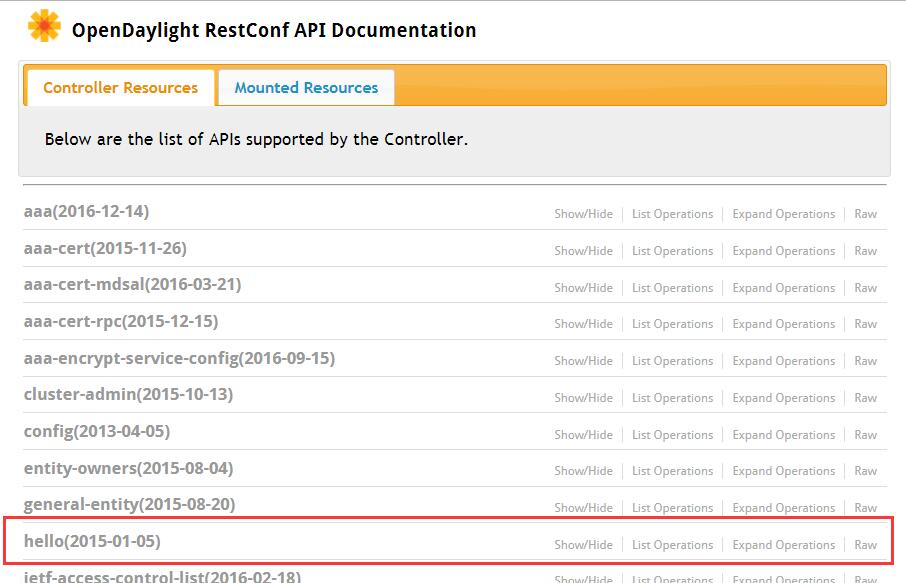
图 7
4、双击hello栏,如图8显示
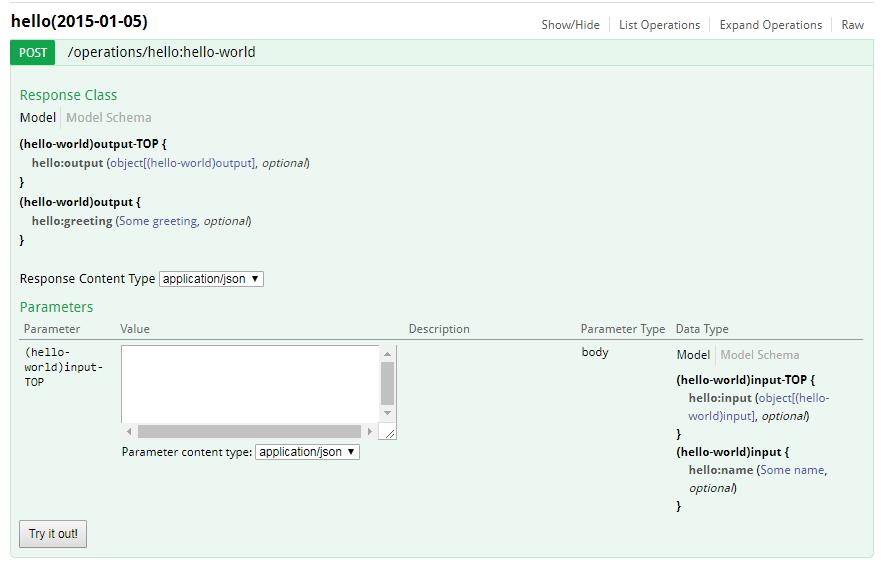
图 8
5、在Value中输入如下的值后,点击Try it out,返回如图9结果,即验证HelloWorld成功。
{"hello:input": { "name":"hello"}}
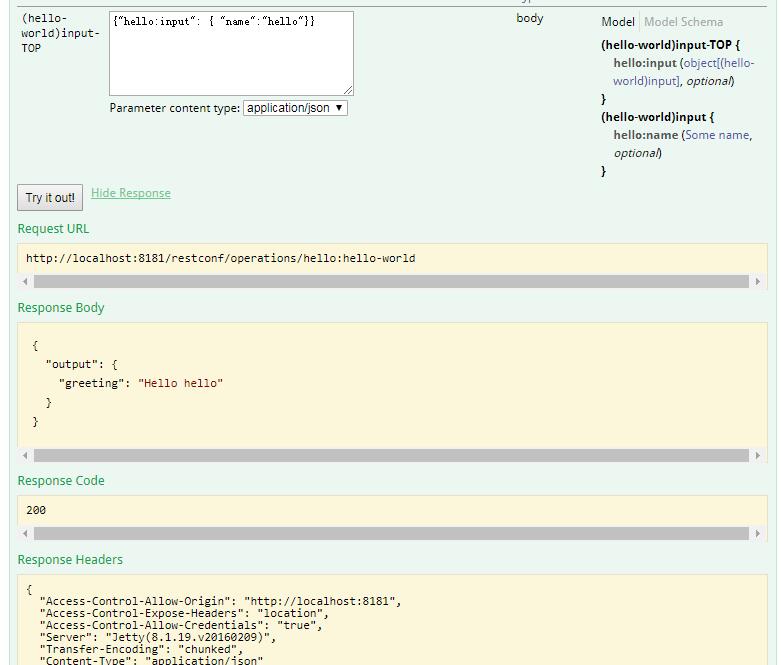
图 9
OpenDayLight——HelloWorld的更多相关文章
- OpenDaylight开发hello-world项目之功能实现
OpenDaylight开发hello-world项目之开发环境搭建 OpenDaylight开发hello-world项目之开发工具安装 OpenDaylight开发hello-world项目之代码 ...
- OpenDaylight开发hello-world项目之代码框架搭建
OpenDaylight开发hello-world项目之开发环境搭建 OpenDaylight开发hello-world项目之开发工具安装 OpenDaylight开发hello-world项目之代码 ...
- OpenDaylight开发hello-world项目之开发环境搭建
OpenDaylight开发hello-world项目之开发环境搭建 OpenDaylight开发hello-world项目之开发工具安装 OpenDaylight开发hello-world项目之代码 ...
- OpenDaylight开发hello-world项目之开发工具安装
OpenDaylight开发hello-world项目之开发环境搭建 OpenDaylight开发hello-world项目之开发工具安装 OpenDaylight开发hello-world项目之代码 ...
- 在OpenDaylight controller上开发App
安装环境:Ubuntu18.04 一.安装依赖 1. 安装JDK: sudo apt update sudo apt install openjdk-8-jdk-headless 选择默认的 JDK: ...
- 使用webstorm+webpack构建简单入门级“HelloWorld”的应用&&引用jquery来实现alert
使用webstorm+webpack构建简单入门级"HelloWorld"的应用&&构建使用jquery来实现 1.首先你自己把webstorm安装完成. 请参考这 ...
- Idea下用SBT搭建Spark Helloworld
没用过IDEA工具,听说跟Eclipse差不多,sbt在Idea其实就等于maven在Eclipse.Spark运行在JVM中,所以要在Idea下运行spark,就先要安装JDK 1.8+ 然后加入S ...
- 菜鸟学Struts2——HelloWorld
写在前面 自从工作后就过上了只有一个月记忆的生活,太健忘,很多学过的东西因为用得少便忘记了,第二次学习struts,为了以后便于查阅,开始自己的博客之旅.Struts的学习还是从Hello World ...
- 初识AngularJS 之 HelloWorld和数据绑定
1.Hello World 我用的开发工具是 atom ,大家有需要的话可以找我要安装包嘻嘻 第一步: 写入以下代码: <!DOCTYPE html> <html ng-ap ...
随机推荐
- Facebook开源最先进的语音系统wav2letter++
最近,Facebook AI Research(FAIR)宣布了第一个全收敛语音识别工具包wav2letter++.该系统基于完全卷积方法进行语音识别,训练语音识别端到端神经网络的速度是其他框架的两倍 ...
- EF code first出现错误:列名 Discriminator 无效
转载:https://blog.csdn.net/lanse_my/article/details/38128355 前几天使用code first碰到错误:列名 'Discriminator' 无效 ...
- Android Spinner 绑定键值对
这里给大家提供下绑定 spinner键值对的方法. 首先创建绑定模型BaseItem public class BaseItem { public BaseItem(Integer id,String ...
- Repository HDU - 2846 字典树
题意:给出很多很多很多很多个 单词 类似搜索引擎一下 输入一个单词 判断有一个字符串包含这个单词 思路:字典树变体,把每个单词的后缀都扔字典树里面,这里要注意dd是一个单词 但是把d 和dd都放字典树 ...
- 「NOI2003」逃学的小孩
传送门:>HERE< 题意:给出一棵树(带权),要从一个节点C先走到距离它近的一个节点B,再走到A,要求最坏情况下的总路程(即最长). 解题思路: 乍一看,A,B,C都没给出,这怎么求? ...
- 基于FPGA的16阶级联型iir带通滤波器实现
警告 此文章将耗费你成吨的流量,请wifi下阅读,造成的流量浪费本人不承担任何责任.初版源代码获取(请勿用作他用,仅供学习):https://gitee.com/kingstacker/iir.git ...
- PHP no input file specified 三种解决方法
一.IIS Noinput file specified (IIS上报的错误) 方法一:改PHP.ini中的doc_root行,打开ini文件注释掉此行,然后重启IIS 方法二: 请修改php.i ...
- 「AtCoder Grand018A」Getting Difference(GCD)
题目链接A - Getting Difference 题意 有n(1~\(10^5\))个数\(A_i\) (1~\(10^9\)),每次选两个数,将它们的差的绝对值加入这堆数.问k(1~\(10^9 ...
- 信用算力基于 RocketMQ 实现金融级数据服务的实践
微服务架构已成为了互联网的热门话题之一,而这也是互联网技术发展的必然阶段.然而,微服务概念的提出者 Martin Fowler 却强调:分布式调用的第一原则就是不要分布式. 纵观微服务实施过程中的弊端 ...
- 「SCOI2014」方伯伯的玉米田 解题报告
#2211. 「SCOI2014」方伯伯的玉米田 发现是取一个最长不下降子序列 我们一定可以把一个区间加的右端点放在取出的子序列的最右边,然后就可以dp了 \(dp_{i,j}\)代表前\(i\)个玉 ...