
Spring Boot+Spring Security+JWT 实现 RESTful Api 权限控制
摘要:用spring-boot开发RESTful API非常的方便,在生产环境中,对发布的API增加授权保护是非常必要的。现在我们来看如何利用JWT技术为API增加授权保护,保证只有获得授权的用户才能够访问API。
一:开发一个简单的API
- <dependency>
- <groupId>org.springframework.boot</groupId>
- <artifactId>spring-boot-starter</artifactId>
- </dependency>
- <dependency>
- <groupId>org.springframework.boot</groupId>
- <artifactId>spring-boot-starter-test</artifactId>
- <scope>test</scope>
- </dependency>
- <dependency>
- <groupId>org.springframework.boot</groupId>
- <artifactId>spring-boot-starter-web</artifactId>
- </dependency>
- <!-- spring-data-jpa -->
- <dependency>
- <groupId>org.springframework.boot</groupId>
- <artifactId>spring-boot-starter-data-jpa</artifactId>
- </dependency>
- <!-- mysql -->
- <dependency>
- <groupId>mysql</groupId>
- <artifactId>mysql-connector-java</artifactId>
- <version>5.1.30</version>
- </dependency>
- <!-- spring-security 和 jwt -->
- <dependency>
- <groupId>org.springframework.boot</groupId>
- <artifactId>spring-boot-starter-security</artifactId>
- </dependency>
- <dependency>
- <groupId>io.jsonwebtoken</groupId>
- <artifactId>jjwt</artifactId>
- <version>0.7.0</version>
- </dependency>
新建一个UserController.java文件,在里面在中增加一个hello方法:
- @RequestMapping("/hello")
- @ResponseBody
- public String hello(){
- return "hello";
- }
这样一个简单的RESTful API就开发好了。
现在我们运行一下程序看看效果,执行JwtauthApplication.java类中的main方法:
等待程序启动完成后,可以简单的通过curl工具进行API的调用,如下图:
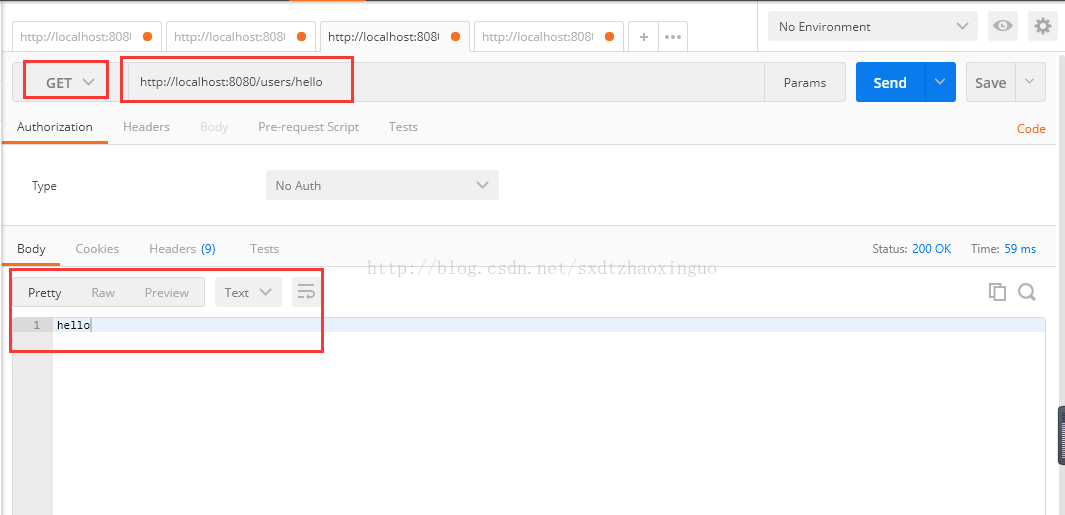
至此,我们的接口就开发完成了。但是这个接口没有任何授权防护,任何人都可以访问,这样是不安全的,下面我们开始加入授权机制。
二:增加用户注册功能
- package boss.portal.entity;
- import javax.persistence.*;
- /**
- * @author zhaoxinguo on 2017/9/13.
- */
- @Entity
- @Table(name = "tb_user")
- public class User {
- @Id
- @GeneratedValue
- private long id;
- private String username;
- private String password;
- public long getId() {
- return id;
- }
- public String getUsername() {
- return username;
- }
- public void setUsername(String username) {
- this.username = username;
- }
- public String getPassword() {
- return password;
- }
- public void setPassword(String password) {
- this.password = password;
- }
- }
然后增加一个Repository类UserRepository,可以读取和保存用户信息:
- package boss.portal.repository;
- import boss.portal.entity.User;
- import org.springframework.data.jpa.repository.JpaRepository;
- /**
- * @author zhaoxinguo on 2017/9/13.
- */
- public interface UserRepository extends JpaRepository<User, Long> {
- User findByUsername(String username);
- }
在UserController类中增加注册方法,实现用户注册的接口:
- /**
- * 该方法是注册用户的方法,默认放开访问控制
- * @param user
- */
- @PostMapping("/signup")
- public void signUp(@RequestBody User user) {
- user.setPassword(bCryptPasswordEncoder.encode(user.getPassword()));
- applicationUserRepository.save(user);
- }
其中的@PostMapping("/signup")
这个方法定义了用户注册接口,并且指定了url地址是/users/signup。由于类上加了注解 @RequestMapping(“/users”),类中的所有方法的url地址都会有/users前缀,所以在方法上只需指定/signup子路径即可。
密码采用了BCryptPasswordEncoder进行加密,我们在Application中增加BCryptPasswordEncoder实例的定义。
- package boss.portal;
- import org.springframework.boot.SpringApplication;
- import org.springframework.boot.autoconfigure.SpringBootApplication;
- import org.springframework.context.annotation.Bean;
- import org.springframework.security.crypto.bcrypt.BCryptPasswordEncoder;
- @SpringBootApplication
- public class JwtauthApplication {
- @Bean
- public BCryptPasswordEncoder bCryptPasswordEncoder() {
- return new BCryptPasswordEncoder();
- }
- public static void main(String[] args) {
- SpringApplication.run(JwtauthApplication.class, args);
- }
- }
三:增加JWT认证功能
用户填入用户名密码后,与数据库里存储的用户信息进行比对,如果通过,则认证成功。传统的方法是在认证通过后,创建sesstion,并给客户端返回cookie。现在我们采用JWT来处理用户名密码的认证。区别在于,认证通过后,服务器生成一个token,将token返回给客户端,客户端以后的所有请求都需要在http头中指定该token。服务器接收的请求后,会对token的合法性进行验证。验证的内容包括:
内容是一个正确的JWT格式
检查签名
检查claims
检查权限
处理登录
创建一个类JWTLoginFilter,核心功能是在验证用户名密码正确后,生成一个token,并将token返回给客户端:
- package boss.portal.web.filter;
- import boss.portal.entity.User;
- import com.fasterxml.jackson.databind.ObjectMapper;
- import io.jsonwebtoken.Jwts;
- import io.jsonwebtoken.SignatureAlgorithm;
- import org.springframework.security.authentication.AuthenticationManager;
- import org.springframework.security.authentication.UsernamePasswordAuthenticationToken;
- import org.springframework.security.core.Authentication;
- import org.springframework.security.core.AuthenticationException;
- import org.springframework.security.web.authentication.UsernamePasswordAuthenticationFilter;
- import javax.servlet.FilterChain;
- import javax.servlet.ServletException;
- import javax.servlet.http.HttpServletRequest;
- import javax.servlet.http.HttpServletResponse;
- import java.io.IOException;
- import java.util.ArrayList;
- import java.util.Date;
- /**
- * 验证用户名密码正确后,生成一个token,并将token返回给客户端
- * 该类继承自UsernamePasswordAuthenticationFilter,重写了其中的2个方法
- * attemptAuthentication :接收并解析用户凭证。
- * successfulAuthentication :用户成功登录后,这个方法会被调用,我们在这个方法里生成token。
- * @author zhaoxinguo on 2017/9/12.
- */
- public class JWTLoginFilter extends UsernamePasswordAuthenticationFilter {
- private AuthenticationManager authenticationManager;
- public JWTLoginFilter(AuthenticationManager authenticationManager) {
- this.authenticationManager = authenticationManager;
- }
- // 接收并解析用户凭证
- @Override
- public Authentication attemptAuthentication(HttpServletRequest req,
- HttpServletResponse res) throws AuthenticationException {
- try {
- User user = new ObjectMapper()
- .readValue(req.getInputStream(), User.class);
- return authenticationManager.authenticate(
- new UsernamePasswordAuthenticationToken(
- user.getUsername(),
- user.getPassword(),
- new ArrayList<>())
- );
- } catch (IOException e) {
- throw new RuntimeException(e);
- }
- }
- // 用户成功登录后,这个方法会被调用,我们在这个方法里生成token
- @Override
- protected void successfulAuthentication(HttpServletRequest req,
- HttpServletResponse res,
- FilterChain chain,
- Authentication auth) throws IOException, ServletException {
- String token = Jwts.builder()
- .setSubject(((org.springframework.security.core.userdetails.User) auth.getPrincipal()).getUsername())
- .setExpiration(new Date(System.currentTimeMillis() + 60 * 60 * 24 * 1000))
- .signWith(SignatureAlgorithm.HS512, "MyJwtSecret")
- .compact();
- res.addHeader("Authorization", "Bearer " + token);
- }
- }
该类继承自UsernamePasswordAuthenticationFilter,重写了其中的2个方法:
attemptAuthentication :接收并解析用户凭证。
successfulAuthentication :用户成功登录后,这个方法会被调用,我们在这个方法里生成token。
授权验证
用户一旦登录成功后,会拿到token,后续的请求都会带着这个token,服务端会验证token的合法性。
创建JWTAuthenticationFilter类,我们在这个类中实现token的校验功能。
- package boss.portal.web.filter;
- import io.jsonwebtoken.Jwts;
- import org.springframework.security.authentication.AuthenticationManager;
- import org.springframework.security.authentication.UsernamePasswordAuthenticationToken;
- import org.springframework.security.core.context.SecurityContextHolder;
- import org.springframework.security.web.authentication.www.BasicAuthenticationFilter;
- import javax.servlet.FilterChain;
- import javax.servlet.ServletException;
- import javax.servlet.http.HttpServletRequest;
- import javax.servlet.http.HttpServletResponse;
- import java.io.IOException;
- import java.util.ArrayList;
- /**
- * token的校验
- * 该类继承自BasicAuthenticationFilter,在doFilterInternal方法中,
- * 从http头的Authorization 项读取token数据,然后用Jwts包提供的方法校验token的合法性。
- * 如果校验通过,就认为这是一个取得授权的合法请求
- * @author zhaoxinguo on 2017/9/13.
- */
- public class JWTAuthenticationFilter extends BasicAuthenticationFilter {
- public JWTAuthenticationFilter(AuthenticationManager authenticationManager) {
- super(authenticationManager);
- }
- @Override
- protected void doFilterInternal(HttpServletRequest request, HttpServletResponse response, FilterChain chain) throws IOException, ServletException {
- String header = request.getHeader("Authorization");
- if (header == null || !header.startsWith("Bearer ")) {
- chain.doFilter(request, response);
- return;
- }
- UsernamePasswordAuthenticationToken authentication = getAuthentication(request);
- SecurityContextHolder.getContext().setAuthentication(authentication);
- chain.doFilter(request, response);
- }
- private UsernamePasswordAuthenticationToken getAuthentication(HttpServletRequest request) {
- String token = request.getHeader("Authorization");
- if (token != null) {
- // parse the token.
- String user = Jwts.parser()
- .setSigningKey("MyJwtSecret")
- .parseClaimsJws(token.replace("Bearer ", ""))
- .getBody()
- .getSubject();
- if (user != null) {
- return new UsernamePasswordAuthenticationToken(user, null, new ArrayList<>());
- }
- return null;
- }
- return null;
- }
- }
该类继承自BasicAuthenticationFilter,在doFilterInternal方法中,从http头的Authorization 项读取token数据,然后用Jwts包提供的方法校验token的合法性。如果校验通过,就认为这是一个取得授权的合法请求。
SpringSecurity配置
通过SpringSecurity的配置,将上面的方法组合在一起。
- package boss.portal.security;
- import boss.portal.web.filter.JWTLoginFilter;
- import boss.portal.web.filter.JWTAuthenticationFilter;
- import org.springframework.boot.autoconfigure.security.SecurityProperties;
- import org.springframework.context.annotation.Configuration;
- import org.springframework.core.annotation.Order;
- import org.springframework.http.HttpMethod;
- import org.springframework.security.config.annotation.authentication.builders.AuthenticationManagerBuilder;
- import org.springframework.security.config.annotation.web.builders.HttpSecurity;
- import org.springframework.security.config.annotation.web.configuration.WebSecurityConfigurerAdapter;
- import org.springframework.security.core.userdetails.UserDetailsService;
- import org.springframework.security.crypto.bcrypt.BCryptPasswordEncoder;
- /**
- * SpringSecurity的配置
- * 通过SpringSecurity的配置,将JWTLoginFilter,JWTAuthenticationFilter组合在一起
- * @author zhaoxinguo on 2017/9/13.
- */
- @Configuration
- @Order(SecurityProperties.ACCESS_OVERRIDE_ORDER)
- public class WebSecurityConfig extends WebSecurityConfigurerAdapter {
- private UserDetailsService userDetailsService;
- private BCryptPasswordEncoder bCryptPasswordEncoder;
- public WebSecurityConfig(UserDetailsService userDetailsService, BCryptPasswordEncoder bCryptPasswordEncoder) {
- this.userDetailsService = userDetailsService;
- this.bCryptPasswordEncoder = bCryptPasswordEncoder;
- }
- @Override
- protected void configure(HttpSecurity http) throws Exception {
- http.cors().and().csrf().disable().authorizeRequests()
- .antMatchers(HttpMethod.POST, "/users/signup").permitAll()
- .anyRequest().authenticated()
- .and()
- .addFilter(new JWTLoginFilter(authenticationManager()))
- .addFilter(new JWTAuthenticationFilter(authenticationManager()));
- }
- @Override
- public void configure(AuthenticationManagerBuilder auth) throws Exception {
- auth.userDetailsService(userDetailsService).passwordEncoder(bCryptPasswordEncoder);
- }
- }
这是标准的SpringSecurity配置内容,就不在详细说明。注意其中的
.addFilter(new JWTLoginFilter(authenticationManager()))
.addFilter(new JwtAuthenticationFilter(authenticationManager()))
这两行,将我们定义的JWT方法加入SpringSecurity的处理流程中。
下面对我们的程序进行简单的验证:
# 请求hello接口,会收到403错误,如下图:
curl http://localhost:8080/hello
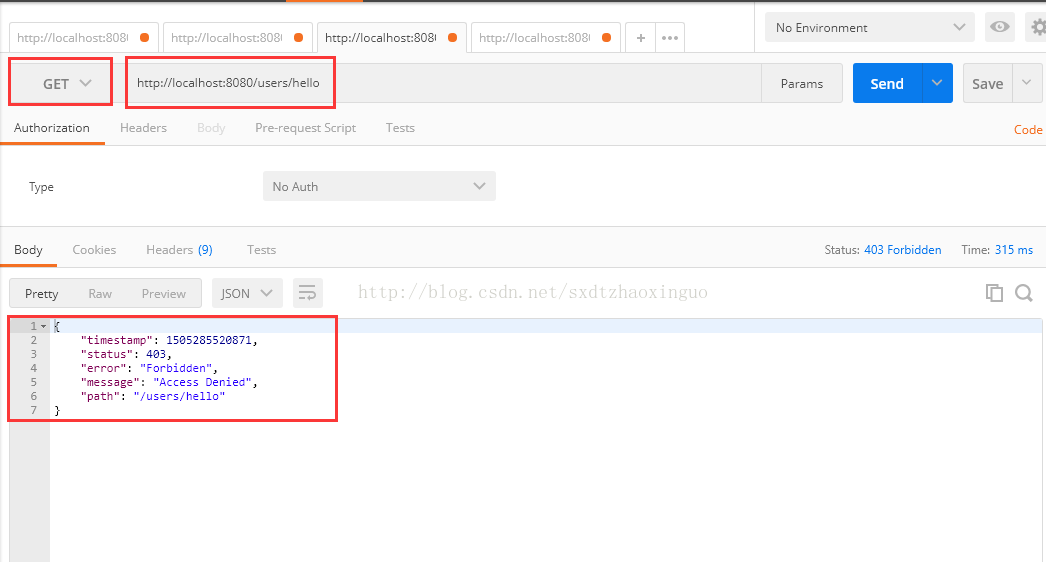
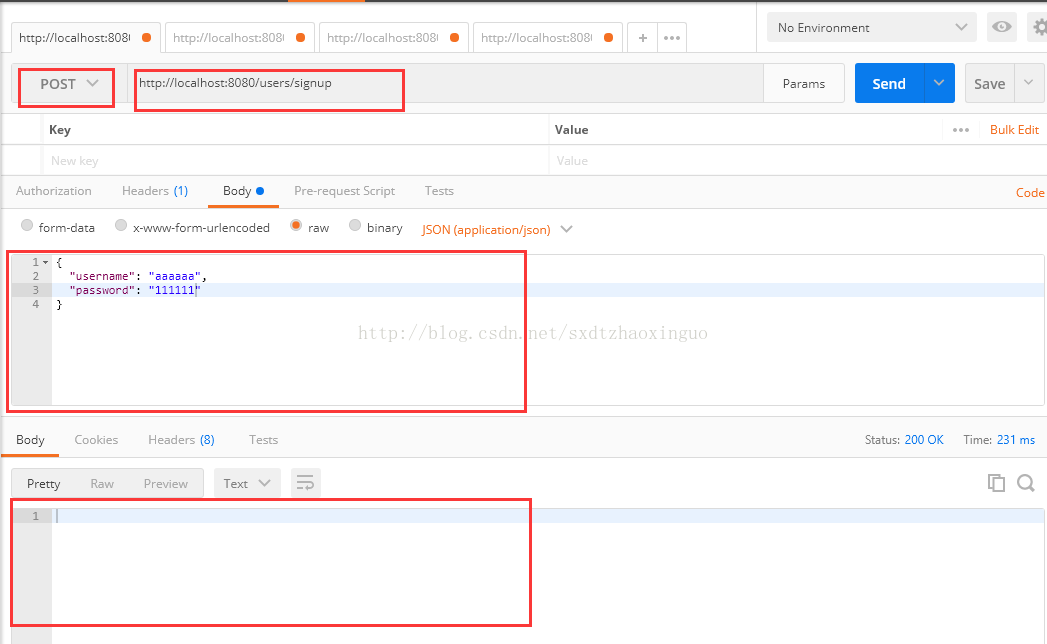
# 注册一个新用户curl -H"Content-Type: application/json" -X POST -d '{"username":"admin","password":"password"}' http://localhost:8080/users/signup
如下图:
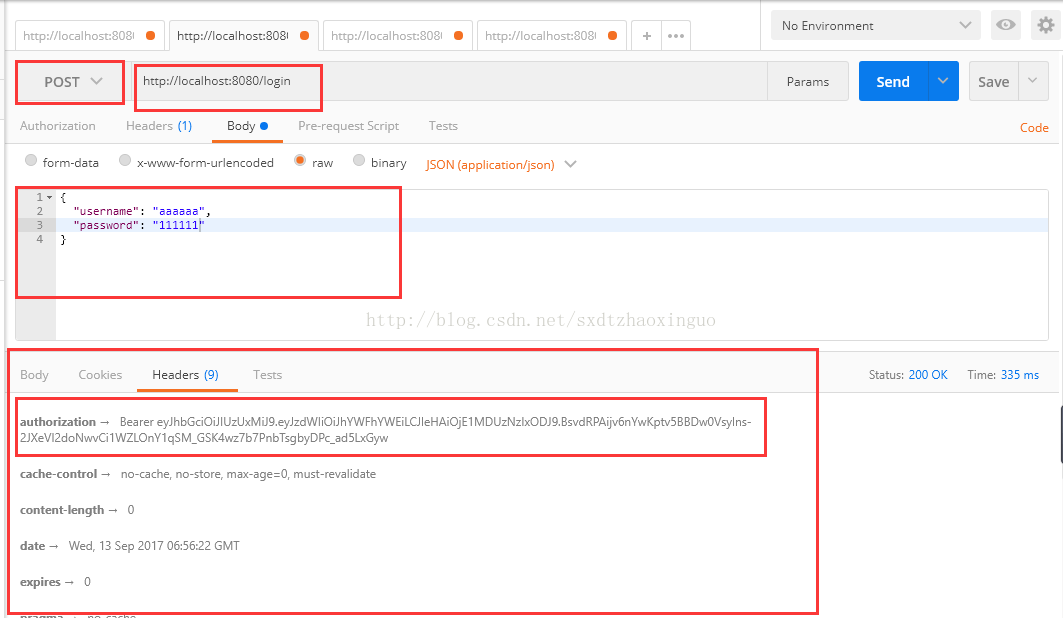
# 登录,会返回token,在http header中,Authorization: Bearer 后面的部分就是tokencurl -i -H"Content-Type: application/json" -X POST -d '{"username":"admin","password":"password"}' http://localhost:8080/login
如下图:
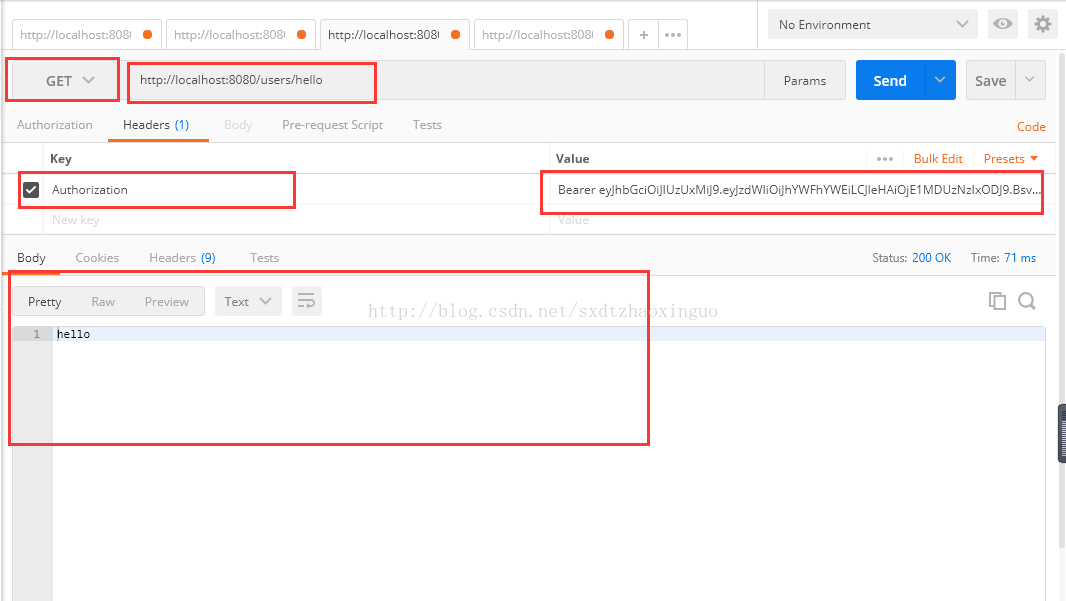
# 用登录成功后拿到的token再次请求hello接口# 将请求中的XXXXXX替换成拿到的token# 这次可以成功调用接口了curl -H"Content-Type: application/json" \-H"Authorization: Bearer XXXXXX" \"http://localhost:8080/users/hello"
如下图:
五:总结
至此,给SpringBoot的接口加上JWT认证的功能就实现了,过程并不复杂,主要是开发两个SpringSecurity的filter,来生成和校验JWT token。
JWT作为一个无状态的授权校验技术,非常适合于分布式系统架构,因为服务端不需要保存用户状态,因此就无需采用redis等技术,在各个服务节点之间共享session数据。
六:源码下载地址:
地址:https://gitee.com/micai/springboot-springsecurity-jwt-demo
七:建议及改进:
若您有任何建议,可以通过1)加入qq群715224124向群主提出,或2)发送邮件至827358369@qq.com向我反馈。本人承诺,任何建议都将会被认真考虑,优秀的建议将会被采用,但不保证一定会在当前版本中实现。
八:鸣谢地址:
http://blog.csdn.net/haiyan_qi/article/details/77373900
https://segmentfault.com/a/1190000009231329
Spring Boot+Spring Security+JWT 实现 RESTful Api 权限控制的更多相关文章
- Spring Boot+Spring Security+JWT 实现 RESTful Api 认证(二)
Spring Boot+Spring Security+JWT 实现 RESTful Api 认证(二) 摘要 上一篇https://javaymw.com/post/59我们已经实现了基本的登录和t ...
- Spring Boot+Spring Security+JWT 实现 RESTful Api 认证(一)
标题 Spring Boot+Spring Security+JWT 实现 RESTful Api 认证(一) 技术 Spring Boot 2.Spring Security 5.JWT 运行环境 ...
- Spring Boot中使用Swagger2构建RESTful API文档
在开发rest api的时候,为了减少与其他团队平时开发期间的频繁沟通成本,传统做法我们会创建一份RESTful API文档来记录所有接口细节,然而这样的做法有以下几个问题: 1.由于接口众多,并且细 ...
- Spring Boot中使用Swagger2生成RESTful API文档(转)
效果如下图所示: 添加Swagger2依赖 在pom.xml中加入Swagger2的依赖 <!-- https://mvnrepository.com/artifact/io.springfox ...
- Spring Cloud实战 | 第十一篇:Spring Cloud Gateway 网关实现对RESTful接口权限控制和按钮权限控制
一. 前言 hi,大家好,这应该是农历年前的关于开源项目 的最后一篇文章了. 有来商城 是基于 Spring Cloud OAuth2 + Spring Cloud Gateway + JWT实现的统 ...
- Spring Boot (21) 使用Swagger2构建restful API
使用swagger可以与spring mvc程序配合组织出强大的restful api文档.它既可以减少我们创建文档的工作量,同时说明内容又整合入现实代码中,让维护文档和修改代码整合为一体,可以让我们 ...
- 使用 Spring Boot 2.0 + WebFlux 实现 RESTful API
概述 什么是 Spring WebFlux, 它是一种异步的, 非阻塞的, 支持背压(Back pressure)机制的Web 开发框架. 要深入了解 Spring WebFlux, 首先要了知道 R ...
- Spring Boot 无侵入式 实现RESTful API接口统一JSON格式返回
前言 现在我们做项目基本上中大型项目都是选择前后端分离,前后端分离已经成了一个趋势了,所以总这样·我们就要和前端约定统一的api 接口返回json 格式, 这样我们需要封装一个统一通用全局 模版api ...
- spring boot shiro redis整合基于角色和权限的安全管理-Java编程
一.概述 本博客主要讲解spring boot整合Apache的shiro框架,实现基于角色的安全访问控制或者基于权限的访问安全控制,其中还使用到分布式缓存redis进行用户认证信息的缓存,减少数据库 ...
随机推荐
- mediainfo使用
1.linux安装mediainfo yum install mediainfo(epel源安装) 2.输出文件信息到xml文件 mediainfo --OUTPUT=XML -f ftp ...
- JavaScript中的let和const
在ES6之前,JavaScript中只有两种作用域:全局作用域和函数内部的局部作用域.ES6中新增了两个重要的关键字,let和const,从而引入了块级作用域. 关键字var 使用var关键字声明的变 ...
- phpcms导航菜单的写法
PHP打印方法: {php print_r(变量);} <?php print_r(变量);?> 1. <div class="webnav"> {pc:g ...
- HDU1846 Brave Game
Brave Game Time Limit: 1000/1000 MS (Java/Others) Memory Limit: 32768/32768 K (Java/Others)Total ...
- HDU 3032 Nim or not Nim?(Multi-Nim)
Time Limit: 2000/1000 MS (Java/Others) Memory Limit: 32768/32768 K (Java/Others)Total Submission( ...
- Mysql LIMIT 分页
格式: LIMIT index, size // index:从哪一行(第几条)开始查,size:多少条 分页: LIMIT (currentPage-1)*pageSize, pageSiz ...
- Android IPC机制(三)使用AIDL实现跨进程方法调用
上一篇文章中我们介绍了使用Messenger来进行进程间通信的方法,但是我们能发现Messenger是以串行的方式来处理客户端发来的信息,如果有大量的消息发到服务端,服务端仍然一个一个的处理再响应客户 ...
- C#:如何使方法过时,如何否决方法
在使用.Net Frameworkd进行开发时,经常可以在方法的智能提示ToolTip上面看到一个方法是[否决的],如图: 或者在警告里面: 甚至使用[否决的]方法的时候还会造成编译错误: 上面的这些 ...
- Kotlin入门(23)适配器的进阶表达
前面在介绍列表视图和网格视图时,它们的适配器代码都存在视图持有者ViewHolder,因为Android对列表类视图提供了回收机制,如果某些列表项在屏幕上看不到了,则系统会自动回收相应的视图对象.随着 ...
- 2014年5月16至24日,杨学明老师为深圳创维RGB事业部提供两天的《软件测试管理》内训服务!
2014年5月16日和24日,<在软件开发流程中构筑软件质量—软件测试管理>内训课程在深圳创维集团成功举办!来自创维研发.测试.生产等部门的管理人员和核心骨干等参加了此次培训,此次培训由研 ...