
Unity 3D调用Windows打开、保存窗口、文件浏览器
Unity调用Window窗口
|
本文提供全流程,中文翻译。 Chinar 坚持将简单的生活方式,带给世人! (拥有更好的阅读体验 —— 高分辨率用户请根据需求调整网页缩放比例) |
|
Chinar —— 心分享、心创新! 助力快速完成 Unity调用 Window api 执行保存/打开操作 为新手节省宝贵的时间,避免采坑! |
Chinar 教程效果:
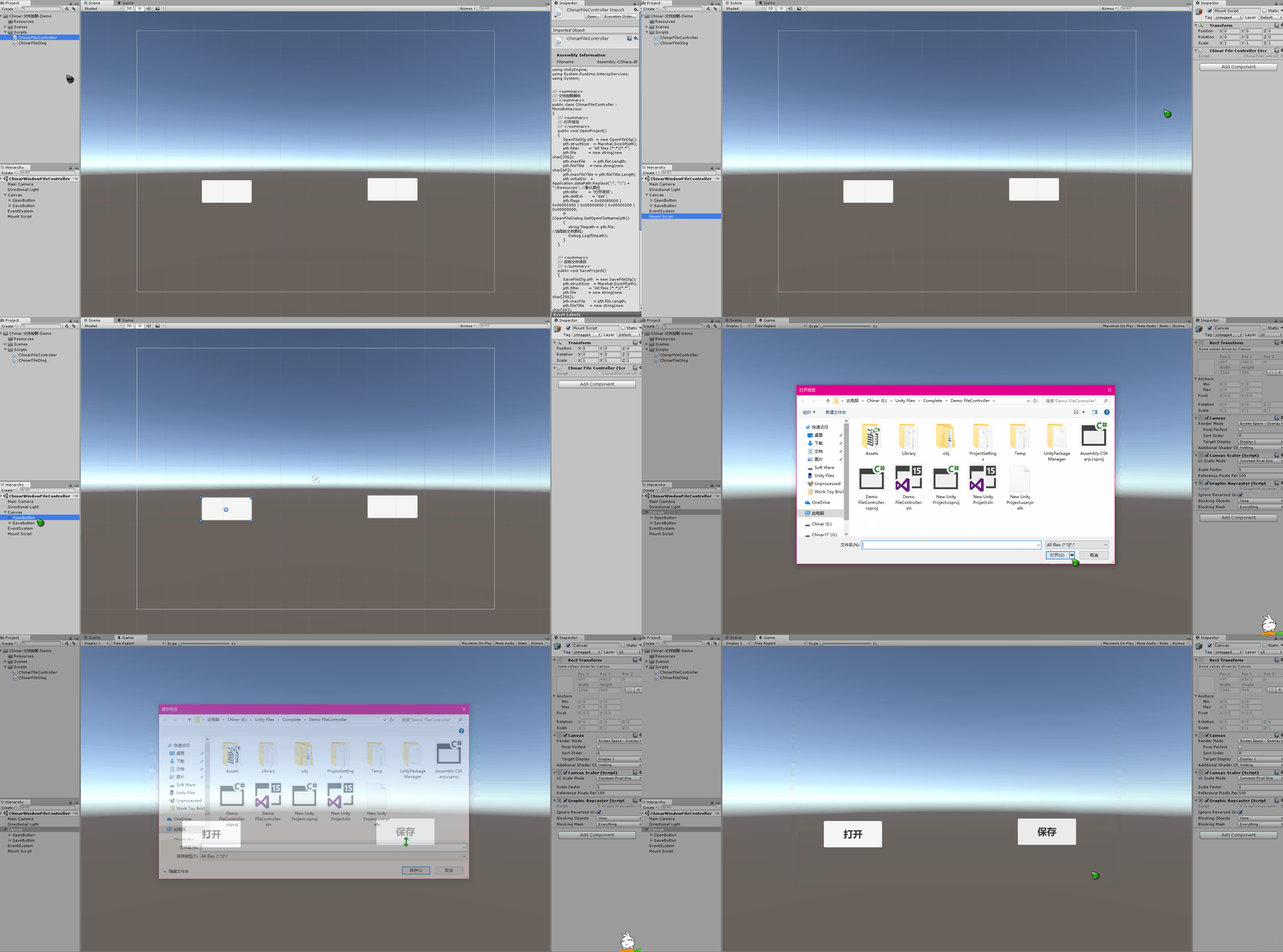
全文高清图片,点击即可放大观看 (很多人竟然不知道)
1
File Controller —— 文件控制脚本
用来控制打开/保存项目文件
将两个脚本放到项目中,分别绑定2个按钮 打开/保存
ChinarFileController 脚本需要挂载到空物体上
即可正常调用
具体需求,需要自己来定,保存到某个路径下

using UnityEngine;

using System.Runtime.InteropServices;

using System;

/// <summary>

/// 文件控制脚本

/// </summary>

public class ChinarFileController : MonoBehaviour

{

    /// <summary>

    /// 打开项目

    /// </summary>

    public void OpenProject()

    {

        OpenFileDlg pth  = new OpenFileDlg();

        pth.structSize   = Marshal.SizeOf(pth);

        pth.filter       = "All files (*.*)|*.*";

        pth.file         = new string(new char[256]);

        pth.maxFile      = pth.file.Length;

        pth.fileTitle    = new string(new char[64]);

        pth.maxFileTitle = pth.fileTitle.Length;

        pth.initialDir   = Application.dataPath.Replace("/", "\\") + "\\Resources"; //默认路径

        pth.title        = "打开项目";

        pth.defExt       = "dat";

        pth.flags        = 0x00080000 | 0x00001000 | 0x00000800 | 0x00000200 | 0x00000008;

        if (OpenFileDialog.GetOpenFileName(pth))

        {

            string filepath = pth.file; //选择的文件路径;

            Debug.Log(filepath);

        }

    }

    /// <summary>

    /// 保存文件项目

    /// </summary>

    public void SaveProject()

    {

        SaveFileDlg pth  = new SaveFileDlg();

        pth.structSize   = Marshal.SizeOf(pth);

        pth.filter       = "All files (*.*)|*.*";

        pth.file         = new string(new char[256]);

        pth.maxFile      = pth.file.Length;

        pth.fileTitle    = new string(new char[64]);

        pth.maxFileTitle = pth.fileTitle.Length;

        pth.initialDir   = Application.dataPath; //默认路径

        pth.title        = "保存项目";

        pth.defExt       = "dat";

        pth.flags        = 0x00080000 | 0x00001000 | 0x00000800 | 0x00000200 | 0x00000008;

        if (SaveFileDialog.GetSaveFileName(pth))

        {

            string filepath = pth.file; //选择的文件路径;

            Debug.Log(filepath);

        }

    }

}
2
FileDlog —— 文件日志
无需挂载到空物体上
using System.Runtime.InteropServices;

using System;

/// <summary>

/// 文件日志类

/// </summary>

// [特性(布局种类.有序,字符集=字符集.自动)]

[StructLayout(LayoutKind.Sequential, CharSet = CharSet.Auto)]

public class ChinarFileDlog

{

    public int    structSize    = 0;

    public IntPtr dlgOwner      = IntPtr.Zero;

    public IntPtr instance      = IntPtr.Zero;

    public String filter        = null;

    public String customFilter  = null;

    public int    maxCustFilter = 0;

    public int    filterIndex   = 0;

    public String file          = null;

    public int    maxFile       = 0;

    public String fileTitle     = null;

    public int    maxFileTitle  = 0;

    public String initialDir    = null;

    public String title         = null;

    public int    flags         = 0;

    public short  fileOffset    = 0;

    public short  fileExtension = 0;

    public String defExt        = null;

    public IntPtr custData      = IntPtr.Zero;

    public IntPtr hook          = IntPtr.Zero;

    public String templateName  = null;

    public IntPtr reservedPtr   = IntPtr.Zero;

    public int    reservedInt   = 0;

    public int    flagsEx       = 0;

}

[StructLayout(LayoutKind.Sequential, CharSet = CharSet.Auto)]

public class OpenFileDlg : ChinarFileDlog

{

}

public class OpenFileDialog

{

    [DllImport("Comdlg32.dll", SetLastError = true, ThrowOnUnmappableChar = true, CharSet = CharSet.Auto)]

    public static extern bool GetOpenFileName([In, Out] OpenFileDlg ofd);

}

public class SaveFileDialog

{

    [DllImport("Comdlg32.dll", SetLastError = true, ThrowOnUnmappableChar = true, CharSet = CharSet.Auto)]

    public static extern bool GetSaveFileName([In, Out] SaveFileDlg ofd);

}

[StructLayout(LayoutKind.Sequential, CharSet = CharSet.Auto)]

public class SaveFileDlg : ChinarFileDlog

{

}
运行效果:
支持
May Be —— 搞开发,总有一天要做的事!
|
拥有自己的服务器,无需再找攻略! Chinar 提供一站式教程,闭眼式创建! 为新手节省宝贵时间,避免采坑! |
先点击领取 —— 阿里全产品优惠券 (享受最低优惠)
1 —— 云服务器超全购买流程 (新手必备!)
2 —— 阿里ECS云服务器自定义配置 - 购买教程(新手必备!)
3—— Windows 服务器配置、运行、建站一条龙 !
4 —— Linux 服务器配置、运行、建站一条龙 !

" role="presentation">
Chinar
END
本博客为非营利性个人原创,除部分有明确署名的作品外,所刊登的所有作品的著作权均为本人所拥有,本人保留所有法定权利。违者必究
对于需要复制、转载、链接和传播博客文章或内容的,请及时和本博主进行联系,留言,Email: ichinar@icloud.com
对于经本博主明确授权和许可使用文章及内容的,使用时请注明文章或内容出处并注明网址
Unity 3D调用Windows打开、保存窗口、文件浏览器的更多相关文章
- Unity调用windows系统dialog 选择文件夹
#region 调用windows系统dialog 选择文件夹 [StructLayout(LayoutKind.Sequential, CharSet = CharSet.Auto)] public ...
- Unity中调用Windows窗口句柄以及根据需求设置并且解决扩展屏窗体显示错乱/位置错误的Bug
问题背景: 现在在搞PC端应用开发,我们开发中需要调用系统的窗口以及需要最大化最小化,缩放窗口拖拽窗口,以及设置窗口位置,去边框等功能 解决根据: 使用user32.dll解决 具体功能: Unity ...
- unity 实现调用Windows窗口/对话框交互
Unity调用Window窗口 本文提供全流程,中文翻译. Chinar 坚持将简单的生活方式,带给世人!(拥有更好的阅读体验 -- 高分辨率用户请根据需求调整网页缩放比例) Chinar -- 心分 ...
- window.open打开新窗口被浏览器拦截的处理方法
一般我们在打开页面的时候, 最常用的就是用<a>标签,如果是新窗口打开就价格target="_blank"属性就可以了, 如果只是刷新当前页面就用window.loca ...
- Flash打开新窗口 被浏览器拦截问题 navigateToURL被拦截 真正试验结果
众所周知,打开新窗口以前经常被用作弹出广告用,而随着浏览器发展,现在估计除了ie6之外,基本都有广告拦截功能,最基本就是拦截这种非人为的弹出新窗口.我对js研究不深,我所了解就是,必须是用户操作的处理 ...
- 使用window.open打开新窗口被浏览器拦截的解决方案
问题描述: 代码中直接使用window.open('//www.baidu.com', '_blank');会被浏览器窗口拦截 原因浏览器为了维护用户安全和体验,在JS中直接使用window.open ...
- Unity中调用Windows窗口选择文件
1.OpenFileName数据接收类,如下: using UnityEngine; using System.Collections; using System; using System.Runt ...
- Unity调用Windows窗口句柄,选择文件和目录
T:2019-6-25 10:06:59 C:Scatt Kang using System; using System.Collections; using System.Collections.G ...
- Unity调用Windows对话框保存时另存为弹框
Unity开发VR之Vuforia 本文提供全流程,中文翻译. Chinar 坚持将简单的生活方式,带给世人!(拥有更好的阅读体验 -- 高分辨率用户请根据需求调整网页缩放比例) Chinar -- ...
随机推荐
- Qt之获取子部件
Qt5.10 QList<QObject*> list_children = this->children(); for(int i=0;i<list_children.siz ...
- Python Number 类型转换
int(x [,base ]) 将x转换为一个整数 long(x [,base ]) 将x转换为一个长整数 float(x ) 将x转换到一个浮点数 complex(real [,imag ]) 创建 ...
- swagger访问api, TypeError: Failed to fetch
用swagger访问https://localhost:44360/api/ads/1, 得到的结果是 TypeError: Failed to fetch.一开始以为是后端代码问题,检查了好久,才发 ...
- Jackson 工具类使用及配置指南
目录 前言 Jackson使用工具类 Jackson配置属性 Jackson解析JSON数据 Jackson序列化Java对象 前言 Json数据格式这两年发展的很快,其声称相对XML格式有很对好处: ...
- vue-cli webpack全局引入jquery
1.首先在package.json里加入, dependencies:{ "jquery" : "^2.2.3" } 2.安装依赖 npm install jq ...
- 8188EU 在AM335X MC183上以AP+STA工作
[目的] 8188EU 在AM335X MC183上以AP+STA工作. [环境] 1. Ubuntu 16.04发行版 2. linux-3.2.0-psp04.06.00.11 3. MC1 ...
- Linux运维工程师必学必备的8项IT技能
如果你在学习Linux,那么强烈推荐你选择RHEL和Centos作为学习的Linux发行版本,在公司及企业当中他们是使用最多的,毕竟学习除了本身是爱好,其次也是为了就业.Centos是RHEL的克隆版 ...
- dell win10 productkey
- 锤子科技 Smartisan M1L 咖啡金 真皮背面 高配版 5.7
http://www.smartisan.com/m1/#/os 快人一步的OS http://www.smartisan.com/shop/#/buyphone?c=coffee&v= ...
- import 语句
声明package的语句必须在java类的有效代码第一行,所import语句要放在package 声明语句之后. import的语法格式为: import+空格+类全限定名+: 该语句的作用是, ...