
(常用)time,datetime,random,shutil(zipfile,tarfile),sys模块
import time
1、时间戳 (时间秒数的表达形式, 从1970年开始)
print(time.time())
start_time=time.time()
time.sleep(3)
stop_time=time.time()
print(stop_time-start_time)
print(time.strftime('%Y-%m-%d %H:%M:%S %p'))
print(time.strftime('%Y-%m-%d %X %p'))
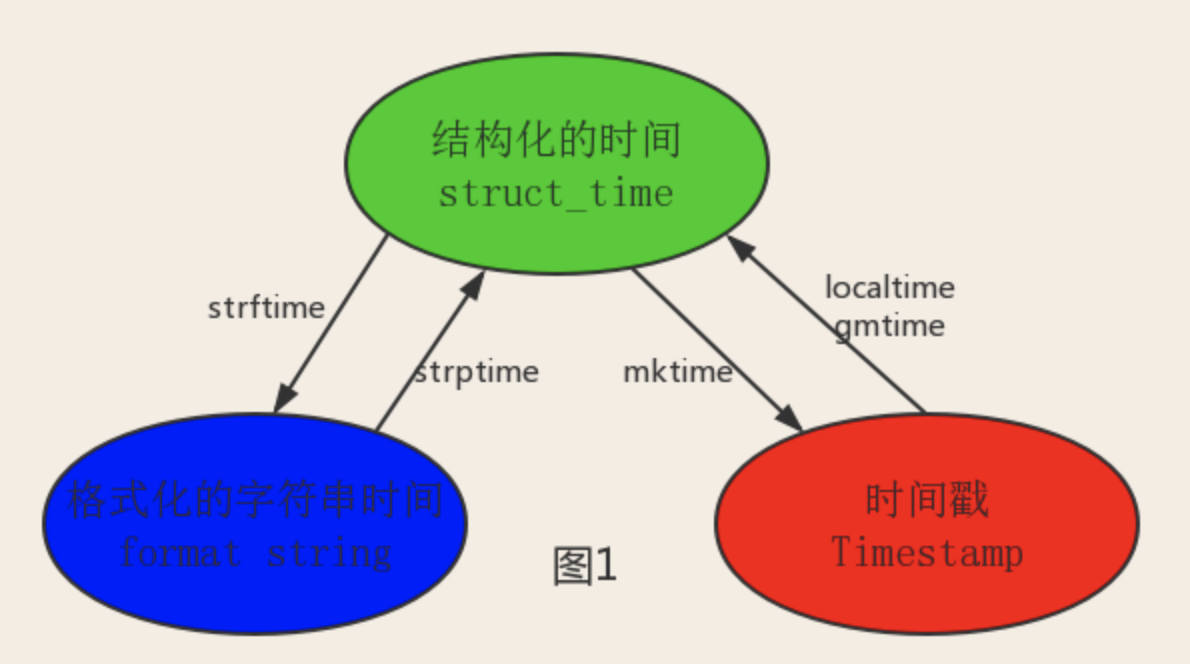
print(time.localtime()) # 上海:东八区
print(time.localtime().tm_year)
print(time.localtime().tm_mday)
print(time.gmtime()) # UTC时区
print(time.localtime(1111111111).tm_hour)
print(time.gmtime(1111111111).tm_hour)
print(time.mktime(time.localtime()))
print(time.strftime('%Y/%m/%d',time.localtime()))
print(time.strptime('2017/04/08','%Y/%m/%d'))
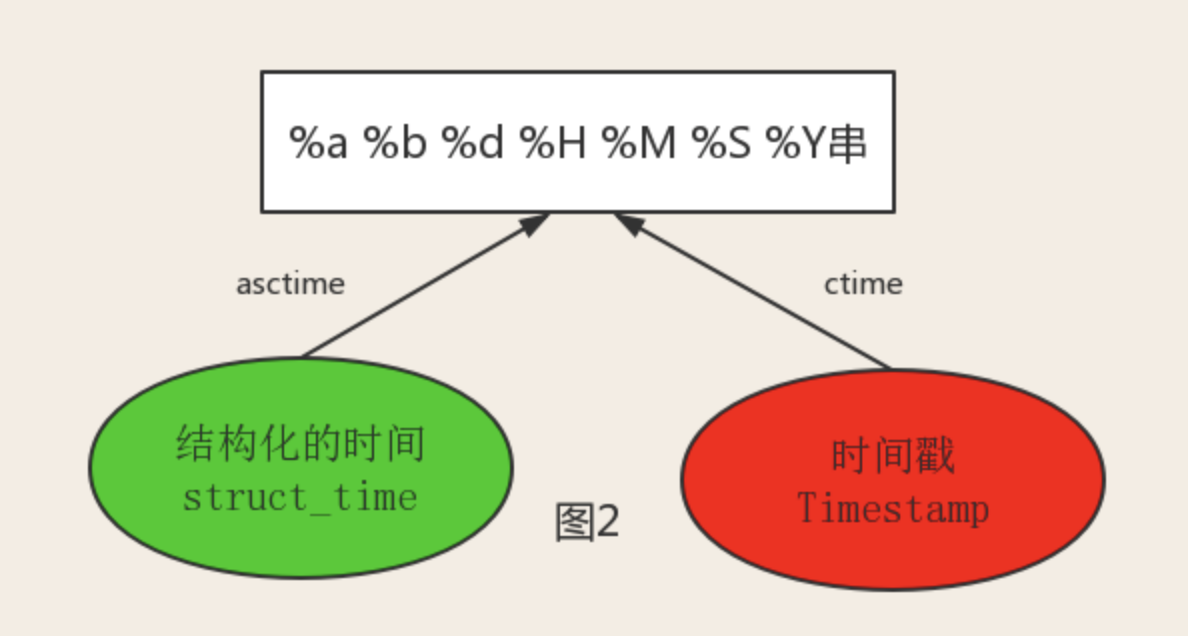
print(time.asctime(time.localtime()))
print(time.ctime(12312312321))
import datetime
print(datetime.datetime.now() + datetime.timedelta(days=3))
print(datetime.datetime.now() + datetime.timedelta(days=-3))
print(datetime.datetime.now() + datetime.timedelta(hours=3))
print(datetime.datetime.now() + datetime.timedelta(seconds=111))
current_time=datetime.datetime.now()
print(current_time.replace(year=1977))
print(datetime.date.fromtimestamp(1111111111))
print(datetime.date.fromtimestamp(time.time()) )
#时间戳直接转成日期格式 2018-04-08
import random
print(random.randint(1,3)) #大于等于1且小于等于3之间的整数
print(random.randrange(1,3)) #大于等于1且小于3之间的整数
print(random.choice([1,'a',[1,2,3]])) #从定义的列表中随机选取
print(random.sample([1,2,3,4,5],3)) #列表中元素任选(3)个数
print(random.uniform(1,3)) #大于1小于3的小数
item=[1,3,5,7,9]
random.shuffle(item) #打乱item的顺序相当于洗牌
print(item)
import random
res=''
for i in range(n):
s1=str(random.randint(0,9))
s2=chr(random.randint(65,90))
res+=random.choice([s1,s2])
return res
print(make_code(10))
if percent > 1:
percent=1 #防止显示百分数超过100%
show_str=('[%%-%ds]' %width) %(int(width*percent) * '#')
print('\r%s %d%%' %(show_str,int(100*percent)),end='')
recv_size=0
total_size=1111111
while recv_size < total_size:
time.sleep(0.1)
recv_size+=8096
percent=recv_size / total_size
progress(percent)
print('[%-30s]'%'#') # %-50s, -左对齐, 50宽度为50不够空格补
print(('[%%-%ds]'%width)%'#') #第一个百分号取消了第二个百分号的特殊含义
print('%s%%' %num) #30%
压缩
import shutil
import time
ret = shutil.make_archive(
"day15_bak_%s" %time.strftime('%Y-%m-%d'),
'gztar',
root_dir=r'D:\code\SH_fullstack_s1\day15'
)
import tarfile
t=tarfile.open('day15_bak_2018-04-08.tar.gz','r')
t.extractall(r'D:\code\SH_fullstack_s1\day16\解包目录')
t.close()
sys.argv
sys.path
import 放在一起
func()
(常用)time,datetime,random,shutil(zipfile,tarfile),sys模块的更多相关文章
- time/datetime/random/string/os/sys/shutil/zipfile/tarfile - 总结
time 模块: time.time() #时间戳 time.localtime() #当前时间对象元组 time.localtime(123123) #根据时间戳的时间对象 time.mktime( ...
- 模块 - random/string/os/sys/shutil/zipfile/tarfile
random 模块 方法: >>> random.randint(1,3) #会包含 1 2 3 3 >>> random.randrange(1,3) #会包含 ...
- python time、datetime、random、os、sys模块
一.模块1.定义模块:用来从逻辑上组织Python代码(变量,函数,类,逻辑:实现一个功能),本质就是.py结尾的python文件(文件名:test.py,对应的模块名:test)包:用来从逻辑上组织 ...
- 内置模块:time, datetime, random, json, pickle, os, sys, hashlib, collections, re
1.time模块 import time time.time() # 时间戳 浮点数 time.sleep() # 睡眠 time.gmtime()/time.localtime() #结构化时间 数 ...
- 模块之 time datetime random json pickle os sys hashlib collections
目录 1. time模块 1.1表示时间的几种方式: 1.2格式化字符串的时间格式 1.3不同格式时间的转换 2.datetim模块 3.random模块 4. json模块 4.1dumps.loa ...
- 序列化、time、random、hashlib、sys模块
•很多常用和内置模块,我们只需要掌握他们的用法而暂时不用考虑内部是如何实现的,这些模块大大提升了开发效率 ! 1.json模块与pickle模块 •json 如果你有这样的困扰,当希望把一种数据存到硬 ...
- 包+time+datetime+random+hashlibhmac+typing+requests+re模块(day17整理)
目录 昨日内容 os模块 sys模块 json模块 pickle模块 logging模块 今日内容 包 相对导入 绝对导入 time模块 sleep 时间戳 time 格式化时间 strtime 结构 ...
- python之random、time与sys模块
一.random模块 import random # float型 print(random.random()) #取0-1之间的随机小数 print(random.uniform(n,m)) #取 ...
- collections,time,random,os, sys 模块的使用
主要内容:1. 模块的简单认识2. collections模块3. time时间模块4. random模块5. os模块6. sys模块 一. 模块的简单认识什么是模块. 模块就是我们把装有特定功能的 ...
随机推荐
- bracketed-paste-magic:zle:41: not enough arguments for -U
原因是zsh的插件出问题了,解法方法如下: 把 ~/.oh-my-zsh/lib/misc.zsh 文件中的第一段 if 注释掉 OK 啦 # ]]; then # for d in $fpath; ...
- typescript变量声明(学习笔记非干货)
var a=10; function f(){ var message="hello,world"; return message; } function f(){ a=10; r ...
- Codeforce Div-3 E.Cyclic Components
You are given an undirected graph consisting of nn vertices and mm edges. Your task is to find the n ...
- windows 下mysql 重设root密码方法
1.首先在命令行里关闭mysql服务 net stop mysql2.在命令行里进入mysql安装目录下bin目录,以不检查权限的方式启动:mysqld-nt --skip-grant-tables ...
- java代码示例(4—1(作业))
package com.java.union4; import static org.junit.Assert.*; import org.junit.Test; public class Demo ...
- python - how to sort
python - how to sort overview Key function (★★★★★) OPerator module functions asc and desc 升序和降序 Over ...
- 三种数据库连接池的配置及使用(For JDBC)
DBCP 一.导包 Apache官网下载DBCP包,导入两个包路径如下: commons-dbcp-1.4-bin\commons-dbcp-1.4\commons-dbcp-1.4.jar:连接池的 ...
- Spark进阶之路-Standalone模式搭建
Spark进阶之路-Standalone模式搭建 作者:尹正杰 版权声明:原创作品,谢绝转载!否则将追究法律责任. 一.Spark的集群的准备环境 1>.master节点信息(s101) 2&g ...
- passat / maintenance / baoyang
s s 南京迎客隆汽车租赁有限公司 / 地址:常府街54号 / 电话:025-84546836 84507610 二手车养不起.修不起?果真如此吗?http://www.che168.com/list ...
- Python基础【day02】:元组和购物车练习的知识点
一.元组 元组其实跟列表差不多,也是存一组数,只不是它一旦创建,便不能再修改,所以又叫只读列表 用途:一般情况下用于自己写的程序能存下数据,但是又希望这些数据不会被改变,比如:数据库连接信息等 1.元 ...