
pytest启动浏览器,失败用例截图
1、conftest.py
# coding:utf-

from selenium import webdriver

import pytest

driver = None

@pytest.mark.hookwrapper

def pytest_runtest_makereport(item):

    """

    当测试失败的时候,自动截图,展示到html报告中

    :param item:

    """

    pytest_html = item.config.pluginmanager.getplugin('html')

    outcome = yield

    report = outcome.get_result()

    extra = getattr(report, 'extra', [])

    if report.when == 'call' or report.when == "setup":

        xfail = hasattr(report, 'wasxfail')

        if (report.skipped and xfail) or (report.failed and not xfail):

            file_name = report.nodeid.replace("::", "_")+".png"

            screen_img = _capture_screenshot()

            if file_name:

                html = '<div><img src="data:image/png;base64,%s" alt="screenshot" style="width:600px;height:300px;" ' \

                       'onclick="window.open(this.src)" align="right"/></div>' % screen_img

                extra.append(pytest_html.extras.html(html))

        report.extra = extra

def _capture_screenshot():

    '''

    截图保存为base64,展示到html中

    :return:

    '''

    return driver.get_screenshot_as_base64()

@pytest.fixture(scope='session', autouse=True)

def browser():

    global driver

    if driver is None:

        driver =webdriver.Chrome()

    return driver
2、test_01.py
from selenium import webdriver
import time

def test_yoyo_01(browser):

    browser.get("https://www.baidu.com/")
    time.sleep(2)
    t = browser.title
    assert t == "郭林莉"
3、test_03.py
from selenium import webdriver
import time

def test_yoyo_01(browser):

    browser.get("https://www.baidu.com/")
    time.sleep(2)
    t = browser.title
    assert "baidu" in t
4、cmd运行用例:pytest --html=report.html --self-contained-html
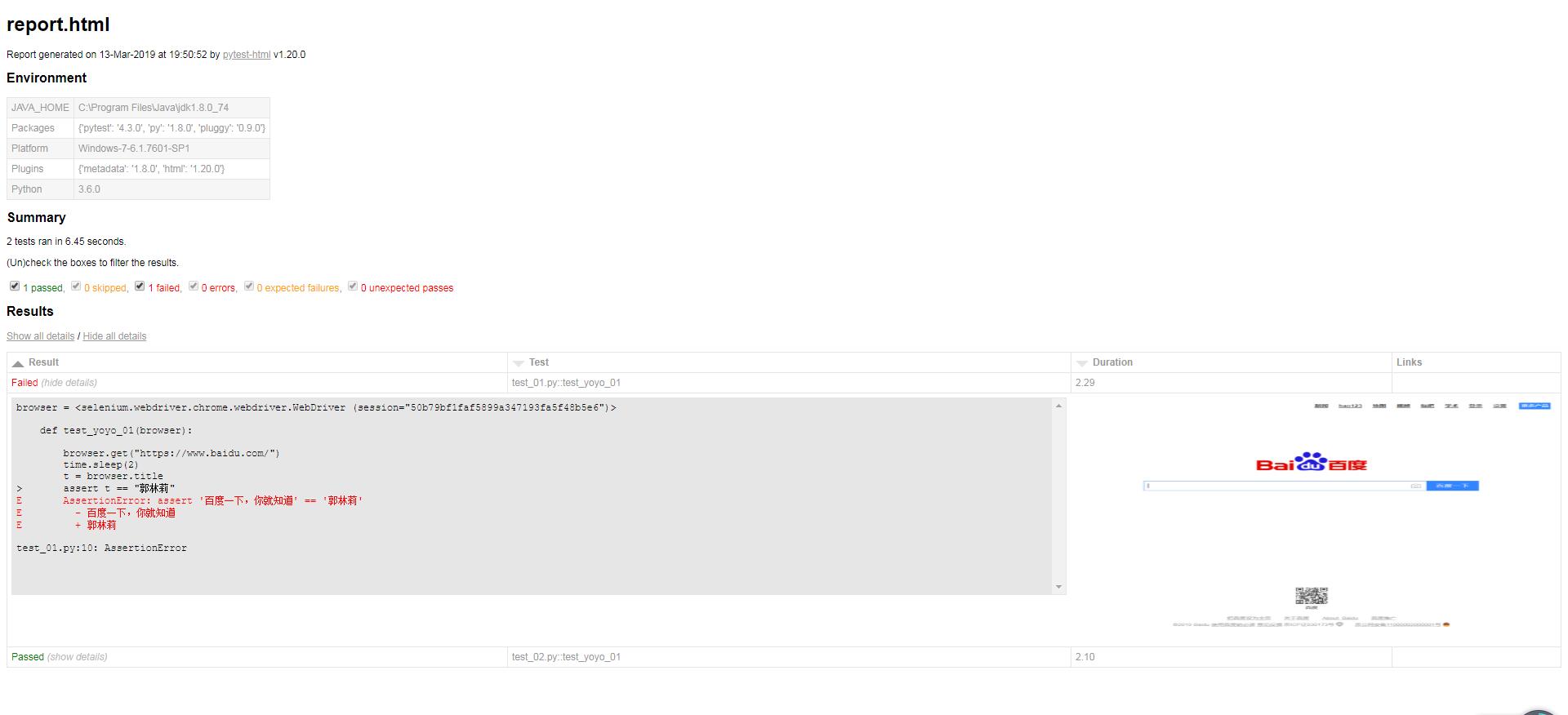
5、运行结果:
pytest启动浏览器,失败用例截图的更多相关文章
- selenium webdriver启动IE浏览器失败的解决办法
通过selenium webdriver启动IE浏览器失败,报错:selenium.common.exceptions.WebDriverException: Message: Unexpected ...
- 执行testng appium用例失败,自动截图
新建一个截图监听类ScreenShotListener ,重写onTestFailure方法,里面定义了 监听的driver ,截图文件路径和名称 package com.fsssc.htsgl.ut ...
- Unittest 支持 case 失败后自动截图功能的另外两种方式
原生的unittest框架是不支持case失败后自动截图的功能的,网上看了大家的解决办法,大体上分为两种:1.要么加装饰器2.也有人封装断言这里我们看看还有没有其他的更加方便的方法值得大家一起探讨一下 ...
- 章节十七章、2- 给执行失败的case截图
一.案例演示 1.首先我们把截图的方法单独进行封装方便以后调用. package utilities; import java.io.File; import java.io.IOException; ...
- selenium是如何启动浏览器的
前几天有同学问到selenium是怎么样启动浏览器的(selenium启动浏览器的原理),当时稍微讲解了一下,不过自我感觉不够具体,现在特地把启动原理通过代码和一系列操作给串联起来,希望可以帮助大家更 ...
- Selenium2启动浏览器且加载插件
一.SELENIUM2启动浏览器 注意: SELENIUM2在启动浏览器时,都是启动一个干净的没有任务 插件及cookies信息的浏览器,即使是你之前的浏览器有设置过代理,到自动化启动时,也是没有代理 ...
- 启动OracleDBConsoleorcl失败,提示错误代码2
异常问题: 启动OracleDBConsoleorcl失败,提示错误代码2 原因分析: 由于更改计算机名导致的异常 解决方法: 1.管理员权限cmd下执行emctl start dbconsole 2 ...
- MyEclipse 启动 tomcate 失败 解决方法
MyEclipse中启动tomcate失败 十月 20, 2015 9:53:04 下午 org.apache.catalina.startup.VersionLoggerListener log信息 ...
- 基于Selenium2+Java的UI自动化(2) - 启动浏览器
一.准备工作 我们常用的浏览器主要有三个:chrome.Firefox.IE:其中chrome 和 IE 需要下载驱动程序,才能启动浏览器,注意驱动程序有32位和64位两种. 另外:如何查看本机的浏览 ...
随机推荐
- hdu-3001 三进制状态压缩+dp
用dp来求最短路,虽然效率低,但是状态的概念方便解决最短路问题中的很多限制,也便于压缩以保存更多信息. 本题要求访问全图,且每个节点不能访问两次以上.所以用一个三进制数保存全图的访问状态(3^10,空 ...
- 编译spark-0.9.1
准备工作:注意 spark-0.9.1 要求 scala-2.10.x 版本,sbt-0.12.4版本. centos 6.4 x64 系统,java 1.7.0 x64 1,安装 scala-2.1 ...
- Confluence 6 空间权限概述
在 Confluence 中的每一个空间都会有自己的权限,这个权限可以被空间的管理员进行调整,也可以被空间管理员取消.当用户创建一个空间的时候,例如用户创建一个你的个人空间,创建控件的这个用户将会被自 ...
- 《完美应用ubuntu》之全面管理ubuntu软件源
2.全面管理ubuntu软件包 2.1 DEB软件包之间的基本关系: (1)软件仓库:由ubuntu软件包的维护者维护并公开发布的DEB软件包的集合:可位于网络,服务器,硬盘等各种存储介质. (2)软 ...
- web功能模块测试用例(模板)
web功能模块测试用例(模板): https://wenku.baidu.com/view/4ada3464ddccda38376baff8.html 如图所示:
- 创建springboot的聚合工程(二)
前篇已经成功创建了springboot的聚合工程并成功访问,下面就要开始子工程木块之间的调用: springboot项目的特点,一个工程下面的类必须要放在启动类下面的子目录下面,否则,启动的时候会报错 ...
- php多线程代码
<?php$thNum = 20; //20个进程$total = 20000;//总数$pageNum=100;//每个页面显示100条数据 $pageCount = ceil($total/ ...
- tomcat压缩版配置
下载Jdk并安装 配置Java环境变量 因为需要用services.bat安装,services.bat中 rem Make sure prerequisite environment variabl ...
- [洛谷 P2709] 小B的询问
P2709 小B的询问 题目描述 小B有一个序列,包含N个1~K之间的整数.他一共有M个询问,每个询问给定一个区间[L..R],求Sigma(c(i)^2)的值,其中i的值从1到K,其中c(i)表示数 ...
- 设计模式之单例模式-C++
单例模式也称单子模式.单件模式,通过单例模式可以保证系统中只有一个类只有一个实例,并提供一个访问它的全局访问点,该实例被所有程序模块共享 对于系统中的某些类来说,只有一个实例很重要,比如一个打印机可以 ...