
spring4全注解web项目demo
记得没接触框架的时候,写demo测试时真的很爽,新建web项目,然后随便写写servlet随便调试
框架越来越多,配置记不得了,整合容易出问题,集成新东西越来越少了,不敢动了。
这是个spring4的全注解的项目,没有任何功能,仅仅是spring+springMVC配置,测试通过
<?xml version="1.0" encoding="UTF-8"?>

<project xmlns="http://maven.apache.org/POM/4.0.0"

         xmlns:xsi="http://www.w3.org/2001/XMLSchema-instance"

         xsi:schemaLocation="http://maven.apache.org/POM/4.0.0 http://maven.apache.org/xsd/maven-4.0.0.xsd">

    <modelVersion>4.0.</modelVersion>

    <groupId>com.zhen</groupId>

    <artifactId>Spring4-WebSocket</artifactId>

    <version>1.0-SNAPSHOT</version>

    <packaging>war</packaging>

    <properties>

        <spring.version>4.3..RELEASE</spring.version>

    </properties>

    <dependencies>

        <dependency>

            <groupId>org.springframework</groupId>

            <artifactId>spring-core</artifactId>

            <version>${spring.version}</version>

        </dependency>

        <dependency>

            <groupId>org.springframework</groupId>

            <artifactId>spring-context</artifactId>

            <version>${spring.version}</version>

        </dependency>

        <!-- 安全起见,添加,这个对任务调度,jml、ftl等提供支持 -->

        <dependency>

            <groupId>org.springframework</groupId>

            <artifactId>spring-context-support</artifactId>

            <version>${spring.version}</version>

        </dependency>

        <dependency>

            <groupId>org.springframework</groupId>

            <artifactId>spring-web</artifactId>

            <version>${spring.version}</version>

        </dependency>

        <dependency>

            <groupId>org.springframework</groupId>

            <artifactId>spring-webmvc</artifactId>

            <version>${spring.version}</version>

        </dependency>

        <!-- jsp和servlet -->

        <dependency>

            <groupId>javax.servlet</groupId>

            <artifactId>javax.servlet-api</artifactId>

            <version>3.0.</version>

            <scope>provided</scope>

        </dependency>

        <dependency>

            <groupId>javax.servlet.jsp</groupId>

            <artifactId>jsp-api</artifactId>

            <version>2.2</version>

            <scope>provided</scope>

        </dependency>

        <!-- 为@Response等的json数据绑定提供支持 -->

        <dependency>

            <groupId>com.fasterxml.jackson.core</groupId>

            <artifactId>jackson-databind</artifactId>

            <version>2.9.</version>

        </dependency>

        <dependency>

            <groupId>com.fasterxml.jackson.core</groupId>

            <artifactId>jackson-core</artifactId>

            <version>2.9.</version>

        </dependency>

    </dependencies>

    <build>

        <plugins>

            <!-- 编译插件 -->

            <plugin>

                <groupId>org.apache.maven.plugins</groupId>

                <artifactId>maven-compiler-plugin</artifactId>

                <version>3.5.</version>

                <configuration>

                    <source>1.7</source>

                    <target>1.7</target>

                    <encoding>UTF-</encoding>

                </configuration>

            </plugin>

            <!-- tomcat 插件 -->

        <plugin>

            <groupId>org.eclipse.jetty</groupId>

            <artifactId>jetty-maven-plugin</artifactId>

            <version>9.3..v20160115</version>

            <configuration>

                <httpConnector>

                    <port></port>

                    <host>localhost</host>

                </httpConnector>

                <webApp>

                    <contextPath>/spring4webSocket</contextPath>

                </webApp>

            </configuration>

        </plugin>

        </plugins>

    </build>

</project>
pom.xml
package com.zhen.spring_websocket.config;

import org.springframework.context.annotation.Configuration;

import org.springframework.http.converter.HttpMessageConverter;

import org.springframework.http.converter.json.Jackson2ObjectMapperBuilder;

import org.springframework.http.converter.json.MappingJackson2HttpMessageConverter;

import org.springframework.web.servlet.config.annotation.*;

import java.text.SimpleDateFormat;

import java.util.List;

/**

 * @author zhen

 * @Date 2018/12/10 15:19

 */

@Configuration

@EnableWebMvc //这个注解类似于 <mvc:annotation-driven/>

public class SpringMVCConfig extends WebMvcConfigurerAdapter {

    @Override

    public void addViewControllers(ViewControllerRegistry registry){

        registry.addViewController("/").setViewName("/index");

    }

    @Override

    public void configureViewResolvers(ViewResolverRegistry registry) {

        //spring4 默认不是jsp,而是Thymeleaf

        registry.jsp().prefix("/jsp").suffix(".jsp");

    }

    @Override

    public void addResourceHandlers(ResourceHandlerRegistry registry) {

        //静态资源处理

        registry.addResourceHandler("/static/**").addResourceLocations("/static/");

    }

    @Override

    public void configureMessageConverters(List<HttpMessageConverter<?>> converters) {

        //增加jackson 的支持,json转换器,支持@RequestBody等

        Jackson2ObjectMapperBuilder builder = new Jackson2ObjectMapperBuilder()

            .dateFormat(new SimpleDateFormat("yyyy-MM-dd"));

        converters.add(new MappingJackson2HttpMessageConverter(builder.build()));

    }

}
springMVC配置
package com.zhen.spring_websocket.config;

import org.springframework.context.annotation.ComponentScan;

import org.springframework.context.annotation.Configuration;

import org.springframework.context.annotation.Import;

/**

 * @author zhen

 * @Date 2018/12/10 16:01

 */

@Configuration

@ComponentScan("com.zhen.spring_websocket")

@Import(SpringMVCConfig.class)

public class ProductConfig {

}
spring配置
package com.zhen.spring_websocket.config;

import org.springframework.web.WebApplicationInitializer;

import org.springframework.web.context.support.AnnotationConfigWebApplicationContext;

import org.springframework.web.servlet.DispatcherServlet;

import javax.servlet.ServletContext;

import javax.servlet.ServletException;

import javax.servlet.ServletRegistration;

/**

 * @author zhen

 * @Date 2018/12/10 15:13

 * servlet 3支持

 */

public class MyWebApplicationInitializer implements WebApplicationInitializer {

    @Override

    public void onStartup(ServletContext servletContext) throws ServletException {

        //Spring

        AnnotationConfigWebApplicationContext ctx = new AnnotationConfigWebApplicationContext();

        ctx.register(ProductConfig.class);

        ctx.setServletContext(servletContext);

        //Spring MVC

        ServletRegistration.Dynamic registration = servletContext.addServlet("servletDispatcher", new DispatcherServlet(ctx));

        registration.setLoadOnStartup();

        registration.addMapping("/");

    }

}
启用spring与springmvc
基于spring4,servlet 3
package com.zhen.spring_websocket.controller;

import org.springframework.stereotype.Controller;

import org.springframework.web.bind.annotation.RequestMapping;

import org.springframework.web.bind.annotation.ResponseBody;

/**

 * @author zhen

 * @Date 2018/12/10 17:32

 */

@Controller

@RequestMapping("/test")

public class TestController {

    @RequestMapping("/do")

    @ResponseBody

    public String test(){

        System.out.println("测试方法执行!");

        return "ok!";

    }

}
测试controller
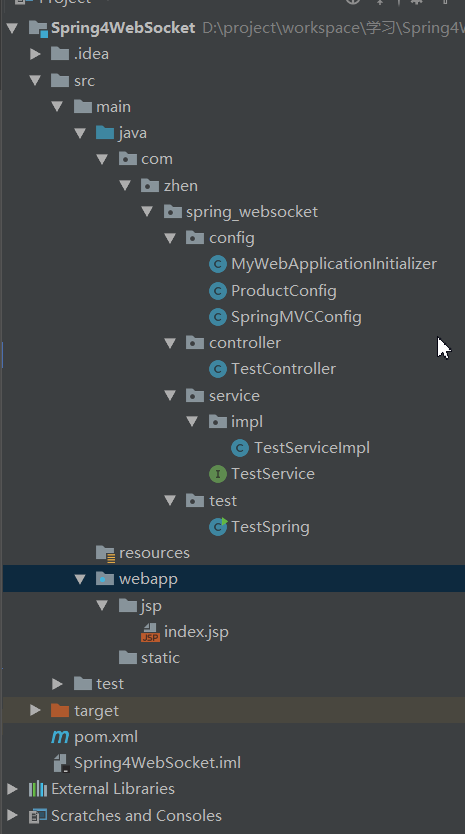
项目结构:
参考:
spring文档:链接:https://pan.baidu.com/s/1zZj-HtKBKbRKjz7FyiXkUg 提取码: 47gu ,这个可以从官网下载最新的文档版本
https://blog.csdn.net/hcwbr123/article/details/78422120 spring与springmvc的扫描重复问题
https://www.cnblogs.com/silfox/p/7659353.html jsp与servlet包的引入maven
https://www.cnblogs.com/csonezp/p/5315725.html 纯注解spring4的demo
https://www.cnblogs.com/tibit/p/5400880.html jetty插件配置
spring4全注解web项目demo的更多相关文章
- 【1】springmvc4 + servlet3 零配置全注解入门项目helloword
自从servlet3.0支持注解,使得javaweb项目使用全注解成为可能. 注解化将成为javaweb的发展方向.包括spring去年推出的spring-boot也是全部使用注解. 代码:https ...
- spring4.2完整web项目(使用html视图解析器)
完整配置springmvc4,最终视图选择的是html,非静态文件. 最近自己配置spring的时候,遇到很多问题,由于开发环境和版本的变化导致网友们给出的建议很多还是不能用的,可能还会有很多人会遇到 ...
- 初步配置基于Struts的maven的Web项目demo
1.创建mavenweb项目 eclipse | Idea 中创建maven项目,具体步骤PASS. 2.导入Struts2核心架包 Idea中在maven项目上,选择ADD FRAMEWORK ec ...
- MyEclipse web项目导入Eclipse,详细说明
最近导入一个MyEclipse的项目,具体是:spring4.1的web项目,同时遇到了一些问题,总结一下. 1.进入项目目录,找到.project文件,打开.增加一个<buildCommand ...
- 基于全注解的SpringMVC+Spring4.2+hibernate4.3框架搭建
概述 从0到1教你搭建spring+springMVC+hibernate整合框架,基于注解. 本教程框架为基于全注解的SpringMVC+Spring4.2+hibernate4.3,开发工具为my ...
- 一款基于SSM框架技术的全栈Java web项目(已部署可直接体验)
概述 此项目基于SSM框架技术的Java Web项目,是全栈项目,涉及前端.后端.插件.上线部署等各个板块,项目所有的代码都是自己编码所得,每一步.部分都有清晰的注释,完全不用担心代码混乱,可以轻松. ...
- Java全栈程序员之07:IDEA中使用MAVEN构架生产级的Web项目
在上一篇我们介绍了如何在IDEA中使用MAVEN,以及如何创建依赖等.那么在这一篇中,我们就试图搭建一个生产级的解决方案,大家可以使用这个解决方案作为骨架代码来搭建自己的开发环境. 在这里,我们要完成 ...
- 【持久化框架】SpringMVC+Spring4+Mybatis3集成,开发简单Web项目+源码下载
上篇博文我们介绍了mybatis的基本概念与原理,这篇博文我们通过Spring与Mybatis集成,开发一个简单用户增删改查的Web项目. 基本准备工作 1.安装JDK1.6以上版本,安装与配置 2. ...
- 基于已构建S2SH项目配置全注解方式简化配置文件
如果还不熟悉s2sh项目搭建的朋友可以先阅读 eclipse环境下基于tomcat-7.0.82构建struts2项目 eclipse环境下基于已构建struts2项目整合spring+hiberna ...
随机推荐
- Could not find method google() for arguments [] on repository container.
出这个问题主要是你Gradle版本太低的原因,一般要使用4.0+的版本 所以你需要更新你的Gradle版本至4.0+呦 tips:注意你的AndroidStudio版本应该是3.0以上,因为Gradl ...
- ubuntu+anaconda
1.下载anaconda 查看ubuntu是32位还是64位 命令: uname -m 如果显示i686,你安装了32位操作系统 如果显示 x86_64,你安装了64位操作系统 uname -a 查看 ...
- filebeat配置文件
filebeat主要用于收集和转发日志.filebeat监视指定的日志文件和位置,收集日志事件,并将它们转发到es或logstash进行索引. 安装 官网:https://www.elastic.c ...
- CSS之transform-origin属性
设置旋转元素的基点位置 语法 transform-orign:0 100% 0 transform-origin: x-axis y-axis z-axis; x-axis 定义视图被置于 X 轴的何 ...
- 卸载WPS后怎么WORD的图标还是WPS
在电脑中选择使用Microsoft Office并将之前安装的WPS Office办公软件卸载了.但是卸载之后发现电脑系统中的Word.Excel等文件无法正常显示图标.在这样的情况下,我们应该如何解 ...
- GIL(全局解释器锁)与互斥锁
针对Cpython所拥有的GIL锁作用:由于Cpython解释器在运行python文件时, Cpython进程与其运行文件所产生的主进程是一个进程(文件进程相当于Cpython的一个线程) 线程的特点 ...
- hive的jdbc使用
①新建maven项目,加载依赖包 在pom.xml中添加 <dependency> <groupId>jdk.tools</groupId> <artifa ...
- leetcode-algorithms-20 Valid Parentheses
leetcode-algorithms-20 Valid Parentheses Given a string containing just the characters '(', ')', '{' ...
- 【LeetCode】数组移除元素
链表等复杂数据结构用多了,简单的数组操作也不能遗忘! 1. 给定一个有序数组,移除所有重复元素并返回新的数组长度,不能分配额外数组的内存空间. e.g. 给定输入的数组 = [1,1,2],函数应当返 ...
- 4.Liunx磁盘管理
1.磁盘管理:df .du 2.磁盘加载:mount. umount 3.磁盘分区:fdisk 1.df -h 查看硬件