
MapReduce- 数据的排序处理
MapReduce- 数据的排序处理
package com.huhu.day02;

import java.io.DataInput;

import java.io.DataOutput;

import java.io.IOException;

import org.apache.hadoop.io.WritableComparable;

/**

 * 6 9

 * 3 8

 * 4 8

 * 1 0

 * 3 0

 * 8 8

 * 6 7

 * 第一列升序,第二列降序

 * @author huhu_k

 *

 */

public class Number implements WritableComparable<Number> {

	private int first;

	private int second;

	// private int third;

	public Number() {

		super();

	}

	public Number(int first, int second) {

		super();

		this.first = first;

		this.second = second;

	}

	public int getFirst() {

		return first;

	}

	public void setFirst(int first) {

		this.first = first;

	}

	public int getSecond() {

		return second;

	}

	public void setSecond(int second) {

		this.second = second;

	}

	@Override

	public int hashCode() {

		final int prime = 31;

		int result = 1;

		result = prime * result + first;

		result = prime * result + second;

		return result;

	}

	@Override

	public boolean equals(Object obj) {

		if (this == obj)

			return true;

		if (obj == null)

			return false;

		if (getClass() != obj.getClass())

			return false;

		Number other = (Number) obj;

		if (first != other.first)

			return false;

		if (second != other.second)

			return false;

		return true;

	}

	@Override

	public String toString() {

		return "Number [first=" + first + ", second=" + second + "]";

	}

	@Override

	public void readFields(DataInput in) throws IOException {

		this.first = in.readInt();

		this.second = in.readInt();

	}

	@Override

	public void write(DataOutput out) throws IOException {

		out.writeInt(this.first);

		out.writeInt(this.second);

	}

	@Override

	public int compareTo(Number o) {

		if (this.first== o.first) {

			//第二行数据降序

			return o.second - this.second;

		}

		//第一行升序

		return this.first - o.first;

	}

}
package com.huhu.day02;

import java.io.IOException;

import org.apache.hadoop.conf.Configuration;

import org.apache.hadoop.fs.Path;

import org.apache.hadoop.io.LongWritable;

import org.apache.hadoop.io.NullWritable;

import org.apache.hadoop.io.Text;

import org.apache.hadoop.mapreduce.Job;

import org.apache.hadoop.mapreduce.Mapper;

import org.apache.hadoop.mapreduce.Reducer;

import org.apache.hadoop.mapreduce.lib.input.FileInputFormat;

import org.apache.hadoop.mapreduce.lib.output.FileOutputFormat;

import org.apache.hadoop.util.GenericOptionsParser;

import org.apache.hadoop.util.Tool;

import org.apache.hadoop.util.ToolRunner;

public class NumericSorting extends ToolRunner implements Tool {

	public static class MyMapper extends Mapper<LongWritable, Text, Number, NullWritable> {

		@Override

		protected void map(LongWritable key, Text value, Context context) throws IOException, InterruptedException {

			String[] line = value.toString().split(" ");

			Number number = null;

			if (line.length == 2) {

				number = new Number(Integer.parseInt(line[0]), Integer.parseInt(line[1]));

			}

			context.write(number, NullWritable.get());

		}

	}

	public static class MyReduce extends Reducer<Number, NullWritable, Number, Text> {

		@Override

		protected void reduce(Number key, Iterable<NullWritable> values, Context context)

				throws IOException, InterruptedException {

			for (NullWritable n : values) {

				context.write(key, new Text("---"));

			}

		}

	}

	@Override

	public Configuration getConf() {

		return new Configuration();

	}

	@Override

	public void setConf(Configuration arg0) {

	}

	@Override

	public int run(String[] other) throws Exception {

		Job job = Job.getInstance(getConf(), "NumbericSorting");

		job.setJarByClass(NumericSorting.class);

		job.setMapperClass(MyMapper.class);

		job.setMapOutputKeyClass(Number.class);

		job.setMapOutputValueClass(NullWritable.class);

		job.setReducerClass(MyReduce.class);

		job.setOutputKeyClass(Number.class);

		job.setOutputValueClass(Text.class);

		FileInputFormat.addInputPath(job, new Path(other[0]));

		FileOutputFormat.setOutputPath(job, new Path(other[1]));

		return job.waitForCompletion(true) ? 0 : 1;

	}

	public static void main(String[] args) throws Exception {

		Configuration conf = new Configuration();

		String[] other = new GenericOptionsParser(conf, args).getRemainingArgs();

		if (other.length != 2) {

			System.out.println("your input args number is fail,you need input <in> and <out>");

			System.exit(0);

		}

		ToolRunner.run(conf, new NumericSorting(), other);

	}

}
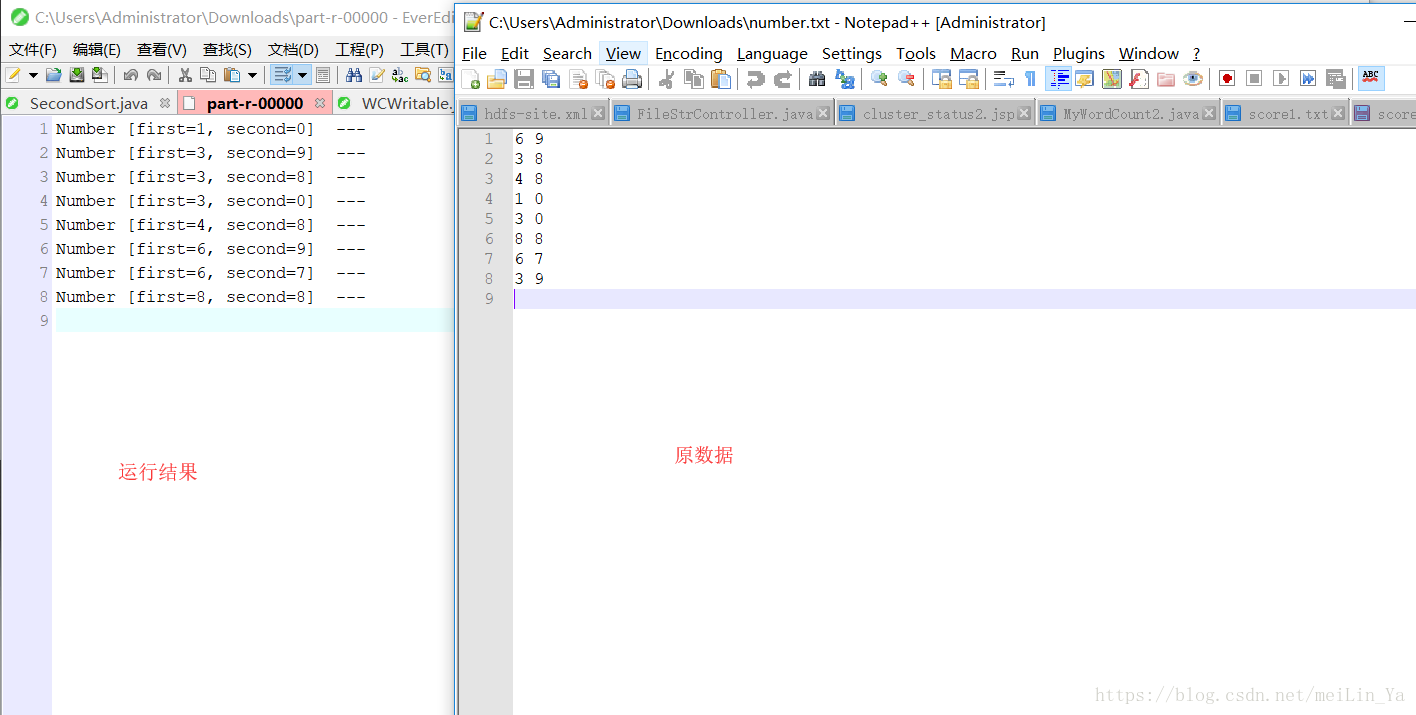
运行结果:
MapReduce- 数据的排序处理的更多相关文章
- Hadoop学习笔记—11.MapReduce中的排序和分组
一.写在之前的 1.1 回顾Map阶段四大步骤 首先,我们回顾一下在MapReduce中,排序和分组在哪里被执行: 从上图中可以清楚地看出,在Step1.4也就是第四步中,需要对不同分区中的数据进行排 ...
- MapReduce二次排序
默认情况下,Map 输出的结果会对 Key 进行默认的排序,但是有时候需要对 Key 排序的同时再对 Value 进行排序,这时候就要用到二次排序了.下面让我们来介绍一下什么是二次排序. 二次排序原理 ...
- (转)MapReduce二次排序
一.概述 MapReduce框架对处理结果的输出会根据key值进行默认的排序,这个默认排序可以满足一部分需求,但是也是十分有限的.在我们实际的需求当中,往往有要对reduce输出结果进行二次排序的需求 ...
- Hadoop MapReduce 二次排序原理及其应用
关于二次排序主要涉及到这么几个东西: 在0.20.0 以前使用的是 setPartitionerClass setOutputkeyComparatorClass setOutputValueGrou ...
- 关于MapReduce二次排序的一点解答
上一篇博客说明了怎么自定义Key,而且用了二次排序的例子来做测试,但没有详细的说明二次排序,这一篇说详细的说明二次排序,为了说明曾经一个思想的误区,特地做了一个3个字段的二次排序来说明.后面称其为“三 ...
- mapreduce 实现数子排序
设计思路: 使用mapreduce的默认排序,按照key值进行排序的,如果key为封装int的IntWritable类型,那么MapReduce按照数字大小对key排序,如果key为封装为String ...
- 详细讲解MapReduce二次排序过程
我在15年处理大数据的时候还都是使用MapReduce, 随着时间的推移, 计算工具的发展, 内存越来越便宜, 计算方式也有了极大的改变. 到现在再做大数据开发的好多同学都是直接使用spark, hi ...
- MapReduce 二次排序
默认情况下,Map 输出的结果会对 Key 进行默认的排序,但是有时候需要对 Key 排序的同时再对 Value 进行排序,这时候就要用到二次排序了.下面让我们来介绍一下什么是二次排序. 二次排序原理 ...
- Spark 颠覆 MapReduce 保持的排序记录
在过去几年,Apache Spark的採用以惊人的速度添加着,通常被作为MapReduce后继,能够支撑数千节点规模的集群部署. 在内存中数 据处理上,Apache Spark比MapReduce更加 ...
- mapreduce数据处理——统计排序
接上篇https://www.cnblogs.com/sengzhao666/p/11850849.html 2.数据处理: ·统计最受欢迎的视频/文章的Top10访问次数 (id) ·按照地市统计最 ...
随机推荐
- JavaScript——类型检测
要检测一个变量是否是基本数据类型,可以用 Typeof 操作符.如果我们想知道它是什么类型的对象,我们可以用instanceof 操作符,语法如下所示: result=variable instanc ...
- CentOS7使用firewalld和selinux
转载自莫小安的博客:https://www.cnblogs.com/moxiaoan/p/5683743.html 如何查看和使用selinux https://blog.csdn.net/edide ...
- 51nod 1349 最大值(单调栈)
http://www.51nod.com/onlineJudge/questionCode.html#!problemId=1349 题意: 求区间内最大值大于等于k的区间个数. 思路: 利用求出对于 ...
- React Native 组建之IOS和Android通用抽屉
/** * Sample React Native App * https://github.com/facebook/react-native * @flow *npm:https://www.np ...
- 关于spring boot启动监控端点的方法(spring-boot-starter-actuator)
前言: 在spring boot的旧版本中,监控端点(如/env)是默认开启的,所以只要项目正常启动,就能通过url获取信息.可是在2.0版本以后,由于安全性考虑,除了/health和/info的端点 ...
- Mongodb 创建管理员帐号与普通帐号
数据库操作权限 readAnyDatabase 任何数据库的只读权限 userAdminAnyDatabase 任何数据库的读写权限 userAdminAnyDatabase 任何数据库用户的管理权限 ...
- Java技术——你真的了解String类的intern()方法吗
0.引言 什么都先不说,先看下面这个引入的例子: String str1 = new String("SEU")+ new String("Calvin") ...
- ArcFace 2.0 Demo [C++]
环境: win10(10.0.16299.0)+ VS2017 sdk版本:ArcFace v2.0 OPENCV3.43版本 x64平台Debug.Release配置都已通过编译 下载地址:http ...
- django数据库的增、删、改、查
1.增加 第一种:save 通过创建模型类对象,执行对象的save()方法保存到数据库中. 第二种:create 2.修改 3.查询 get 查询单一结果,如果不存在会抛出模型类.DoesNotExi ...
- Python中数据类型
一.整数 Python可以处理任意大小的整数,当然包括负整数,在Python程序中,整数的表示方法和数学上的写法一模一样,例如:1,100,-8080,0,等等. 计算机由于使用二进制,所以,有时候用 ...