
Environment error: “CodeBloks can't find compiler executable in your configured search path's for GNU GCC compiler”
codeblock安装后,提示cant find compiler executable in your configured search paths for GNU GCC Compiler
可能的情况有两个:
1)安装的是不带编译器的版本
2)安装了带编译器的版本,但是没有指定正确的路径。
解决办法:
对于第一种情况,直接在官网下载带有编译器的版本;
官网链接:http://www.codeblocks.org/downloads/26#windows

{
或者下载MinGW-w64:http://sourceforge.net/projects/mingwbuilds/files/mingw-builds-install/mingw-builds-install.exe 下载后将../bin加到环境变量PATH中
然后打开codeblocks中的settings/compiler/ToolChain executables  将Program Files下的c compiler 等等全部设置位置到你刚下载的bin文件下对应的
}
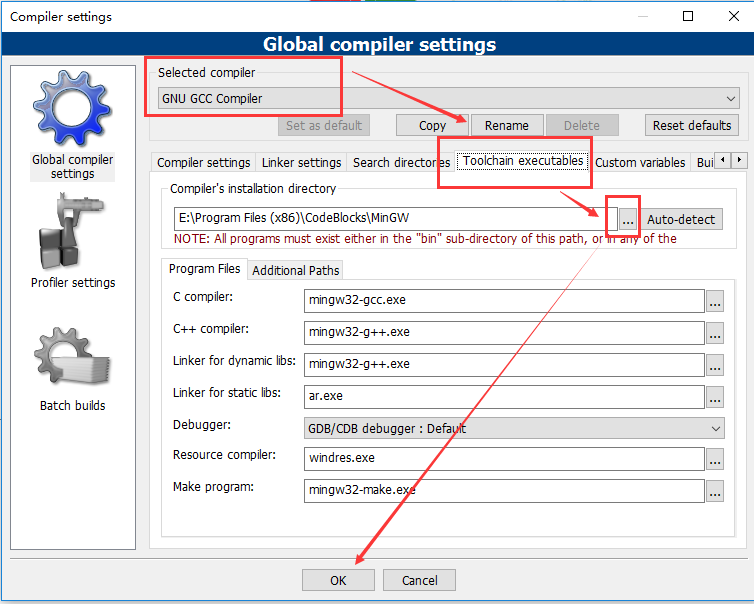
对于第二种情况,需要手动的指定编译器的路径。
具体操作如下:
a.在Code::Blocks的菜单中点击Settings->Compiler,如果安装了上面的GCC请在Selected Compiler选中GNU GCC Compiler.
b.点开Toolchain executables标签,点击Auto-detect之前的文件浏览,找到codebook安装的路径下面的MinGW文件夹,并且保存。
c.重新打开codeblock,问题应该就已经解决了。
Environment error: “CodeBloks can't find compiler executable in your configured search path's for GNU GCC compiler”的更多相关文章
- Error: opening registry key 'Software\JavaSoft\Java Runtime Environment' Error: could not find java.dll
java -jar yxCollector-1.1.0.jarError: opening registry key 'Software\JavaSoft\Java Runtime Environme ...
- error: #error This file requires compiler and library support for the ISO C++ 2011 standard. This support is currently experimental, and must be enabled with the -std=c++11 or -std=gnu++11 compiler op
caffe c++11编译问题 问题:error: #error This file requires compiler and library support for the ISO C++ 201 ...
- Could not install packages due to an Environment Error: [Errno 13] Permission denied 解决方案
执行pip install 报错如下: Could not install packages due to an Environment Error: [Errno 13] Permission de ...
- docker: Error response from daemon: OCI runtime create failed: container_linux.go:345: starting container process caused "exec: \"ping\": executable file not found in $PATH": unknown.
docker: Error response from daemon: OCI runtime create failed: container_linux.go:345: starting cont ...
- HOWTO Install the MinGW (GCC) Compiler Suite
Posted July 25th, 2008 by mingwadmin getting started install mingw Automated Installer If you are ne ...
- gogs仓库管理软件 exec: "git-upload-pack": executable file not found in $PATH
当配置完个人中心的ssh公钥的时候,在客户端拉取代码的时候,提示如下错误: Cloning into 'comix-b2m'... Gogs: Internal error fatal: Could ...
- centos7 selenium.common.exceptions.WebDriverException: Message: 'chromedriver' executable needs to be in PATH
1.查看安装的chrome浏览器版本 2.查看版本对应的驱动 https://sites.google.com/a/chromium.org/chromedriver/downloads 下载后拷贝到 ...
- exec: "docker-proxy": executable file not found in $PATH
在执行 docker run 操作的时候,一直报如下错误: [root@etcd1 vagrant]# docker run --name redis-6379 -p 6379:6379 -d --r ...
- OCI runtime exec failed: exec failed: container_linux.go:380: starting container process caused: exec: "ip": executable file not found in $PATH: unknown (Docker容器没有ip addr命令:exec ip addr 报错)
一.报错 1.报错信息1: OCI runtime exec failed: exec failed: container_linux.go:380: starting container proce ...
随机推荐
- js 窗口滚动到一定高度时加载数据
<script type="text/javascript"> //当窗口滚动到一定高度时 某块页面开始加载数据 window.onload = function() ...
- asp.net 使用一般处理程序和ajax post实现登录以及记住密码
1.登录页面login.aspx <%@ Page Language="C#" AutoEventWireup="true" CodeBehind=&qu ...
- pyqt5 添加属性-类方法用属性形式访问
方法一 装饰器法 import sys from PyQt5.QtWidgets import QApplication, QWidget, QPushButton, QHBoxLayout,QLab ...
- JavaScript之DOM概念
一.DOM概念 1.DOM是什么? 1.1 起源.DOM起源于Netscape与Microsoft 公司的DHTML(动态HTML). 1.2 名词解释.Document Object Model,文 ...
- html 替换元素
参考博客:http://www.cnblogs.com/wkylin/archive/2011/05/12/2044328.html 可替换元素也是行内元素 替换元素是浏览器根据其标签的元素与属性来判 ...
- android彻底关闭应用程序方法
Android SDK > 7(Android2.1)之后,即Android2.2及以后版本彻底关闭应用的方法,目前试验只有一下方法有效: Intent startMain = new Inte ...
- sklearn调参(验证曲线,可视化不同参数下交叉验证得分)
一 . 原始方法: 思路: 1. 参数从 0+∞ 的一个 区间 取点, 方法如: np.logspace(-10, 0, 10) , np.logspace(-6, -1, 5) 2. 循环调用cr ...
- 基于Jenkins,docker实现自动化部署(持续交互)【转】
前言 随着业务的增长,需求也开始增多,每个需求的大小,开发周期,发布时间都不一致.基于微服务的系统架构,功能的叠加,对应的服务的数量也在增加,大小功能的快速迭代,更加要求部署的快速化,智能化.因此 ...
- php -- 魔术方法、魔术常量 简单介绍
魔术方法:PHP把类中所有以__(两个下划线)开头的方法当成魔术方法,一般建议用户不要将自定义的方法前面加上__作为前缀.魔术方法: 1. __construct() 类的默认构造方法,如果__con ...
- pytorch实现花朵数据集读取
import os from PIL import Image from torch.utils import data import numpy as np from torchvision imp ...