
window JNI_CreateJavaVM启动java程序
https://blog.csdn.net/earbao/article/details/51889605
- #define _CRT_SECURE_NO_WARNINGS 1
- #include <stdio.h>
- #include "jni.h"
- #include <stdlib.h>
- #include <windows.h>
- #include <tchar.h>
- //#pragma comment(lib, "jvm.lib")
- #define PATH_SEPARATOR ';' /* define it to be ':' on Solaris */
- #define USER_CLASSPATH "." /* where Prog.class is */
- void testEnv()
- {
- #ifdef _WIN32
- CHAR dir[1024],path[1024];
- GetCurrentDirectoryA(MAX_PATH, dir);
- sprintf(path, "set PATH=%s\\jre\\bin\\client;.;", dir);
- system(path);
- printf("%s\n", path);
- /**
- //set PATH=%PATH%;%currentdir%\jre\bin\client;
- TCHAR dir[1024];
- GetCurrentDirectoryA(MAX_PATH, dir);
- CHAR p[1024], path[1024];
- GetEnvironmentVariableA("PATH", p, 1024);
- sprintf("PATH = %s\n", p);
- sprintf(path, "%s;%s\\jre\\bin\\client", p, dir);
- system(path);
- printf("%s\n", path);
- GetEnvironmentVariableA("PATH", path, 1024);
- printf("PATH = %s\n", path);
- */
- #else
- char * p;
- if ((p = getenv("USER")))
- printf("USER = %s\n", p);
- setenv("USER", "test", 1);
- printf("USER = %s\n", getenv("USER"));
- unsetenv("USER");
- printf("USER = %s\n", getenv("USER"));
- #endif // __WIN32
- }
- //window JNI_CreateJavaVM启动java程序
- int main(int argc, char* argv[])
- {
- JNIEnv *env;
- JavaVM *jvm;
- jint res;
- jclass cls;
- jmethodID mid;
- jstring jstr;
- jclass stringClass;
- jobjectArray args;
- testEnv();
- CHAR dir[1024], path[1024];
- GetCurrentDirectoryA(MAX_PATH, dir);
- sprintf(path, "%s\\jre\\bin\\client\\jvm.dll", dir);
- typedef jint (*JNI_CreateJavaVMT)(JavaVM **pvm, void **penv, void *args);
- JNI_CreateJavaVMT pJNI_CreateJavaVM = (JNI_CreateJavaVMT)GetProcAddress(LoadLibraryA(path), "JNI_CreateJavaVM");
- if (pJNI_CreateJavaVM == NULL)
- {
- printf("pJNI_CreateJavaVM == NULL\n");
- }
- else
- {
- printf("pJNI_CreateJavaVM != NULL\n");
- }
- #ifdef JNI_VERSION_1_2
- JavaVMInitArgs vm_args;
- JavaVMOption options[1];
- options[0].optionString ="-Djava.class.path=.";
- vm_args.version = 0x00010002;
- vm_args.options = options;
- vm_args.nOptions = 1;
- vm_args.ignoreUnrecognized = JNI_TRUE;
- /* Create the Java VM */
- res = pJNI_CreateJavaVM(&jvm, (void**)&env, &vm_args);
- #else
- JDK1_1InitArgs vm_args;
- char classpath[1024];
- vm_args.version = 0x00010001;
- JNI_GetDefaultJavaVMInitArgs(&vm_args);
- /* Append USER_CLASSPATH to the default system class path */
- sprintf(classpath, "%s%c%s",
- vm_args.classpath, PATH_SEPARATOR, USER_CLASSPATH);
- vm_args.classpath = classpath;
- /* Create the Java VM */
- res = JNI_CreateJavaVM(&jvm, &env, &vm_args);
- #endif /* JNI_VERSION_1_2 */
- if (res < 0) {
- fprintf(stderr, "Can't create Java VM\n");
- exit(1);
- }
- cls = (*env)->FindClass(env, "Prog");
- if (cls == NULL) {
- goto destroy;
- }
- mid = (*env)->GetStaticMethodID(env, cls, "main","([Ljava/lang/String;)V");
- if (mid == NULL) {
- goto destroy;
- }
- jstr = (*env)->NewStringUTF(env, " from C!");
- if (jstr == NULL) {
- goto destroy;
- }
- stringClass = (*env)->FindClass(env, "java/lang/String");
- args = (*env)->NewObjectArray(env, 1, stringClass, jstr);
- if (args == NULL) {
- goto destroy;
- }
- (*env)->CallStaticVoidMethod(env, cls, mid, args);
- destroy:
- if ((*env)->ExceptionOccurred(env)) {
- (*env)->ExceptionDescribe(env);
- }
- (*jvm)->DestroyJavaVM(jvm);
- }
- import java.io.IOException;
- public class Prog {
- public static void main(String[] args) throws IOException {
- //System.out.println(args.length);
- if(args.length>0)
- {
- System.out.println("Hello World " + args[0]);
- }else{
- System.out.println("Hello World ");
- }
- System.in.read();
- }
- }
exe通过jni调用Java程序
- #define _CRT_SECURE_NO_WARNINGS 1
- #include <stdio.h>
- #include "jni.h"
- #include <stdlib.h>
- #include <windows.h>
- #include <tchar.h>
- //#pragma comment(lib, "jvm.lib")
- #define PATH_SEPARATOR ';' /* define it to be ':' on Solaris */
- #define USER_CLASSPATH "." /* where Prog.class is */
- void testEnv()
- {
- CHAR dir[1024], path[1024];
- GetCurrentDirectoryA(MAX_PATH, dir);
- sprintf(path, "set PATH=%s\\jre\\bin\\client;.;", dir);
- system(path);
- printf("%s\n", path);
- sprintf(path, "set PATH=%s\\jre\\bin\\server;.;", dir);
- system(path);
- printf("%s\n", path);
- }
- //window JNI_CreateJavaVM启动java程序
- int main(int argc, char* argv[])
- {
- JNIEnv *env;
- JavaVM *jvm;
- jint res;
- jclass cls;
- jmethodID mid;
- jstring jstr;
- jclass stringClass;
- jobjectArray args;
- //testEnv();
- CHAR dir[1024], path[1024];
- GetCurrentDirectoryA(MAX_PATH, dir);
- //注意exe的位数64bit/32bit要和jdk的相匹配
- HMODULE handle = NULL;
- if (argc > 1)
- {
- sprintf(path, "%s", argv[1]);
- printf("%s\n", path);
- handle=LoadLibraryA(path);
- }
- if (handle == NULL)
- {
- sprintf(path, "%s\\jre\\bin\\client\\jvm.dll", dir);
- printf("%s\n", path);
- handle = LoadLibraryA(path);
- }
- if (handle == NULL)
- {
- sprintf(path, "%s\\jre\\bin\\server\\jvm.dll", dir);
- printf("%s\n", path);
- handle = LoadLibraryA(path);
- }
- if (handle == NULL)
- {
- handle = LoadLibraryA("jvm.dll");
- }
- if (handle == NULL)
- {
- printf("handle==NULL\n");
- return -1;
- }
- typedef jint(*JNI_CreateJavaVMT)(JavaVM **pvm, void **penv, void *args);
- JNI_CreateJavaVMT pJNI_CreateJavaVM = (JNI_CreateJavaVMT)GetProcAddress(handle, "JNI_CreateJavaVM");
- if (pJNI_CreateJavaVM == NULL)
- {
- printf("pJNI_CreateJavaVM == NULL\n");
- }
- else
- {
- printf("pJNI_CreateJavaVM != NULL\n");
- }
- //初始化jvm参数 http://blog.csdn.net/louka/article/details/7101562
- JavaVMInitArgs vm_args;
- JavaVMOption options[2];
- //搜索的类路径。把java类和jar包放在当前目录下
- #if _WIN32
- options[0].optionString = "-Djava.class.path=.;test.jar"; //这里指定了要使用的第三方Jar包
- #else
- options[0].optionString = "-Djava.class.path=.:test.jar"; //这里指定了要使用的第三方Jar包
- #endif
- options[1].optionString = "-verbose:NONE"; //用于跟踪运行时的信息
- vm_args.version = 0x00010002;
- vm_args.options = options;
- vm_args.nOptions = 1;
- vm_args.ignoreUnrecognized = JNI_TRUE;
- /* Create the Java VM */
- res = pJNI_CreateJavaVM(&jvm, (void**)&env, &vm_args);
- if (res < 0) {
- fprintf(stderr, "Can't create Java VM\n");
- exit(1);
- }
- cls = (*env)->FindClass(env, "Prog");
- if (cls == NULL) {
- goto destroy;
- }
- mid = (*env)->GetStaticMethodID(env, cls, "main", "([Ljava/lang/String;)V");
- if (mid == NULL) {
- goto destroy;
- }
- jstr = (*env)->NewStringUTF(env, " from C!");
- if (jstr == NULL) {
- goto destroy;
- }
- stringClass = (*env)->FindClass(env, "java/lang/String");
- args = (*env)->NewObjectArray(env, 1, stringClass, jstr);
- if (args == NULL) {
- goto destroy;
- }
- (*env)->CallStaticVoidMethod(env, cls, mid, args);
- (*env)->DeleteLocalRef(env, cls);
- (*env)->DeleteLocalRef(env, jstr);
- (*env)->DeleteLocalRef(env, stringClass);
- (*env)->DeleteLocalRef(env, args);
- destroy:
- if ((*env)->ExceptionOccurred(env)) {
- (*env)->ExceptionDescribe(env);
- }
- (*jvm)->DestroyJavaVM(jvm);
- FreeLibrary(handle);
- }
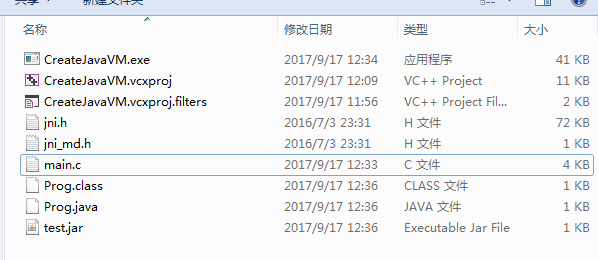
源码下载(右键另存为zip):
window JNI_CreateJavaVM启动java程序的更多相关文章
- Android For JNI(一)——JNI的概念以及C语言开发工具dev-c++,编写你的第一个C语言程序,使用C启动JAVA程序
Android For JNI(一)--JNI的概念以及C语言开发工具dev-c++,编写你的第一个C语言程序 当你的Android之旅一步步的深入的时候,你其实会发现,很多东西都必须去和framew ...
- Linux上设置开机启动Java程序
在Linux上设置开机启动Java程序,例如:test.jar 在Linux上启动Java程序的命令: nohup java -jar test.jar >/dev/>& & ...
- eclipse通过maven建立java se工程配置log4j,打包成zip,将jar包和配置文件分开,并以bat和sh文件启动java程序
一.新建maven的java工程 1.eclipse里file-new-other,选择maven Project 2.选中 Use default Workspace location,然后 nex ...
- 利用脚本启动java程序
今天在工作中,需要写一个shell脚本,启动一个socket程序,从而模拟短信网关.查了一些资料,终于搞定了,现在记录一下,方便大家查阅. 为了说明使用方法,我们就用最简单的程序来实现,比如我们要运行 ...
- ActiveMQ(下载,启动,java程序中 如何操作)
为了快速上手ActiveMQ 找个一个windows版本的mq来实现它的功能 1.http://activemq.apache.org/activemq-5158-release.html 下载 2. ...
- shell脚本启动java程序
#!/bin/bash ### 切换到工作目录 bin=$(cd `dirname ${0}`;pwd) cd ${bin} echo "bin [${bin}] .." ### ...
- java_linux_shell_定时kill 启动java程序
#!/bin/bash #while truedo Process_ID=`ps -ef |grep 'LoginSinaWeiboCookie.jar' |grep -v grep |awk '{p ...
- Shell 启动java程序
#!/bin/sh SHELL_PATH=$(cd ")";pwd) echo $SHELL_PATH cd "$SHELL_PATH" CLASSPATH=. ...
- Window 无法启动此程序,因为计算机中丢失api-ms-win-crt-runtime-l1-1-0.dll。尝试重新安装该程序以解决此问题。
现象: 解决办法: 方法一:缺什么补什么 http://www.greenxf.com/soft/125654.html 把api-ms-win-crt-runtime-l1-1-0.dll下载到电脑 ...
随机推荐
- NgDL:第四周深层神经网络
4.3核对矩阵维数 根据前向的矩阵,可以计算出右上的规律,对于第L层的w来说,其维数为(n[L],n[L-1]),n[L]表示第L层的单元数. 4.4为什么深层神经网络会好用? 如果要做一个人脸识别的 ...
- 20个Java练手项目,献给嗜学如狂的人
给大家推荐一条由浅入深的JAVA学习路径,首先完成 Java基础.JDK.JDBC.正则表达式等基础实验,然后进阶到 J2SE 和 SSH 框架学习.最后再通过有趣的练手项目进行巩固. JAVA基础 ...
- jenkins 实现多用户同时触发任务 + 修改job的config.xml 不重启服务生效
(后期添加: 这篇博客是在刚研究并发构建时写的,所以方法比较老套,采用的时流水线(pipeline)的方式,实现时通过如果job的用户配置来创建多个新的执行任务的job,并且将执行日志回收到入口job ...
- C# asp.net webapi下支持文件下载输出接口
/// <summary> /// 下载文件 /// </summary> public class DownloadController : ApiC ...
- Oracle表空间管理相关
以下以我自己的测试环境举例: 1.表空间的 block_size 为 8192字节,即8KBytes.从数据字典中查到 max_size 为 2147483645,即约为15.9TBytes. 2.在 ...
- itextsharp利用模板生成pdf文件笔记
iTextSharp是一款开源的PDF操作类库,使用它可以快速的创建PDF文件. 中文参考网站:http://hardrock.cnblogs.com/ http://pdfhome.hope.com ...
- field_automation源码分析
field_automation主要通过uvm_field_utils_begin和uvm_field_utils_end来加到自己写的class中. uvm_field_utils_begin,在o ...
- hdu4787 AC自动机加分块
这题说的是 有n次操作 +w 表示读入一个字符串,?p 询问这个字符串的子串在那些模板串中有多少个, http://blog.csdn.net/qq574857122/article/details/ ...
- eclipse更换workspace需要重新设置的内容
.jdk Window-->java-->Installed JREs,新增或修改你所需要的jdk版本,点击需要的jdk-->edit 在Default VM arguments里面 ...
- PGPDesktop在win7环境下的安装和使用
PGPDesktop在win7环境下的安装和使用 PGP的简介 PGP(Pretty Good Privacy),是一个基于RSA公钥加密体系的邮件加密软件,它提供了非对称加密和数字签名,是目前非常流 ...