
Elasticsearch5.x Head插件安装
在5.0版本中不支持直接安装head插件,需要启动一个服务。
由于head插件本质上还是一个nodejs的工程,因此需要安装node,使用npm来安装依赖的包。(npm可以理解为maven)
1、安装Node.js
官网nodejs,https://nodejs.org/en/download/
wget https://nodejs.org/dist/v6.10.2/node-v6.10.2-linux-x64.tar.xz

xz –d node-v6.10.2-linux-x64.tar.xz

tar xvf node-v6.10.2-linux-x64.tar

mv node-v6.10.2-linux-x64 /usr/local/node

vim /etc/profile

export NODE_HOME=/usr/local/node

export PATH=$PATH:$NODE_HOME/bin

source /etc/profile

# node –v

v6.10.2

# npm –v

3.10.10
说明:前面讲了,npm相当于是maven,但npm究竟在哪?其实npm已经在Node.js安装的时候顺带装好了。
2、下载插件包
如果找不到git,请先安装:
yum install –y git

git clone https://github.com/mobz/elasticsearch-head.git
3、安装grunt
cd elasticsearch-head

npm install -g grunt --registry=https://registry.npm.taobao.org
4、安装Head插件
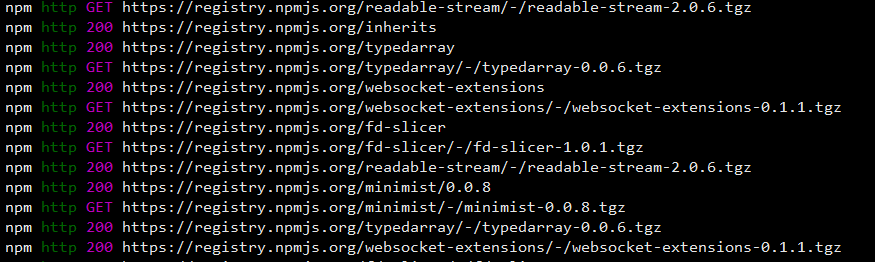
npm install
在elasticsearch-head目录下node_modules/grunt下如果没有grunt二进制程序,需要执行:
cd elasticsearch-head

npm install grunt --save
5、修改配置
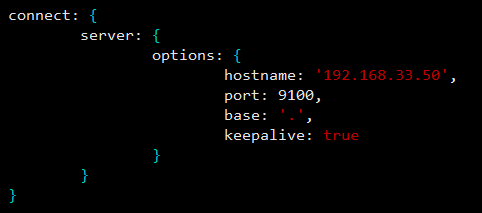
修改elasticsearch-head下Gruntfile.js文件,默认监听在127.0.0.1下9200端口:
hostname: ‘192.168.33.50’,
修改 _site/app.js
修改http://localhost:9200字段到本机ES端口与IP:
21行:http://192.168.33.50:9200
6、修改Elasticsearch配置
修改elasticsearch.yml文件加入以下内容:
# 是否支持跨域

http.cors.enabled: true

# *表示支持所有域名

http.cors.allow-origin: "*"
7、启动服务
/elasticsearch-head/node_modules/grunt/bin/grunt server (后台运行 + &)

浏览器访问 http://192.168.33.50:9100/

附:
wiki上的解释是 Cross-origin resource sharing (CORS) is a mechanism that allows restricted resources ,即跨域访问。
这个字段默认为false,在Elasticsearch安装集群之外的一台机上用Sense、Head等监控插件访问Elasticsearch是不允许的。这个字段最早可以追溯到1.4.x版本,而非5.x特有。
具体这个http.cors.x字段还有哪些用途和用法,见下表:
|
http.cors.enabled |
是否支持跨域,默认为false |
|
http.cors.allow-origin |
当设置允许跨域,默认为*,表示支持所有域名,如果我们只是允许某些网站能访问,那么可以使用正则表达式。比如只允许本地地址。 /https?:\/\/localhost(:[0-9]+)?/ |
|
http.cors.max-age |
浏览器发送一个“预检”OPTIONS请求,以确定CORS设置。最大年龄定义多久的结果应该缓存。默认为1728000(20天) |
|
http.cors.allow-methods |
允许跨域的请求方式,默认OPTIONS,HEAD,GET,POST,PUT,DELETE |
|
http.cors.allow-headers |
跨域允许设置的头信息,默认为X-Requested-With,Content-Type,Content-Length |
|
http.cors.allow-credentials |
是否返回设置的跨域Access-Control-Allow-Credentials头,如果设置为true,那么会返回给客户端。 |
Elasticsearch5.x Head插件安装的更多相关文章
- Elasticsearch5 及 head插件 安装说明
Elasticsearch5.X及 head插件 安装说明: 1.下载elasticsearch安装文件: a) 下载官方源码: https://artifacts.elastic.co/downlo ...
- elasticsearch5.0及head插件安装
这个瞎jb整了半天.准备把es2.4升级到5.0,结果老报错 环境:centos6.5+es2.4是ok的换成es5就出毛病.也不能说啥 ,我用的是最新的 源码解压启动时候报错,具体错误for ...
- [elk]elasticsearch5.0及head插件安装
ElasticSearch2.3/2.4升级到ElasticSearch5.0 参考文档(排名不分先后)https://www.elastic.co/guide/en/elasticsearch/re ...
- elasticsearch及head插件安装与配置
1. 环境软件版本说明 系统:ubuntu14.04.1 JDK:1.8 elasticsearch:5.5.2 node:9.11.1 elasticsearch:5.X 2. 环境软件下载说明 1 ...
- ElasticSearch 5.0及head插件安装
一.elasticsearch安装配置 1.官网下载源码包 https://artifacts.elastic.co/downloads/elasticsearch/elasticsearch-5.0 ...
- ElasticSearch5.5.1插件分类
ElasticSearch5.5.1插件分类 附官网介绍:https://www.elastic.co/guide/en/elasticsearch/plugins/5.5/intro.html 一. ...
- ElasticSearch安装和head插件安装
本文主要介绍elasticsearch5.0安装及head插件安装.确保系统已经安装好jdk1.8以上,操作系统CentOS6以上. 一.elasticsearch安装配置 1.官网下载源码包 下载不 ...
- ELK安装和配置及常用插件安装
环境 CentOS 7.3 root 用户 JDK 版本:1.8(最低要求),主推:JDK 1.8.0_121 以上 关闭 firewall systemctl stop firewalld.serv ...
- [Android Studio]SQLScout插件安装破解
以下内容为原创,欢迎转载,转载请注明 来自天天博客:http://www.cnblogs.com/tiantianbyconan/p/5972138.html [Android Studio]SQLS ...
随机推荐
- Python数据结构——二叉树
数的特征和定义: 树是一种重要的非线性数据结构,直观地看,它是数据元素(在树中称为结点)按分支关系组织起来的结构,很象自然界中的树那样.树结构在客观世界中广泛存在,如人类社会的族谱和各种社会组织机构都 ...
- 创建数据库,创建数据库表,例子。MySQL语句
1.创建数据库: 创建的代码:create 数据库的代码:database 数据库表名:随便起,只要自己记住就行.test create database test; 2.删除数据库: 删 ...
- Python----八荣八耻
以动手实践为荣 , 以只看不练为耻; 以打印日志为荣 , 以单步跟踪为耻; 以空格缩进为荣 , 以制表缩进为耻; 以单元测试为荣 , 以人工测试为耻; 以模块复用为荣 , 以复制粘贴为耻; 以多态应用 ...
- 编译openssl失败(SLES11.3), undefined reference to `OPENSSL_cpuid_setup'
https://stackoverflow.com/questions/11381514/undefined-reference-when-compiling-openssl I ran into t ...
- Glufster挂载失败Mount failed. Please check the log file for more details解决办法
设置两台glusterfs服务器主机名分别为gfs1,gfs2 设置好glusterfs挂载不成功提示如下 Mount failed. Please check the log file for mo ...
- python中的os.path.dirname(__file__)的使用
在编程时,我们要获取当前文件所在的路径,以适合所有的工程,建立相对路径. python的os.path.dirname(__file__)非常好用,建议大家使用: import os FILE = o ...
- hdu 6390 欧拉函数+容斥(莫比乌斯函数) GuGuFishtion
http://acm.hdu.edu.cn/showproblem.php?pid=6390 题意:求一个式子 题解:看题解,写代码 第一行就看不出来,后面的sigma公式也不会化简.mobius也不 ...
- hive分析nginx日志之UDF清洗数据
hive分析nginx日志一:http://www.cnblogs.com/wcwen1990/p/7066230.html hive分析nginx日志二:http://www.cnblogs.com ...
- 小心踩雷,一次Java内存泄漏排查实战
1.使用 jstack pid > jstack.log 保存了线程栈的现场,使用 jmap -dump:format=b,file=heap.log pid 保存了堆现场: https://m ...
- HBase实战 | 知乎实时数仓架构演进
https://mp.weixin.qq.com/s/hx-q13QteNvtXRpNsE5Y0A 作者 | 知乎数据工程团队编辑 | VincentAI 前线导读:“数据智能” (Data Inte ...