
springMVC注解的入门案例
1、web.xml
 <?xml version="1.0" encoding="UTF-8"?>

 <web-app xmlns:xsi="http://www.w3.org/2001/XMLSchema-instance" xmlns="http://java.sun.com/xml/ns/javaee" xsi:schemaLocation="http://java.sun.com/xml/ns/javaee http://java.sun.com/xml/ns/javaee/web-app_2_5.xsd" id="WebApp_ID" version="2.5">

   <display-name>springmvc1</display-name>

   <filter>

     <filter-name>characterEncoding</filter-name>

     <filter-class>org.springframework.web.filter.CharacterEncodingFilter</filter-class>

     <init-param>

       <param-name>encoding</param-name>

       <param-value>UTF-8</param-value>

     </init-param>

   </filter>

   <filter-mapping>

     <filter-name>characterEncoding</filter-name>

     <url-pattern>/*</url-pattern>

   </filter-mapping>

   <servlet>

     <servlet-name>springmvc</servlet-name>

     <servlet-class>org.springframework.web.servlet.DispatcherServlet</servlet-class>

     <init-param>

       <param-name>contextConfigLocation</param-name>

       <param-value>classpath:springmvc.xml</param-value>

     </init-param>

   </servlet>

   <servlet-mapping>

     <servlet-name>springmvc</servlet-name>

     <url-pattern>*.do</url-pattern>

   </servlet-mapping>

   <welcome-file-list>

     <welcome-file>index.html</welcome-file>

     <welcome-file>index.htm</welcome-file>

     <welcome-file>index.jsp</welcome-file>

     <welcome-file>default.html</welcome-file>

     <welcome-file>default.htm</welcome-file>

     <welcome-file>default.jsp</welcome-file>

   </welcome-file-list>

 </web-app>
2、springmvc.xml
 <?xml version="1.0" encoding="UTF-8"?>

 <beans xmlns="http://www.springframework.org/schema/beans"

     xmlns:mvc="http://www.springframework.org/schema/mvc"

     xmlns:aop="http://www.springframework.org/schema/aop"

     xmlns:tx="http://www.springframework.org/schema/tx"

     xmlns:context="http://www.springframework.org/schema/context"

     xmlns:xsi="http://www.w3.org/2001/XMLSchema-instance"

     xsi:schemaLocation="http://www.springframework.org/schema/beans

                         http://www.springframework.org/schema/beans/spring-beans-3.2.xsd

                         http://www.springframework.org/schema/mvc

                         http://www.springframework.org/schema/mvc/spring-mvc-3.2.xsd

                         http://www.springframework.org/schema/context

                         http://www.springframework.org/schema/context/spring-context-3.2.xsd

                         http://www.springframework.org/schema/aop

                         http://www.springframework.org/schema/aop/spring-aop-3.2.xsd

                         http://www.springframework.org/schema/tx

                         http://www.springframework.org/schema/tx/spring-tx-3.2.xsd">

         <!-- 把Controller交给spring管理 -->

         <context:component-scan base-package="com.xiaostudy"/>

         <!-- 配置注解处理器映射器 功能:寻找执行类Controller -->

         <bean class="org.springframework.web.servlet.mvc.method.annotation.RequestMappingHandlerMapping"/>

         <!-- 配置注解处理器适配器 功能:调用controller方法,执行controller -->

         <bean class="org.springframework.web.servlet.mvc.method.annotation.RequestMappingHandlerAdapter"/>

         <!-- 配置sprigmvc视图解析器:解析逻辑试图

              后台返回逻辑试图:index

             视图解析器解析出真正物理视图:前缀+逻辑试图+后缀====/WEB-INF/index.jsp -->

         <bean class="org.springframework.web.servlet.view.InternalResourceViewResolver">

             <property name="prefix" value="/WEB-INF/"/>

             <property name="suffix" value=".jsp"/>

         </bean>

 </beans>
3、用注解@Controller类
 package com.xiaostudy.controller;

 import org.springframework.stereotype.Controller;

 import org.springframework.web.bind.annotation.RequestMapping;

 import org.springframework.web.bind.annotation.RequestMethod;

 @Controller//<bean class="com.xiaostudy.controller.MyController"/>

 @RequestMapping(value="/myController")//访问该类的方法时,前面多这样一个路径

 public class MyController {

 //    @RequestMapping("hello")//http://localhost:8080/demo2/hello.do

 //    @RequestMapping("/hello")//http://localhost:8080/demo2/hello.do

 //    @RequestMapping(value="/hello.do")//http://localhost:8080/demo2/hello.do

 //    @RequestMapping(value="/hello.do",method=RequestMethod.GET)//http://localhost:8080/demo2/hello.do

 //    @RequestMapping(value="/hello.do",method= {RequestMethod.GET,RequestMethod.POST})//http://localhost:8080/demo2/hello.do

     public String print() {

         return "index";

     }

     @RequestMapping("hi")//http://localhost:8080/demo2/myController/hi.do

     public String hello() {

         return "index";

     }

 }
4、index.jsp
 <%@ page language="java" contentType="text/html; charset=UTF-8" pageEncoding="UTF-8"%>

 <!DOCTYPE html PUBLIC "-//W3C//DTD HTML 4.01 Transitional//EN"

             "http://www.w3.org/TR/html4/loose.dtd">

 <html>

 <head>

     <meta http-equiv="Content-Type" content="text/html; charset=UTF-8">

     <title>springMVC_demo</title>

 </head>

 <body>

     xiaostudy

 </body>

 </html>
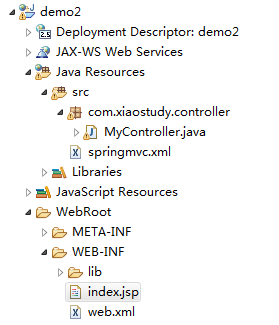
项目文件结构
springMVC注解的入门案例的更多相关文章
- springmvc注解基本入门
简单介绍使用springmvc注解的基本流程. 1.在web.xml中配置DispatcherServlet <?xml version="1.0" encoding=&qu ...
- 阶段3 3.SpringMVC·_01.SpringMVC概述及入门案例_08.RequestMapping注解的作用
用于建立请求URL和处理请求方法之间的对应关系. 增加一个testResuqestMapping方法来测试 把注解放在类上 服务器重新部署 再次重新部署 这次就可以请求到数据 了 注解放在类上:用来表 ...
- 阶段3 3.SpringMVC·_01.SpringMVC概述及入门案例_09.RequestMapping注解的属性
看下RequestMapping下面 一共有几个属性 那么属性用处不大 value和path互相为别名 这里用value表示path也是没有问题的 只有一个属性,并且属性名称叫做value那么就可以省 ...
- 阶段3 3.SpringMVC·_01.SpringMVC概述及入门案例_05.入门程序之入门代码编写
先把默认的index.jsp删掉.默认的index.jsp没有jsp的声明 ok webapp文件夹下new一个 起名叫做index.新建的页面有jsp的头 创建控制器类 java下新建一个class ...
- 阶段3 3.SpringMVC·_01.SpringMVC概述及入门案例_07.入门案例中使用的组件介绍
这里配置上注解的支持,相当于配置了上面的前端控制器.处理映射器这两个
- 阶段3 3.SpringMVC·_01.SpringMVC概述及入门案例_04.入门程序之搭建开发环境
选择骨架构建 默认选中next-然后finish后就会去网上下载插件.会比较耗费时间. 添加一组键值对: archetypeCatalog internal 添加了这组坚持对,就可以解决Mavn项目创 ...
- 阶段3 3.SpringMVC·_01.SpringMVC概述及入门案例_01.SpringMVC概述及入门案例
第二章 第三章 第四章 三层框架 springMvc是表现层
- 阶段3 3.SpringMVC·_01.SpringMVC概述及入门案例_06.入门案例的流程总结
配置了load-on-startup等于1 表示启动了服务器就会去创建DispatcherServlet 如果不配置load-on-startup为1 那么第一次发送请求才会去创建Dispatcher ...
- 阶段3 3.SpringMVC·_01.SpringMVC概述及入门案例_03.入门程序之需求分析
随机推荐
- Nginx无法启动,80端口被PID=4占用
在nginx启动后,error.log中总是显示 80 端口被占用. 通过netstat -ano发现,其被一个叫PID=4的系统服务占用. 网上大多数的方法是说通过regidit修改注册表的方式解决 ...
- 在Win10上,Android Studio检测不到设备的解决方案
下载ADB驱动程序安装器 运行ADBDriverInstaller.exe,可以看到设备状态不正常,点击Install 可能会弹出这样的对话框,点击Got it, Restart Now,按照提示完成 ...
- Favorite Donut--hdu5442(2015年长春网选赛,kmp,最大表示法)
题目链接:http://acm.hdu.edu.cn/showproblem.php?pid=5442 打比赛的时候还没学kmp更没有学最大最小表示法,之后做完了kmp的专题,学了它们,现在再来做这道 ...
- AntiSamy测试
AntiSamy为owasp针对xss提供的处理库,可以配置xml策略来决定过滤的内容,比如标签.属性.css等,自定义策略给开发人员使用成本比较高,AntiSamy也提供了几个内置的策略,其安全级别 ...
- 15.Update Documents-官方文档摘录
1.插入数据 db.inventory.insertMany( [ { item: "canvas", qty: 100, size: { h: 28, w: 35.5, uom: ...
- 3.Github介绍
很多人都知道,Linus在1991年创建了开源的Linux.从此,Linux系统不断发展,已经成为最大的服务器系统软件了.Linus虽然创建了Linux,但Linux的壮大是靠全世界热心的志愿者参与的 ...
- python爬虫系列(2)—— requests和BeautifulSoup
本文主要介绍python爬虫的两大利器:requests和BeautifulSoup库的基本用法. 1. 安装requests和BeautifulSoup库 可以通过3种方式安装: easy_inst ...
- mysql 下的命令
1.查看mysql日志vim /var/log/mysqld.log
- PAT 1037 Magic Coupon[dp]
1037 Magic Coupon(25 分) The magic shop in Mars is offering some magic coupons. Each coupon has an in ...
- 深入了解SQL Tuning Advisor(转载)
1.前言:一直以来SQL调优都是DBA比较费力的技术活,而且很多DBA如果没有从事过开发的工作,那么调优更是一项头疼的工作,即使是SQL调优很厉害的高手,在SQL调优的过程中也要不停的分析执行计划.加 ...