
Selenium+Python定位实例
常见的定位方式参见:http://www.cnblogs.com/ranxf/p/7928732.html
1、ID定位(find_element_by_id)
<input class="easyui-textbox" id="userID" name="userID" size="29" data-options="required:true" type="text">
<input class="easyui-validatebox validatebox-text" id="password" name="password" value="" size="30" data-options="validType:'password'" type="password">
实现代码:
driver.find_element_by_id("userID").clear()

driver.find_element_by_id("userID").send_keys("")
driver.find_element_by_id("password").clear()
driver.find_element_by_id("password").send_keys("0000000")
2、CSS定位(find_element_by_css_selector)
页面标签:
<div id="xz-guide-system" class="xz-content-guide-btpanel-button xz-w-eq-h xz-cursor-hand">button</div>
实现代码
driver.find_element_by_css_selector("div[id='xz-guide-system']").click()  # ok 用标签名称+属性值

driver.find_element_by_css_selector("#xz-guide-system").click()  # ok css用#号表示id标签属性
3、find_elements

上面的页面中多个(div class="panel-title")
<div class="panel-title" style="height: 24px; line-height: 24px;">设备</div>
设备属于第五个,采用CSS和find_elements定位方法如下“
device = driver.find_elements("css selector", ".panel-title")

print(device[4].text)

device[4].click()
4、Xpath绝对路径定位(find_element_by_xpath)
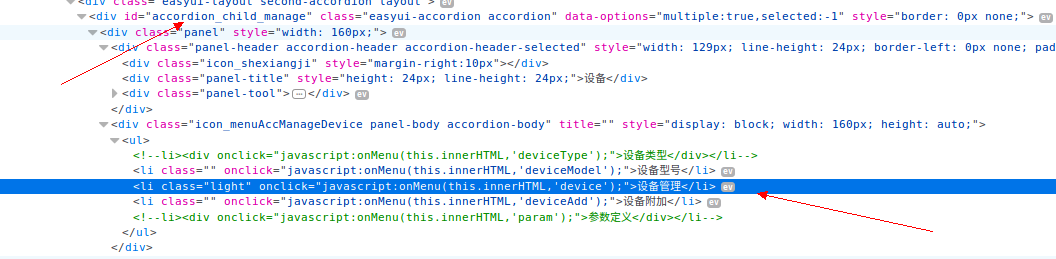
定位设备管理采用Xpath定位方法如下:
driver.find_element_by_xpath("//*[@id='accordion_child_manage']/div[1]/div[2]/ul/li[2]").click()
Selenium+Python定位实例的更多相关文章
- selenium+python定位元素方法
定位元素方法 官网地址:http://selenium-python.readthedocs.org/locating-elements.html 这里有各种策略用于定位网页中的元素(l ...
- selenium+python定位元素的方法及使用
selenium的八种定位方法 By.ID 通过id定位 By.CLASS_NAME 通过className定位 By.CSS_SELECTOR 通过CSS定位 By.LINK_TEXT 通过link ...
- 基础selenium+Python(定位、等待、打印)
1.第一个脚本 # coding = utf-8 from selenium import webdriver browser = webdriver.Firefox() browser.get(&q ...
- selenium python 定位一组对象
为什么定位一组对象? 定位一组对象的思想 在定位一组对象的过程中我们如何实现?以前的都是通过具体的对象定位,那么定位一组我们就需要通过css来定位 在单个定位对象中使用的是find_elem ...
- selenium python 第一个脚本
为什么选择python?我的回答很简单,简单易学,功能强大! 下面看看python和selenium 2的结合是什么样子吧 一.第一个selenium python脚本: #coding = utf- ...
- python selenium expected_conditions使用实例
今天正好虫师问到selenium python binding中support.expected_conditions的用法,顺手总结了一下,希望对大家有所帮助. 场景 Expected Condit ...
- 【转载】【selenium+Python WebDriver】之元素定位
总结: 感谢: “煜妃”<Selenuim+Python之元素定位总结及实例说明> “Huilaojia123”<selenium WebDriver定位元素学习总结> “上海 ...
- selenium python 一些操作和定位收集
(—)滚动条操作 python中selenium操作下拉滚动条方法汇总 selenium_webdriver(python)控制浏览器滚动条 selenium+Python(select定位) Sel ...
- 【转】【selenium+Python WebDriver】之元素定位不到解决办法
感谢: 煜妃的<Python+Selenium定位不到元素常见原因及解决办法(报:NoSuchElementException)> ClassName定位报错问题:<[Python] ...
随机推荐
- springboot整合mybatis之用外置服务器启动项目(二)
在上一篇中我们是用的springboot自带的tomcat服务器,接下来想试一下 将springboot当做一个web项目 放在eclipse中用tomcat来启动. 首先在pom.xml中加上,移除 ...
- 2、Android自己的下拉刷新SwipeRefreshLayout--样式2
<android.support.v4.widget.SwipeRefreshLayout xmlns:android="http://schemas.android.com/apk/ ...
- [2011WorldFinal]Chips Challenge[流量平衡]
Chips Challenge Time Limit: 10000/5000 MS (Java/Others) Memory Limit: 65536/65536 K (Java/Others) ...
- Map中存放数组
Map<String,Object> map = new HashMap<String, Object>(); Map<String,String> agentMa ...
- jQuery设置内容和属性方
何问起 hovertree.com 设置内容 - text().html() 以及 val()text() - 设置或返回所选元素的文本内容html() - 设置或返回所选元素的内容(包括 HTML ...
- 170323、Spring 事物机制总结
spring两种事物处理机制,一是声明式事物,二是编程式事物 声明式事物 1)Spring的声明式事务管理在底层是建立在AOP的基础之上的.其本质是对方法前后进行拦截,然后在目标方法开始之前创建或者加 ...
- 160615、Spring3 MVC 拦截器拦截不到的问题
昨天项目组有个成员使用拦截器的时候发现不起作用,后来发现了原因,在这里跟大家分享一下(主要是冲突了).分享的是一位网友写的文章,他总结的很好. com.zk.interceptors.MyInterc ...
- Dart异步与消息循环机制
Dart与消息循环机制 翻译自https://www.dartlang.org/articles/event-loop/ 异步任务在Dart中随处可见,例如许多库的方法调用都会返回Future对象来实 ...
- python--excel
import xlrd, xlwt # 读取Exceldef read_excel(excel_name, sheet_name): if excel_name and excel_name: all ...
- 设计模式之——Template模板模式
Template模式又叫模板模式,是在父类中定义处理流程的框架,在子类中实现具体处理逻辑的模式.当父类的模板方法被调用时程序行为也会不同,但是,不论子类的具体实现如何,处理的流程都会按照父类中所定义的 ...