
springmvc+rest整合redis
最近在做一个项目需要用到关系数据库mysql和缓存redis,以及非关系型数据库mongoDB。昨天下午到今天上午一直在搞springmvc整合redis,期间出现的错误一直让人抓狂,在网上搜索的结果也没有解决得了自己的问题,因此整理此文希望可以帮助到和我一样为整合redis而抓狂的人。
首先,在这里说明springmvc整合redis所需要的jar包,commons-pool-1.6.jar、commons-pool2-2.4.2.jar、jedis-2.9.0.jar、spring-data-commons-1.8.6.RELEASE.jar、spring-data-redis-1.8.6.RELEASE.jar。这里主要用到了这些jar包,期间遇到的jar包冲突问题也是醉醉的了,一直在倒腾jar包,最后终于使用以上几个jar包成功了。
以下用代码告诉大家我是怎么做的
1、redis.properties
redis.ip=127.0.0.1

redis.port=6379

redis.pool.maxActive=100

redis.pool.maxIdle=300

redis.pool.maxWait=1000

redis.pool.testOnBorrow=true
2、redis-config.xml
<?xml version="1.0" encoding="UTF-8"?>

<beans xmlns="http://www.springframework.org/schema/beans"

    xmlns:xsi="http://www.w3.org/2001/XMLSchema-instance" xmlns:aop="http://www.springframework.org/schema/aop"

    xmlns:tx="http://www.springframework.org/schema/tx" xmlns:context="http://www.springframework.org/schema/context"

    xsi:schemaLocation="

     http://www.springframework.org/schema/beans http://www.springframework.org/schema/beans/spring-beans-3.2.xsd

     http://www.springframework.org/schema/tx http://www.springframework.org/schema/tx/spring-tx-3.2.xsd

     http://www.springframework.org/schema/aop http://www.springframework.org/schema/aop/spring-aop-3.2.xsd

     http://www.springframework.org/schema/context  http://www.springframework.org/schema/context/spring-context-3.2.xsd"

    default-autowire="byName" default-lazy-init="true">

    <bean id="poolConfig" class="redis.clients.jedis.JedisPoolConfig">

        <property name="maxIdle" value="${redis.pool.maxIdle}" />

        <property name="maxTotal" value="${redis.pool.maxActive}" />

        <property name="maxWaitMillis" value="${redis.pool.maxWait}" />

        <property name="testOnBorrow" value="${redis.pool.testOnBorrow}" />

    </bean>

    <!-- redis服务器中心 -->

    <bean id="connectionFactory" class="org.springframework.data.redis.connection.jedis.JedisConnectionFactory">

        <property name="poolConfig" ref="poolConfig" />

        <property name="port" value="${redis.port}" />

        <property name="hostName" value="${redis.ip}" />

    </bean>

    <bean id="redisTemplate" class="org.springframework.data.redis.core.RedisTemplate">

        <property name="connectionFactory" ref="connectionFactory" />

        <property name="keySerializer">

            <bean class="org.springframework.data.redis.serializer.StringRedisSerializer" />

        </property>

        <property name="valueSerializer">

            <bean class="org.springframework.data.redis.serializer.JdkSerializationRedisSerializer" />

        </property>

    </bean>

</beans>
3、applicationContext.xml
<?xml version="1.0" encoding="UTF-8"?>

<beans xmlns="http://www.springframework.org/schema/beans"

    xmlns:xsi="http://www.w3.org/2001/XMLSchema-instance" xmlns:context="http://www.springframework.org/schema/context"

    xmlns:mvc="http://www.springframework.org/schema/mvc" xmlns:util="http://www.springframework.org/schema/util"

    xmlns:p="http://www.springframework.org/schema/p"

    xsi:schemaLocation="http://www.springframework.org/schema/beans

        http://www.springframework.org/schema/beans/spring-beans.xsd

        http://www.springframework.org/schema/context

        http://www.springframework.org/schema/context/spring-context.xsd

        http://www.springframework.org/schema/mvc http://www.springframework.org/schema/mvc/spring-mvc-3.2.xsd

        http://www.springframework.org/schema/util http://www.springframework.org/schema/util/spring-util-3.2.xsd"

    default-autowire="byName">

    <!-- 启动annotation支持 -->

    <context:annotation-config />

    <context:component-scan base-package="com.fp.daoImpl,com.fp.serviceImpl,com.fp.rest"></context:component-scan>

    <mvc:annotation-driven/>

    <!-- <util:properties id="jdbcProps" location="classpath:jdbc.properties"></util:properties> -->

    <context:property-placeholder location="classpath:jdbc.properties,classpath:redis.properties" />

    <!-- 导入redis的配置文件 -->

    <import resource="redis-config.xml"/>

    <!-- 配置mysql数据源 -->

     <bean id="dataSource" class="org.apache.commons.dbcp.BasicDataSource" destroy-method="close">

         <property name="driverClassName" value="${jdbc.driverClassName}"/>

         <property name="url" value="${jdbc.url}"/>

         <property name="username" value="${jdbc.username}"/>

         <property name="password" value="${jdbc.password}"/>

    </bean>

    <!-- 配置jdbctemplate,并为其注入dataSource数据源 -->

    <bean id="jdbcTemplate" class="org.springframework.jdbc.core.JdbcTemplate">

       <property name="dataSource" ref="dataSource"></property>

    </bean>

</beans>
4、jdbc.properties
jdbc.driverClassName=com.mysql.jdbc.Driver

jdbc.url = jdbc:mysql://localhost:3306/xxx?useUnicode=true&characterEncoding=utf8

jdbc.username = root

jdbc.password =root
5、web.xml
<?xml version="1.0" encoding="UTF-8"?>

<web-app xmlns:xsi="http://www.w3.org/2001/XMLSchema-instance" xmlns="http://java.sun.com/xml/ns/javaee" xsi:schemaLocation="http://java.sun.com/xml/ns/javaee http://java.sun.com/xml/ns/javaee/web-app_3_0.xsd" id="WebApp_ID" version="3.0">

  <display-name>JerseyProject</display-name>

  <welcome-file-list>

    <welcome-file>index.html</welcome-file>

    <welcome-file>index.htm</welcome-file>

    <welcome-file>index.jsp</welcome-file>

    <welcome-file>default.html</welcome-file>

    <welcome-file>default.htm</welcome-file>

    <welcome-file>default.jsp</welcome-file>

  </welcome-file-list>

  <context-param>

    <param-name>contextConfigLocation</param-name>

    <param-value>classpath:applicationContext.xml</param-value>

  </context-param>

  <listener>

    <listener-class>org.springframework.web.context.ContextLoaderListener</listener-class>

  </listener>

  <listener>

    <listener-class>

            org.springframework.web.context.request.RequestContextListener

        </listener-class>

  </listener>

 <!-- 使用rest风格-->

  <servlet>

    <servlet-name>restService</servlet-name>

    <servlet-class>com.sun.jersey.spi.spring.container.servlet.SpringServlet</servlet-class>

    <init-param>

      <param-name>com.sun.jersey.config.property.packages</param-name>

      <param-value>com.fp.rest</param-value>

    </init-param>

    <load-on-startup>1</load-on-startup>

  </servlet>

  <servlet-mapping>

    <servlet-name>restService</servlet-name>

    <url-pattern>/*</url-pattern>

  </servlet-mapping>
6、模块代码
Member.java
package com.fp.entity;

import javax.xml.bind.annotation.XmlRootElement;

import com.ems.base.BaseModel;

@XmlRootElement

public class Member extends BaseModel{

  private static final long serialVersionUID = -1959528436584592183L;

  private String id;

  private String nickname;

  public Member(){}

  public Member(String id, String nickname){

    this.setId(id);

    this.setNickname(nickname);

  }

  public String getId() {

    return id;

  }

  public void setId(String id) {

    this.id = id;

  }

  public String getNickname() {

    return nickname;

  }

  public void setNickname(String nickname) {

    this.nickname = nickname;

  }

}
MemberDao
package com.fp.dao;

import com.fp.entity.Member;

public interface MemberDao {

    Member get(String keyId);

}
MemberDaoImpl
package com.fp.daoImpl;

import java.io.Serializable;

import javax.annotation.Resource;

import org.springframework.beans.factory.annotation.Autowired;

import org.springframework.dao.DataAccessException;

import org.springframework.data.redis.connection.RedisConnection;

import org.springframework.data.redis.core.RedisCallback;

import org.springframework.data.redis.core.RedisTemplate;

import org.springframework.data.redis.serializer.RedisSerializer;

import org.springframework.stereotype.Repository;

import com.fp.dao.MemberDao;

import com.fp.entity.Member;

@Repository(value = "memberDao")

public class MemberDaoImpl implements MemberDao {

    @Autowired

    private RedisTemplate<Serializable, Object> redisTemplate;

    @Resource

    public void setRedisTemplate(RedisTemplate<Serializable, Object> redisTemplate) {

        this.redisTemplate = redisTemplate;

    }

    /**

     * 读取缓存

     *

     * @param key

     * @return

     */

    public Member get(final String keyId) {

        Member result = redisTemplate.execute(new RedisCallback<Member>() {

            public Member doInRedis(RedisConnection connection)

                    throws DataAccessException {

                RedisSerializer<String> serializer = redisTemplate.getStringSerializer();

                byte[] key = serializer.serialize(keyId);

                byte[] value = connection.get(key);

                if (value == null) {

                    return null;

                }

                String nickname = serializer.deserialize(value);

                System.out.println("nickname::"+nickname);

                return new Member(keyId, nickname);

            }

        });

        return result;

    }

}
MemberService
package com.fp.service;

import com.fp.entity.Member;

public interface MemberService {

    public Member get(String id);

}
MemberServiceImpl
package com.fp.serviceImpl;

import org.springframework.beans.factory.annotation.Autowired;

import org.springframework.stereotype.Service;

import com.fp.dao.MemberDao;

import com.fp.entity.Member;

import com.fp.service.MemberService;

@Service("memberService")

public class MemberServiceImpl implements MemberService {

    @Autowired

    private MemberDao memberDao;

    public Member get(String id) {

        return memberDao.get(id);

    }

}
MemberResource(提供rest服务)
package com.fp.rest;

import com.fp.entity.Member;

import com.fp.service.MemberService;

import javax.ws.rs.GET;

import javax.ws.rs.Path;

import javax.ws.rs.PathParam;

import javax.ws.rs.Produces;

import javax.ws.rs.core.MediaType;

import org.springframework.beans.factory.annotation.Autowired;

import org.springframework.web.bind.annotation.RestController;

@RestController

@Path("/member")

public class MemberResource {

    @Autowired

    private MemberService memberService;

    @Path("/{id}")

    @GET  //表示此服务路径基于get请求模式

    @Produces(MediaType.APPLICATION_JSON+";charset=utf-8")  //表示响应的结果以文本方式返回

    public Member get(@PathParam("id") String id){

        return memberService.get(id);

    }

}
7、运行结果
访问地址:http://localhost:8080/JerseyProject/member/id,运行结果如下:
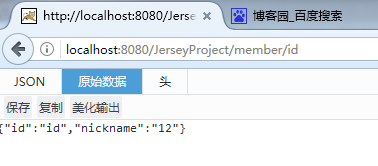
到此springmvc+rest+redis就整合完毕了,重要的事情再强调一遍,一定要导入版本相符的jar包,commons-pool-1.6.jar、commons-pool2-2.4.2.jar、jedis-2.9.0.jar、spring-data-commons-1.8.6.RELEASE.jar、spring-data-redis-1.8.6.RELEASE.jar。相信你一定可以的,嘿嘿。。。
springmvc+rest整合redis的更多相关文章
- Spring+SpringMVC+Mybatis整合redis
SSM整合redis redis是一种非关系型数据库,与mongoDB不同的是redis是内存数据库,所以访问速度很快.常用作缓存和发布-订阅式的消息队列. 这里用的是ssm框架+maven构建的项目 ...
- springmvc整合redis架构搭建实例
新换环境,又有新东西可以学习了,哈皮! 抽空学习之余看了一下redis,个人对Springmvc的爱是忠贞不渝,所以整理了一下Springmvc整合redis的环境搭建.分享学习. 第一步: 创建ma ...
- Spring+Mybatis基于注解整合Redis
基于这段时间折腾redis遇到了各种问题,想着整理一下.本文主要介绍基于Spring+Mybatis以注解的形式整合Redis.废话少说,进入正题. 首先准备Redis,我下的是Windows版,下载 ...
- SSM之整合Redis
Redis安装与使用 第一步当然是安装Redis,这里以Windows上的安装为例. 首先下载Redis,可以选择msi或zip包安装方式 zip方式需打开cmd窗口,在解压后的目录下运行redis- ...
- Spring整合Redis&JSON序列化&Spring/Web项目部署相关
几种JSON框架用法和效率对比: https://blog.csdn.net/sisyphus_z/article/details/53333925 https://blog.csdn.net/wei ...
- ssm 整合 redis(简单教程)
最后我建议大家使用 Spring StringRedisTemplate 配置,参阅: http://blog.csdn.net/hanjun0612/article/details/78131333 ...
- sping整合redis,以及做mybatis的第三方缓存
一.spring整合redis Redis作为一个时下非常流行的NOSQL语言,不学一下有点过意不去. 背景:学习Redis用到的框架是maven+spring+mybatis(框架如何搭建这边就不叙 ...
- [手把手教程][JavaWeb]优雅的SpringMvc+Mybatis整合之路
来源于:http://www.jianshu.com/p/5124eef40bf0 [手把手教程][JavaWeb]优雅的SpringMvc+Mybatis整合之路 手把手教你整合最优雅SSM框架:S ...
- Spring4+SpringMVC+MyBatis整合思路(山东数漫江湖)
1.Spring框架的搭建 这个很简单,只需要web容器中注册org.springframework.web.context.ContextLoaderListener,并指定spring加载配置文件 ...
随机推荐
- 利用Octopress在Github上搭建博客及后续问题总汇
首先贴一下我的新博客地址: http://findingsea.github.io 用Octopress在GitHub上搭建博客已经不是什么新鲜事了,网上的教程也多了去了,大题的方法什么都差不多,这篇 ...
- mysql ERROR 1264 (22003): Out of range value for column 'x' at row 1 错误
mysql> insert into t1 values (-129), (-128), (127),(128);ERROR 1264 (22003): Out of range value f ...
- 从数学分析的角度来看Softmax
作者:无影随想 时间:2016年1月. 出处:https://zhaokv.com/machine_learning/2016/01/softmax-calculous-perspective.htm ...
- ui-select : There is no "X"(delete button) with selectize theme, when allow-clear="true"
but add allow-clear="true"For Bootstrap and Select2 themes, it's working perfectly. reason ...
- Linux PHP7的openssl扩展安装
Linux环境下使用PHPmailer发送邮件时,出现如下错误: SMTP -> ERROR: Failed to connect to server: Unable to find the s ...
- FileZilla使用
FileZilla是一个免费开源的FTP软件,分为客户端版本和服务器版本,具备所有的FTP软件功能.可控性.有条理的界面和管理多站点的简化方式使得Filezilla客户端版成为一个方便高效的FTP客户 ...
- php的正则表达式完全手册
前言 正则表达式是烦琐的,但是强大的,学会之后的应用会让你除了提高效率外,会给你带来绝对的成就感.只要认真去阅读这些资料,加上应用的时候进行一定的参考,掌握正则表达式不是问题. 索引 1._引子 2. ...
- [acm/icpc2016ChinaFinal][CodeforcesGym101194] Mr. Panda and Fantastic Beasts
地址:http://codeforces.com/gym/101194 题目:略 思路: 这题做法挺多的,可以sam也可以后缀数组,我用sam做的. 1.我自己yy的思路(瞎bb的) 把第一个串建立s ...
- $思维导图——numpy基本知识
- javascript中常用函数汇总
js中函数很多,在实际项目开发中,函数的应用可以很大程度上简化我们的代码,所以在此记下开发中js中常用的函数,增强记忆. 1.isNaN(X):函数用于检查其参数是否是非数字值. 如果 x 是特殊的非 ...