
Spring+Mybatis基于注解整合Redis
基于这段时间折腾redis遇到了各种问题,想着整理一下。本文主要介绍基于Spring+Mybatis以注解的形式整合Redis。废话少说,进入正题。
首先准备Redis,我下的是Windows版,下载后直接启动redis-server就行了,见下图:
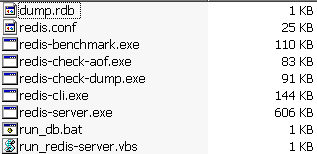
一,先上jar包

二,创建实体类
 package com.sl.user.vo;

 import java.io.Serializable;

 import com.fasterxml.jackson.databind.PropertyNamingStrategy;

 import com.fasterxml.jackson.databind.annotation.JsonNaming;

 import com.fasterxml.jackson.databind.annotation.JsonSerialize;

 @JsonSerialize

 @JsonNaming(PropertyNamingStrategy.LowerCaseWithUnderscoresStrategy.class)

 public class UserVO implements Serializable{

     private static final long serialVersionUID = 1L;

     private int id;

     private String username;

     private String password;

     private int age;

     public UserVO(){

         super();

     }

     public UserVO(int id, String username, String password, int age) {

         super();

         this.id = id;

         this.username = username;

         this.password = password;

         this.age = age;

     }

     public int getId() {

         return id;

     }

     public void setId(int id) {

         this.id = id;

     }

     public String getUsername() {

         return username;

     }

     public void setUsername(String username) {

         this.username = username;

     }

     public String getPassword() {

         return password;

     }

     public void setPassword(String password) {

         this.password = password;

     }

     public int getAge() {

         return age;

     }

     public void setAge(int age) {

         this.age = age;

     }

     @Override

     public String toString() {

         return "UserVO [id=" + id + ", username=" + username + ", password="

                 + password + ", age=" + age + "]";

     }

 }
三,dao接口
 package com.sl.user.dao;

 import com.sl.user.vo.UserVO;

 public interface UserDao {

     public void addUser(UserVO user);

     public void deleteUser(UserVO user);

     public void updateUser(UserVO user);

     public UserVO getUserById(int id);

     public UserVO getUser(int id);

 }
四,UserMapper
 <?xml version="1.0" encoding="UTF-8" ?>

 <!DOCTYPE mapper PUBLIC "-//mybatis.org//DTD Mapper 3.0//EN" "http://mybatis.org/dtd/mybatis-3-mapper.dtd" >

 <mapper namespace="com.sl.user.dao.UserDao" >

     <resultMap id="userResult" type="User">

         <result column="id" property="id"/>

         <result column="userame" property="userame"/>

         <result column="password" property="password"/>

         <result column="age" property="age"/>

     </resultMap>

     <insert id="addUser" parameterType="User">

         insert into t_user(username,password,age) values(#{username},#{password},#{age})

     </insert>

     <update id="deleteUser" parameterType="User">

         delete * from t_user where id = #{id}

     </update>

     <update id="updateUser" parameterType="User">

         update t_user set

         <if test="username != null and username != ''"> username = #{username},</if>

         <if test="password != null and password != ''"> password = #{password},</if>

         <if test="age != null and age != ''"> age = #{age}</if>

         where 1=1

         <if test="id != null and id != ''">and id = #{id}</if>

     </update>

     <select id="getUser" parameterType="int" resultType="User" >

         select * from t_user where id = #{id}

     </select>

     <select id="getUserById" parameterType="int" resultType="java.lang.String" >

         select username from t_user where id = #{id}

     </select>

 </mapper>
五,Service接口
 package com.sl.user.service;

 import com.sl.user.vo.UserVO;

     public interface UserService {

         public void addUser(UserVO user);

         public void deleteUser(UserVO user);

         public void updateUser(UserVO user);

         public UserVO getUserById(int id);

         public UserVO getUser(int id);

 }
六,Service实现
 package com.sl.user.service.impl;

 import org.springframework.beans.factory.annotation.Autowired;

 import org.springframework.cache.annotation.CacheEvict;

 import org.springframework.cache.annotation.Cacheable;

 import org.springframework.stereotype.Service;

 import org.springframework.transaction.annotation.Propagation;

 import org.springframework.transaction.annotation.Transactional;

 import com.sl.user.dao.UserDao;

 import com.sl.user.service.UserService;

 import com.sl.user.vo.UserVO;

 @Service("userService")

 @Transactional(propagation=Propagation.REQUIRED, rollbackFor=Exception.class)

 public class UserServiceImpl implements UserService{

     @Autowired

     private UserDao userDao;

     @Override

     @CacheEvict(value="User",key="addUser",allEntries=true)

     public void addUser(UserVO user) {

         userDao.addUser(user);

     }

     @Override

     @CacheEvict(value = {"getUser", "getUserById"}, allEntries = true)

     public void deleteUser(UserVO user) {

         userDao.deleteUser(user);

     }

     @Override

     @CacheEvict(value = {"getUser", "getUserById"}, allEntries = true)

     public void updateUser(UserVO user) {

         userDao.updateUser(user);

     }

     @Override

     @Cacheable(value="User",key="getUserById")

     public UserVO getUserById(int id) {

         return userDao.getUserById(id);

     }

     @Override

     @Cacheable(value="User",key="'getUser'")

     public UserVO getUser(int id) {

         return userDao.getUser(id);

     }

 }
七,Ctrl层
 package com.sl.user.web;

 import java.util.HashMap;

 import java.util.Map;

 import org.springframework.beans.factory.annotation.Autowired;

 import org.springframework.stereotype.Controller;

 import org.springframework.web.bind.annotation.RequestMapping;

 import org.springframework.web.bind.annotation.ResponseBody;

 import com.sl.user.service.UserService;

 import com.sl.user.vo.UserVO;

 @Controller

 @RequestMapping("/userCtrl")

 public class UserCtrl {

     @Autowired

     private UserService userService;

     @RequestMapping("/addUser")

     public void addUser(UserVO user){

         userService.addUser(user);

     }

     @RequestMapping("/deleteUser")

     public void deleteUser(UserVO user){

         userService.deleteUser(user);

     }

     @RequestMapping("/updateUser")

     public void updateUser(UserVO user){

         userService.updateUser(user);

     }

     @ResponseBody

     @RequestMapping("/getUserById")

     public Map<String,Object> getUserById(UserVO user){

         Map<String,Object> map = new HashMap<String,Object>();

         map.put("msg",userService.getUserById(4));

         return map;

     }

     @ResponseBody

     @RequestMapping("/getUser")

     public Map<String,Object> getUser(UserVO vo){

         Map<String,Object> map = new HashMap<String,Object>();

         Object user = userService.getUser(4);

         map.put("msg",user.toString());

         return map;

     }

 }
八,Redis关键类,用于CRUD操作
 package com.sl.user.redis;

 import java.io.ByteArrayInputStream;

 import java.io.ByteArrayOutputStream;

 import java.io.IOException;

 import java.io.ObjectInputStream;

 import java.io.ObjectOutputStream;

 import org.springframework.cache.Cache;

 import org.springframework.cache.support.SimpleValueWrapper;

 import org.springframework.dao.DataAccessException;

 import org.springframework.data.redis.connection.RedisConnection;

 import org.springframework.data.redis.core.RedisCallback;

 import org.springframework.data.redis.core.RedisTemplate;

 public class RedisUtil implements Cache{

     private RedisTemplate<String, Object> redisTemplate;

     private String name;

     public RedisTemplate<String, Object> getRedisTemplate() {

         return redisTemplate;

     }

     public void setRedisTemplate(RedisTemplate<String, Object> redisTemplate) {

         this.redisTemplate = redisTemplate;

     }

     public void setName(String name) {

         this.name = name;

     }

     @Override

     public String getName() {

         return this.name;

     }

     @Override

     public Object getNativeCache() {

         return this.redisTemplate;

     }

     /**

      * 从缓存中获取key

      */

     @Override

     public ValueWrapper get(Object key) {

 System.out.println("get key");

       final String keyf =  key.toString();

       Object object = null;

       object = redisTemplate.execute(new RedisCallback<Object>() {

       public Object doInRedis(RedisConnection connection)

                   throws DataAccessException {

           byte[] key = keyf.getBytes();

           byte[] value = connection.get(key);

           if (value == null) {

              return null;

             }

           return toObject(value);

           }

        });

         return (object != null ? new SimpleValueWrapper(object) : null);

       }

      /**

       * 将一个新的key保存到缓存中

       * 先拿到需要缓存key名称和对象,然后将其转成ByteArray

       */

      @Override

      public void put(Object key, Object value) {

 System.out.println("put key");

        final String keyf = key.toString();

        final Object valuef = value;

        final long liveTime = 86400;

        redisTemplate.execute(new RedisCallback<Long>() {

            public Long doInRedis(RedisConnection connection)

                    throws DataAccessException {

                 byte[] keyb = keyf.getBytes();

                 byte[] valueb = toByteArray(valuef);

                 connection.set(keyb, valueb);

                 if (liveTime > 0) {

                     connection.expire(keyb, liveTime);

                  }

                 return 1L;

              }

          });

       }

       private byte[] toByteArray(Object obj) {

          byte[] bytes = null;

          ByteArrayOutputStream bos = new ByteArrayOutputStream();

          try {

            ObjectOutputStream oos = new ObjectOutputStream(bos);

            oos.writeObject(obj);

            oos.flush();

            bytes = bos.toByteArray();

            oos.close();

            bos.close();

           }catch (IOException ex) {

                ex.printStackTrace();

           }

           return bytes;

         }

        private Object toObject(byte[] bytes) {

          Object obj = null;

            try {

                ByteArrayInputStream bis = new ByteArrayInputStream(bytes);

                ObjectInputStream ois = new ObjectInputStream(bis);

                obj = ois.readObject();

                ois.close();

                bis.close();

            } catch (IOException ex) {

                ex.printStackTrace();

             } catch (ClassNotFoundException ex) {

                ex.printStackTrace();

             }

             return obj;

         }

        /**

         * 删除key

         */

        @Override

        public void evict(Object key) {

 System.out.println("del key");

          final String keyf = key.toString();

          redisTemplate.execute(new RedisCallback<Long>() {

          public Long doInRedis(RedisConnection connection)

                    throws DataAccessException {

              return connection.del(keyf.getBytes());

             }

           });

         }

         /**

          * 清空key

          */

         @Override

         public void clear() {

 System.out.println("clear key");

            redisTemplate.execute(new RedisCallback<String>() {

                 public String doInRedis(RedisConnection connection)

                         throws DataAccessException {

                   connection.flushDb();

                     return "ok";

                }

            });

         }

         @Override

         public <T> T get(Object key, Class<T> type) {

             return null;

         }

         @Override

         public ValueWrapper putIfAbsent(Object key, Object value) {

             return null;

         }

 }
九,Spring整合mybatis和redis配置文件
 <?xml version="1.0" encoding="UTF-8"?>

 <beans xmlns="http://www.springframework.org/schema/beans"

     xmlns:xsi="http://www.w3.org/2001/XMLSchema-instance"

     xmlns:p="http://www.springframework.org/schema/p"

     xmlns:context="http://www.springframework.org/schema/context"

     xmlns:tx="http://www.springframework.org/schema/tx"

     xmlns:mvc="http://www.springframework.org/schema/mvc"

     xmlns:aop="http://www.springframework.org/schema/aop"

     xmlns:cache="http://www.springframework.org/schema/cache"

     xsi:schemaLocation="http://www.springframework.org/schema/beans http://www.springframework.org/schema/beans/spring-beans-4.0.xsd

        http://www.springframework.org/schema/aop http://www.springframework.org/schema/aop/spring-aop-4.0.xsd

        http://www.springframework.org/schema/tx http://www.springframework.org/schema/tx/spring-tx-4.0.xsd

        http://www.springframework.org/schema/context http://www.springframework.org/schema/context/spring-context-4.0.xsd

        http://www.springframework.org/schema/mvc http://www.springframework.org/schema/mvc/spring-mvc-4.0.xsd

        http://www.springframework.org/schema/cache http://www.springframework.org/schema/cache/spring-cache.xsd">

     <!-- 扫描dao,service -->

     <context:component-scan base-package="com.sl.user.service" />

     <context:component-scan base-package="com.sl.user.service.*" />

     <context:component-scan base-package="com.sl.user.redis" />

     <!-- 启用注解 -->

     <context:annotation-config/>

     <!-- 启动缓存注解 -->

     <cache:annotation-driven/>

     <!-- MyBatis start -->

         <!-- 配置dataSource DriverManagerDataSource-->

         <bean id="dataSource" class="org.springframework.jdbc.datasource.DriverManagerDataSource">

             <property name="driverClassName" value="com.mysql.jdbc.Driver"></property>

             <property name="url" value="jdbc:mysql://127.0.0.1:3306/test"></property>

             <property name="username" value="root"></property>

             <property name="password" value="root"></property>

         </bean>

         <!-- MyBatis配置 SqlSessionFactoryBean -->

         <bean id="sessionFactory" class="org.mybatis.spring.SqlSessionFactoryBean">

             <property name="dataSource" ref="dataSource"></property>

             <property name="configLocation" value="classpath:config/mybatis.xml"></property>

             <property name="mapperLocations" value="classpath:mapper/UserMapper.xml"></property>

         </bean>

         <!-- mybatis自动扫描加载Sql映射文件/接口 : MapperScannerConfigurer

                    sqlSessionFactory

                 basePackage:指定sql映射文件/接口所在的包(自动扫描) -->

         <bean class="org.mybatis.spring.mapper.MapperScannerConfigurer">

             <property name="sqlSessionFactory" ref="sessionFactory"></property>

             <property name="basePackage" value="com.sl.user.dao"></property>

         </bean>

          <!-- 事务管理  DataSourceTransactionManager-->

          <bean id="txManager" class="org.springframework.jdbc.datasource.DataSourceTransactionManager">

              <property name="dataSource" ref="dataSource"></property>

          </bean>

          <!-- 使用声明式事务 transaction-manager:引用上面定义的事务管理器-->

          <tx:annotation-driven transaction-manager="txManager"></tx:annotation-driven>

      <!-- MyBatis end -->

      <!-- 配置redis部分 start -->

          <!-- 配置redis连接池  JedisPoolConfig-->

          <bean id="poolConfig" class="redis.clients.jedis.JedisPoolConfig">

              <property name="maxIdle" value="300" />

             <property name="maxTotal" value="600" />

          </bean>

          <!-- 配置CoonnectionFactory JedisConnectionFactory-->

          <bean id="connFactory" class="org.springframework.data.redis.connection.jedis.JedisConnectionFactory">

               <property name="hostName" value="127.0.0.1"></property>

               <property name="port" value="6379"></property>

               <property name="poolConfig" ref="poolConfig"></property>

          </bean>

          <!-- 配置redisTemplate StringRedisTemplate-->

          <bean id="redisTemplate" class="org.springframework.data.redis.core.StringRedisTemplate">

             <property name="connectionFactory" ref="connFactory"/>

          </bean>

          <bean id="cacheManager" class="org.springframework.cache.support.SimpleCacheManager">

              <property name="caches">

                 <set>

                     <bean class="com.sl.user.redis.RedisUtil">

                          <property name="redisTemplate" ref="redisTemplate" />

                          <property name="name" value="User"/>

                          <!-- User名称要在类或方法的注解中使用 -->

                     </bean>

                 </set>

              </property>

          </bean>

 </beans>
十,SpringMVC配置文件
 <?xml version="1.0" encoding="UTF-8"?>

 <beans xmlns="http://www.springframework.org/schema/beans" xmlns:xsi="http://www.w3.org/2001/XMLSchema-instance" xmlns:p="http://www.springframework.org/schema/p"

     xmlns:context="http://www.springframework.org/schema/context" xmlns:tx="http://www.springframework.org/schema/tx" xmlns:mvc="http://www.springframework.org/schema/mvc"

     xmlns:aop="http://www.springframework.org/schema/aop"

     xsi:schemaLocation="http://www.springframework.org/schema/beans http://www.springframework.org/schema/beans/spring-beans-4.0.xsd

        http://www.springframework.org/schema/aop http://www.springframework.org/schema/aop/spring-aop-4.0.xsd

        http://www.springframework.org/schema/tx http://www.springframework.org/schema/tx/spring-tx-4.0.xsd

        http://www.springframework.org/schema/context http://www.springframework.org/schema/context/spring-context-4.0.xsd

        http://www.springframework.org/schema/mvc http://www.springframework.org/schema/mvc/spring-mvc-4.0.xsd">

     <mvc:annotation-driven/>

     <!-- 启用spring mvc 注解 -->

     <context:annotation-config/>

     <!-- 设置使用注解的类所在的jar包 -->

     <context:component-scan base-package="com.sl.user.*"></context:component-scan>

     <!-- 对模型视图名称的解析,即在模型视图名称添加前后缀 -->

     <bean id="viewResolver" class="org.springframework.web.servlet.view.InternalResourceViewResolver">

         <property name="viewClass" value="org.springframework.web.servlet.view.JstlView"/>

         <property name="prefix" value="/views/"/>

         <property name="suffix" value=".jsp"/>

     </bean>

     <bean class="org.springframework.web.servlet.mvc.method.annotation.RequestMappingHandlerAdapter">

         <!-- JSON转换器 -->

         <property name="messageConverters">

             <list>

                 <bean class="org.springframework.http.converter.json.MappingJackson2HttpMessageConverter">

                     <property name="supportedMediaTypes">

                         <list>

                             <value>application/json;charset=utf-8</value>

                             <value>text/json;charset=utf-8</value>

                         </list>

                     </property>

                 </bean>

             </list>

         </property>

     </bean>

 </beans>
十一,mybatis配置文件
 <?xml version="1.0" encoding="UTF-8"?>

 <!DOCTYPE configuration PUBLIC "-//mybatis.org//DTD Config 3.0//EN"

 "http://mybatis.org/dtd/mybatis-3-config.dtd">

 <configuration>

     <!-- 实体类,简称 -设置别名 -->

     <typeAliases>

         <typeAlias alias="User" type="com.sl.user.vo.UserVO" />

     </typeAliases>

 </configuration>
十二,log4j
 # Set root category priority to INFO and its only appender to CONSOLE.

 log4j.rootCategory=DEBUG, CONSOLE

 #log4j.rootCategory=INFO, CONSOLE, LOGFILE

 # CONSOLE is set to be a ConsoleAppender using a PatternLayout.

 log4j.appender.CONSOLE=org.apache.log4j.ConsoleAppender

 log4j.appender.CONSOLE.Threshold=DEBUG

 log4j.appender.CONSOLE.layout=org.apache.log4j.PatternLayout

 log4j.appender.CONSOLE.layout.ConversionPattern=%d{yyyy-MM-dd HH\:mm\:ss} %p - %m%n

 log4j.logger.java.sql.Connection=DEBUG

 log4j.logger.java.sql.Statement=DEBUG

 log4j.logger.java.sql.PreparedStatement=DEBUG

 log4j.logger.java.sql.ResultSet=DEBUG
十三,web.xml
 <?xml version="1.0" encoding="UTF-8"?>

 <web-app version="3.0"

     xmlns="http://java.sun.com/xml/ns/javaee"

     xmlns:xsi="http://www.w3.org/2001/XMLSchema-instance"

     xsi:schemaLocation="http://java.sun.com/xml/ns/javaee

     http://java.sun.com/xml/ns/javaee/web-app_3_0.xsd">

   <display-name>TestRedis</display-name>

   <context-param>

         <param-name>contextConfigLocation</param-name>

         <param-value>

             classpath:config/applicationContext.xml

         </param-value>

     </context-param>

     <context-param>

         <param-name>log4jConfigLocation</param-name>

         <param-value>classpath:config/log4j.properties</param-value>

     </context-param>

     <context-param>

         <param-name>log4jRefreshInterval</param-name>

         <param-value>60000</param-value>

     </context-param>

     <listener>

         <listener-class>org.springframework.web.context.ContextLoaderListener</listener-class>

     </listener>

     <!-- 日志 -->

     <listener>

         <listener-class>org.springframework.web.util.Log4jConfigListener</listener-class>

     </listener>

     <servlet>

         <servlet-name>spring</servlet-name>

         <servlet-class>org.springframework.web.servlet.DispatcherServlet</servlet-class>

         <init-param>

             <param-name>contextConfigLocation</param-name>

             <param-value>classpath:config/SpringMVC.xml</param-value>

         </init-param>

         <load-on-startup>1</load-on-startup>

     </servlet>

     <servlet-mapping>

         <servlet-name>spring</servlet-name>

         <url-pattern>*.do</url-pattern>

     </servlet-mapping>

     <!-- 解决中文乱码问题 -->

     <filter>

         <filter-name>characterEncoding</filter-name>

         <filter-class>org.springframework.web.filter.CharacterEncodingFilter</filter-class>

         <init-param>

             <param-name>encoding</param-name>

             <param-value>UTF-8</param-value>

         </init-param>

         <init-param>

             <param-name>forceEncoding</param-name>

             <param-value>true</param-value>

         </init-param>

     </filter>

     <filter-mapping>

         <filter-name>characterEncoding</filter-name>

         <url-pattern>*.do</url-pattern>

     </filter-mapping>

   <welcome-file-list>

     <welcome-file>index.jsp</welcome-file>

   </welcome-file-list>

 </web-app>
十四,测试,已查询为例(getUser()方法),jsp测试页面整的比较丑就不贴出来了,自己写一个吧。。。
查询前:

执行第一次查询:
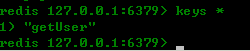

执行第二次查询操作:

上图可见,没有再执行sql,直接从redis中获取数据。
大功告成!!!!
在下初学,文中多有不足之处,还望多多指教。不喜勿喷。。。
Spring+Mybatis基于注解整合Redis的更多相关文章
- SpringMvc+Spring+MyBatis 基于注解整合
最近在给学生们讲Spring+Mybatis整合,根据有的学生反映还是基于注解实现整合便于理解,毕竟在先前的工作中团队里还没有人完全舍弃配置文件进行项目开发,由于这两个原因,我索性参考spring官方 ...
- 基于注解整合struts2与spring的时候如果不引入struts2-spring-plugin包自动装配无效
基于注解整合struts2与spring的时候如果不引入struts2-spring-plugin包,自动装配将无效,需要spring注入的对象使用时将抛出空指针异常(NullPointerExcep ...
- Spring+MyBatis纯注解零XML整合(4)
不得不说,利用XML作为配置文件是一个非常好的想法,它可以轻松地实现配置集中化,而且修改之后无需再次编译.然而,由于大多数情况下开发者基本都会拿到程序的源码,加之对于各种XML配置文件一般情况下也只有 ...
- Spring boot 基于注解方式配置datasource
Spring boot 基于注解方式配置datasource 编辑 Xml配置 我们先来回顾下,使用xml配置数据源. 步骤: 先加载数据库相关配置文件; 配置数据源; 配置sqlSessionF ...
- mybatis学习笔记(五) -- maven+spring+mybatis从零开始搭建整合详细过程(附demo和搭建过程遇到的问题解决方法)
文章介绍结构一览 一.使用maven创建web项目 1.新建maven项目 2.修改jre版本 3.修改Project Facts,生成WebContent文件夾 4.将WebContent下的两个文 ...
- Spring Boot 2.x整合Redis
最近在学习Spring Boot 2.x整合Redis,在这里和大家分享一下,希望对大家有帮助. Redis是什么 Redis 是开源免费高性能的key-value数据库.有以下的优势(源于Redis ...
- Maven聚合、Maven仓库jar包以及Spring+MyBatis+JUnit+Maven整合测试的搭建过程
一.Maven将父项目创建到父项目的内部 在父项目的pom.xml上 点右键,选择maven-->new-->maven module project 二.Maven聚合 在某个项目的p ...
- Spring Boot 2.x 整合 Redis最佳实践
一.前言 在前面的几篇文章中简单的总结了一下Redis相关的知识.本章主要讲解一下 Spring Boot 2.0 整合 Redis.Jedis 和 Lettuce 是 Java 操作 Redis 的 ...
- Spring Boot WebFlux-06——WebFlux 整合 Redis
第06课:WebFlux 整合 Redis 前言 上一篇内容讲了如何整合 MongoDB,这里继续讲如何操作 Redis 这个数据源,那什么是 Reids? Redis 是一个高性能的 key-val ...
随机推荐
- [板子]ISAP
ISAP求最大流,敲了一发板子,无压行,教程略去.转载请随意. #include <cstdio> #include <cstring> #include <algori ...
- Python学习--Python简介
Python 简介 Python是一种解释型.编译性.面向对象.动态数据类型的高级程序设计语言.Python由Guido van Rossum于1989年底发明,第一个公开发行版发行于1991年. P ...
- C#图像处理笔记
1.灰度拉伸 灰度拉伸又叫对比度拉伸,它是最基本的一种灰度变换,使用的是最简单的分段线性变换函数,它的主要思想是提高图像处理时灰度级的动态范围.
- beanstalkd 消息队列
概况:Beanstalkd,一个高性能.轻量级的分布式内存队列系统,最初设计的目的是想通过后台异步执行耗时的任务来降低高容量Web应用系统的页面访问延迟,支持过有9.5 million用户的Faceb ...
- C#-WebForm-简单控件
在HTML中称"元素",添加了"runat='server'"后称控件,后台服务端可以控制 想要后台改变前端的控件,需要先让后台获取前端控件 常用的简单的表单元 ...
- Android Studio配置OpenCV(非NDK)
参考:http://www.cnblogs.com/tail/p/4618476.html 工具: 1,Android Studio(AS)1.4 2,Opencv 2.4.11 步骤: 1,解压下载 ...
- (转)git常见错误
如果输入$ Git remote add origin git@github.com:djqiang(github帐号名)/gitdemo(项目名).git 提示出错信息:fatal: remote ...
- Leetcode 15. 3Sum
Given an array S of n integers, are there elements a, b, c in S such that a + b + c = 0? Find all un ...
- 【总结】.Net面试题集锦(一)
一.背景 最近一直在准备面试,收到的面试邀请邮件里还有面试题,真是要当面霸的节奏,不过看看也好,一方面能够锻炼锻炼生锈的脑子,查缺补漏一下,另一方面,万一靠这几个面试题拿到offer呢,哈哈.开个玩笑 ...
- JavaScript中的私有属性
一.使用构造函数获得私有属性: function Gadget(){ var name = 'iPod'; this.getName = function(){ return name; }; }; ...