
WPF把CheckBox的文字放到左边,开关在右边
效果
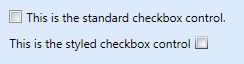
实现
这篇文章给了一个不错的参考方案.
http://www.codeproject.com/Articles/19141/WPF-Checkbox-Text-On-Left-Side
但是因为只是想把开关文字换一个位置,我觉得应该有CheckBox默认的模板再稍作修改就可以了.而且上面那个文章的方案在对其上面和原来的CheckBox有所不同.
所以我去看了一下CheckBox默认的模板.以下是和今天内容相关的部分.
<Setter Property="Control.Template">

  <Setter.Value>

    <ControlTemplate TargetType="CheckBox">

      <BulletDecorator Background="#00FFFFFF" SnapsToDevicePixels="True">

        <BulletDecorator.Bullet>

          <mwt:BulletChrome Background="{TemplateBinding Panel.Background}" BorderBrush="{TemplateBinding Border.BorderBrush}" RenderMouseOver="{TemplateBinding UIElement.IsMouseOver}" RenderPressed="{TemplateBinding ButtonBase.IsPressed}" IsChecked="{TemplateBinding ToggleButton.IsChecked}" />

        </BulletDecorator.Bullet>

        <ContentPresenter RecognizesAccessKey="True" Content="{TemplateBinding ContentControl.Content}" ContentTemplate="{TemplateBinding ContentControl.ContentTemplate}" ContentStringFormat="{TemplateBinding ContentControl.ContentStringFormat}" Margin="{TemplateBinding Control.Padding}" HorizontalAlignment="{TemplateBinding Control.HorizontalContentAlignment}" VerticalAlignment="{TemplateBinding Control.VerticalContentAlignment}" SnapsToDevicePixels="{TemplateBinding UIElement.SnapsToDevicePixels}" />

      </BulletDecorator>

    </ControlTemplate>

  </Setter.Value>

</Setter>
这里有一个很重要的类就是BulletDecorator,这是一个Decorator元素,它具有两个内容属性: Bullet 和 Child。 Bullet 属性定义用作项目符号的 UIElement。 Child 属性定义以可视化方式与该项目符号对齐的 UIElement。 也就是两个东西,左边的是Bullet右边的那个是Child.他们会自动对齐.所以解决方案就是把Bullet和Child的内容对换一下就好了.这里需要注意的是,BulletChrome是在clr-namespace:Microsoft.Windows.Themes;assembly=PresentationFramework.Aero的程序集中.所以项目需要添加PresentationFramework.Aero.dll的引用,这个文件在C:\Program Files\Reference Assemblies\Microsoft\Framework\v3.0下面.而且需要在XAML文档中声明.
下面给我修改后的源文件.
<Window x:Class="TreeAndCheckBox.MainWindow"

        xmlns="http://schemas.microsoft.com/winfx/2006/xaml/presentation"

        xmlns:x="http://schemas.microsoft.com/winfx/2006/xaml"

        xmlns:Microsoft_Windows_Themes="clr-namespace:Microsoft.Windows.Themes;assembly=PresentationFramework.Aero"

        Title="MainWindow" Height="350" Width="525">

    <Window.Resources>

        <ResourceDictionary>

            <Style TargetType="{x:Type CheckBox}">

                <Setter Property="Template">

                    <Setter.Value>

                        <ControlTemplate TargetType="{x:Type CheckBox}">

                            <BulletDecorator SnapsToDevicePixels="True" Background="#00FFFFFF">

                                <BulletDecorator.Bullet>

                                    <ContentPresenter

                                    SnapsToDevicePixels="{TemplateBinding UIElement.SnapsToDevicePixels}"

                                    Margin="{TemplateBinding Control.Padding}"

                                    VerticalAlignment="{TemplateBinding Control.VerticalContentAlignment}"

                                    HorizontalAlignment="{TemplateBinding Control.HorizontalContentAlignment}"

                                    ContentStringFormat="{TemplateBinding ContentControl.ContentStringFormat}"

                                    ContentTemplate="{TemplateBinding ContentControl.ContentTemplate}"

                                    Content="{TemplateBinding ContentControl.Content}"

                                    RecognizesAccessKey="True"/>

                                </BulletDecorator.Bullet>

                                <Microsoft_Windows_Themes:BulletChrome

                                        Background="{TemplateBinding Panel.Background}"

                                        IsChecked="{TemplateBinding ToggleButton.IsChecked}"

                                        RenderPressed="{TemplateBinding ButtonBase.IsPressed}"

                                        RenderMouseOver="{TemplateBinding UIElement.IsMouseOver}"

                                        BorderBrush="{TemplateBinding Border.BorderBrush}"/>

                            </BulletDecorator>

                        </ControlTemplate>

                    </Setter.Value>

                </Setter>

            </Style>

        </ResourceDictionary>

    </Window.Resources>

    <Grid>

        <CheckBox Content="测试CheckBox" HorizontalAlignment="Left" VerticalAlignment="Top" />

    </Grid>

</Window>
WPF把CheckBox的文字放到左边,开关在右边的更多相关文章
- WPF笔记(2.7 文字布局)——Layout
原文:WPF笔记(2.7 文字布局)--Layout 这一节介绍的是文字布局的几个控件:1.TextBlock 最基本的文字控件可以配置5个Font属性.TextWraping属性,&quo ...
- WPF:CheckBox竖向的滑块效果
原文:WPF:CheckBox竖向的滑块效果 之前做了一个横向的滑块效果,<WPF:CheckBox滑块效果>,其实我觉得那个不好看,今天又做了一个竖向的玩. <Style Targ ...
- WPF系列-CheckBox
自定义样式1 效果: 代码: <!-- CheckBox的样式 --> <Style TargetType="{x:Type CheckBox}"> < ...
- WPF 带CheckBox、图标的TreeView
WPF 带CheckBox.图标的TreeView 在WPF实际项目开发的时候,经常会用到带CheckBox的TreeView,虽然微软在WPF的TreeView中没有提供该功能,但是微软在WPF中提 ...
- radio 和checkbox与文字对齐问题
今天在项目中遇到radio和文字对齐问题(ie不明显,火狐和google比较明显),在此记录. 1.浏览器默认文字大小为14px,因而当文字字体为14px时radio和checkbox与文字对齐良好, ...
- WPF中CheckBox三种状态打勾打叉和滑动效果
本文分为两个demo, 第一个demo实现checkBox的打叉或打勾的效果: 第二个demo部分实现checkBox的滑动效果. Demo1: wpf的CheckBox支持三种状态,但是美中不足的是 ...
- js文字从左边飞入效果
贴代码之前,我们先讲一下它的原理,我们使用setInterval,让文字一开始置于屏幕看不到的位置,左右上下都可以,然后让它的位置不断移入到屏幕看得到的位置. 下面上代码: html: <h2 ...
- WPF 中的三维文字[转贴]
原文:WPF 中的三维文字[转贴] 原文: http://msdn.microsoft.com/msdnmag/issues/07/10/Foundations/default.aspx?loc=zh ...
- checkbox与文字对齐
checkbox和后面的文字如果不加样式,会导致checkbox和文字对齐,解决办法是对checkbox和文字同时添加如下样式: vertical-align:middle;
随机推荐
- May 27th 2017 Week 21st Saturday
I learned the value of hard work by working hard. 只有真的努力了,才会知道努力的价值. I remember in the movie, The Da ...
- OA环境搭建及卸载操作帮助文档
目 录 项目介绍 JDK的安装与验证 1.安装JDK 2.添加环境变量 3.验证JDK MySql的安装与验 1.安装MySql 2.登录Mysql帐号 3.导入数据库 Tomcat的安装与验证 ...
- gluon实现softmax分类FashionMNIST
from mxnet import gluon,init from mxnet.gluon import loss as gloss,nn from mxnet.gluon import data a ...
- 【转】Android listview与adapter用法
一个ListView通常有两个职责. (1)将数据填充到布局. (2)处理用户的选择点击等操作. 第一点很好理解,ListView就是实现这个功能的.第二点也不难做到,在后面的学习中读者会发现,这非常 ...
- 使用canvas上传图片+上传进度
实现效果: 速度过快,调式浏览器方式:F12 后台java代码 public String imageshangchuan(@RequestPart("xxx") Multipar ...
- Java中基本类型和引用类型(简单介绍)
8种基本类型 一.4种整型 byte 1字节 -128——127 short 2 字节 -32,768 —— 32,767 in ...
- QBXT Day 2 记录
例题1:乌龟棋 略 例题2: noip2015 子串 有两个仅包含小写英文字母的字符串 A 和 B. 现在要从字符串 A 中取出 k 个互不重叠的非空子串,然后把这 k 个子串按照其在字符串 A 中出 ...
- qbxt Day1 测试犯傻祭祀
今天是2018/7/15 然后又是我最不喜乱的测试,期末考试爆炸仍在眼前. T1 van♂游戏 题意 小喵喵喜欢玩RPG游戏.在这款游戏中,玩家有两个属性,攻击和防御,现在小喵喵的攻击和防御都是1,接 ...
- 【luogu P4231 三步必杀】 题解
题目链接:https://www.luogu.org/problemnew/show/P4231 诶 我很迷啊..这跟树状数组有什么关系啊...拿二阶差分数组过了..? #include <cs ...
- 【luogu P3808 AC自动机(简单版)】 模板
题目链接:https://www.luogu.org/problemnew/show/P3808 #include <queue> #include <cstdio> #inc ...