
Tensorflow训练结果测试
代码参考(https://blog.csdn.net/disiwei1012/article/details/79928679)
import os
import sys
import random
import math
import numpy as np
import skimage.io
import matplotlib
import matplotlib.pyplot as plt
# import coco
from mrcnn import utils
from mrcnn import model as modellib
from mrcnn import visualize
from mrcnn.config import Config
#%matplotlib inline
# Root directory of the project
ROOT_DIR = os.getcwd()
# Directory to save logs and trained model
MODEL_DIR = os.path.join(ROOT_DIR, "logs")
# Local path to trained weights file
COCO_MODEL_PATH = "mask_rcnn_shapes_0001.h5"
# Directory of images to run detection on
IMAGE_DIR = os.path.join(ROOT_DIR, "images")
class ShapesConfig(Config):
"""Configuration for training on the toy shapes dataset.
Derives from the base Config class and overrides values specific
to the toy shapes dataset.
"""
# Give the configuration a recognizable name
NAME = "shapes"
# Train on 1 GPU and 8 images per GPU. We can put multiple images on each
# GPU because the images are small. Batch size is 8 (GPUs * images/GPU).
GPU_COUNT = 1
IMAGES_PER_GPU = 1
# Number of classes (including background)
NUM_CLASSES = 1 + 1 # background + 3 shapes
# Use small images for faster training. Set the limits of the small side
# the large side, and that determines the image shape.
IMAGE_MIN_DIM = 1024
IMAGE_MAX_DIM = 1280
# Use smaller anchors because our image and objects are small
RPN_ANCHOR_SCALES = (8 * 6, 16 * 6, 32 * 6, 64 * 6, 128 * 6) # anchor side in pixels
# Reduce training ROIs per image because the images are small and have
# few objects. Aim to allow ROI sampling to pick 33% positive ROIs.
TRAIN_ROIS_PER_IMAGE = 32
# Use a small epoch since the data is simple
STEPS_PER_EPOCH = 100
# use small validation steps since the epoch is small
VALIDATION_STEPS = 5
class InferenceConfig(ShapesConfig):
# Set batch size to 1 since we'll be running inference on
# one image at a time. Batch size = GPU_COUNT * IMAGES_PER_GPU
GPU_COUNT = 1
IMAGES_PER_GPU = 1
config = InferenceConfig()
config.display()
# Create model object in inference mode.
model = modellib.MaskRCNN(mode="inference", model_dir=MODEL_DIR, config=config)
# Load weights trained on MS-COCO
model.load_weights(COCO_MODEL_PATH, by_name=True)
# COCO Class names
# Index of the class in the list is its ID. For example, to get ID of
# the teddy bear class, use: class_names.index('teddy bear')
class_names = ['BG', 'mono']
# Load a random image from the images folder
file_names = next(os.walk(IMAGE_DIR))[2]
image = skimage.io.imread(os.path.join(IMAGE_DIR, random.choice(file_names)))
# Run detection
results = model.detect([image], verbose=1)
# Visualize results
r = results[0]
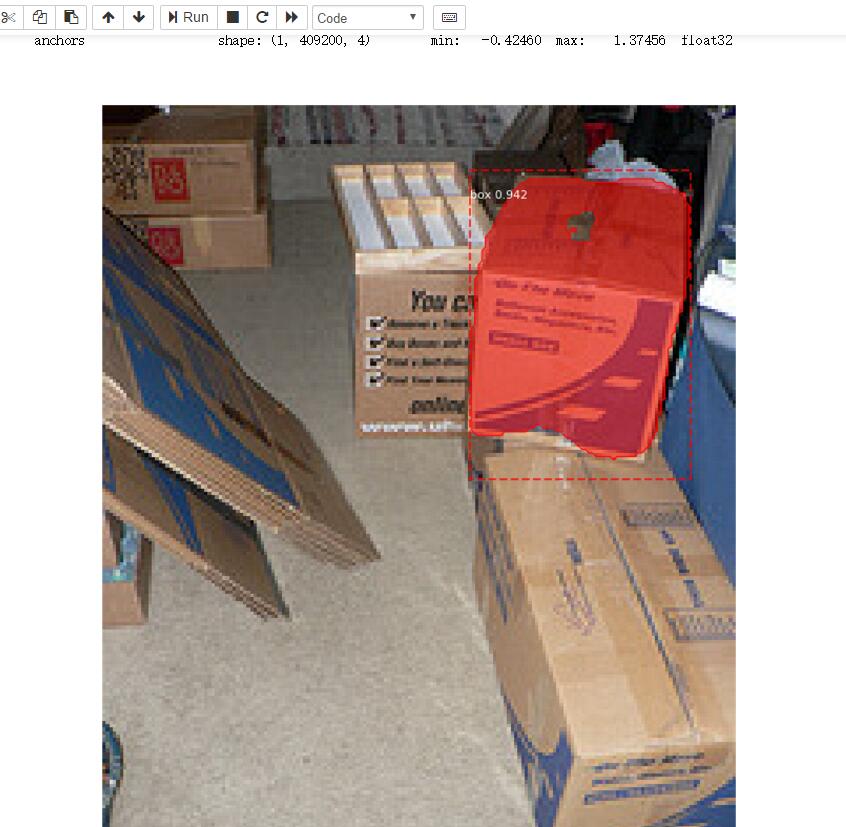
visualize.display_instances(image, r['rois'], r['masks'], r['class_ids'],
class_names, r['scores'])
print('OK')
Tensorflow训练结果测试的更多相关文章
- 不要怂,就是GAN (生成式对抗网络) (四):训练和测试 GAN
在 /home/your_name/TensorFlow/DCGAN/ 下新建文件 train.py,同时新建文件夹 logs 和文件夹 samples,前者用来保存训练过程中的日志和模型,后者用来保 ...
- TensorFlow 训练MNIST数据集(2)—— 多层神经网络
在我的上一篇随笔中,采用了单层神经网络来对MNIST进行训练,在测试集中只有约90%的正确率.这次换一种神经网络(多层神经网络)来进行训练和测试. 1.获取MNIST数据 MNIST数据集只要一行代码 ...
- 2、TensorFlow训练MNIST
装载自:http://www.tensorfly.cn/tfdoc/tutorials/mnist_beginners.html TensorFlow训练MNIST 这个教程的目标读者是对机器学习和T ...
- TensorFlow------单层(全连接层)实现手写数字识别训练及测试实例
TensorFlow之单层(全连接层)实现手写数字识别训练及测试实例: import tensorflow as tf from tensorflow.examples.tutorials.mnist ...
- tensorflow训练验证码识别模型
tensorflow训练验证码识别模型的样本可以使用captcha生成,captcha在linux中的安装也很简单: pip install captcha 生成验证码: # -*- coding: ...
- TensorFlow训练MNIST报错ResourceExhaustedError
title: TensorFlow训练MNIST报错ResourceExhaustedError date: 2018-04-01 12:35:44 categories: deep learning ...
- ensorflow学习笔记四:mnist实例--用简单的神经网络来训练和测试
http://www.cnblogs.com/denny402/p/5852983.html ensorflow学习笔记四:mnist实例--用简单的神经网络来训练和测试 刚开始学习tf时,我们从 ...
- 使用TensorFlow训练自己的语音识别AI
这次来训练一个基于CNN的语音识别模型.训练完成后,我们将尝试将此模型用于Hotword detection. 人类是怎样听懂一句话的呢?以汉语为例,当听到"wo shi"的录音时 ...
- Caffe初试(二)windows下的cafee训练和测试mnist数据集
一.mnist数据集 mnist是一个手写数字数据库,由Google实验室的Corinna Cortes和纽约大学柯朗研究院的Yann LeCun等人建立,它有60000个训练样本集和10000个测试 ...
随机推荐
- ESLint在vue中的使用
ESLint的用途 1.审查代码是否符合编码规范和统一的代码风格: 2.审查代码是否存在语法错误: 中文网地址 http://eslint.cn/ 使用VSCode编译器在Vue项目中的使用 在初始 ...
- HDU - 3949 :XOR(线性基,所有集合的不同异或和中,求从小到大第K个)
XOR is a kind of bit operator, we define that as follow: for two binary base number A and B, let C=A ...
- iOS UI调试工具 -- UIDebuggingInformationOverlay
英文原文: http://ryanipete.com/blog/ios/swift/objective-c/uidebugginginformationoverlay/ 无意中看到iOS自带调试工具 ...
- 剑指offer-第六章面试中的各项能力(扑克牌中的顺子)
//扑克牌的顺子 //题目:在一个扑克牌中随机的抽5张牌,看是不是顺子.大小王为0,A为1,J为11,Q为12,K为13.其他数字为自己本身. //思路:大小王可以代表任意一个数字,因此我们在看是不是 ...
- LA2797 Monster Trap
题意 PDF 分析 可以考虑建图,跑迷宫. 然后以线段端点,原点,和无穷大点建图,有边的条件是两点连线和墙没有交点. 但是对两个线段的交点处理就会有问题,所以把线段延长.另外还需要判断延长后在墙上,舍 ...
- Linux 环境下安装Maven
1.安装wget命令 如果需要通过使用wget命令,直接通过网络下载maven安装包时,需要在linux系统中安装wget命令. yum -y install wget 2.下载maven安装包 wg ...
- fatal: read error: Connection reset by peer解决办法
标签(空格分隔): ceph源码安装,git 问题描述: 源码安装ceph,克隆代码时提示如下错误: [root@localhost ~]# git clone git://github.com/ce ...
- PHP传入数组到js
1.方式一,处理成字符串 js再将字符串处理成数组. var spec1_default = "{$spec1_default}"; spec1_default = spec1_d ...
- 【转】分布式存储和一致性hash
本文我将对一致性算法作介绍,同时谈谈自己对一致性hash和一般意义上的hash算法的区别 hash是什么 hash即hash算法,又称为散列算法,百度百科的定义是 哈希算法将任意长度的二进制值映射为较 ...
- 工程添加EF框架的方法
1.VS2015添加新项缺少ADO.net实体数据模型解决方法 手动运行安装目录包中的\packages\EFTools\EFTools.msi即可恢复 2.此时,在添加->新建项目下会出现AD ...