
Struts2 第六讲 -- Struts2的结果类型
7.struts2的结果类型
- l 每个 action 方法都将返回一个 String 类型的值, Struts 将根据这个值来决定响应什么结果.
- l 每个 Action 声明都必须包含有数量足够多的 result 元素, 每个result 元素分别对应着 action 方法的一个返回值.
- l result 元素可以有下面两个属性
- l name: 结果的名字, 必须与 Action 方法的返回值相匹配, 默认值为 success
- l type: 响应结果的类型. 默认值为 dispatcher
struts2的所有结果类型在struts2-core-2.5.14.jar文件struts-default.xml中配置
   <result-types>

            <result-type name="chain" class="com.opensymphony.xwork2.ActionChainResult"/>

            <result-type name="dispatcher" class="org.apache.struts2.dispatcher.ServletDispatcherResult" default="true"/>

            <result-type name="freemarker" class="org.apache.struts2.views.freemarker.FreemarkerResult"/>

            <result-type name="httpheader" class="org.apache.struts2.dispatcher.HttpHeaderResult"/>

            <result-type name="redirect" class="org.apache.struts2.dispatcher.ServletRedirectResult"/>

            <result-type name="redirectAction" class="org.apache.struts2.dispatcher.ServletActionRedirectResult"/>

            <result-type name="stream" class="org.apache.struts2.dispatcher.StreamResult"/>

            <result-type name="velocity" class="org.apache.struts2.dispatcher.VelocityResult"/>

            <result-type name="xslt" class="org.apache.struts2.views.xslt.XSLTResult"/>

            <result-type name="plainText" class="org.apache.struts2.dispatcher.PlainTextResult" />

        </result-types>
7.1 dispatcher(请求转发)
- l dispatcher 结果类型是最常用的结果类型, 也是 struts 框架默认的结果类型
- l 该结果类型有一个 location 参数, 它是一个默认参数
<action name="contextAction02_test" class="cn.youric.you.two_context.ContextActionTwo">

            <result name="success" type="dispatcher">

                <param name="location">/context/attr.jsp</param>

            </result>

        </action>
<action name="contextAction02_test" class="cn.youric.you.two_context.ContextActionTwo">

        <result name="success" type="dispatcher">/context/attr.jsp</result>

</action>
<action name="contextAction02_test" class="cn.youric.you.two_context.ContextActionTwo">

            <result name="success">/context/attr.jsp    </result>

</action>
上面三个是等价的。
- l dispatcher 结果类型将把控制权转发给应用程序里的某个资源.
- l dispatcher 结果类型不能把控制权转发给一个外部资源. 若需要把控制权重定向到一个外部资源, 应该使用 redirect 结果类型
7.2 redirect(重定向到页面)
- l redirect 结果类型将把响应重定向到另一个资源, 而不是转发给该资源.
- l redirect 结果类型接受下面这些参数:
- l location: 用来给出重定向的目的地
- l param: 用来表明是否把 location 参数的值视为一个 OGNL 表达式来解释. 默认值为 true
- l redirect 结果类型可以把响应重定向到一个外部资源
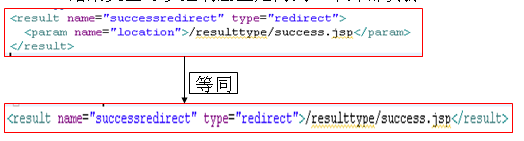
也可以重定向到其它项目下;
7.3 redirectAction(重定向到Action)
- l redirectAction 结果类型把响应重定向到另一个 Action
- l redirectAction 结果类型接受下面这些参数:
- l actionName: 指定 “目的地” 动作的名字. 它是默认属性
- l namespace: 用来指定 “目的地” 动作的命名空间. 如果没有配置该参数, Struts 会把当前 Action 所在的命名空间作为 “目的地” 的命名空间

7.4 chain(解决重定向request作用域失效)
解决request作用域传递值失效的问题。我们知道请求转发是一个请求,那么重定向就是两个请求了,此时request域不是同一个,自然数据也就消失了,那么怎么解决作用域失效的问题呢?
我们下面做这样一个操作,访问【创建一个新包,将原类copy过来】ContextAction,然后重定向到helloWorldAction.action,在对应的Action类中获取request域中中的username【两种情况,一种不考虑解决域失效,一种解决域失效】
  <body>

    <form action="${pageContext.request.contextPath}/resulttype/resulttypeAction.action"

          name="form1"  method="post">

      <input type="submit" value="提交">

    </form>

  </body>
@SuppressWarnings("serial")

public class ResulttypeAction extends ActionSupport{

    @Override

    public String execute() throws Exception {

        System.out.println("欢迎访问ResulttypeAction中的execute方法!");

        ActionContext.getContext().put("username", "request_username");

        return SUCCESS;

    }

}
<struts>

    <package name="resulttype" namespace="/resulttype" extends="struts-default">

        <default-action-ref name="resulttypeAction"></default-action-ref>

        <action name="resulttypeAction" class="cn.youric.you.c_resulttype.ResulttypeAction">

            <result name="success" type="redirectAction">

                <param name="namespace">/primer</param>

                <param name="actionName">helloWorldAction.action</param>

            /context/success.jsp</result>

        </action>

    </package>

</struts>
public class HelloWorldAction extends ActionSupport{

    @Override

    public String execute() throws Exception {

        System.out.println("欢迎访问HelloWorldAction中的execute方法!");

        String username = (String) ServletActionContext.getRequest().getAttribute("username");

        System.out.println("跨域获取:"+username);

        return "success";

    }

我们发现重定向的话,request域中的数据丢失了,因为这是两个请求,下面解决
方式一:
type=redirectAction,使用OGNL表达式,从request作用域中获取username的值,然后再使用username作为名称,传递给重定向的的Action类
在HelloWorldAction类中使用:
String username = ServletActionContext.getRequest().getParameter("username");

Struts-resulttype。Xml      HelloWorldAction
<action name="resulttypeAction" class="cn.youric.you.c_resulttype.ResulttypeAction">

            <result name="success" type="redirectAction">

                <param name="namespace">/primer</param>

                <param name="actionName">helloWorldAction.action?username=${#request.username}</param>

            /context/success.jsp</result>

        </action>
    @Override

    public String execute() throws Exception {

        System.out.println("欢迎访问HelloWorldAction中的execute方法!");

        String username = (String) ServletActionContext.getRequest().getParameter("username");

        System.out.println("跨域获取:"+username);

        return "success";

    }

相当于是将request域中的参数取出,作为重定向请求的参数传递
方式二:
type=chain,此时不需要传递username的值
在HelloWorldAction类中使用:
String username = (String) ServletActionContext.getRequest().getAttribute("username");
ResulttypeAction
@Override
    public String execute() throws Exception {
        System.out.println("欢迎访问ResulttypeAction中的execute方法!");
        ActionContext.getContext().put("username", "request_username");
        return SUCCESS;
    }
<result name="success" type="chain">

                <param name="namespace">/primer</param>

                <param name="actionName">helloWorldAction.action</param>

            </result>
HelloWorldAction
@Override
    public String execute() throws Exception {
        System.out.println("欢迎访问HelloWorldAction中的execute方法!");
        String username = (String) ServletActionContext.getRequest().getAttribute("username");
//        String username = (String) ServletActionContext.getRequest().getParameter("username");
        System.out.println("跨域获取:"+username);
        return "success";
    }
String username = (String) ServletActionContext.getRequest().getAttribute("username");

测试Action类:
Struts2 第六讲 -- Struts2的结果类型的更多相关文章
- Struts2 第四讲 -- Struts2的基本配置
5.struts2的基本配置 5.1 struts2的访问连接url 在struts1中,通过<action path=“/primer/helloWorldAction.action”> ...
- Struts2 第二讲 -- Struts2的入门
搭建struts2环境时,我们一般需要做以下几个步骤的工作: 第一步:创建javaweb工程(这个很废话有木有) 第二步:找到开发Struts2应用需要使用到的jar文件.(这个很白痴有没有) 到ht ...
- 六、Struts2的配置文件
六.Struts2的配置文件 1.default.properties:在struts2-core-**.jar的org.apache.struts包中 关于Struts2一些常量配置(框架内部) s ...
- Java框架之Struts2(六)
一.OGNL表达式语言 Ognl Object Graphic Navigation Language(对象图导航语言),它是一种功能强大的表达式语言(Expression Language,简称为E ...
- 二十六:Struts2 和 spring整合
二十六:Struts2 和 spring整合 将项目名称为day29_02_struts2Spring下的scr目录下的Struts.xml文件拷贝到新项目的scr目录下 在新项目的WebRoot-- ...
- Struts2 用 s:if test 判断String类型的对象属性值和单字符是否相等的问题
Struts2 用 s:if test 判断String类型的对象属性值和单字符是否相等的问题 首先,这里所指的单字符形如:Y,男. 有两种做法: a. <s:if test='news.s ...
- 第六篇——Struts2的后缀
Struts2后缀 1.Struts2默认后缀是action: 2.Struts2使用默认后缀时 *.aciton 和 * 都是同一个请求: 3.Struts2自定义后缀后只能使用自定义的后缀访问: ...
- 【Java EE 学习 36】【struts2】【struts2系统验证】【struts2 ognl值栈】【struts2 ongl标签】【struts2 UI标签】【struts2模型驱动和令牌机制】
一.struts2系统验证 1.基于struts2系统验证的方式实际上就是通过配置xml文件的方式达到验证的目的. 2.实际上系统校验的方法和手工校验的方法在底层的基本实现是相同的.但是使用系统校验的 ...
- Struts2系列笔记(7)---Struts2类型转换
Struts2类型转换 struts2中内置了大量的类型转换器用来完成数据类型转换的问题,这篇随笔主要通过两个方面来写Struts类型转换 1:Struts2内置的类型转换器 2:如何自定义 ...
随机推荐
- 【shell】《shell学习指南》读书笔记
一.使用shell脚本 优点:脚本语言能够轻易处理文件与目录之间的对象,如把文件从所有目录拷贝到另一个目录 缺点:效率不如编译型语言 二.简单的脚本 1.查看现在系统有谁登录 $who 2.算出行数 ...
- phpstorm一些简单配置
1.字体大小和行间距 2.设置编码:包括编辑工具编码和项目编码
- 跨页面传值2之cookie多值使用
单值cookie结构 CookieKeyName——CookieValue CookieKeyName2——CookieValue2 ............... 通过CookieKeyName进行 ...
- java.sql.SQLException: The server time zone value 'Öйú±ê׼ʱ¼ 解决方案
//第一个异常 Loading class `com.mysql.jdbc.Driver'. This is deprecated. The new driver class is `com.mysq ...
- oracle之数据同步:Oracle Sql Loader使用说明(大批量快速插入数据库记录)
1.准备表数据 select * from emp10; create sequence seq_eseq increment start maxvalue ; --得到序列的SQL语句 select ...
- Bootstrap导航栏navbar源码分析
1.本文目地:分析bootstrap导航栏及其响应式的实现方式,提升自身css水平 先贴一个bootstrap的导航栏模板 http://v3.bootcss.com/examples/navbar- ...
- HTML表单(form)的“enctype”属性
Form元素的语法中,EncType表明提交数据的格式 属性值: application/x-www-form-urlencoded:在发送前编码所有字符(默认) multipart/form-dat ...
- asp.net后台获取html控件的值
1.asp.net后台获取前台type=text控件的值 前台:<input name="txtName" class="username" type=& ...
- python 后台运行命令
nohup python a.py > a.log 2>&1 & 在窗口中单开虚拟session: tmux new -s "name" 推出虚拟窗口 ...
- Chrome+ProxySwitchySharp+Putty
好不容易写一个不编程的随笔了. 题目写出来,目的就已经很明确了,我就不详细解释原因了. 其实一年前多就已经配置成功了,写这篇随笔主要是给自己做一个备份,如果顺便能帮助其他人,也算功德无量了. 我就从最 ...