
修复XAMPP安装过程中 因端口80被占用 Apache无法启动的问题
Fix XAMPP Apache Not Starting Because Port 80 In Use
XAMPP中Apache服务器无法启动,出现该问题的最常见原因是由于默认端口号80可能已被其他程序(如Skype,Teamviewer等)使用。
得到了以下消息,其中说明了另一个程序使用的80端口
I can not start Apache because of the problem mentioned below.

I can not understand how to solve it. Any body help me, please.

3:07:06 PM [main] Initializing Control Panel

3:07:06 PM [main] Windows Version: Windows 7 Ultimate 32-bit

3:07:06 PM [main] XAMPP Version: 1.8.3

3:07:06 PM [main] Control Panel Version: 3.2.1 [ Compiled: May 7th 2013 ]

3:07:06 PM [main] You are not running with administrator rights! This will work for

3:07:06 PM [main] most application stuff but whenever you do something with services

3:07:06 PM [main] there will be a security dialogue or things will break! So think

3:07:06 PM [main] about running this application with administrator rights!

3:07:06 PM [main] XAMPP Installation Directory: “c:\xampp\”

3:07:06 PM [main] Checking for prerequisites

3:07:07 PM [main] All prerequisites found

3:07:07 PM [main] Initializing Modules

3:07:07 PM [Apache] Problem detected!

3:07:07 PM [Apache] Port 80 in use by “Unable to open process” with PID 4!

3:07:07 PM [Apache] Apache WILL NOT start without the configured ports free!

3:07:07 PM [Apache] You need to uninstall/disable/reconfigure the blocking application

3:07:07 PM [Apache] or reconfigure Apache and the Control Panel to listen on a different port

3:07:07 PM [main] Starting Check-Timer

3:07:07 PM [main] Control Panel Ready

3:08:54 PM [Apache] Problem detected!

3:08:54 PM [Apache] Port 80 in use by “Unable to open process” with PID 4!

3:08:54 PM [Apache] Apache WILL NOT start without the configured ports free!

3:08:54 PM [Apache] You need to uninstall/disable/reconfigure the blocking application

3:08:54 PM [Apache] or reconfigure Apache and the Control Panel to listen on a different port

3:08:54 PM [Apache] Attempting to start Apache app…

3:08:54 PM [Apache] Status change detected: running

3:08:56 PM [Apache] Status change detected: stopped

3:08:56 PM [Apache] Error: Apache shutdown unexpectedly.

3:08:56 PM [Apache] This may be due to a blocked port, missing dependencies,

3:08:56 PM [Apache] improper privileges, a crash, or a shutdown by another method.

3:08:56 PM [Apache] Press the Logs button to view error logs and check

3:08:56 PM [Apache] the Windows Event Viewer for more clues

3:08:56 PM [Apache] If you need more help, copy and post this

3:08:56 PM [Apache] entire log window on the forums
解决方案1:找到并停止冲突程序 重启Apache服务器
如果您仔细阅读此XAMPP消息,您将看到他们提供解决方案 - 卸载/禁用或重新配置阻止程序。一般来说,Apache最常见的冲突程序是Skype, 如果是这种情况 退出/停止 Skype并重新运行Apache查看。 我还听过Teamviewer,Microsoft Internet Server等其他程序也使用端口80并妨碍Apache启动。
然而,这并不是最佳解决方案。 如果今天这个程序妨碍Apache启动,明天那一个程序(甚至像Windows Web发布服务等服务)同样也可以使用相同的端口妨碍Apache运行。
解决方案2:更改XAMPP 中 Apache Server的默认端口80,443
因此,像EL.Web.ID和Geethika这样的最佳解决方案是重新配置XAMPP Apache服务器以侦听和使用不同的端口号。
1、首先,您需要打开Apache 的配置文件 httpd.conf并将其配置为在新端口号上使用/监听
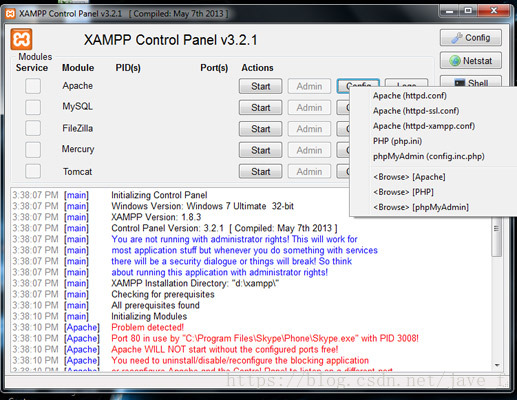
单击并打开XAMPP控制面板Apache的 Config 按钮, 在打开的弹出菜单中,单击并打开 httpd.conf
2、在 httpd.conf 文件中搜索 listen,定位到类似这段代码位置
#Listen 12.34.56.78:80

Listen 80
将端口号更改为你选择的(如端口1234),如下所示
#Listen 12.34.56.78:1234

Listen 12343、接下来,httpd.conf 文件中查找 rverName localhost:,将其设置为新端口号
ServerName localhost:12344、保存并关闭 httpd.conf 文件
5、再次单击并打开XAMPP控制面板Apache的 Config 按钮,并打开 httpd-ssl.conf 文件
6、同样地,在 httpd-ssl.conf 文件中搜索 listen,将
Listen 443修改为
Listen 14437、 接下来,httpd-ssl.conf 文件中搜索 <VirtualHost _default_:443>,将其设置为新端口号 (如1443)
同样地,在其中搜索 ServerName
ServerName www.example.com:443 or ServerName localhost:433将 ServerName 修改为新端口号(如1443)
8、保存并关闭 httpd-ssl.conf 文件
9、最后,还有一个地方你应该去改变端口号。
单击并打开XAMPP控制面板Apache的 Config 按钮,然后单击 Service and Port Settings 按钮,选中 Apache 选项卡,然后在 main port 和 SSL port 框中输入并保存新端口号 (1234,1443)。
如果一切顺利,您的Apache服务器应该便正常启动了,XAMPP控制面板中的 Apache 端口号 已更改为您设置的新端口号
英文原文
Fix XAMPP Apache Not Starting Because Port 80 In Use
修复XAMPP安装过程中 因端口80被占用 Apache无法启动的问题的更多相关文章
- XAMPP安装过程中,出现的问题
这次运行一个简单的前端(html+css+js+ajax)+php后端项目,运行XAMPP的时候,出现两个问题: phpmyadmin运行不起来,一直报1544错误 请求本地图片及php文件报403错 ...
- 用友ERP-U8最新破解(再次更新版本,附安装过程中的解决办法)
新版用友u8.70下载地址:http://ftp.shangyuchem.com/应用软件/用友ERP-U8管理软件(8.70版).rar 准备好安装环境,因为需要SQLSERVER和IIS支持,而个 ...
- oracle 11g在安装过程中出现监听程序未启动或数据库服务未注册到该监听程序
15511477451 原文 oracle 11g在安装过程中出现监听程序未启动或数据库服务未注册到该监听程序? 环境:win7 64位系统.oracle11g数据库 问题描述:在win7 64位系统 ...
- MySQL5.7 安装过程中出现 attempting to start service 过不去
MySQL5.7 安装过程中出现 attempting to start service 过不去. 1,机制打开服务,把MySql服务名启动(我的是MySqlAliyun) 启动失败:提示1067错误 ...
- iOS cocopods安装使用和安装过程中遇到的问题及解决办法
在osx 10.11之前cocopods问题不多,但是升级到11之后的版本,之前的cocopods大多用不了,需要重新安装,对于我这种使用测试版系统的技术狂来说,每次都需要重新安装很多东西, 当然,c ...
- ltib安装过程中遇到好多问题,从网上转来的好多份总结
最近调试MPC5125的板子,第一步LTIB都装不过去,挫败感十足. LTIB的安装镜像来自于freescale的ltib-mpc5121ads-200906,是用于Ubuntu 10版本之前的,现在 ...
- ubuntu安装过程中遇到的一些问题及解决办法。
由于ubuntu与win10的双系统安装过程百度一下就有很多,在此不再赘述. (其实主要是忘记拍照片了,我一个菜鸡说得肯定也没有那些大佬们好,但网上确实也很多哈,加上有中文引导安装,问题不大.) 此篇 ...
- JAVA安装过程中出现的“javac不是内部或外部指令”的解决方法
近来重新安装了JAVA,安装过程中出现问题,网上找到解决办法,汇总发布. 解决流程: 1.确定自己的环境变量设置没问题,没有出现遗漏 : . 等情况 (具体环境变量设置百度) 2.环境变量设置后 ,d ...
- SQL Server 2008 安装过程中遇到“性能计数器注册表配置单元一致性”检查失败 问题的解决方法
操作步骤: 1. 在 Microsoft Windows 2003 或 Windows XP 桌面上,依次单击"开始"."运行",然后在"打开&quo ...
随机推荐
- egrep对于conf文件中去掉#注释,排除无用项
[root@localhost conf]# egrep -v "#|^$" nginx.conf.default > nginx.conf dd
- Javascript 的addEventListener()及attachEvent()区别分析
大家都知道事件的用法就是当某个事件(状况)被触发了之后就会去执行某个Function, 尤其是Javascript, 在当红AJAX的催化下, 了解Javascript的Event用法更加重要, 在这 ...
- Spring学习-- Bean 的作用域
Bean 的作用域: 在 Spring 中 , 可以在 <bean> 元素的 scope 属性里设置 bean 的作用域. 默认情况下 , Spring 只为每个在 IOC 容器里声明的 ...
- java三
1,深复制与浅复制 浅复制:被复制对象的所有变量都含有与原来的对象相同的值,而所有的对其他对象的引用仍然指向原来的对象.换言之,浅复制仅仅复制所考虑的对象,而不复制它所引用的对象. 深复制:被复制对象 ...
- 汕头市队赛 SRM 06 A 撕书
A 撕书 SRM 06 背景&&描述 游行寺汀正在杀书. 书总共有n页,每页都可以看作是一个小写英文字母,所以我们可以把书看成长度为n的字符串s. 琉璃 ...
- NYOJ 284 坦克大战 (广搜)
题目链接 描述 Many of us had played the game "Battle city" in our childhood, and some people (li ...
- Bcrypt介绍
Bcrypt把算法版本.计算次数和salt都放到hash值里面去了 Stored in the database, a bcrypt "hash" might look somet ...
- Swift开发学习(一):初始篇
http://blog.csdn.net/powerlly/article/details/29351103 Swift开发学习:初始篇 关于 苹果公司于WWDC2014(Apple Worldwid ...
- (接口自动化)Python3操作MySQL数据库
基础语法: import pymysql #导入模块 conn = pymysql.connect(host='localhost',user='root', passwd='123456', db= ...
- CUDA核函数调用基础数学API的一个奇葩情况
今天测试在核函数在GTX 950M上运行的情况,核函数中的pow竟然出不来结果...在网上查了一圈,说是要改成powf,结果确实就好了. 但是,奇怪的是,CUDA版本都是最新的8.0,之前在GT 72 ...