
【招聘App】—— React/Nodejs/MongoDB全栈项目:项目准备
前言:最近在学习Redux+react+Router+Nodejs全栈开发高级课程,这里对实践过程作个记录,方便自己和大家翻阅。最终成果github地址:https://github.com/66Web/react-antd-zhaoping,欢迎star。
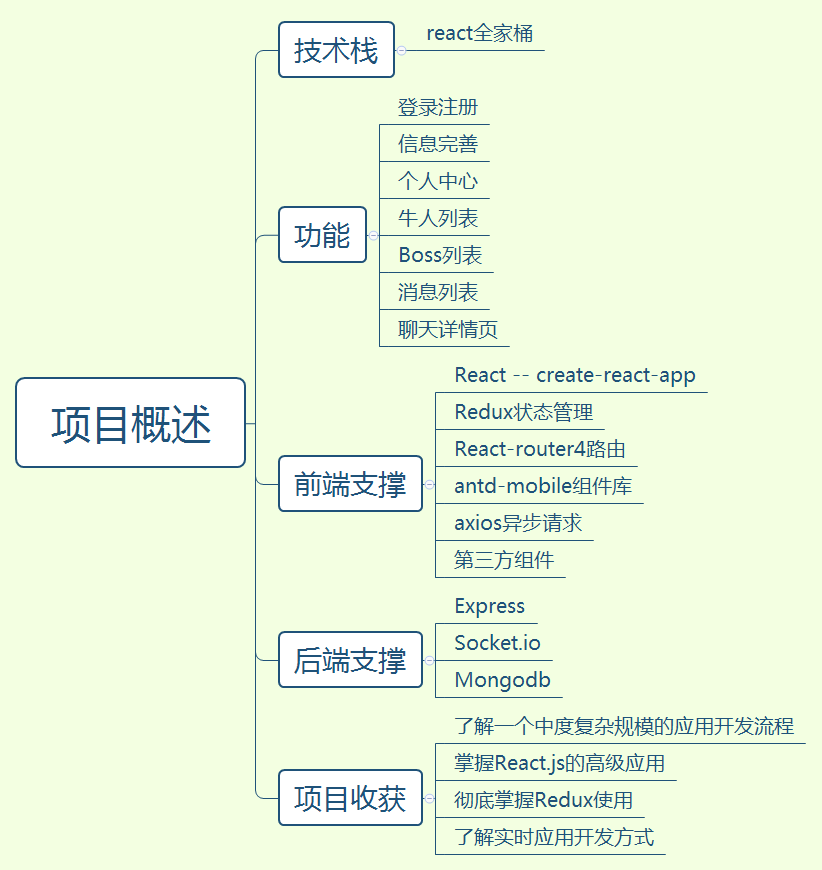
一、项目概述
二、需求分析
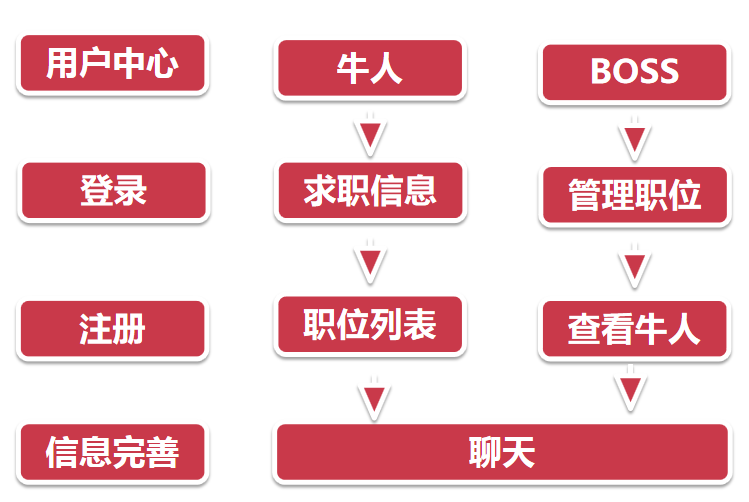
- 文件架构和规范
- src目录:前端源码目录
- server目录:后端express目录
- 根据功能文件夹:component,container,reducers等
- router划分页面方式
- 进入应用时获取用户信息,用户未登录跳转login页面
- Login和reigster页面不需要权限认证
- 用户信息,聊天列表,职位列表页面共享底部tabbar
- 其它注意事项
- Mongodb字段设计
- axios发送异步请求
- redux管理所有数据,组件尽量用antd-mobile,弱化css
三、React开发环境
- Ceate-reacp-app脚手架生成文件格式
- 官网:https://github.com/facebookincubator/create-react-app
- 全局安装:
npm install -g create-react-app
- 新建项目:
create-react-app my-project
- 开启调试环境:
npm start
- 查看调试页面:浏览器访问localhost:3000
- 脚手架命令
- 安装第三方库redux:
npm install redux --save
- 弹出配置文件,自定义配置webpack:
npm run eject
- 扩展package.json里的script字段,扩展npm run命令
四、ES6常用语法
- ES6是新的JavaScript语法规范
- 使用babel语法转换器,支持低端浏览器
- 流行的库基本都属于ES6构建,React默认使用ES6新语法开发
- ES6语法概述:块级作用域、字符串、函数、对象扩展、解构、类、模块化
五、AntD-Mobile组件库
- 蚂蚁金服出品的UI组件库:antdesignPC端使用,ant-mobile移动端使用
- Ant Design Mobile:一个基于 Preact / React / React Native 的 UI 组件库
- 官网:https://mobile.ant.design/index-cn 【AntUI文档】
- 安装:
npm install antd-mobile --save

//或使用yarn更块

yarn add antd-mobile --save
- 使用组件
import {Button} from 'antd-mobile'

import 'antd-mobile/dist/antd-mobile.css' //全部加载 - 按需加载
- 安装babel-plugin-import(之后就可以不用引入css)
yarn add babel-plugin-import --save
- 配置:修改package.json中的bable项
"plugins":[

    ["import", { "libraryName": "antd-mobile", "style": "css" }] // `style: true` 会加载 less 文件

] - 个性化配置需要执行
npm run eject
- 兼容Web和ReactNative
- 常用组件:Import后可以直接使用
- Layout 布局组件
- 表单组件,数据展示组件,选择器等等
- 操作组件
六、前后端联调
- 使用axios发送异步请求
axios:简洁好用的发送请求库
npm install axios --save
- 如何发送:端口不一致,使用proxy配置转发
- package.json中:使用proxy统一端口
"proxy":"http://localhost:9093" //所有端口都转换到9093
- 获取数据(不使用redux的情况)
import axios from 'axios'

constructor(props){

    super(props)

    this.state = {

         data: {}

    }

}

componentDidMount(){

     axios.get('/data')

        .then(res => {

                if(res.status == 200){

                   this.setState({data: res.data})

                }

                //console.log(res)

       })

}

<h2>我的名字是{this.state.data.user}</h2>
- 使用redux获取数据
- redux.js中:使用异步数据
import axios from 'axios'

const USER_DATA = 'USER_DATA'

const initState = {

        user: '李云龙',

        age: 20

}

export function auth(state=initState,action){

        switch(action.type){

             case USER_DATA:

                  return {...state, ...action.payload}

             default:

                  return state

        }

}

//获取异步数据:axios.get,post发送请求,返回promise对象;Redux里获取数据,然后dispatch即可

export function getUserdata(){

        //dispatch用来通知数据修改

        return dispatch => {

             axios.get('/data')

               .then(res => {

                  if(res.status == 200){

                    dispatch(userData(res.data)

                  }

                  //console.log(res)

             })

        }

}

export function userData(data){

        return {type:USER_DATA, payload:data}

}
Auth.js中:渲染页面
import {connect} from 'react-redux'

import {getUserData} from './Auth.redux'

componentDidMount(){

       this.props.getUserData()

}

<h2>我的名字是{this.props.user},年龄{this.props.age}</h2>

Auth = connect()(Auth)

export default Auth;
- axios拦截器,统一loading处理
config.js中:专门配置axios,Axios.interceptors设置拦截器,比如全局的loading
import axios from 'axios'

import {Toast} from 'antd-mobile'  //轻提示

//拦截请求

axios.interceptors.request.use(function(config){

         Toast.loading('加载中',0)

         return config

})

//拦截响应

axios.interceptors.response.use(function(config){

         Toast.hide()

         return config

})
index.js中:应用axios和antd配置
import './config'

import 'antd-mobile/dist/antd-mobile.css'
七、项目环境搭建
- 安装
yarn  add  antd-mobile   babel-plugin-import  axios  express、

           mongoose  react-redux  redux   redux-thunk

           redux-devtools-extension   cookie-parser  --save
yarn add babel-plugin-transform-decorators-legacy --save-dev
配置
"babel": {

    "presets": [

      "react-app"

    ],

    "plugins": [

      [

        "import",

        {

          "libraryName": "antd-mobile",

          "style": "css"

        }

      ],

      ["@babel/plugin-proposal-decorators",

        { "legacy": true }

      ]

    ]

  },

  "proxy":"http://localhost:9093"
reducer.js:合并所有reducer的文件
//合并所有reducer,并且返回

import {combineReducers} from 'redux'

export default combineReducers({})  //暂无reducer
注:项目来自慕课网
【招聘App】—— React/Nodejs/MongoDB全栈项目:项目准备的更多相关文章
- 【招聘App】—— React/Nodejs/MongoDB全栈项目:登录注册
前言:最近在学习Redux+react+Router+Nodejs全栈开发高级课程,这里对实践过程作个记录,方便自己和大家翻阅.最终成果github地址:https://github.com/66We ...
- 【招聘App】—— React/Nodejs/MongoDB全栈项目:消息列表
前言:最近在学习Redux+react+Router+Nodejs全栈开发高级课程,这里对实践过程作个记录,方便自己和大家翻阅.最终成果github地址:https://github.com/66We ...
- 【招聘App】—— React/Nodejs/MongoDB全栈项目:socket.io&聊天实现
前言:最近在学习Redux+react+Router+Nodejs全栈开发高级课程,这里对实践过程作个记录,方便自己和大家翻阅.最终成果github地址:https://github.com/66We ...
- 【招聘App】—— React/Nodejs/MongoDB全栈项目:信息完善&用户列表
前言:最近在学习Redux+react+Router+Nodejs全栈开发高级课程,这里对实践过程作个记录,方便自己和大家翻阅.最终成果github地址:https://github.com/66We ...
- 【招聘App】—— React/Nodejs/MongoDB全栈项目:个人中心&退出登录
前言:最近在学习Redux+react+Router+Nodejs全栈开发高级课程,这里对实践过程作个记录,方便自己和大家翻阅.最终成果github地址:https://github.com/66We ...
- 一个 Vue & Node 的全栈小项目
约学 - 可以寻找一起自习的小伙伴的Web APP 一个基于 Vue & Node 的移动端全栈小项目 在线演示(请使用移动端查看效果) 源码地址: https://github.com/G- ...
- 基于NodeJS的全栈式开发
前言 为了解决传统Web开发模式带来的各种问题,我们进行了许多尝试,但由于前/后端的物理鸿沟,尝试的方案都大同小异.痛定思痛,今天我们重新思考了“前后端”的定义,引入前端同学都熟悉的 NodeJS,试 ...
- (转)也谈基于NodeJS的全栈式开发(基于NodeJS的前后端分离)
原文链接:http://ued.taobao.org/blog/2014/04/full-stack-development-with-nodejs/ 随着不同终端(pad/mobile/pc)的兴起 ...
- 也谈基于NodeJS的全栈式开发(基于NodeJS的前后端分离)
前言 为了解决传统Web开发模式带来的各种问题,我们进行了许多尝试,但由于前/后端的物理鸿沟,尝试的方案都大同小异.痛定思痛,今天我们重新思考了“前后端”的定义,引入前端同学都熟悉的NodeJS,试图 ...
随机推荐
- ECharts问题--柱状图和折线图中xAxis.data为空时报错问题解决
1. 我们在日常的开发中使用Echarts时,不像在学习的过程中是自己在option中的配置项填写图表需要的参数,而是通过ajax请求后台,获取数据后,使用javascript来动态的修改数据,但是有 ...
- tkinter之事件绑定
- Selenium2+python自动化70-unittest之跳过用例(skip)【转载】
前言 当测试用例写完后,有些模块有改动时候,会影响到部分用例的执行,这个时候我们希望暂时跳过这些用例. 或者前面某个功能运行失败了,后面的几个用例是依赖于这个功能的用例,如果第一步就失败了,后面的用例 ...
- 为用户分配角色 C#
开发网站时,在后台管理系统中,如果有多类角色,将会涉及到为角色分配用户的功能,或者是为用户选择角色.为用户分配角色相对来说操作的数据量比较小,因为系统所设定的角色不会有很多种.而如果是为角色分配用户, ...
- poj 1066(枚举+线段相交)
Treasure Hunt Time Limit: 1000MS Memory Limit: 10000K Total Submissions: 6328 Accepted: 2627 Des ...
- hdu 1147(线段相交)
Pick-up sticks Time Limit: 4000/2000 MS (Java/Others) Memory Limit: 65536/32768 K (Java/Others)To ...
- JSON格式数据的js操作
第一种方式: 使用js函数eval(); testJson=eval(testJson);是错误的转换方式. 正确的转换方式需要加(): testJson = eval("(" + ...
- 山东省第六届省赛 H题:Square Number
Description In mathematics, a square number is an integer that is the square of an integer. In other ...
- P问题,NP问题 NPC问题 大神解答
http://blog.sina.com.cn/s/blog_5212bec30100o03y.html http://blog.csdn.net/u010385646/article/details ...
- HDU 1426 Sudoku Killer【DFS 数独】
自从2006年3月10日至11日的首届数独世界锦标赛以后,数独这项游戏越来越受到人们的喜爱和重视. 据说,在2008北京奥运会上,会将数独列为一个单独的项目进行比赛,冠军将有可能获得的一份巨大的奖品— ...