
Android SharedPreferences(数据存储,需掌握)
1.SharePrefences类介绍
SharedPreferences 类提供了一个通用框架,以便您能够保存和检索原始数据类型的永久性键值对。 您可以使用 SharedPreferences 来保存任何原始数据:布尔值、浮点值、整型值、长整型和字符串。 此数据将跨多个用户会话永久保留(即使您的应用已终止亦如此)。
文件存储位置://文件存放地址 //data/data/包名/shared_pres

2.使用方法



3.xml布局
<?xml version="1.0" encoding="utf-8"?>

<LinearLayout xmlns:android="http://schemas.android.com/apk/res/android"

    xmlns:app="http://schemas.android.com/apk/res-auto"

    xmlns:tools="http://schemas.android.com/tools"

    android:layout_width="match_parent"

    android:layout_height="match_parent"

    android:orientation="vertical"

    tools:context=".MainActivity">

    <LinearLayout

        android:layout_width="match_parent"

        android:layout_height="wrap_content"

        android:gravity="center_horizontal"

        android:orientation="horizontal">

        <TextView

            android:id="@+id/textView"

            android:layout_width="wrap_content"

            android:layout_height="wrap_content"

            android:text="请输入存储的数据:" />

        <EditText

            android:id="@+id/editText"

            android:layout_width="wrap_content"

            android:layout_height="wrap_content"

            android:ems="10"

            android:inputType="textPersonName" />

    </LinearLayout>

    <LinearLayout

        android:layout_width="match_parent"

        android:layout_height="wrap_content"

        android:gravity="center_horizontal"

        android:orientation="horizontal">

        <Button

            android:id="@+id/button"

            android:layout_width="wrap_content"

            android:layout_height="wrap_content"

            android:text="存储" />

        <Button

            android:id="@+id/button2"

            android:layout_width="wrap_content"

            android:layout_height="wrap_content"

            android:text="读取" />

    </LinearLayout>

    <TextView

        android:id="@+id/textView2"

        android:layout_width="match_parent"

        android:layout_height="wrap_content"

        android:text="TextView" />

</LinearLayout>
4.java后台
package com.lucky.test45sharedpreferences;

import android.content.SharedPreferences;

import android.support.v7.app.AppCompatActivity;

import android.os.Bundle;

import android.view.View;

import android.widget.Button;

import android.widget.EditText;

import android.widget.TextView;

public class MainActivity extends AppCompatActivity {

    EditText editText1;

    TextView textView2;

    Button button1;

    Button button2;

    SharedPreferences sharedPreferences;

    SharedPreferences.Editor editor;

    @Override

    protected void onCreate(Bundle savedInstanceState) {

        super.onCreate(savedInstanceState);

        setContentView(R.layout.activity_main);

        editText1=findViewById(R.id.editText);

        textView2=findViewById(R.id.textView2);

        button1=findViewById(R.id.button);

        button2=findViewById(R.id.button2);

        //1.获取SharedPreferences实例,去保存数据,参数1为生成的xml文件的名称,参数2是文件的模式

        sharedPreferences=getSharedPreferences("lucky",MODE_WORLD_WRITEABLE); //初始化SharedPreferences

        editor=sharedPreferences.edit();  //2.获取编辑器

        button1.setOnClickListener(new View.OnClickListener() {

            @Override

            public void onClick(View v) {

                editor.putString("001",editText1.getText().toString()); //3.放入所需存储的数据

                editor.commit(); //4.提交数据

            }

        });

        button2.setOnClickListener(new View.OnClickListener() {

            @Override

            public void onClick(View v) {

                String str=sharedPreferences.getString("001",""); //读取数据,参数1为数据代号,参数2为默认值

                textView2.setText(str);

            }

        });

    }

}
5.效果图
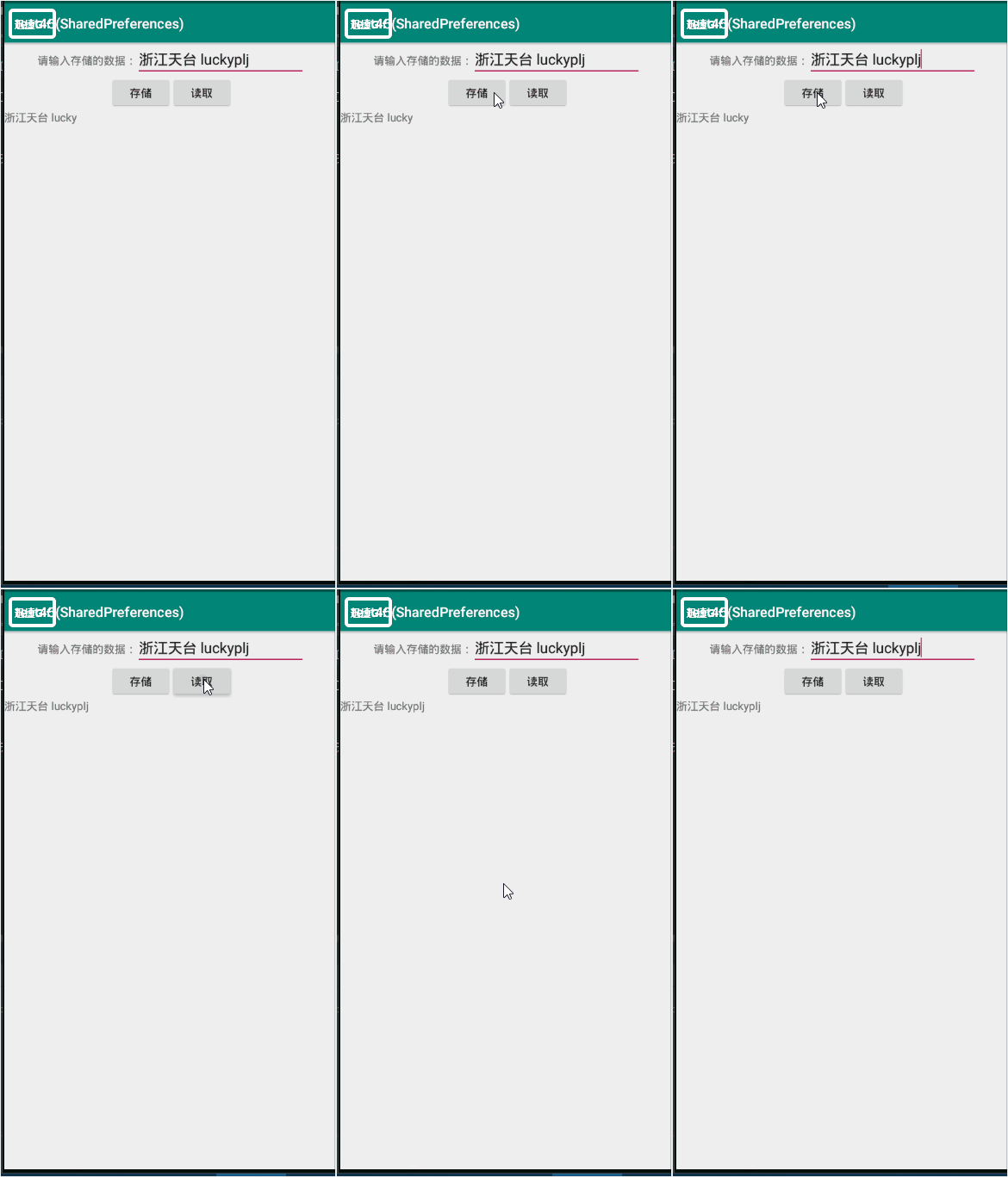
动态1为:app效果图,动态2为:SharedPreferences存储的位置
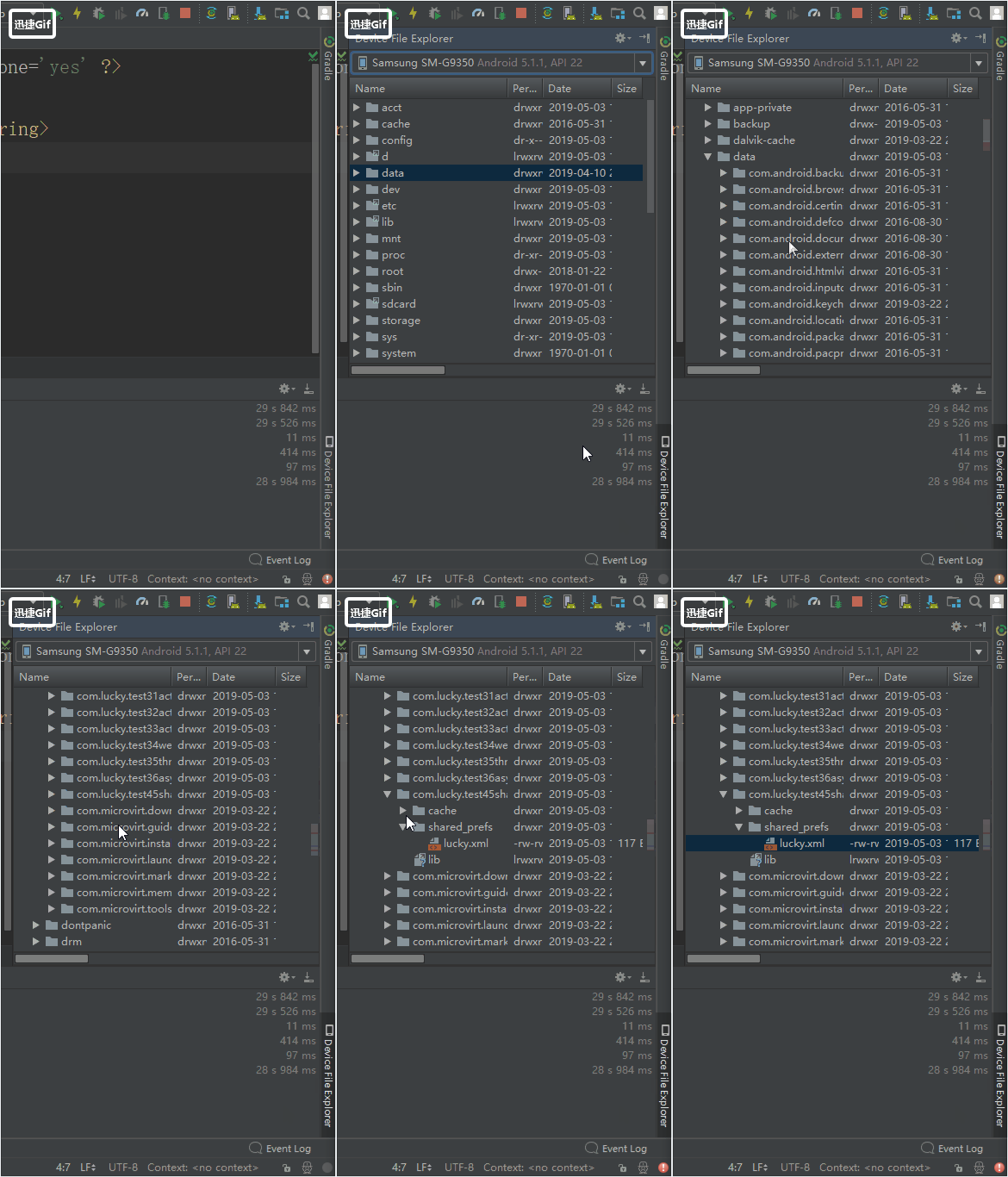
存储内容的XML文件截图:

Android SharedPreferences(数据存储,需掌握)的更多相关文章
- Android之数据存储的五种方法
1.Android数据存储的五种方法 (1)SharedPreferences数据存储 详情介绍:http://www.cnblogs.com/zhangmiao14/p/6201900.html 优 ...
- Android中数据存储(一)
国庆没有给国家添堵,没有勾搭妹子,乖乖的写着自己的博客..... 本文将为大家介绍Android中数据存储的五种方式,数据存储可是非常重要的知识哦. 一,文件存储数据 ①在ROM存储数据 关于在ROM ...
- Android本地数据存储复习
Android本地数据存储复习 Android无论是应用层还是系统层都需要在本地保存一些数据,尤其在应用层中使用的就更为普遍,大体有这么几种:SharedPreference,file,sqlite数 ...
- android学习笔记45——android的数据存储和IO
android的数据存储和IO SharedPreferences与Editor简介 SharedPreferences保存的数据主要是类似于配置信息格式的数据,因此其保存的数据主要是简单的类型的ke ...
- Android实现数据存储技术
转载:Android实现数据存储技术 本文介绍Android中的5种数据存储方式. 数据存储在开发中是使用最频繁的,在这里主要介绍Android平台中实现数据存储的5种方式,分别是: 1 使用Shar ...
- android中数据存储
android中数据存储 Android 中存储数据的方式有五种:SQLite数据库.文件存储.内容提供者.网络.SharedPreferences(Key----value)五种存储方式. ...
- Android中数据存储(四)——ContentProvider存储数据
目录(?)[+] 当一个应用程序在Android中安装后,我们在使用应用的过程中会产生很多的数据,应用都有自己的数据,那么我们应该如何存储数据呢? 数据存储方式 Android 的数据存储有5种方 ...
- Android中数据存储(三)——SQLite数据库存储数据
当一个应用程序在Android中安装后,我们在使用应用的过程中会产生很多的数据,应用都有自己的数据,那么我们应该如何存储数据呢? 数据存储方式 Android 的数据存储有5种方式: 1. Share ...
- 关于Android开发数据存储的方式(一)
关于Android开发数据存储方式(一) 在厦门做Android开发也有两个月了,快情人节了.我还在弄代码. 在微信平台上开发自己的APP,用到了数据存储的知识,如今总结一下: 整体的来讲.数据存储方 ...
随机推荐
- 【CF#338D】GCD Table
[题目描述] 有一张N,M<=10^12的表格,i行j列的元素是gcd(i,j) 读入一个长度不超过10^4,元素不超过10^12的序列a[1..k],问是否在某一行中出现过 [题解] 要保证g ...
- Apache ab命令
一.简介 ab是apache自带的压力测试工具.ab非常实用,它不仅可以对apache服务器进行网站访问压力测试,也可以对或其它类型的服务器进行压力测试.比如nginx.tomcat.IIS等. 二. ...
- Luogu 1379 八数码难题
吐槽:此题就是一点一点卡过去的 警告: 1.千万不能用dfs搜这种东西(dfs需要遍历所有状态才能找到最优解), 分分钟爆炸 2.写结构体的时候要综合判断&的加和不加 Code: // luo ...
- 1.ef 映射关系
1.edmx <?xml version="1.0" encoding="utf-8"?><edmx:Edmx Version="3 ...
- Mr_matcher的细节3
主要是订阅了playbag发布的scan话题和odom话题 其类型分别为 //cache the static tf from base to laser getBaseToLaserTf(scan_ ...
- React官方网站学习
React官方网站 英文版 https://reactjs.org/tutorial/tutorial.html React官方网站 中文版 https://react.docschina.org ...
- [GO]全局变量
package main import "fmt" func test01() { fmt.Println("test a = ", a) } //a := 1 ...
- Unity3D面试题整合
第一部分 1. 请简述值类型与引用类型的区别答:区别:1.值类型存储在内存栈中,引用类型数据存储在内存堆中,而内存单元中存放的是堆中存放的地址.2.值类型存取快,引用类型存取慢.3.值类型表示实际数据 ...
- C# How To Read .xlsx Excel File With 3 Lines Of Code
Download Excel.zip - 9.7 KB Download ExcelDLL.zip - 3.7 KB Introduction We produce professional busi ...
- cmake的一些词的解释
cmake中一些预定义变量 PROJECT_SOURCE_DIR 工程的根目录 PROJECT_BINARY_DIR 运行cmake命令的目录,通常是${PROJECT_SOURCE_DIR} ...