
如何发布一个包到npm && 如何使用自己发布的npm包 && 如何更新发布到npm的package && 如何更新当前项目的包?
如何发布一个包到npm
First
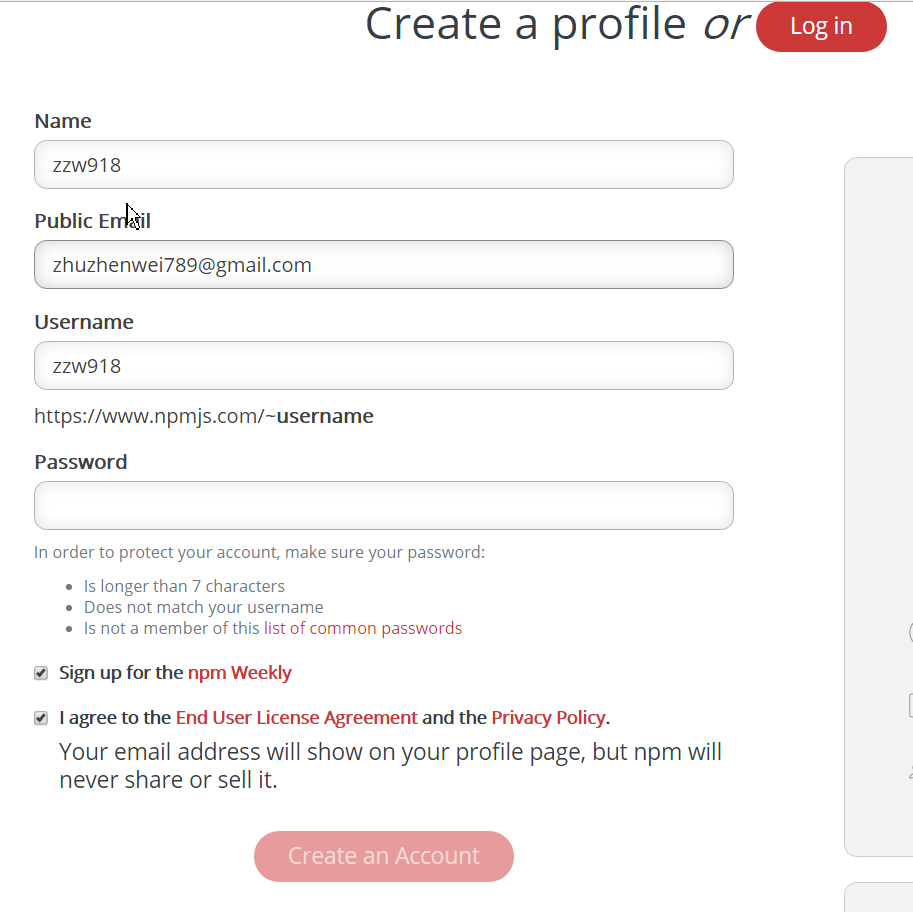
在https://www.npmjs.com注册一个账号。
Second
编辑好项目,文件大致如下:
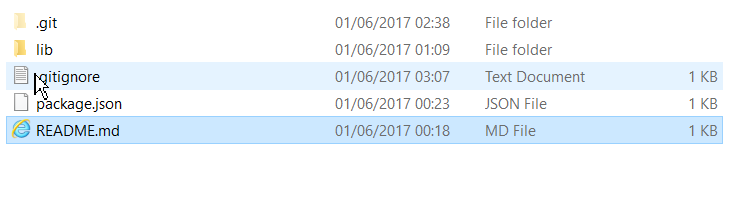
其中,gitignore可以如下:
.DS_Store

node_modules/

dist/
注意:不能包含 npm-debug.log 。
Third:
npm login
Fourth:
npm publish
注意:如果使用了cnpm(默认使用),会报错:no_perms Private mode enable, only admin can publish this module
设置:npm config set registry http://registry.npmjs.org 即可。
这样就发布成功了。
如何使用自己发布的npm包
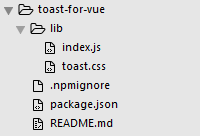
即第一步: npm install toast-for-vue --save , 然后我们就可以发现根目录下的node_modules文件中多了这个包,而这个包就是我发布的包:
第二步: 在src下的main.js中引入两个文件,如下所示:但是在使用过程中遇到了困难,就是在main.js(我使用的是vue-cli构建的项目)的引入方式如下:
import Toast from 'toast-for-vue'

import 'toast-for-vue/lib/toast.css'

Vue.use(Toast);
但是,多次尝试后台都在报错,提示这个包没有安装,我也是百思不得其解。 最后终于发现了问题所在!
因为我发现我只引入 css 文件的时候是可以引进来的,而引入 Toast 时却引不进来,于是我就尝试了下面两种方式,发现都可以成功引入:
import Toast from 'toast-for-vue/lib'

import Toast from 'toast-for-vue/lib/index.js'
于是,我自然想到了入口文件,我的package.json文件内容如下:
{

  "name": "toast-for-vue",

  "version": "1.0.0",

  "description": "toast used with vue project",

  "main": "index.js",

  "scripts": {

    "test": "echo \"Error: no test specified\" && exit 1"

  },

  "repository": {

    "type": "git",

    "url": "git+https://github.com/zzw918/toast-for-vue.git"

  },

  "keywords": [

    "toast",

    "vue",

    "plugin"

  ],

  "author": "John Zhu",

  "license": "ISC",

  "bugs": {

    "url": "https://github.com/zzw918/toast-for-vue/issues"

  },

  "homepage": "https://github.com/zzw918/toast-for-vue#readme"

}
可以发现,入口文件是index.js, 那么当我引入 toast-for-vue 时,肯定是不能得到 Toast 的, 因为在根目录下么有index.js ,注意,为什么我想要直接引入的时 Toast 呢? 因为在index.js中我导出了Toast插件,如下所示:
/**

 * toast-for-vue v1.0.0

 * https://github.com/zzw918/toast-for-vue

 * Released under the MIT license

 * Date: 2017-05-22

 * Author: John Zhu , in xjtu

 */

var Toast = {};

Toast.install = function (Vue, options) {

  // set default option

  var defaultOpt = {

    defaultType: 'center',

    defaultDuration: ''

  };

  // replace the option if we set params in Vue.use()

  for (var prop in options) {

    defaultOpt[prop] = options[prop];

  }

  // define the core function

  Vue.prototype.$toast = function (message, type) {

    // we think center type the default type

    if (typeof type == "undefined") {

      var curType = defaultOpt.defaultType;

    } else {

      var curType = type;

    }

    // if toast is used, we should delay the defaultDuration

    if (document.querySelector('.toast')) {

      function getTime() {

        return new Date().getTime();

      }

      var startTime = getTime();

      while (getTime() < startTime + defaultOpt.defaultDuration);

    }

    // create the constructor

    var template = Vue.extend({

      template: '<div class="toast toast-' + curType + '">' + message + "</div>"

    });

    // create an instance and mount it on an element

    var temEle = new template().$mount().$el;

    // insert the instance

    document.body.appendChild(temEle);

    // after the duration time, remove it

    setTimeout(function () {

      document.body.removeChild(temEle);

    }, defaultOpt.defaultDuration);

  };

  // set different kinds for call

  ['bottom', 'center', 'top'].forEach(function (type) {

    Vue.prototype.$toast[type] = function (message) {

      return Vue.prototype.$toast(message, type);

    }

  });

}

module.exports = Toast;
这样就不难理解了! 所以当务之急是设置好入口文件。 即"main": "lib/index.js", 欲了解更多,请看下文。。。
如何更新发布到npm的package?
在上面的过程中,由于没有入口文件,所以这是一个bug,我希望添加一个入口文件,所以想要更新 npm 包,并重新引入。 现介绍方法。
我们在package.json中添加入口文件,如下所示:
{

  "name": "toast-for-vue",

  "version": "1.0.0",

  "description": "toast used with vue project",

  "main": "lib/index.js",

  "scripts": {

    "test": "echo \"Error: no test specified\" && exit 1"

  },

  "repository": {

    "type": "git",

    "url": "git+https://github.com/zzw918/toast-for-vue.git"

  },

  "keywords": [

    "toast",

    "vue",

    "plugin"

  ],

  "author": "John Zhu",

  "license": "ISC",

  "bugs": {

    "url": "https://github.com/zzw918/toast-for-vue/issues"

  },

  "homepage": "https://github.com/zzw918/toast-for-vue#readme"

}
即这时我修改了入口文件。
接着,git add --all、 git commit 、git push 。。。
接下来,因为我们的包已经变了,所以我们就要更换版本, 如下:

即在patch之后,版本自动就成为了 1.0.1。
最后, npm publish 即可。 (注意:不要用git bash,使用管理员方式打开cmd即可。)

ok! 这样,我们进入npm官网,就会发现版本已经变化了:
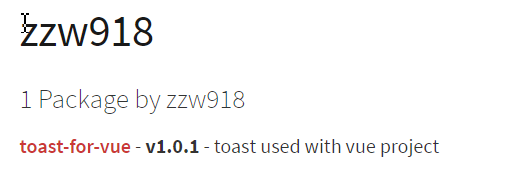
好了,在上面的过程中,我们已经把包进行了升级,所以我们的项目中使用的版本也需要迭代, 所以,这时候,我们就需要进行更新包了,更新包非常简单,使用:
npm update toast-for-vue
这样就可以成功更新了!
补充: 其实这里更好的做法是 npm install toast-for-vue --save

import Toast from 'toast-for-vue'

import 'toast-for-vue/lib/toast.css'

Vue.use(Toast);
这样,就可以成功使用了!!!

恩,就是为了这个小效果!!!
如何发布一个包到npm && 如何使用自己发布的npm包 && 如何更新发布到npm的package && 如何更新当前项目的包?的更多相关文章
- 手把手教你用npm发布一个包,详细教程
我们已经实现了路由的自动化构建,但是我们可以看到,一大串代码怼在里面.当然你也可以说,把它封装在一个JS文件里面,然后使用require('./autoRoute.js')给引入进来,那也行.但是,为 ...
- (转)前端开发-发布一个NPM包之最简单易懂流程
原文地址:https://www.cnblogs.com/sghy/p/6829747.html 1.npm官网创建npm账户 npm网站地址:https://www.npmjs.com/ npm网站 ...
- 怎么用npm发布一个包,详细教程
我们已经实现了路由的自动化构建,但是我们可以看到,一大串代码怼在里面.当然你也可以说,把它封装在一个JS文件里面,然后使用require('./autoRoute.js')给引入进来,那也行.但是,为 ...
- 在npm上发布一个自己的包
1.首先你要在npm上创建一个账号,这里需要输入邮箱的,注意激活邮箱否则无法publish自己的包 2.在本地创建一个文件夹,输入npm init初始化项目,这里是我使用npm init创建的pack ...
- 如何发布一个npm包(基于vue)
前言:工作的时候总是使用别人的npm包,然而我有时心底会好奇自己如何发布一个npm包呢,什么时候自己的包能够被很多人喜欢并使用呢...今天我终于迈出了第一步. 前提:会使用 npm,有 vue 基础, ...
- webpack创建library及从零开始发布一个npm包
最近公司有个需求,我们部门开发一个平台项目之后,其他兄弟部门开发出的插件我们可以拿来直接用,并且不需要我们再进行打包,只是做静态的文件引入,研究一波后发现,webpack创建library可以实现. ...
- 发布一个npm包
前言 我这里是写了一个vue轮播图插件,因此我使用了vue的脚手架工具创建一个项目,当然你也可以选择自己搭建脚手架. 本例中我会使用vue脚手架创建一个项目,并发布到npm上面去. 通过脚手架创建项目 ...
- 从0到1发布一个npm包
从0到1发布一个npm包 author: @TiffanysBear 最近在项目业务中有遇到一些问题,一些通用的方法或者封装的模块在PC.WAP甚至是APP中都需要使用,但是对于业务的PC.WAP.A ...
- 发布一个简单的npm包
本文简单地记录了发布一个简单npm包的过程,以便后续参考使用. 初始化npm init 通过npm init创建一个package.json文件 D:\robin\lib\weapp-utils> ...
随机推荐
- java实现wc功能
github项目地址:https://github.com/3216004717/ruanjiangongcheng.git 项目相关要求 基本要求 wc.exe -c file.c //返回文件 f ...
- MessageBox.Show() 多重用法
MessageBox.Show (String) 显示具有指定文本的消息框. 由 .NET Compact Framework 支持. MessageBox.Show (IWin32Window, S ...
- C#英文面试常见问题[转]
I was reading a post about some common C# interview questions, and thought I'd share some of mine. T ...
- C#中实现UrlEncode和UrlDecode
有时需要进行url编码.解码,比如从html中捞数据,有可能>.&等字符会被编码成>等. WinForm中默认没有引入System.Web,因此要现在项目中引入依赖 System. ...
- loj #2510. 「AHOI / HNOI2018」道路
#2510. 「AHOI / HNOI2018」道路 题目描述 W 国的交通呈一棵树的形状.W 国一共有 n−1 个城市和 nnn 个乡村,其中城市从 111 到 n−1 编号,乡村从 111 到 n ...
- hexo的jacman主题配置
获得更多资料欢迎进入我的网站或者 csdn或者博客园 这是在我搭建博客时用的主题,这个主题时基于pacman修改的,同时我也是借助于wuchong同时他还在一直更新.一下时我的一些基本配置: 相关文章 ...
- [译文]Casperjs1.1.0参考文档-快速开始
快速开始 只要casperjs被正确安装,你就可以开始写你的第一个脚本,你可以使用javascript或者coffiescript编译脚本. 提示: 如果你对javascript不是很熟悉,最好先看专 ...
- XMLHttpRequest 与 Ajax 概要
关于XMLHttpRequest 开发者使用XMLHttpRequest对象与服务端进行交互(发送http请求.接受返回数据等),可以在不打断用户下一步操作的情况下刷新局部页面.XMLHttpRequ ...
- [JSOI2007]麻将 模拟 BZOJ1028
题目描述 麻将是中国传统的娱乐工具之一.麻将牌的牌可以分为字牌(共有东.南.西.北.中.发.白七种)和序数牌(分为条子.饼子.万子三种花色,每种花色各有一到九的九种牌),每种牌各四张. 在麻将中,通常 ...
- 实现bootstrap的dropdown-menu(下拉菜单)点击后不关闭的方法 (转)
实现bootstrap的dropdown-menu(下拉菜单)点击后不关闭的方法 问题描述,在下拉菜单中,添加其他元素,例如,原文作者所述的<a>和我自己实际用到的<input> ...