
Spring Boot中使用thymeleaf
Spring Boot支持FreeMarker、Groovy、Thymeleaf和Mustache四种模板解析引擎,官方推荐使用Thymeleaf。
spring-boot-starter-thymeleaf
在Spring Boot中使用Thymeleaf只需在pom中加入Thymeleaf的starter即可:
<dependency>
    <groupId>org.springframework.boot</groupId>
    <artifactId>spring-boot-starter-thymeleaf</artifactId>
</dependency>
在Spring Boot 1.5.9.RELEASE版本中,默认的Thymeleaf版本为2.1.6.RELEASE版本,这里推荐使用3.0以上版本。在pom中将Thymeleaf的版本修改为3.0.2.RELEASE:
<properties>
    <thymeleaf.version>3.0.2.RELEASE</thymeleaf.version>
    <thymeleaf-layout-dialect.version>2.0.1</thymeleaf-layout-dialect.version>
</properties>
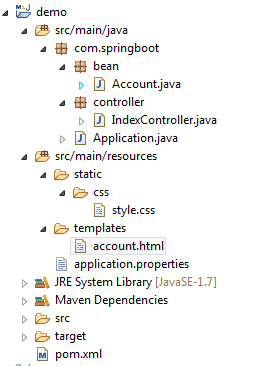
在Spring Boot中,默认的html页面地址为src/main/resources/templates,默认的静态资源地址为src/main/resources/static。
Thymeleaf默认配置
在Spring Boot配置文件中可对Thymeleaf的默认配置进行修改:
#开启模板缓存(默认值:true)
spring.thymeleaf.cache=true
#Check that the template exists before rendering it.
spring.thymeleaf.check-template=true
#检查模板位置是否正确(默认值:true)
spring.thymeleaf.check-template-location=true
#Content-Type的值(默认值:text/html)
spring.thymeleaf.content-type=text/html
#开启MVC Thymeleaf视图解析(默认值:true)
spring.thymeleaf.enabled=true
#模板编码
spring.thymeleaf.encoding=UTF-8
#要被排除在解析之外的视图名称列表,用逗号分隔
spring.thymeleaf.excluded-view-names=
#要运用于模板之上的模板模式。另见StandardTemplate-ModeHandlers(默认值:HTML5)
spring.thymeleaf.mode=HTML5
#在构建URL时添加到视图名称前的前缀(默认值:classpath:/templates/)
spring.thymeleaf.prefix=classpath:/templates/
#在构建URL时添加到视图名称后的后缀(默认值:.html)
spring.thymeleaf.suffix=.html
#Thymeleaf模板解析器在解析器链中的顺序。默认情况下,它排第一位。顺序从1开始,只有在定义了额外的TemplateResolver Bean时才需要设置这个属性。
spring.thymeleaf.template-resolver-order=
#可解析的视图名称列表,用逗号分隔
spring.thymeleaf.view-names=
一般开发中将spring.thymeleaf.cache设置为false,其他保持默认值即可。
简单示例
编写一个简单的Controller:
@Controller
public class IndexController {

    @RequestMapping("/account")
    public String index(Model m) {
        List<Account> list = new ArrayList<Account>();
        list.add(new Account("KangKang", "康康", "e10adc3949ba59abbe56e", "超级管理员", "17777777777"));
        list.add(new Account("Mike", "麦克", "e10adc3949ba59abbe56e", "管理员", "13444444444"));
        list.add(new Account("Jane","简","e10adc3949ba59abbe56e","运维人员","18666666666"));
        list.add(new Account("Maria", "玛利亚", "e10adc3949ba59abbe56e", "清算人员", "19999999999"));
        m.addAttribute("accountList",list);
        return "account";
    }
}
编写account.html页面:
<!DOCTYPE html>
<html xmlns:th="http://www.thymeleaf.org">
<head>
    <title>account</title>
    <meta http-equiv="Content-Type" content="text/html; charset=UTF-8" />
    <link rel="stylesheet" th:href="@{/css/style.css}" type="text/css">
</head>
<body>
    <table>
        <tr>
            <th>no</th>
            <th>account</th>
            <th>name</th>
            <th>password</th>
            <th>accountType</th>
            <th>tel</th>
        </tr>
        <tr th:each="list,stat : ${accountList}">
            <td th:text="${stat.count}"></td>
            <td th:text="${list.account}"></td>
            <td th:text="${list.name}"></td>
            <td th:text="${list.password}"></td>
            <td th:text="${list.accountType}"></td>
            <td th:text="${list.tel}"></td>
        </tr>
    </table>
</body>
</html>
最终项目目录如下所示:
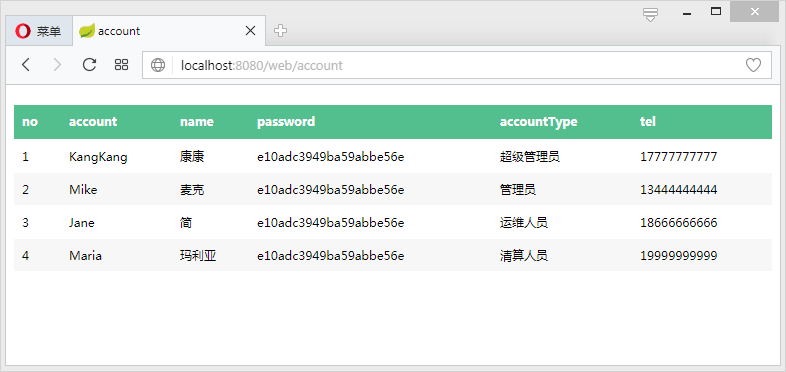
启动项目,访问http://localhost:8080/web/account:
Spring Boot中使用thymeleaf的更多相关文章
- 在Spring MVC和Spring Boot中使用thymeleaf模板
Spring MVC: POM: <!-- thymeleaf模板 --> <!-- https://mvnrepository.com/artifact/org.thymeleaf ...
- Spring Boot中使用 Thymeleaf
目录 1.pom.xml引入thymeleaf 2.关闭缓存application.properties 3.编写Controller类 4.模板html 5.运行结果 1.pom.xml引入thym ...
- spring boot 学习(二)spring boot 框架整合 thymeleaf
spring boot 框架整合 thymeleaf spring boot 的官方文档中建议开发者使用模板引擎,避免使用 JSP.因为若一定要使用 JSP 将无法使用. 注意:本文主要参考学习了大神 ...
- spring boot 中的路径映射
在spring boot中集成thymeleaf后,我们知道thymeleaf的默认的html的路径为classpath:/templates也就是resources/templates,那如何访问这 ...
- Spring Boot 中关于自定义异常处理的套路!
在 Spring Boot 项目中 ,异常统一处理,可以使用 Spring 中 @ControllerAdvice 来统一处理,也可以自己来定义异常处理方案.Spring Boot 中,对异常的处理有 ...
- Spring Boot 中的静态资源到底要放在哪里?
当我们使用 SpringMVC 框架时,静态资源会被拦截,需要添加额外配置,之前老有小伙伴在微信上问松哥Spring Boot 中的静态资源加载问题:"松哥,我的HTML页面好像没有样式?& ...
- Spring Boot 中配置文件application.properties使用
一.配置文档配置项的调用(application.properties可放在resources,或者resources下的config文件夹里) package com.my.study.contro ...
- Spring Boot中Starter是什么
比如我们要在Spring Boot中引入Web MVC的支持时,我们通常会引入这个模块spring-boot-starter-web,而这个模块如果解压包出来会发现里面什么都没有,只定义了一些POM依 ...
- Spring Boot中使用Spring-data-jpa让数据访问更简单、更优雅
在上一篇Spring中使用JdbcTemplate访问数据库中介绍了一种基本的数据访问方式,结合构建RESTful API和使用Thymeleaf模板引擎渲染Web视图的内容就已经可以完成App服务端 ...
- Spring Boot中使用Spring Security进行安全控制
我们在编写Web应用时,经常需要对页面做一些安全控制,比如:对于没有访问权限的用户需要转到登录表单页面.要实现访问控制的方法多种多样,可以通过Aop.拦截器实现,也可以通过框架实现(如:Apache ...
随机推荐
- UI动画 - CATransaction
前言 1 - CAAnimation 并不是一个单纯的实现动画的框架,它原本叫 Layer Kit.管理着树状结构的图层数据,并快速组合这些图层,最终构成了一切可视化的基础 2 - 在构建可视化,也就 ...
- linux 安装goland
一.Goland-IDEA 2020.3.2安装 1 下载 下载GoLand https://www.jetbrains.com/go/download/#section=linux 2 安装Gola ...
- [django]钩子函数的一些细节(clean)
函数名 说明:clean_后面跟着的是需要校验字段名称 示例: class RelUserReset(forms.ModelForm): def clean_confirm_password(self ...
- c函数调用过程
一.内存结构内存大致可以分为四个部分:代码段,静态存储区,堆,栈.具体划分如下图所示: 栈:在执行函数时,函数内部局部变量的存储单元都可以在栈上创建,函数执行结束后会自动释放内存.栈内存的分配运算内置 ...
- https代理服务器(四)java动态签发【失败】
https://zhuanlan.zhihu.com/p/355241710?utm_id=0 http://t.zoukankan.com/xiaxj-p-8961131.html https:// ...
- 10 个常用的 JS 工具库,80% 的项目都在用!
Day.js 一个极简的处理时间和日期的 JavaScript 库,和 Moment.js 的 API 设计保持一样, 但体积仅有2KB. npm install dayjs 基本用法 import ...
- keypress和keydown的区别
keypress不识别功能键,比如ctrl,alt,shift,上下左右.keypress返回的ascII码区分大小写.输入小写a返回97,输入大写A返回65. keydown识别.keydown返回 ...
- CxImageJPG
typedef struct tag_ExifInfo { char Version [5]; //EXIF 信息版本 char CameraMake [32]; //DC 制造商 char Came ...
- chrome浏览器通知与语音播放
HTML5 Web Notification 语法 https://developer.mozilla.org/zh-CN/docs/Web/API/notification 如果浏览器支持Web N ...
- 获取内存及cpu信息
<dependency> <groupId>com.github.oshi</groupId> <artifactId>oshi-core</ar ...