
opengl helloworld vscode 通过glfw 绘制三角形
opengl helloworld vscode 调用glfw 绘制三角形
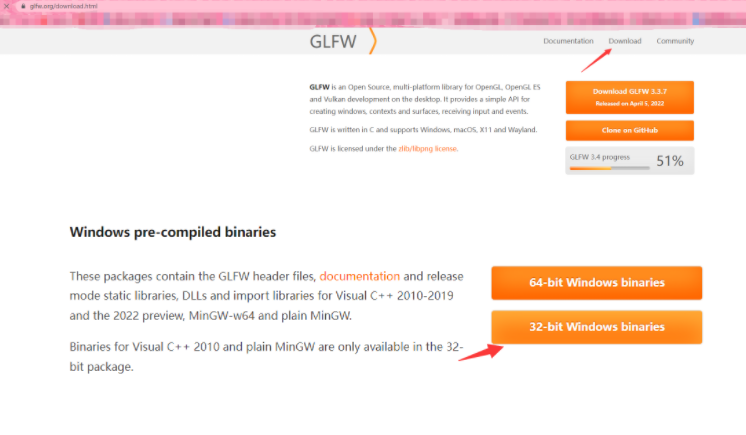
打开 glfw.org, 我下的64
目录构成如下 include 和lib-mingw 提出来:

ctrl + shift + p 打开编辑配置

{

    "configurations": [

        {

            "name": "Win32",

            "includePath": [

                "${workspaceFolder}/**",

                "${workspaceFolder}/depends/include" //include path

            ],

            "defines": [

                "_DEBUG",

                "UNICODE",

                "_UNICODE"

            ],

            "compilerPath": "I:\\VSProject\\MinGW32\\mingw64\\bin\\gcc.exe",

            "cStandard": "gnu17",

            "cppStandard": "gnu++14",

            "intelliSenseMode": "windows-gcc-x64"  // x86

        }

    ],

    "version": 4

}
tasks.json
{

    "tasks": [

        {

            "type": "cppbuild",

            "label": "C/C++: g++.exe 生成活动文件",

            "command": "I:\\VSProject\\MinGW32\\mingw64\\bin\\g++.exe",

            "args": [

                "-fdiagnostics-color=always",

                "-g",

                "${file}",

                "${fileDirname}\\depends\\lib-mingw-w64\\libglfw3.a",

                "-lopengl32",  //

                "-lgdi32",     // 这两依赖也要带上,否则 undefined xxx

                "-o",

                "${fileDirname}\\${fileBasenameNoExtension}.exe",

                "--include-directory=${fileDirname}\\depends\\include"

            ],

            "options": {

                "cwd": "${fileDirname}"

            },

            "problemMatcher": [

                "$gcc"

            ],

            "group": {

                "kind": "build",

                "isDefault": true

            },

            "detail": "调试器生成的任务。"

        }

    ],

    "version": "2.0.0"

}
跳至 Documentation ctrl v 样例

编写主函数F5运行
#include <GLFW/glfw3.h>

int main(void)

{

    GLFWwindow* window;

    /* Initialize the library */

    if (!glfwInit())

        return -1;

    /* Create a windowed mode window and its OpenGL context */

    window = glfwCreateWindow(640, 480, "Hello World", NULL, NULL);

    if (!window)

    {

        glfwTerminate();

        return -1;

    }

    /* Make the window's context current */

    glfwMakeContextCurrent(window);

    /* Loop until the user closes the window */

    while (!glfwWindowShouldClose(window))

    {

        /* Render here */

        glClear(GL_COLOR_BUFFER_BIT);

        /* Swap front and back buffers */

        glfwSwapBuffers(window);

        /* Poll for and process events */

        glfwPollEvents();

    }

    glfwTerminate();

    return 0;

}
一个空窗口:

画个三角形:
#include <GLFW/glfw3.h>

int main(void)

{

    GLFWwindow* window;

    /* Initialize the library */

    if (!glfwInit())

        return -1;

    /* Create a windowed mode window and its OpenGL context */

    window = glfwCreateWindow(640, 480, "Hello World", NULL, NULL);

    if (!window)

    {

        glfwTerminate();

        return -1;

    }

    /* Make the window's context current */

    glfwMakeContextCurrent(window);

    /* Loop until the user closes the window */

    while (!glfwWindowShouldClose(window))

    {

        /* Render here */

        glClear(GL_COLOR_BUFFER_BIT);

        // Draw triangles begin

        glBegin(GL_TRIANGLES);

        glVertex2f(-0.5f, -0.5f);

        glVertex2f(0.0f, 0.5f);

        glVertex2f(0.5f, -0.5f);

        glEnd();

        // Draw triangles end

        /* Swap front and back buffers */

        glfwSwapBuffers(window);

        /* Poll for and process events */

        glfwPollEvents();

    }

    glfwTerminate();

    return 0;

}

opengl helloworld vscode 通过glfw 绘制三角形的更多相关文章
- OpenGL学习(2)——绘制三角形
在创建窗口的基础上,添加代码实现三角形的绘制. 声明和定义变量 在屏幕上绘制一个三角形需要的变量有: 三角形的三个顶点坐标: Vertex Buffer Object 将顶点数据存储在GPU的内存中: ...
- Android OpenGL ES(十)绘制三角形Triangle .
三角形为OpenGL ES支持的面,同样创建一个DrawTriangle Activity,定义6个顶点使用三种不同模式来绘制三角形: float vertexArray[] = { -0.8f, - ...
- OpenGL学习(2)——绘制三角形(补)
对上一篇的补充,通过绘制三角形来完成矩形的绘制.此外,完成章节后练习. 绘制矩形 一个矩形由两个三角形组成,因此绘制矩形需要绘制两个三角形,一共6个顶点,其中2个顶点重复画了两次. 为了减小开销,仅储 ...
- OpenGL笔记(一) 绘制三角形
GLTools: 一些有用且可复用的函数 GLEW: OpenGL API的一些扩展机制 GLUT: OpenGL Utility toolkit, OpenGL跨平台相关,隐藏平台相关细节 RC代表 ...
- opengl绘制三角形
顶点数组对象:Vertex Array Object,VAO 顶点缓冲对象:Vertex Buffer Object,VBO 索引缓冲对象:Element Buffer Object,EBO或Inde ...
- 1.opengl绘制三角形
顶点数组对象:Vertex Array Object,VAO,用于存储顶点状态配置信息,每当界面刷新时,则通过VAO进行绘制. 顶点缓冲对象:Vertex Buffer Object,VBO,通过VB ...
- Android OpenGL 入门示例----绘制三角形和正方形
Android上对OpenGl的支持是无缝的,所以才有众多3D效果如此逼真的游戏,在Camera的一些流程中也有用到GLSurfaceView的情况.本文记录OpenGL在Android上的入门级示例 ...
- Linux OpenGL 实践篇-3 绘制三角形
本次实践是绘制两个三角形,重点理解顶点数组对象和OpenGL缓存的使用. 顶点数组对象 顶点数组对象负责管理一组顶点属性,顶点属性包括位置.法线.纹理坐标等. OpenGL缓存 OpenGL缓存实质上 ...
- iOS OpenGL ES简单绘制三角形
OpenGL 是用于2D/3D图形编程的一套基于C语言的统一接口. windows,Linux,Unix上均可兼容. OpenGL ES 是在OpenGL嵌入式设备上的版本, android/iOS ...
- opengl es中不同的绘制方式
opengl es中不同的绘制方式 转载请保留出处:http://xiaxveliang.blog.163.com/blog/static/297080342013467344263/ 1. GL_P ...
随机推荐
- spring中.xml配置文件头部
<?xml version="1.0" encoding="UTF-8"?> <beans xmlns="http://www.sp ...
- 如何在微信小程序中使用ECharts图表
在微信小程序中使用ECharts 1. 下载插件 首先,下载 GitHub 上的 ecomfe/echarts-for-weixin 项目. 下载链接:ecomfe/echarts-for-weixi ...
- 三,打包electron
1,在当前项目下运行 npm install --save-dev @electron-forge/cli npx electron-forge import 此时package.json内容如下: ...
- JVM - 1.内存结构
1 内存结构 1.1 程序计数器 1.1.1 作用 在执行的过程中 , 记住下一条jvm指令的执行地址 物理上通过寄存器实现 1.1.2 特性 每个线程都有自己的程序计数器 - 线程私有 不会存在内存 ...
- VueUse实用工具
1.安装 npm i @vueuse/core 2.使用 useClipboard 剪贴板 <script setup lang="ts"> import { ref ...
- cpu的调度
什么是cpu的调度 所谓 CPU 调度,就是确定把哪个处于淮备就绪状态的进程移入运行状态.也就是说,CPU调度算法将决定把 CPU 给予哪个进程,以便它能够运行. 两种调度方式 CPU 调度可以是在一 ...
- Levenshtein距离【编辑距离算法】字符串相似度算法
指两个字串之间,有一个转成另一个所需的最少编辑操作的次数. 算法过程 str1或str2的长度为0返回另一个字符串的长度. if(str1.length==0) return str2.length; ...
- Shell脚本实现模拟并发及并发数控制
#!/bin/bash #by inmoonlight@163.com #下面的代码控制并发数.其实是利用令牌原理实现 #一个线程要运行,首先要拿到令牌在该代码中即read一行数据,读取不到就会暂停, ...
- Java集合框架个人总结
Java集合框架个人总结 集合主要分为两大类:①单列集合Collection ②双列集合Map 集合存储的都是引用类型,不可是基础类型,如果保存基础类型需要用包装类. 1.Collection接口 ...
- 前端复习之DOM、BOM
BOM VS DOM: 1 BOM:浏览器对象模型(API),专门操作浏览器窗口的API 2 没标准! 3 DOM:文档对象模型(API),专门操作网页内容的API 4 可以对网页中任意对象,做任意修 ...