
opengl helloworld vscode 通过glfw 绘制三角形
opengl helloworld vscode 调用glfw 绘制三角形
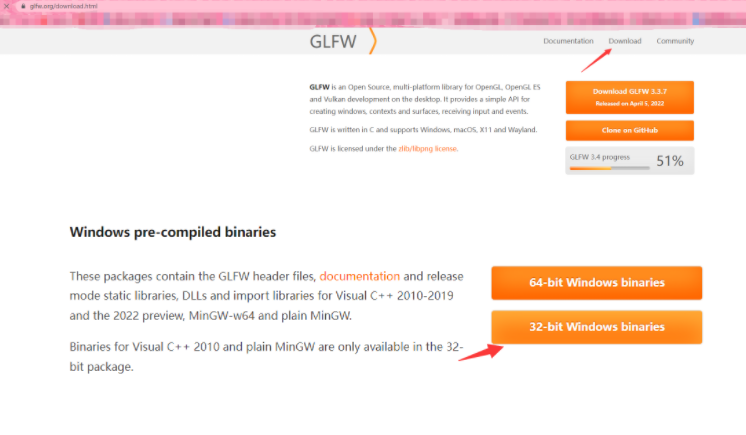
打开 glfw.org, 我下的64
目录构成如下 include 和lib-mingw 提出来:

ctrl + shift + p 打开编辑配置

{

    "configurations": [

        {

            "name": "Win32",

            "includePath": [

                "${workspaceFolder}/**",

                "${workspaceFolder}/depends/include" //include path

            ],

            "defines": [

                "_DEBUG",

                "UNICODE",

                "_UNICODE"

            ],

            "compilerPath": "I:\\VSProject\\MinGW32\\mingw64\\bin\\gcc.exe",

            "cStandard": "gnu17",

            "cppStandard": "gnu++14",

            "intelliSenseMode": "windows-gcc-x64"  // x86

        }

    ],

    "version": 4

}
tasks.json
{

    "tasks": [

        {

            "type": "cppbuild",

            "label": "C/C++: g++.exe 生成活动文件",

            "command": "I:\\VSProject\\MinGW32\\mingw64\\bin\\g++.exe",

            "args": [

                "-fdiagnostics-color=always",

                "-g",

                "${file}",

                "${fileDirname}\\depends\\lib-mingw-w64\\libglfw3.a",

                "-lopengl32",  //

                "-lgdi32",     // 这两依赖也要带上,否则 undefined xxx

                "-o",

                "${fileDirname}\\${fileBasenameNoExtension}.exe",

                "--include-directory=${fileDirname}\\depends\\include"

            ],

            "options": {

                "cwd": "${fileDirname}"

            },

            "problemMatcher": [

                "$gcc"

            ],

            "group": {

                "kind": "build",

                "isDefault": true

            },

            "detail": "调试器生成的任务。"

        }

    ],

    "version": "2.0.0"

}
跳至 Documentation ctrl v 样例

编写主函数F5运行
#include <GLFW/glfw3.h>

int main(void)

{

    GLFWwindow* window;

    /* Initialize the library */

    if (!glfwInit())

        return -1;

    /* Create a windowed mode window and its OpenGL context */

    window = glfwCreateWindow(640, 480, "Hello World", NULL, NULL);

    if (!window)

    {

        glfwTerminate();

        return -1;

    }

    /* Make the window's context current */

    glfwMakeContextCurrent(window);

    /* Loop until the user closes the window */

    while (!glfwWindowShouldClose(window))

    {

        /* Render here */

        glClear(GL_COLOR_BUFFER_BIT);

        /* Swap front and back buffers */

        glfwSwapBuffers(window);

        /* Poll for and process events */

        glfwPollEvents();

    }

    glfwTerminate();

    return 0;

}
一个空窗口:

画个三角形:
#include <GLFW/glfw3.h>

int main(void)

{

    GLFWwindow* window;

    /* Initialize the library */

    if (!glfwInit())

        return -1;

    /* Create a windowed mode window and its OpenGL context */

    window = glfwCreateWindow(640, 480, "Hello World", NULL, NULL);

    if (!window)

    {

        glfwTerminate();

        return -1;

    }

    /* Make the window's context current */

    glfwMakeContextCurrent(window);

    /* Loop until the user closes the window */

    while (!glfwWindowShouldClose(window))

    {

        /* Render here */

        glClear(GL_COLOR_BUFFER_BIT);

        // Draw triangles begin

        glBegin(GL_TRIANGLES);

        glVertex2f(-0.5f, -0.5f);

        glVertex2f(0.0f, 0.5f);

        glVertex2f(0.5f, -0.5f);

        glEnd();

        // Draw triangles end

        /* Swap front and back buffers */

        glfwSwapBuffers(window);

        /* Poll for and process events */

        glfwPollEvents();

    }

    glfwTerminate();

    return 0;

}

opengl helloworld vscode 通过glfw 绘制三角形的更多相关文章
- OpenGL学习(2)——绘制三角形
在创建窗口的基础上,添加代码实现三角形的绘制. 声明和定义变量 在屏幕上绘制一个三角形需要的变量有: 三角形的三个顶点坐标: Vertex Buffer Object 将顶点数据存储在GPU的内存中: ...
- Android OpenGL ES(十)绘制三角形Triangle .
三角形为OpenGL ES支持的面,同样创建一个DrawTriangle Activity,定义6个顶点使用三种不同模式来绘制三角形: float vertexArray[] = { -0.8f, - ...
- OpenGL学习(2)——绘制三角形(补)
对上一篇的补充,通过绘制三角形来完成矩形的绘制.此外,完成章节后练习. 绘制矩形 一个矩形由两个三角形组成,因此绘制矩形需要绘制两个三角形,一共6个顶点,其中2个顶点重复画了两次. 为了减小开销,仅储 ...
- OpenGL笔记(一) 绘制三角形
GLTools: 一些有用且可复用的函数 GLEW: OpenGL API的一些扩展机制 GLUT: OpenGL Utility toolkit, OpenGL跨平台相关,隐藏平台相关细节 RC代表 ...
- opengl绘制三角形
顶点数组对象:Vertex Array Object,VAO 顶点缓冲对象:Vertex Buffer Object,VBO 索引缓冲对象:Element Buffer Object,EBO或Inde ...
- 1.opengl绘制三角形
顶点数组对象:Vertex Array Object,VAO,用于存储顶点状态配置信息,每当界面刷新时,则通过VAO进行绘制. 顶点缓冲对象:Vertex Buffer Object,VBO,通过VB ...
- Android OpenGL 入门示例----绘制三角形和正方形
Android上对OpenGl的支持是无缝的,所以才有众多3D效果如此逼真的游戏,在Camera的一些流程中也有用到GLSurfaceView的情况.本文记录OpenGL在Android上的入门级示例 ...
- Linux OpenGL 实践篇-3 绘制三角形
本次实践是绘制两个三角形,重点理解顶点数组对象和OpenGL缓存的使用. 顶点数组对象 顶点数组对象负责管理一组顶点属性,顶点属性包括位置.法线.纹理坐标等. OpenGL缓存 OpenGL缓存实质上 ...
- iOS OpenGL ES简单绘制三角形
OpenGL 是用于2D/3D图形编程的一套基于C语言的统一接口. windows,Linux,Unix上均可兼容. OpenGL ES 是在OpenGL嵌入式设备上的版本, android/iOS ...
- opengl es中不同的绘制方式
opengl es中不同的绘制方式 转载请保留出处:http://xiaxveliang.blog.163.com/blog/static/297080342013467344263/ 1. GL_P ...
随机推荐
- scala概述入门和项目创建
1.scala简介 (1).scala基于JVM,与JAVA完全兼容,具有跨平台.可移植性好.方便的垃圾回收等特性: (2).scala比JAVA更加面向对象: (3).scala是一门函数式编程语言 ...
- formidable处理文件上传的细节
koa在请求体的处理方面依赖于通用插件koa-bodyparser或者koa-body,前者比较小巧,内部使用了co-body库,可以处理一般的x-www-form-urlencoded格式的请求,但 ...
- 《视觉SLAM十四讲》visual studio 19 + PCL点云创建图像与现实
SLCM真是博大精深.之前简单的学习了OpenCV,主要是是使用python语言,现在学习SLAM需要使用C++,略难,但比起SLAM本身,不值一提. <视觉SLAM十四讲>里面的环境主要 ...
- 钉钉扫码登录第三方,appSecret签名算法(附包名)
包名 import java.io.UnsupportedEncodingException; import java.net.URLEncoder; import javax.crypto.Mac; ...
- 07.异常、多线程、Lambda 表达式
一.异常 指的是程序在执行过程中,出现的非正常的情况,最终会导致JVM的非正常停止. 异常体系 根类 java.lang.Throwable 两个直接子类 java.lang.Error 严重错误Er ...
- pip下载时使用国内镜像 设置pip.ini文件
https://blog.csdn.net/u011107575/article/details/109901086 https://www.python.org/ftp/python/https:/ ...
- IDEA创建Spring Boot项目无法连接http://start.spring.io 解决方法
1.修改代理 2. 搭建自己的SpringBoot initializer构建服务器 https://blog.csdn.net/KingBoyWorld/article/details/773732 ...
- Django数据迁移介绍
1.简介 迁移是 Django 将你对模型的修改(例如增加一个字段,删除一个模型)应用至数据库表结构对方式 2.基本命令 python manage.py migrate---负责应用和撤销迁移 py ...
- Python第九章实验报告
一.实验对象:<零基础学Python>第九章异常处理及程序调试的实例 二.实验环境:IDLE Shell 3.9.7 三.实验目的:了解和掌握常用的异常处理语句 四.实验过程: 实例01 ...
- 在创建maven项目时提示找不到插件 'org.springframework.boot:spring-boot-maven-plugin:'
因为是版本号缺失,不过我idea自建项目没这个问题,但是从springboot官网上创建下载就出现了这个问题. 找到文件夹的打开pom.xml文件 然后找到下图位置添加版本号,我的是2.6.1 添加完 ...