
【Android】7.4TableLayout(表格布局)
分类:C#、Android、VS2015;
创建日期:2016-02-11
一、简介
TableLayout也是用行和列划分单元格,但不会显示Row、Column以及Cell的边框线,其子元素有许多TableRow组成,每个TableRow定义表的一行(Row),每个Row拥有0个或多个单元格(Cell),每个Cell拥有一个View对象。
使用TableLayout时,应注意每个cell的宽度。
TableLayout可设置的属性包括全局属性及单元格属性。
1、全局属性
android:stretchColumns 设置可伸展的列,最多可占据一整行。
android:shrinkColumns 设置可收缩的列,即将该列向下挤压(变高了)。
android:collapseColumns 设置要隐藏的列。
例如:
android:stretchColumns="0" 第0列可伸展
android:shrinkColumns="1,2" 第1,2列皆可收缩
android:collapseColumns="*" 隐藏所有行
说明:某一列可以同时设置stretchColumns及shrinkColumns属性,即这一列根据宽度情况既可以伸展,又可以收缩。
2、单元格属性
android:layout_column 指定该单元格在第几列显示
android:layout_span 指定该单元格占据的列数(未指定时,默认为1)
例如:
android:layout_column="0" 该控件显示在第1列
android:layout_span="2" 该控件跨2列
3、横向平均分布各列
如果希望平均分布各列,将每列宽度设置为最小即可。另外,GridLayout虽然也能平均分布各列(见上一个例子),但显然没有用TableLayout方便。
总之,如果希望平均分布各列,应该用TableLayout实现而不是用GridLayout去实现。
二、示例-- Demo03TableLayout
1、运行截图
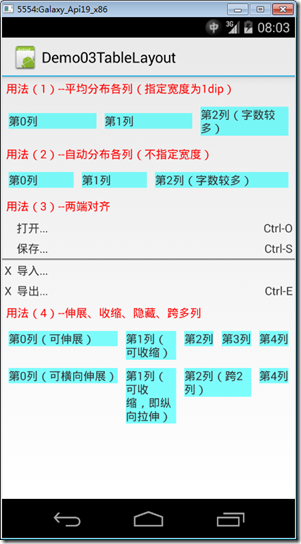
2、添加Demo03TableLayout.axml文件
在Resources/layout文件夹下添加该文件。
<?xml version="1.0" encoding="utf-8"?>

<LinearLayout xmlns:android="http://schemas.android.com/apk/res/android"

    android:orientation="vertical"

    android:layout_width="fill_parent"

    android:layout_height="fill_parent">

  <TextView

      android:layout_width="wrap_content"

      android:layout_height="wrap_content"

      android:textColor="#ff0000"

      android:text="用法(1)--平均分布各列(指定宽度为1dip)"

      android:layout_margin="5dp" />

  <TableLayout

      android:layout_width="fill_parent"

      android:layout_height="wrap_content"

      android:stretchColumns="*"

      android:padding="3dip">

    <TableRow>

      <TextView

          android:text="第0列"

          android:layout_width="1dip"

          android:background="#7f00ffff"

          android:layout_margin="5dp"

          android:layout_gravity="center_vertical" />

      <TextView

          android:text="第1列"

          android:layout_width="1dip"

          android:background="#7f00ffff"

          android:layout_margin="5dp"

          android:layout_gravity="center_vertical" />

      <TextView

          android:text="第2列(字数较多)"

          android:layout_width="1dip"

          android:background="#7f00ffff"

          android:layout_margin="5dp"

          android:layout_gravity="center_vertical" />

    </TableRow>

  </TableLayout>

  <TextView

      android:layout_width="wrap_content"

      android:layout_height="wrap_content"

      android:textColor="#ff0000"

      android:text="用法(2)--自动分布各列(不指定宽度)"

      android:layout_margin="5dp" />

  <TableLayout

      android:layout_width="fill_parent"

      android:layout_height="wrap_content"

      android:stretchColumns="*"

      android:padding="3dip">

    <TableRow>

      <TextView

          android:text="第0列"

          android:background="#7f00ffff"

          android:layout_margin="5dp"

          android:layout_gravity="center_vertical" />

      <TextView

          android:text="第1列"

          android:background="#7f00ffff"

          android:layout_margin="5dp"

          android:layout_gravity="center_vertical" />

      <TextView

          android:text="第2列(字数较多)"

          android:background="#7f00ffff"

          android:layout_margin="5dp"

          android:layout_gravity="center_vertical" />

    </TableRow>

  </TableLayout>

  <TextView

      android:layout_width="wrap_content"

      android:layout_height="wrap_content"

      android:textColor="#ff0000"

      android:text="用法(3)--两端对齐"

      android:layout_margin="5dp" />

  <TableLayout

      android:layout_width="fill_parent"

      android:layout_height="wrap_content"

      android:stretchColumns="1">

    <TableRow>

      <TextView

          android:layout_column="1"

          android:text="打开..."

          android:padding="3dip" />

      <TextView

          android:text="Ctrl-O"

          android:gravity="right"

          android:padding="3dip" />

    </TableRow>

    <TableRow>

      <TextView

          android:layout_column="1"

          android:text="保存..."

          android:padding="3dip" />

      <TextView

          android:text="Ctrl-S"

          android:gravity="right"

          android:padding="3dip" />

    </TableRow>

    <View

        android:layout_height="2dip"

        android:background="#FF909090" />

    <TableRow>

      <TextView

          android:text="X"

          android:padding="3dip" />

      <TextView

          android:text="导入..."

          android:padding="3dip" />

    </TableRow>

    <TableRow>

      <TextView

          android:text="X"

          android:padding="3dip" />

      <TextView

          android:text="导出..."

          android:padding="3dip" />

      <TextView

          android:text="Ctrl-E"

          android:gravity="right"

          android:padding="3dip" />

    </TableRow>

  </TableLayout>

  <TextView

      android:layout_width="wrap_content"

      android:layout_height="wrap_content"

      android:textColor="#ff0000"

      android:text="用法(4)--伸展、收缩、隐藏、跨多列"

      android:layout_margin="5dp" />

  <TableLayout

      android:layout_width="fill_parent"

      android:layout_height="wrap_content"

      android:stretchColumns="0"

      android:shrinkColumns="1"

      android:collapseColumns="2"

      android:padding="3dip">

    <TableRow>

      <TextView

          android:background="#7f00ffff"

          android:layout_margin="5dp"

          android:text="第0列(可伸展)" />

      <TextView

          android:background="#7f00ffff"

          android:layout_margin="5dp"

          android:text="第1列(可收缩)" />

      <TextView

          android:background="#7f00ffff"

          android:layout_margin="5dp"

          android:text="第2列(隐藏了)" />

      <TextView

          android:background="#7f00ffff"

          android:layout_margin="5dp"

          android:text="第3列" />

    </TableRow>

    <TableRow>

      <TextView

          android:background="#7f00ffff"

          android:layout_margin="5dp"

          android:text="第0列(可横向伸展)" />

      <TextView

          android:background="#7f00ffff"

          android:layout_margin="5dp"

          android:text="第1列(可收缩,即纵向拉伸)" />

      <TextView

          android:background="#7f00ffff"

          android:layout_margin="5dp"

          android:text="第2列(跨2列)"

          android:layout_span="2" />

    </TableRow>

  </TableLayout>

</LinearLayout>
3、添加Demo03TableLayout.cs文件
在SrcDemos文件夹下添加该文件。
using Android.App;

using Android.OS;

namespace ch07demos.SrcDemos

{

    [Activity(Label = "Demo03TableLayout")]

    public class Demo03TableLayout : Activity

    {

        protected override void OnCreate(Bundle savedInstanceState)

        {

            base.OnCreate(savedInstanceState);

            SetContentView(Resource.Layout.Demo03TableLayout);

        }

    }

}
【Android】7.4TableLayout(表格布局)的更多相关文章
- .Net程序猿玩转Android开发---(8)表格布局TableLayout
表格布局TableLayout是Android中比較经常使用的一个布局控件,既然是表格,肯定有行和列,TableLayout中的行有TableRow组成.列依据每行控件的数量来确定 假如第一行有3个控 ...
- Android 自学之表格布局 TableLayout
表格布局(TableLayout),表格布局采用行.列的形式来管理UI组件,TableLayout并不需要明确的声明多少行,多少列,而是通过TableRow.其他组件来控制表格的行数和列数. 每次想T ...
- Android中的表格布局TableLayout
表格布局最基本的三个属性: XML代码实例: <?xml version="1.0" encoding="utf-8"?> <LinearLa ...
- Android之TableLayout表格布局
1.相关属性 1.1.常用属性 android:collapseColumns 设置需要被隐藏的列的序列号 android:shrinkColumns 设置允许被收缩的列的序列号 android:st ...
- android:TableLayout表格布局详解
1.TableLayout简介2.TableLayout行列数的确定3.TableLayout可设置的属性详解4.一个包含4个TableLayout布局的实例及效果图一.Tablelayout简介 ...
- Android开发-之五大布局
在html中大家都知道布局是什么意思了,简单来说就是将页面划分模块,比如html中的div.table等.那么Android中也是这样的.Android五大布局让界面更加美化,开发起来也更加方便.当然 ...
- 表格布局tabelLayout
表格布局tabelLayout 一.简介 二.实例 <!-- 这个tableRow里面有两个组件,所以是两列 --> <!-- 这个tableRow里面有三个组件,所以是三列 --& ...
- android——相对布局,表格布局
1.相对布局 RelativeLayout 又称作相对布局,也是一种非常常用的布局.和LinearLayout 的排列规则不同,RelativeLayout 显得更加随意一些,它可以通过相对定位的方式 ...
- Android课程---表格布局TableLayout
特别注意:由于表格布局继承自线性布局,因此并不显示表格线 示例代码: <?xml version="1.0" encoding="utf-8"?> ...
- Android布局_表格布局TableLayout
一.TableLayout概述 TableLayout表格布局模型以行列的形式管理子控件,每一行为一个TableRow的对象,当然也可以是一个View的对象 二.TableLayout的全局属性 1 ...
随机推荐
- Mac和PC在工作中管理的对比(5)
ACLs, 企业应用必备 Windows: ACLs是Access Control Lists的缩写, 存取控制列表/访问控制列表. 它已经在大多数的现代操作系统中得到支持. 系统安全就是通过ACLs ...
- DOM与JavaScript、jQuery之间的关系
DOM(document object model) 其实是浏览器内元素对象的一个总称 我们用JavaScript对网页进行的所有操作都是通过DOM进行的.DOM属于浏览器,而不是JavaScript ...
- Docker网络一览
转自:http://dockone.io/article/1143 [编者的话]本文是Nuage Networks公司Filip Verloy的一篇博文,简介了一下Docker网络情况,单主机的四种模 ...
- Eclipse——工作台
Workspace 磁盘区域.存放工作资料
- openerp many2many
many2many (0,0,{values}) 根据values里面的信息新建一个记录. (1,ID,{values})更新id=ID的记录(写入values里面的数据) (2,ID) 删除id=I ...
- 引入css的几种方式
使用CSS样式的几种方式 CreateTime--2017年10月11日16:45:26 Author:Marydon a.外部样式 a1.链接式(推荐使用) <link href=&quo ...
- C-从源文件到可执行文件的详细编译链接过程
一直用windows一键搞定, 没有去了解详细的编译链接过程, 今天看了一篇文章, 顺便实验和记录在Linux下逐步生成的步骤. 预处理: 执行#include, #define, #if, #ifd ...
- js firstChild 、nextSibling、lastChild、previousSibling、parentNode
nextSibling下一个兄弟节点 previousSibling上一个兄弟 parentNode父亲节点 <select><option value="zs" ...
- Log4Net的概念和使用
第一篇文本日志 log4net简介: log4net简介: log4net是一个功能著名的开源日志记录组件,由java平台而来. 利用log4net可以方便地将日志信息记录到文件.控制台.Window ...
- no !/ in spec
问题: 在学习hibernate的过程中涉及到hibernate.cfg.xml和hibernate.hbm.xml配置文件的编写,写完之后配置文件出现黄色感叹号,鼠标悬停在感叹号上时显示no !/ ...