
datagrid在MVC中的运用04-同时添加搜索和操作区域
本文介绍在datagrid上同时添加搜索和操作区域。
仅仅是增加操作区域
□ 方法1
$('#dg').datagrid({
toolbar: '#tb'
});
<div id="tb">
<a href="#" class="easyui-linkbutton" data-options="iconCls:'icon-edit',plain:true"/a>
<a href="#" class="easyui-linkbutton" data-options="iconCls:'icon-help',plain:true"/a>
</div>
□ 方法2
$('#dg').datagrid({
toolbar: [{
iconCls: 'icon-edit',
handler: function(){alert('edit')}
},'-',{
iconCls: 'icon-help',
handler: function(){alert('help')}
}]
});
仅仅增加搜索区域
$('#dg').datagrid({
toolbar: '#tb'
});
<!--搜索开始-->
<div id="tb" style="padding:3px">
<span>主键:</span>
<input id="itemid" style="line-height:22px;border:1px solid #ccc">
<span>产品编号:</span>
<input id="productid" style="line-height:22px;border:1px solid #ccc">
<a href="#" class="easyui-linkbutton" plain="false" id="btnQuery">搜索</a>
</div>
<!--搜索结束-->
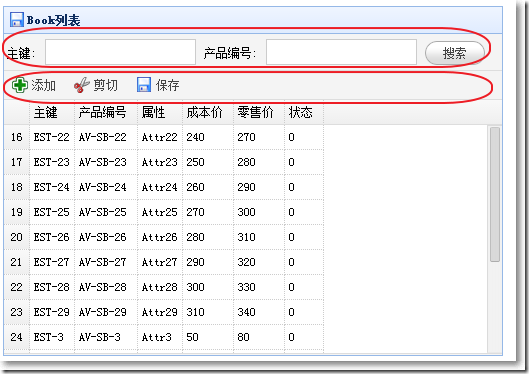
同时增加搜索和操作区域
$('#dg').datagrid({
toolbar: '#tb,#tb1',
});
<!--搜索开始-->
<div id="tb" style="padding:3px">
<span>主键:</span>
<input id="itemid" style="line-height:22px;border:1px solid #ccc">
<span>产品编号:</span>
<input id="productid" style="line-height:22px;border:1px solid #ccc">
<a href="#" class="easyui-linkbutton" plain="false" id="btnQuery">搜索</a>
</div>
<!--搜索结束-->
<!--操作按钮开始-->
<div id="tb1">
<a href="#" class="easyui-linkbutton" iconCls="icon-add" plain="true" onclick="javascript:alert('Add')">添加</a>
<a href="#" class="easyui-linkbutton" iconCls="icon-cut" plain="true" onclick="javascript:alert('Cut')">剪切</a>
<a href="#" class="easyui-linkbutton" iconCls="icon-save" plain="true" onclick="javascript:alert('Save')">保存</a>
</div>
<!--操作按钮结束-->
datagrid在MVC中的运用04-同时添加搜索和操作区域的更多相关文章
- datagrid在MVC中的运用05-加入时间搜索条件,枚举填充下拉框
本文主要来体验在搜索区域增加更多的搜索条件,主要包括: ※ 使用jQuery ui的datepicker显示时间,设置显示格式.样式. ※ 设置jQuery ui的onClose事件,使开始和结束时间 ...
- datagrid在MVC中的运用01-基本属性并实现分页
本文体验jQuery EasyUI的datagrid在MVC中的应用.主要涉及到: ※ datagrid的基本属性和方法 ※ datagrid分页在前后台的实现 最终效果: 与视图显示对应的view ...
- Android中通过ActionBar为标题栏添加搜索以及分享视窗
在Android3.0之后,Google对UI导航设计上进行了一系列的改革,其中有一个非常好用的新功能就是引入的ActionBar,他用于取代3.0之前的标题栏,并提供更为丰富的导航效果.Action ...
- datagrid在MVC中的运用07-实现Master-Detail(使用PartialView)
本文主要体验用jQuery Easyui的datagrid来实现Master-Detail主次表.谢谢Kevin的博文,助我打开了思路. 主表显示所有的Category,当点击主表的展开按钮,显示该C ...
- jQuery EasyUI DataGrid在MVC中的运用-基本属性并实现分页
※ datagrid的基本属性和方法 ※ datagrid分页在前后台的实现 最终效果: 与视图显示对应的view model public class Book public strin ...
- datagrid在MVC中的运用10-勾选
本文体验与勾选有关的特性. 需要加载的books.json 展开{ "total": 4, "rows": [ { "productid": ...
- datagrid在MVC中的运用09-实现排序
本文体验datagrid的排序. □ 思路 当点击datagrid的标题,视图传递给Controller的Form Data类似这样:page=1&rows=10&sort=Custo ...
- datagrid在MVC中的运用06-固定连续列
本文主要体验datagrid的frozenColumns属性. □ frozenColumns效果: 在frozenColumns的列将保持不动,而其他列横向滚动. □ frozenColumns效果 ...
- datagrid在MVC中的运用02-结合搜索
本文接着上一篇,来体验给datagrid加上搜索功能.主要涉及到: ※ 把一个div与datagrid相关起来 ※ datagrid接收查询参数 ※ 查询参数的封装 效果图: 查询参数封装 分页相关的 ...
随机推荐
- 使用Jsoup解析出html中的img元素
jsoup 是一款Java 的HTML解析器,可直接解析某个URL地址.HTML文本内容.它提供了一套非常省力的API,可通过DOM,CSS以及类似于jQuery的操作方法来取出和操作数据. 博客项目 ...
- 课堂实验-模拟实现Sort
课堂实验 模拟实现Linux下Sort -t : -k 2的功能.参考 Sort的实现. 代码如下: /** * Created by Administrator on 2017/5/20. */ i ...
- pycharm、webstorm和idea激活码
pycharm ---> http://blog.csdn.net/kevinelstri/article/details/57413791 idea ---> http://idea.l ...
- #CSS 文本溢出部分显示省略号
单行结尾溢出: 用text-overflow:ellipsis属性实现,当然还需要加宽度width属来兼容部分浏览. width:300px;overflow: hidden; text-overfl ...
- mycat 配置文件详解
server.xml 包含mycat的系统配置信息,它有两个标签,分别是user和system,掌握system标签的各项配置属性是mycat调优的关键. <?xml version=" ...
- 将C++ IplImage 图像用C#读取
如何将C++ IplImage 图像用C#读取 ? 将opencv 的C++程序做成 dll 动态链接库 用C#调用 当然这里需要安装emgucv ,也可以自己实现这个类. 下面我把实现贴出来给大 ...
- bzoj 1899 贪心+dp
思路:这个贪心排顺序我居然没看出来. 吃饭时间长的在前面, 用反证法很容易得出. 剩下的就是瞎dp啦. #include<bits/stdc++.h> #define LL long lo ...
- 2015 icpc北京赛区 D 最小割
题目大意:给你一棵技能树,如果要学习一个技能,那么它之前的技能要全部学完,第 i 个点需要ai 能学习 每条边有一个消耗c 如果支付c那么就能去掉这条边, 你还可以kejin 花费di 就能直接学习 ...
- POJ - 2785 4 Values whose Sum is 0 二分
4 Values whose Sum is 0 Time Limit: 15000MS Memory Limit: 228000K Total Submissions: 25615 Accep ...
- 三、redis系列之事务
1. 绪言 Redis也提供了事务机制,可以一次执行多个命令,本质是一组命令的集合.一个事务中的所有命令都会序列化,按顺序地串行化执行而不会被其他命令插入,不许加塞.但Redis对事务的支持是部分支持 ...