
.net mvc使用FlexPaper插件实现在线预览PDF,EXCEL,WORD的方法
FlexPaper插件可以实现在浏览器中在线预览pdf,word,excel等。
在网上看到很多关于这个插件实现预览的技术,但是很难做到word和excel在线预览。
pdf很好实现。
首先下载相关的插件信息,这里不多说了。
其中这个插件主要需要配合Aspose来实现将上传的excel和word来转换为pdf。再通过pdf2swf来将pdf转换为swf格式。才能在前段在线预览。
1.所以这里还需要下载Aspose.dll 和Aspose.Cells.dll(处理Excel)还有Aspose.Words.dll(处理word)
有了dll之后,需要写一个cs类,专门处理word和excel转换为pdf,以及pdf转换为swf的方法。
直接推荐这篇文章里面已经实现的方法。
http://www.bkjia.com/Asp_Netjc/890896.html
通过这个类实现的方法
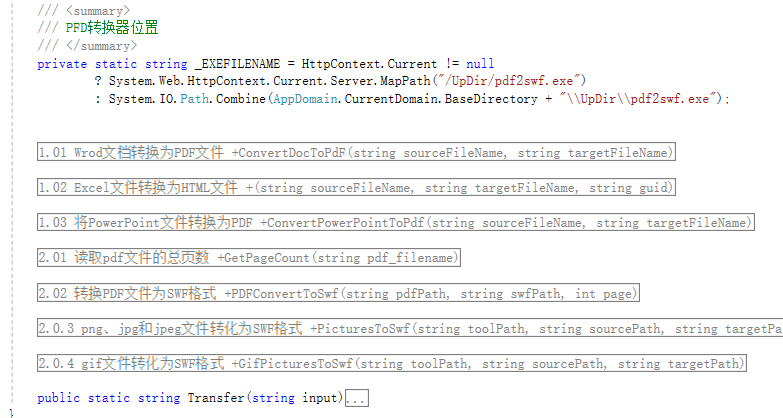
2.结合我们上传的文件路径,来实现将上传的文件格式转换以及在线预览。
首先配置前段页面信息
  <input type="hidden" id="_filename" value="/./../../@Model" />

         <div style="margin:0 auto;width:100%;">

             <div id="flashContent" style="display:none;">

                 <p>

                     To view this page ensure that Adobe Flash Player version

                     10.0.0 or greater is installed.

                 </p>

             </div>

             <script src="~/Scripts/jquery-1.10.2.js"></script>

             <script src="~/Scripts/swfupload/flexpaper_flash.js"></script>

             <script src="~/Scripts/swfupload/swfobject.js"></script>

             <script type="text/javascript">

                 var _filename = $("#_filename").val();

                  // alert(_filename)

                 //alert(_filename);

                 var swfVersionStr = "9.0.0";

                 var xiSwfUrlStr = "playerProductInstall.swf";

                 var flashvars = {

                     SwfFile: escape(_filename),

                     SwfFile: _filename,

                     // SwfFile: "/./../../UpDir/expressInstall.swf",

                     Scale: 0.6,

                     ZoomTransition: "easeOut",

                     ZoomTime: 0.5,

                     ZoomInterval: 0.1,

                     FitPageOnLoad: false,

                     FitWidthOnLoad: true,

                     PrintEnabled: true,

                     FullScreenAsMaxWindow: false,

                     ProgressiveLoading: true,

                     PrintToolsVisible: true,

                     ViewModeToolsVisible: true,

                     ZoomToolsVisible: true,

                     FullScreenVisible: true,

                     NavToolsVisible: true,

                     CursorToolsVisible: true,

                     SearchToolsVisible: true,

                     SearchMatchAll: true,

                     localeChain: "zh_CN"

                 };

                 var params = {

                     quality: "high",

                     bgcolor: "#ffffff",

                     allowscriptaccess: "sameDomain",

                     allowfullscreen: "true",

                     wmode: "direct"

                 }

                 var attributes = { id: "FlexPaperViewer", name: "FlexPaperViewer" };

54                 swfobject.embedSWF("../../../../Scripts/FlexPaper/FlexPaperViewer.swf", "flashContent", "100%", "1000", swfVersionStr, xiSwfUrlStr, flashvars, params, attributes);

55

56                 swfobject.createCSS("#flashContent", "display:block;text-align:left;");

             </script>

         </div>
一些主要的配置信息我已经标红,至于插件配置信息的属性功能,自行参考网上很多文档介绍,我用的就是一般上传。
3.接下来就是controller中实现的转换方法,我直接将路径传给了model返回给页面显示了。
                        //swf文件路径

             string path = Server.MapPath("~\\UpDir") + node.FilePath.Substring().Replace('\\', '/') + ".swf";

                 //SIO是system.io  我重命名了

             SIO.FileInfo fileinfo = new SIO.FileInfo(path);

             if (fileinfo.Exists)

             {

                 return View((object)(node.FilePath + ".swf"));

             }

             else

             {

                 try

                 {

                     //上传的源文件地址

                     string sourcefile = Server.MapPath("~\\UpDir") + node.FilePath.Substring();

                     string FileName = node.name;

                     string ext = node.FilePath.Substring(node.FilePath.LastIndexOf(".") + );

                     if (ext.ToLower() == "doc" || ext.ToLower() == "docx")

                     {

                         string pdffile = sourcefile;

                         string swffile = Server.MapPath("~\\UpDir") + node.FilePath.Substring().Replace('\\', '/');

                         string path1 = Server.MapPath("~\\UpDir") + node.FilePath.Substring().Replace('\\', '/') + ".swf";

                         Aspose.Words.Document doc = new Aspose.Words.Document(pdffile);

25                         doc.Save(swffile, Aspose.Words.SaveFormat.Pdf);

                         AsposeUtils.ConvertDocToPdF(swffile, path1);

                         AsposeUtils.PDFConvertToSwf(swffile, path1, AsposeUtils.GetPageCountByPDF(swffile));

                     }

                     else if (ext.ToLower() == "xls" || ext.ToLower() == "xlsx")

                     {

                         string pdffile = sourcefile;

                         string swffile = Server.MapPath("~\\UpDir") + node.FilePath.Substring().Replace('\\', '/') + ".pdf";

                         string path1 = Server.MapPath("~\\UpDir") + node.FilePath.Substring().Replace('\\', '/') + ".swf";

                         Aspose.Cells.Workbook workbook = new Aspose.Cells.Workbook(pdffile);

                         workbook.Save(swffile, Aspose.Cells.SaveFormat.Pdf);

                         //AsposeUtils.ConvertExcelToHtml(swffile, swffile);

42                         AsposeUtils.PDFConvertToSwf(swffile, path1, AsposeUtils.GetPageCountByPDF(swffile));

                     }

                     else if (ext.ToLower() == "pdf")

                     {

                         try

                         {

                             string pdffile = sourcefile;

                             string swffile = path;

                             SIO.File.Copy(pdffile, swffile, true);

                             AsposeUtils.PDFConvertToSwf(pdffile, swffile, AsposeUtils.GetPageCountByPDF(pdffile));

                         }

                         catch (Exception ex)

                         {

                             string str = ex.Message;

                         }

                     }

                     else if (ext.ToLower() == "ppt" || ext.ToLower() == "pptx")

                     {

                         string pdffile = sourcefile;

                         string swffile = path;

                         AsposeUtils.ConvertPowerPointToPdf(sourcefile, swffile);

                         AsposeUtils.PDFConvertToSwf(pdffile, swffile, AsposeUtils.GetPageCountByPDF(pdffile));

                     }

                     else if (ext.ToLower() == "txt")

                     {

                         string pdffile = sourcefile;

                         string swffile = path;

                         Txt2Pdf.zscsc(sourcefile, swffile);

                         AsposeUtils.PDFConvertToSwf(pdffile, swffile, AsposeUtils.GetPageCountByPDF(pdffile));

                     }

                     else if (ext.ToLower() == "jpg" || ext.ToLower() == "jpeg" || ext.ToLower() == "png")

                     {

                         return View((object)node.FilePath);

                     }

                     else

                     {

                         // ViewBag.FileName = @"/./../../UpDir/"+ project.ProjectCode + "/" + contract.ContractType + "/" + contract.Id + ".swf"; ;

                     }
4.我用的上传插件师swfupload,个人觉得不怎么好用,后面用uploadfiy插件了。上传不说了,controller中对word和excel的转换方法和我连接中文章使用的不一样。因为用文章中的总不能在前段使用flexpapaer预览成功。所以标黄的代码是我自己加上的。绿色代码是原先的代码。可以自己参考,两种方法哪个可行用哪个。
.net mvc使用FlexPaper插件实现在线预览PDF,EXCEL,WORD的方法的更多相关文章
- 前端实现在线预览pdf、word、xls、ppt等文件
最近在做一个公司的资源管理系统,一些知识小记一下. 1.前端实现pdf文件在线预览功能 方式一.pdf文件理论上可以在浏览器直接打开预览但是需要打开新页面.在仅仅是预览pdf文件且UI要求不高的情况下 ...
- pc或者微信上用pdf.js在线预览pdf和word
最近项目要求pdf和word可以在线预览功能,pc端还好解决,但是微信端就有点坑了,pc端原来的思路是将文件转成base64,然后用html格式显示 ,但是微信端不支持, 这种方式就pass掉了,谷歌 ...
- 前端实现在线预览pdf、docx、xls、ppt等文件
思路:前台将各种格式的附件上传到服务器----后台通过方法将这些格式的文件转化成图片,前台通过放映ppt的方式将其展示在页面上. 关键点:reveal.js 参考文章:https://www.awes ...
- FlexPaper+SWFTool+操作类=在线预览PDF
引言 由于客户有在线预览PDF格式的需求,在网上找了一下解决方案,觉得FlexPaper用起来还是挺方便的,flexpaper是将pdf转换为swf格式的文件预览的,所以flexpaper一般和swf ...
- FlexPaper+SWFTool+操作类=在线预览PDF(转)
引言 由于客户有在线预览PDF格式的需求,在网上找了一下解决方案,觉得FlexPaper用起来还是挺方便的,flexpaper是将pdf转换为swf格式的文件预览的,所以flexpaper一般和swf ...
- 网页嵌入pdf、在线预览pdf工具及插件(转)
摘要:在web开发时我们有时会需要在线预览PDF内容,在线嵌入pdf文件: 问题1:如何网页中嵌入PDF: 在网页中: 常用的几种PDF预览代码片段如下: 代码片段1: 1 <object ty ...
- 使用pdfjs插件在线预览PDF文件
前言 本文介绍在html中使用 pdfjs插件在线预览PDF文件的方法. 实现步骤 下载 pdfjs 并引入项目中 到PDFJS官网 http://mozilla.github.io/pdf.js/g ...
- 在线预览PDF
FlexPaper+SWFTool+操作类=在线预览PDF 引言 由于客户有在线预览PDF格式的需求,在网上找了一下解决方案,觉得FlexPaper用起来还是挺方便的,flexpaper是将pdf ...
- 网页中动态嵌入PDF文件/在线预览PDF内容https://www.cnblogs.com/xgyy/p/6119459.html
#网页中动态嵌入PDF文件/在线预览PDF内容# 摘要:在web开发时我们有时会需要在线预览PDF内容,在线嵌入pdf文件: 问题1:如何网页中嵌入PDF: 在网页中: 常用的几种PDF预览代码片段如 ...
随机推荐
- UVa 1595 Symmetry(set)
We call a figure made of points is left-right symmetric as it is possible to fold the sheet of paper ...
- 用 PHP-GTK2 做 Win32 GUI 程序
PHP通常是做为服务器端脚本执行,如果告诉你PHP可以编写普通的GUI程序,你应该很感兴趣.下面介绍的PHP-GTK就是PHP的GUI扩展.GTK是一个业界标准的图形库,具有良好的移植性.如果你用过l ...
- Linux tcpdump命令
一.简介 用简单的话来定义tcpdump,就是:dump the traffic on a network,根据使用者的定义对网络上的数据包进行截获的包分析工具. tcpdump可以将网络中传送的数据 ...
- 挪过来的spring mvc 的入门 介绍
目录 一.前言二.spring mvc 核心类与接口三.spring mvc 核心流程图 四.spring mvc DispatcherServlet说明 五.spring mvc 父子上下文的说明 ...
- Python图像处理库:Pillow 初级教程-乾颐堂
Image类 Pillow中最重要的类就是Image,该类存在于同名的模块中.可以通过以下几种方式实例化:从文件中读取图片,处理其他图片得到,或者直接创建一个图片. 使用Image模块中的open函数 ...
- 什么是Jenkins 以及如何使用?
Jenkins是什么? Jenkins是一个功能强大的应用程序,允许持续集成和持续交付项目,无论用的是什么平台.这是一个免费的源代码,可以处理任何类型的构建或持续集成.集成Jenkins可以用于一些测 ...
- part1:14-开发板介绍和开发板系统安装准备
开发板介绍: Norflash与nandflash都充当硬盘,前者容量小,速度快,价格高:后者容量大,速度相对慢,价格低. 一般把这些系统都安装到nandflash里面. 1.安装到nandflash ...
- ListView单行刷新
之前要改变某一行ListView内容或者显示出删除按钮等,都要adapter.notifyDataSetChanged();刷新一下,数据少还可以,数据多的时候明显会消耗性能,单独刷新某一行就不会了, ...
- Ehcache整合spring配置
为了提高系统的运行效率,引入缓存机制,减少数据库访问和磁盘IO.下面说明一下ehcache和spring整合配置. 1. 需要的jar包 slf4j-api-1.6.1.jar ehcache-c ...
- sql server 2008安装的时候选NT AUTHORITY\NEWORK SERVICE 还是选 NT AUTHORITY\SYSTEM ?
sql server 2008安装的时候选NT AUTHORITY\NEWORK SERVICE 还是选 NT AUTHORITY\SYSTEM ? sql server 2008安装的时候选NT A ...