
[Git] An efficient GIT workflow for mid/long term projects
reference : http://fle.github.io/an-efficient-git-workflow-for-midlong-term-projects.html
Our full-web project has been going on for nearly two years and is running in production for over 18 months. I think it's my first project without any headache about our codebase and VCS management. So, I'll present our GIT workflow which has proven to be very effective for now.
Context
- Several developers
- Several staging/pre-production servers, several (non-synchronous) production servers
- Monthly releases (more or less) with delivery on staging, then on production servers
- On servers, basecode is directly pulled from the GIT repository with fabric
Rules
To handle this, we have set some simple rules:
- One (and only one) maintainer, who manage GIT repository and releases
- Never commit directly on master
- Never rebase master on any branch
- Do not get out of planned workflow
Workflow
Master branch
Our branch master is the common trunk and simply contains all the codebase of the next release. Since we don't work directly on it, it evolves mainly with merges.

Development branches
When a developer starts a new feature or a bugfix, he creates a new branch from master HEAD
$ (master) git checkout -b featureA

$ (featureA) git commit -a -m "featureA part 1"

$ (featureA) git commit -a -m "featureA part 2"
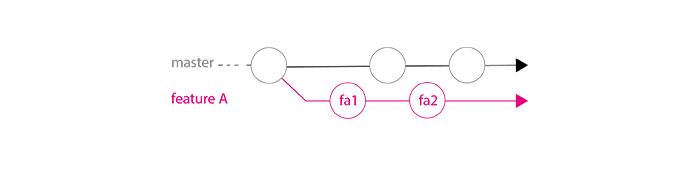
He follows branch master evolution and regularly ensures his code still works, by rebasing his branch featureA on branch master.
$ (featureA) git rebase master
When his developments are done (commits fa1 / fa2 in schema below), he does a last rebase. Thanks to this:
- he ensures that the maintainer will be able to merge easily (maintainer should not need to read code deeply and search why there are conflicts)
- if tests pass on development branch after rebase, they should pass on master after merge, so we ensure that branch ``master`` is always working well
Possibly, it will be the good time to clean the development branch to let it neat just when it is finished.

The maintainer can now merge this branch in master peacefully, without big conflict troubles. As the maintainer, I like to use no-ff option to force a merge commit, so history can stay really readable (we easily see where the branch has started and where it has been merged).
$ (master) git merge --no-ff featureA

Now that the branch has been merged, the developer should remove his development branch.
$ (master) git branch -d featureA

$ (master) git push origin :featureA
Stable branches
When we prepare a release, we update CHANGELOG (with our workflow, a git log --oneline should be quite clear to do that) and tag the branch master (optional), then we start a stable branch.
$ (master) git tag 1.0

$ (master) git checkout -b stable1.0

$ (stable1.0) git push origin stable1.0
This branch is deployed on different servers.
While development goes on, we possibly have to do some hotfixes (for example: commit hf1 in schema below), that must be sent in production quickly. These hotfixes are done directly on concerned stable branch.
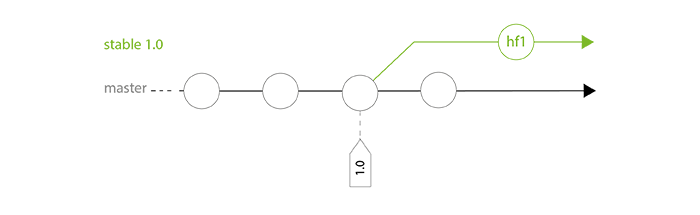
Regularly, the maintainer merges stable branch in master to bring back these commits. This action is particularly important before the next release.
$ (master) git merge --no-ff stable1.0
We found this method really useful because:
- each stable branch has its own life and doesn't take care of branch master evolution, so we can hotfix stable branche freely and without stress
- we ensure that no hotfix commit has been lost before next release (avoid regressions)
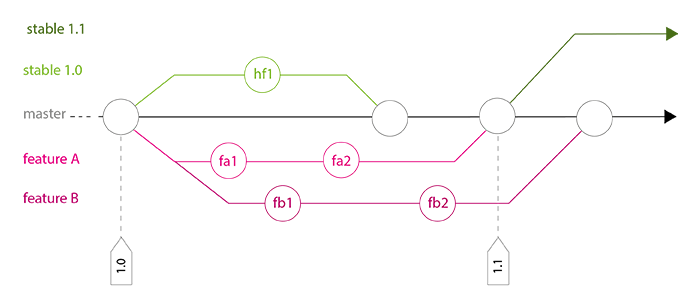
A complete history example
Conclusion
Of course, there are several GIT workflows which can be very efficient, but we found many advantages in working with this method, and no real issue:
- Branch master is always clean and working well
- Developers don't care about GIT whole workflow
- We can fix stable branch without asking ourselves what happened on master since last release
- We ensure that each stable release contains new features and possible fixes
- Always working with branches and using``-no-ff``option make history really clear !
- This workflow is scalable (number of developers or branches doesn't really matter)
[Git] An efficient GIT workflow for mid/long term projects的更多相关文章
- git项目实战常用workflow和命令
一个从无到有的项目大体经历-创建项目目录,创建repo,配置过滤集,配置git user,导入已有基础代码入库,将库放到central去,建立分支,修改代码,checkin代码,分支上 测试验证代码, ...
- Git基本命令 -- 创建Git项目
在这里下载git:https://git-scm.com/ 安装的时候, 如果是windows系统的话, 可以勾选unix的命令行工具, 这样在windows命令行下会多出很多命令, 例如ls. Gi ...
- git push and git pull
原文链接 git push 通常对于一个本地的新建分支,例如git checkout -b develop, 在develop分支commit了代码之后,如果直接执行git push命令,develo ...
- git init和git init -bare区别
1 Git init 和 git init –bare 的区别 用"git init"初始化的版本库用户也可以在该目录下执行所有git方面的操作.但别的用户在将更新push上来的 ...
- 小丁带你走进git世界一-git简单配置
小丁带你走进git世界一-git简单配置 1.github的简单配置 配置提交代码的信息,例如是谁提交的代码之类的. git config –global user.name BattleHeaer ...
- Git(远程仓库:git@oschina)-V2.0
1.注册git@osc(也就是“码云”) 这里会提示注册密码==push密码,反正一定要记住的东西. 2.安装git 这里要设置个人信息 git config --list //查看git信息 g ...
- git pull和git fetch的区别
Git中从远程的分支获取最新的版本到本地有这样2个命令:1. git fetch:相当于是从远程获取最新版本到本地,不会自动merge Git fetch origin master git log ...
- [.net 面向对象程序设计进阶] (26) 团队开发利器(五)分布式版本控制系统Git——图形化Git客户端工具TortoiseGit
[.net 面向对象程序设计进阶] (26) 团队开发利器(五)分布式版本控制系统Git——图形化Git客户端工具TortoiseGit 读前必备: 接上篇: 分布式版本控制系统Git——使用GitS ...
- Git:Git初体验——Git安装配置
作为即将成为一个程序员的男人,一直在听别人说Git多好多好,之前也随便了解了一些,但是始终没有决心去学会.现在大四了,只有毕设和一门开学六七周只去过一次课的全员必修课外,也没有什么事情做,何不去做这些 ...
随机推荐
- spring调用方法(接口和多个实现类的情况)
以spring框架注入bean说明接口TestService 有2个实现类 TestServiceImp1 @Service("TestService1") ,TestServic ...
- Codeforces Round #213 (Div. 1) B - Free Market 思维+背包 好题
B - Free Market 思路:这个题怎么说呢,迷惑性很大,题目里说了交换了两个集合的时候如果有相同元素不能交换,感觉如果没 这句话能很快写出来, 其实当交换的两个集合有重复元素的时候只要交换那 ...
- django Form 表单 总结与小实例
开头寄语: 这几天一直在看Django的form表单验证,然后想对于这几天要有个总结. 首先,先来看一下找到的一个form表单验证的流程: 验证过程 流程详解1. 函数full_clean()依次调用 ...
- 9-4 Unidirectional TSP uva116 (DP)
题意:给一个n行m列矩阵 从第一列任意一个位置出发 每次往右 右上 右下三个方向走一格 直到最后一列 输出所类和的最小值和路径!! 最小值相同则输出字典序最小路径 很像一开始介绍的三角形dp ...
- Linux 服务器上Redis安装和配置
1.下载安装redis 在Linux服务器上,命令行执行以下命令(cd ./usr local/src 一般源码放在这里(推荐源码安装)) wget http://download.redis.io/ ...
- iOS 11开发教程(十二)iOS11应用视图始祖——UIView
iOS 11开发教程(十二)iOS11应用视图始祖——UIView 在Swift中,NSObject是所有类的根类.同样在UIKit框架(UIKit框架为iOS应用程序提供界面对象和控制器)中,也存在 ...
- Qt中文本编辑器实现语法高亮功能(Qscitinlla)
Scintilla是一个免费.跨平台.支持语法高亮的编辑控件.它完整支持源代码的编辑和调试,包括语法高亮.错误指示.代码完成(code completion)和调用提示(call tips).能包含标 ...
- 在Windows上安装FFmpeg程序
原文地址:http://helloway.blog.51cto.com/7666282/1642247 FFmpeg是一套可以用来记录.转换数字音频.视频,并能将其转化为流的开源计算机程序.它提供了录 ...
- 快速排序之C++实现
快速排序之C++实现 一趟快速排序的算法是: 1)设置两个变量i.j,排序开始的时候:i=0,j=N-1: 2)以第一个数组元素作为关键数据,赋值给key,即key=A[0]: 3)从j开始向前搜索, ...
- Codeforces.547C.Mike and Foam(容斥/莫比乌斯反演)
题目链接 \(Description\) 给定n个数(\(1\leq a_i\leq 5*10^5\)),每次从这n个数中选一个,如果当前集合中没有就加入集合,有就从集合中删去.每次操作后输出集合中互 ...