
linux下安装shellinabox实现web登录服务器
GitHub地址(含有文件下载和详细安装流程):https://github.com/shellinabox/shellinabox
这里我们使用的是redhat安装方法如下:
1.配置安装依赖环境
yum install git openssl-devel pam-devel zlib-devel autoconf automake libtool
2.下载shellinabox包,开始安装
(1)git远程获取,克隆源文件到项目目录
git clone https://github.com/shellinabox/shellinabox.git && cd shellinabox
(2)在页面下载zip文件,上传至服务器。
unzip shellinabox-master.zip
cd shellinabox-master
(3)在项目目录中运行自动工具
autoreconf -i
(4)编译运行配置文件(可设置项目存放位置)
./configure

./configure --prefix=/usr/local/shellinabox  #设置项目存放位置
(5)执行安装程序
make && make install
3.进行测试
(1)启动程序(需要在管理员下启动,不然所有用户都无法登录)
[root@redhat2 bin]# cd /usr/local/shellinabox/bin

[root@redhat2 bin]# ./shellinaboxd -t  #默认是开启在4200端口  -b  #后台启动  -p  #设置端口
  -b, --background[=PIDFILE]  run in background

  -c, --cert=CERTDIR          set certificate dir (default: $PWD)

      --cert-fd=FD            set certificate file from fd

      --css=FILE              attach contents to CSS style sheet

      --cgi[=PORTMIN-PORTMAX] run as CGI

  -d, --debug                 enable debug mode

  -f, --static-file=URL:FILE  serve static file from URL path

  -g, --group=GID             switch to this group (default: nobody)

  -h, --help                  print this message

      --linkify=[none|normal|aggressive] default is "normal"

      --localhost-only        only listen on 127.0.0.1

      --no-beep               suppress all audio output

  -n, --numeric               do not resolve hostnames

  -m, --messages-origin=ORIGIN allow iframe message passing from origin

      --pidfile=PIDFILE       publish pid of daemon process

  -p, --port=PORT             select a port (default: )

  -s, --service=SERVICE       define one or more services

  -t, --disable-ssl           disable transparent SSL support

      --disable-ssl-menu      disallow changing transport mode

      --disable-utmp-logging  disable logging to utmp and wtmp

  -q, --quiet                 turn off all messages

      --unixdomain-only=PATH:USER:GROUP:CHMOD listen on unix socket

  -u, --user=UID              switch to this user (default: nobody)

      --user-css=STYLES       defines user-selectable CSS options

  -v, --verbose               enable logging messages

      --version               prints version information

      --disable-peer-check    disable peer check on a session
所有参数
(2)可以查看程序运行端口
[root@redhat2 ~]# netstat -tulnp

Active Internet connections (only servers)

Proto Recv-Q Send-Q Local Address               Foreign Address             State       PID/Program name

tcp               0.0.0.0:                0.0.0.0:*                   LISTEN      /./shellinabox
(3)可能此时在主机上,依旧无法访问,需要配置防火墙
0.查看防火墙状态
/etc/init.d/iptables status
1.设置防火墙:
[root@redhat2 crazyeye]# /sbin/iptables -I INPUT -p tcp --dport 4200 -j ACCEPT  #允许8080端口数据访问

[root@redhat2 crazyeye]# /etc/init.d/iptables save  #保存配置

iptables: Saving firewall rules to /etc/sysconfig/iptables: [  OK  ]
2.临时关闭防火墙
/etc/init.d/iptables stop
3.永久关闭,不随着我们下一次重启而启动
chkconfig --level 35 iptables off

chkconfig iptables off
(4)成功访问
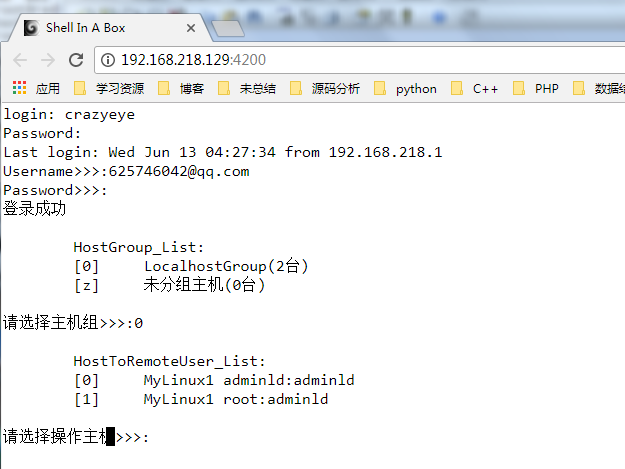
推文:Shellinabox:基于 Web 的远程 Terminal 模拟器安装使用详解
4.使用iframe嵌入页面
(1)补充:一般设置div高度自适应方法
style="height:0;padding-bottom:100%"
(2)在使用shellinabox的web页面时使用iframe嵌入(不需要指定高度)
<div id="page-content">

    <div class="row">

        <div class="col-lg-12">

             <iframe src="http://192.168.218.129:4200/" width="100%" style="padding-bottom:100%;background-color:white;"></iframe>

        </div>

    </div>

</div>
(3)实现效果

linux下安装shellinabox实现web登录服务器的更多相关文章
- linux下安装EJBCA 搭建私有CA服务器
linux下安装EJBCA 搭建私有CA服务器 EJBCA是一个全功能的JAVA的CA系统软件,我们可以用此搭建私有CA服务器: 一:首先我的测试环境: 1. linux mint18.3 62位: ...
- 用了一天的时间,linux下expect实现ssh自动登录服务器记,鄙视下网上各种抄来抄去残段子
因为要对客户方的快30个项目进行特别有顺序的重启,所以不得不想办法写个脚本,网上看了不少段子.真是残缺的可以.没有一段是可以正常运行的.我来按顺序记录一下 脚本的本身 使用expect实现自动登录的脚 ...
- linux下安装haproxy作为端口转发服务器,以及安装keepalived作为haproxy高可用方案
一.安装haproxy作为端口转发服务器(主服务器:172.28.5.4,备服务器:172.28.5.8,浮点IP为:172.28.5.6) 1.安装依赖包 yum -y install wget g ...
- Linux下安装PHP并在nginx服务器中进行配置的详细方法
先介绍一下使用的环境:centos 7.4, PHP 7.0 , nginx 1.12 Linux系统版本可以通过命令:lsb_release -a 查看. 现在开始步入正题了! 1. 首先查看一下 ...
- linux下安装好mysql后,登录时提示libgcc_s.so.1 must be installed for pthread_cancel to work
网上找了很多帖子,各说纷纭, 自己到https://centos.pkgs.org/下载对应版本的libgcc_s.so.1,使用rpm -ivh libgcc-4.8.5-16.el7.i686.r ...
- Linux下安装Tomcat服务器和部署Web应用
一.上传Tomcat服务器
- 转】Linux下安装Tomcat服务器和部署Web应用
原博文出自于: http://www.cnblogs.com/xdp-gacl/p/4097608.html 感谢! 一.上传Tomcat服务器
- Linux 下安装 Tomcat 服务器和部署 Web 应用
一.上传Tomcat服务器 二.安装Tomcat服务器 2.1.解压tomcat服务器压缩包 2.2.配置环境变量 tomcat服务器运行时是需要JDK支持的,所以必须配置好JDK用到的那些环境变量 ...
- 转 Linux下安装Tomcat服务器和部署Web应用
转载声明: http://www.cnblogs.com/xdp-gacl/p/4097608.html 一.上传Tomcat服务器
随机推荐
- angualrJs指令起名的bug
我在写一个demo时: <div ng-repeat="user in users" my-template2 my-template> //my-template2 ...
- 再学HTML之一
Html 超文本标记语言 什么是html? HTML 是用来描述网页的一种语言. HTML 指的是超文本标记语言 (Hyper Text Markup Language) HTML 不是一种编程语言, ...
- Ubuntu恢复被误删的文件
主要内容转载自博客:https://blog.csdn.net/YLD10/article/details/80241160 写在前面,该方法只能用于误删的文件,若文件被覆盖,则无法恢复. 1.下载工 ...
- ubuntu中启动VIM,以及学习VIM
启动VIM:首先打开终端,然后输入vi回车,然后输入i或者a,进入. 学习VIM:首先打开终端,然后输入vimtutor回车,然后进入教程学习.
- Oculus VR眼镜调研
VR眼镜 oculus 软件安装 最详细的Oculus Rift VR/3D眼镜安装设置教程(多图) 在线安装Oculus rift驱动[非VPN方法] Rift,Go,Gear VR,Quest: ...
- web.config文件详解[转]
一).Web.Config是以XML文件规范存储,配置文件分为以下格式1.配置节处理程序声明特点: 位于配置文件的顶部,包含在<configSections>标志中.2.特定应用程序配置特 ...
- Ubuntu 14.04(64bit)使用indicator-sysmonitor显示系统运行状态
原帖位置:http://tieba.baidu.com/p/3005287033 在使用ubutu时,如果可以查看当前系统使用情况,如CPU,内存,网速等是非常爽的,今天就讲一下一个系统运行状态显示软 ...
- spring通过工厂模式解决页面耦合问题
spring通过工厂模式解决页面耦合问题
- java传统的文件拷贝 相当于两个大缸需要通过一个勺子(字节数组)一点一点运过去
- 【Java并发编程】之九:死锁
当线程需要同时持有多个锁时,有可能产生死锁.考虑如下情形: 线程A当前持有互斥所锁lock1,线程B当前持有互斥锁lock2.接下来,当线程A仍然持有lock1时,它试图获取lock2,因为线程B ...