
MAC 下用 Common Lisp 调试 OpenGL 程序
MAC 下用 Common Lisp 调试 OpenGL 程序
环境搭建
- 运行环境: OSX 10.11.3 EI Capitan
- Common Lisp: SBCL
使用 SBCL, 首先要安装这几个库 quicklisp, cl-opengl, cl-glu, lispbuilder-sdl. 先安装好 quicklisp, 再用它来安装其他库.
安装过程如下.
安装 quicklisp
先安装 quicklisp
Air:~ admin$ cd code-staff/

Air:code-staff admin$ mkdir sbcl

Air:code-staff admin$ cd sbcl

Air:sbcl admin$ curl -O https://beta.quicklisp.org/quicklisp.lisp

  % Total    % Received % Xferd  Average Speed   Time    Time     Time  Current

                                 Dload  Upload   Total   Spent    Left  Speed

100 57144  100 57144    0     0  12184      0  0:00:04  0:00:04 --:--:-- 12545

Air:sbcl admin$ ls

quicklisp.lisp

Air:sbcl admin$ sbcl --load quicklisp.lisp

This is SBCL 1.0.55, an implementation of ANSI Common Lisp.

More information about SBCL is available at <http://www.sbcl.org/>.

SBCL is free software, provided as is, with absolutely no warranty.

It is mostly in the public domain; some portions are provided under

BSD-style licenses.  See the CREDITS and COPYING files in the

distribution for more information.

  ==== quicklisp quickstart 2015-01-28 loaded ====

    To continue with installation, evaluate: (quicklisp-quickstart:install)

    For installation options, evaluate: (quicklisp-quickstart:help)
执行 (quicklisp-quickstart:install) 发现原来已经安装过了, 那就选择使用已经安装好的.
* (quicklisp-quickstart:install)

debugger invoked on a SIMPLE-ERROR in thread

#<THREAD "initial thread" RUNNING {10029A91C3}>:

  Quicklisp has already been installed. Load #P"/Users/admin/quicklisp/setup.lisp" instead.

Type HELP for debugger help, or (SB-EXT:QUIT) to exit from SBCL.

restarts (invokable by number or by possibly-abbreviated name):

  0: [LOAD-SETUP] Load #P"/Users/admin/quicklisp/setup.lisp"

  1: [ABORT     ] Exit debugger, returning to top level.

(QUICKLISP-QUICKSTART:INSTALL

 :PATH

 NIL

 :PROXY

 NIL

 :CLIENT-URL

 NIL

 :CLIENT-VERSION

 NIL

 :DIST-URL

 NIL

 :DIST-VERSION

 NIL)

0] 0

T
然后执行 (ql:add-to-init-file) 加载到 SBCL 的初始化文件中, 这样每次启动 SBCL 就会自动加载 quicklisp:
* (ql:add-to-init-file)

I will append the following lines to #P"/Users/admin/.sbclrc":

  ;;; The following lines added by ql:add-to-init-file:

  #-quicklisp

  (let ((quicklisp-init (merge-pathnames "quicklisp/setup.lisp"

                                         (user-homedir-pathname))))

    (when (probe-file quicklisp-init)

      (load quicklisp-init)))

Press Enter to continue.

#P"/Users/admin/.sbclrc"

*
安装好 quicklisp 之后, 剩下的就是用它来安装其他几个库, 具体来说就是这几条命令:
(ql:quickload 'cl-opengl)

(ql:quickload 'cl-glu)

(ql:quickload 'lispbuilder-sdl)
安装 cl-opengl
接下来就可以用 quicklisp 的 ql:quickload 命令加载需要的库了, 先加载 cl-opengl
* (ql:quickload 'cl-opengl)

To load "cl-opengl":

  Load 2 ASDF systems:

    alexandria cffi

  Install 1 Quicklisp release:

    cl-opengl

; Fetching #<URL "http://beta.quicklisp.org/archive/cl-opengl/2013-03-12/cl-opengl-20130312-git.tgz">

; 356.91KB

==================================================

365,475 bytes in 1.52 seconds (235.43KB/sec)

; Loading "cl-opengl"

..................................................

[package cl-opengl-bindings]......................

..................................................

..................................................

[package cl-opengl]...............................

........

(CL-OPENGL)

*
安装 cl-glu
再加载 cl-glu
* (ql:quickload 'cl-glu)

To load "cl-glu":

  Load 1 ASDF system:

    cl-glu

; Loading "cl-glu"

[package cl-glu].....

(CL-GLU)

*
安装 lispbuilder-sdl
接下来加载 lispbuilder-sdl, 结果一开始出错, 报错信息如下:
* (ql:quickload 'lispbuilder-sdl)

To load "lispbuilder-sdl":

  Load 1 ASDF system:

    lispbuilder-sdl

; Loading "lispbuilder-sdl"

debugger invoked on a LOAD-FOREIGN-LIBRARY-ERROR in thread

#<THREAD "initial thread" RUNNING {10029A91C3}>:

  Unable to load any of the alternatives:

   ((:FRAMEWORK "cocoahelper") (:DEFAULT "cocoahelper"))

Type HELP for debugger help, or (SB-EXT:QUIT) to exit from SBCL.

restarts (invokable by number or by possibly-abbreviated name):

  0: [RETRY          ] Try loading the foreign library again.

  1: [USE-VALUE      ] Use another library instead.

  2: [TRY-RECOMPILING] Recompile cocoahelper and try loading it again

  3: [RETRY          ] Retry

                       loading FASL for #<CL-SOURCE-FILE "cocoahelper" "cocoahelper" "cocoahelper">.

  4: [ACCEPT         ] Continue, treating

                       loading FASL for #<CL-SOURCE-FILE "cocoahelper" "cocoahelper" "cocoahelper">

                       as having been successful.

  5: [ABORT          ] Give up on "lispbuilder-sdl"

  6:                   Exit debugger, returning to top level.

(CFFI::FL-ERROR

 "Unable to load any of the alternatives:~%   ~S"

 ((:FRAMEWORK "cocoahelper") (:DEFAULT "cocoahelper")))

0]
仔细阅读这篇文档Using OpenGL with Common Lisp, 发现作者提到了这一点, 也说了解决办法, 就是进入对应的 cocoahelper 目录, 手动编译/安装, 实际上只要进到这个目录 /Users/admin/quicklisp/dists/quicklisp/software/lispbuilder-20130312-svn/lispbuilder-sdl/cocoahelper, 然后执行命令 make 就可以了.
另外开一个终端窗口, 编译 cocoahelper库, 在我的机器上操作记录如下:
Air:cocoahelper admin$ pwd

/Users/admin/quicklisp/dists/quicklisp/software/lispbuilder-20130312-svn/lispbuilder-sdl/cocoahelper

Air:cocoahelper admin$ make

gcc -fPIC  -I/usr/local/include/SDL -D_GNU_SOURCE=1 -D_THREAD_SAFE -c cocoahelper.m -o cocoahelper.o

cocoahelper.m:90:52: warning: passing 'char [1024]' to parameter of type 'UInt8 *' (aka 'unsigned char *') converts between pointers to integer types with different sign

      [-Wpointer-sign]

                if (CFURLGetFileSystemRepresentation(url2, true, parentdir, MAXPATHLEN)) {

                                                                 ^~~~~~~~~

/Applications/Xcode.app/Contents/Developer/Platforms/MacOSX.platform/Developer/SDKs/MacOSX10.11.sdk/System/Library/Frameworks/CoreFoundation.framework/Headers/CFURL.h:113:91: note:

      passing argument to parameter 'buffer' here

Boolean CFURLGetFileSystemRepresentation(CFURLRef url, Boolean resolveAgainstBase, UInt8 *buffer, CFIndex maxBufLen);

                                                                                          ^

cocoahelper.m:163:12: warning: instance method '-setAppleMenu:' not found (return type defaults to 'id') [-Wobjc-method-access]

    [NSApp setAppleMenu:appleMenu];

           ^~~~~~~~~~~~

/Applications/Xcode.app/Contents/Developer/Platforms/MacOSX.platform/Developer/SDKs/MacOSX10.11.sdk/System/Library/Frameworks/AppKit.framework/Headers/NSApplication.h:110:12: note:

      receiver is instance of class declared here

@interface NSApplication : NSResponder <NSUserInterfaceValidations, NSAccessibilityElement, NSAccessibility>

           ^

cocoahelper.m:292:31: warning: incompatible pointer to integer conversion passing 'void *' to parameter of type 'int' [-Wint-conversion]

    CustomApplicationMain (0, NULL);

                              ^~~~

/Applications/Xcode.app/Contents/Developer/Toolchains/XcodeDefault.xctoolchain/usr/bin/../lib/clang/7.3.0/include/stddef.h:105:16: note: expanded from macro 'NULL'

#  define NULL ((void*)0)

               ^~~~~~~~~~

cocoahelper.m:293:5: warning: 'GetCurrentProcess' is deprecated: first deprecated in OS X 10.9 [-Wdeprecated-declarations]

    GetCurrentProcess(&processSerialNum);

    ^

/Applications/Xcode.app/Contents/Developer/Platforms/MacOSX.platform/Developer/SDKs/MacOSX10.11.sdk/System/Library/Frameworks/ApplicationServices.framework/Frameworks/HIServices.framework/Headers/Processes.h:415:1: note:

      'GetCurrentProcess' has been explicitly marked deprecated here

MacGetCurrentProcess(ProcessSerialNumber * PSN)               AVAILABLE_MAC_OS_X_VERSION_10_0_AND_LATER_BUT_DEPRECATED_IN_MAC_OS_X_VERSION_10_9;

^

/Applications/Xcode.app/Contents/Developer/Platforms/MacOSX.platform/Developer/SDKs/MacOSX10.11.sdk/System/Library/Frameworks/ApplicationServices.framework/Frameworks/HIServices.framework/Headers/Processes.h:412:34: note:

      expanded from macro 'MacGetCurrentProcess'

    #define MacGetCurrentProcess GetCurrentProcess

                                 ^

cocoahelper.m:294:5: warning: implicit declaration of function 'CPSEnableForegroundOperation' is invalid in C99 [-Wimplicit-function-declaration]

    CPSEnableForegroundOperation (&processSerialNum);

    ^

cocoahelper.m:295:5: warning: 'SetFrontProcess' is deprecated: first deprecated in OS X 10.9 [-Wdeprecated-declarations]

    SetFrontProcess(&processSerialNum);

    ^

/Applications/Xcode.app/Contents/Developer/Platforms/MacOSX.platform/Developer/SDKs/MacOSX10.11.sdk/System/Library/Frameworks/ApplicationServices.framework/Frameworks/HIServices.framework/Headers/Processes.h:603:1: note:

      'SetFrontProcess' has been explicitly marked deprecated here

SetFrontProcess(const ProcessSerialNumber * PSN)              AVAILABLE_MAC_OS_X_VERSION_10_0_AND_LATER_BUT_DEPRECATED_IN_MAC_OS_X_VERSION_10_9;

^

6 warnings generated.

gcc -dynamiclib  -L/usr/local/lib -lSDLmain -lSDL -Wl,-framework,Cocoa -o cocoahelper.dylib cocoahelper.o

Air:cocoahelper admin$
回到刚才加载 lispbuilder-sdl 的窗口, 选择 0, 这样:
0] 0

[package lispbuilder-sdl-cffi]....................

..................................................

[package lispbuilder-sdl-base]....................

[package trivial-garbage].........................

[package lispbuilder-sdl].........................

..................................................

..............

(LISPBUILDER-SDL)

*
不太放心, 再重新来一次, 直接显示成功:
* (ql:quickload 'lispbuilder-sdl)

To load "lispbuilder-sdl":

  Load 1 ASDF system:

    lispbuilder-sdl

; Loading "lispbuilder-sdl"

(LISPBUILDER-SDL)

*
别人写的例程
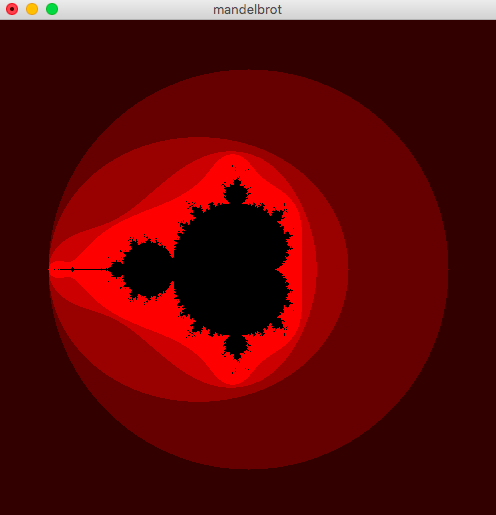
用 cl-glut 画的 Manderlbrot 图
这里有一段只用 cl-glut 库绘制的 manderlbrot 集的代码, 如下:
(ql:quickload "cl-glut")

(defparameter *width* 500)

(defparameter *height* 500)

(defparameter *magnification* 100.0)

(defun get-latice-points (width height reduction)

  (apply #'append (loop for x from (* -1 (/ width 2)) below (1+ (/ width 2))

                        collect (loop for y from (* -1 (/ height 2)) below (1+ (/ height 2))

                                 collect (complex (/ x reduction) (/ y reduction))))))

(defun calc-mandelbrot (c)

  (labels ((f (z c n)

    (cond ((= n 27) `(,c -1))

          ((< 2 (abs z)) `(,c ,n))

          (t (f (+ c (expt z 2)) c (1+ n))))))

    (f 0 c 0)))

(defun get-mandelbrot ()

  (mapcar #'calc-mandelbrot (get-latice-points  *width* *height* *magnification*)))

(defun set-mandelbrot-vertexes (latice-points)

  (mapcar #'(lambda (x)

	      (let ((latice-point (car x))

	       	    (n (cadr x)))

		(cond ((= n -1) (%gl:color-3f 0 0 0))

		      (t (%gl:color-3f (* n 0.2) 0 0)))

		(gl:vertex (* *magnification* (realpart latice-point)) (* *magnification* (imagpart latice-point)) 0)))

	  latice-points))

(defclass my-window (glut:window)

  ()

  (:default-initargs :title "mandelbrot" :width *width* :height *height*

		     :mode '(:single :rgb :depth)))

(defmethod glut:display-window :before ((w my-window))

  (gl:clear-color 1 1 1 0)

  (gl:matrix-mode :projection)

  (gl:load-identity)

  (gl:ortho 0 *width* *height* 0 -1 1))

(defmethod glut:display ((window my-window))

  (gl:clear :color-buffer-bit)

  (%gl:color-3f 0 0 0)

  (gl:push-matrix)

  (gl:translate (/ *width* 2) (/ *height* 2) 0)

  (gl:begin :points)

  (set-mandelbrot-vertexes *mandelbrot*)

  (gl:end)

  (gl:pop-matrix)

  (gl:flush))

(defparameter *mandelbrot* (get-mandelbrot))

(defun draw-mandelbrot ()

  (glut:display-window (make-instance 'my-window)))
加载命令:
sbcl --load mandelbrot.lisp
然后执行:
* (draw-mandelbrot)
运行截图:
立方体绘制代码
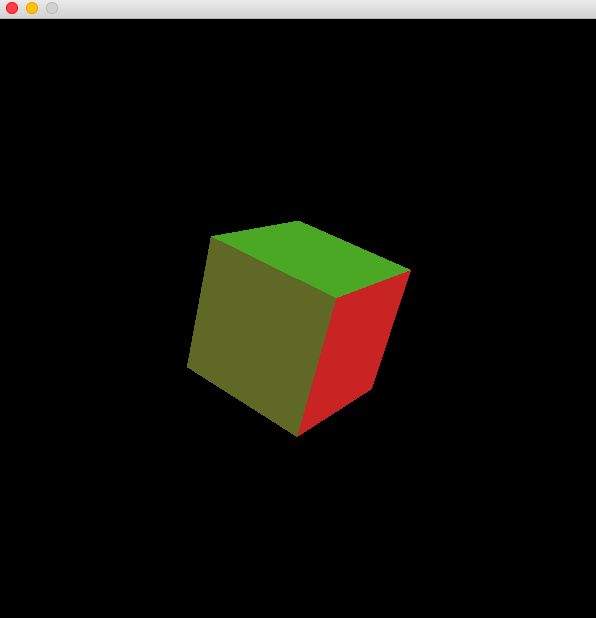
具体就是绘制一个立方体, 代码如下:
(require 'cl-opengl)

(require 'cl-glu)

(require 'lispbuilder-sdl)

(defconstant +window-width+  600)

(defconstant +window-height+ 600)

(defconstant +cube-vertices+

  #(#(0 0 0)

    #(0 1 0)

    #(1 1 0)

    #(1 0 0)

    #(0 0 1)

    #(0 1 1)

    #(1 1 1)

    #(1 0 1)))

(defconstant +cube-faces+

  '((#(4 7 6 5) #(0 0 1))

    (#(5 6 2 1) #(0 1 0))

    (#(1 2 3 0) #(0 0 -1))

    (#(0 3 7 4) #(0 -1 0))

    (#(4 5 1 0) #(-1 0 0))

    (#(3 2 6 7) #(1 0 0))))

(defun draw-figure (verts faces)

  (labels ((set-normal (n)

             (gl:normal (aref n 0) (aref n 1) (aref n 2)))

           (set-vertex (index)

             (let ((v (aref verts index)))

               (gl:vertex (aref v 0) (aref v 1) (aref v 2))))

           (draw-face (vertex-indices normal)

             (set-normal normal)

             (gl:begin :quads)

             (map 'nil #'set-vertex vertex-indices)

             (gl:end)))

    (map 'nil #'(lambda (x) (draw-face (first x) (second x))) faces)))

(defun draw-frame (rotx roty rotz)

  (gl:matrix-mode :modelview)

  (gl:push-matrix)

  (gl:translate 0.5 0.5 0.5)

  (gl:rotate rotx 1 0 0)

  (gl:rotate roty 0 1 0)

  (gl:rotate rotz 0 0 1)

  (gl:translate -0.5 -0.5 -0.5)

  (draw-figure +cube-vertices+ +cube-faces+)

  (gl:pop-matrix))

(defun start ()

  (let ((rotx 0)

        (roty 0)

        (rotz 0))

    (sdl:with-init ()

      (sdl:window +window-width+ +window-height+

                  :opengl t

                  :opengl-attributes '((:sdl-gl-depth-size   16)

                                       (:sdl-gl-doublebuffer 1)))

      (setf (sdl:frame-rate) 10)

      (gl:viewport 0 0 +window-width+ +window-height+)

      (gl:matrix-mode :projection)

      (gl:load-identity)

      (glu:perspective 50 (/ +window-height+ +window-width+) 1.0 10.0)

      (glu:look-at -2 2 4

                    0.5 0.5 0.5

                    0 1 0)

      (gl:matrix-mode :modelview)

      (gl:load-identity)

      (gl:clear-color 0 0 0 0)

      (gl:shade-model :flat)

      (gl:cull-face :back)

      (gl:polygon-mode :front :fill)

      (gl:draw-buffer :back)

      (gl:material :front :ambient-and-diffuse #(0.7 0.7 0.7 0.4))

      (gl:light :light0 :position #(0 0 1 0))

      (gl:light :light0 :diffuse #(1 0 0 0))

      (gl:light :light1 :position #(-1 2 -0.5 0))

      (gl:light :light1 :diffuse #(0 1 0 0))

      (gl:enable :cull-face :depth-test

                 :lighting :light0 :light1)

      (gl:clear :color-buffer :depth-buffer)

      (draw-frame rotx roty rotz)

      (sdl:update-display)

      (sdl:with-events ()

        (:quit-event () t)

        (:video-expose-event () (sdl:update-display))

        (:idle

          (setq rotx (mod (+ rotx 2.5) 360.0))

          (setq roty (mod (+ roty 0.7) 360.0))

          (setq rotz (mod (+ rotz 4.4) 360.0))

          (gl:clear :color-buffer :depth-buffer)

          (draw-frame rotx roty rotz)

          (sdl:update-display))))))
运行截图如下:
这是一个非常好的开始, 以后就可以在这个基础上用 Common Lisp 来调试 OpenGL 程序了.
参考
Using OpenGL with Common Lisp
Common Lisp 3D/2D Graphics Engine for OpenGL
Common Lisp library for creative coding
MAC 下用 Common Lisp 调试 OpenGL 程序的更多相关文章
- 在Mac下运行ASP.NET Core应用程序
在Mac下运行ASP.NET Core应用程序 通过参照.NET Core相关官方文档,在我的Mac电脑上用Visual Studio Code创建了我的第一个ASP.NET应用. 开发环境搭建 首先 ...
- Mac下运行ASP.NET Core应用程序
Mac下运行ASP.NET Core应用程序 在Mac下运行ASP.NET Core应用程序 通过参照.NET Core相关官方文档,在我的Mac电脑上用Visual Studio Code创建了我的 ...
- MAC使用IDA PRO远程调试LINUX程序
1 背景 在学习Linux系统上的一些漏洞知识的时候,往往需要进行“实地测试”,但是在Linux系统上进行调试并不太方便,因为LINUX自带的GDB调试工具真的不太人性化,即使有GDBTUI之类的“伪 ...
- 解决小米、红米及其他 Android 手机无法在 Mac 下进行真机调试的问题(转)
转自:http://ju.outofmemory.cn/entry/103522 Begin iOS 2014-08-19 271 阅读 手机 Android 小米 mac 调试 在 Mac OSX ...
- .NET Core初体验 - 在Mac下运行第一个Web示例程序
要说最近两天程序猿之间最喜欢吹水的事是什么?那绝壁是甲骨文要放弃Java!简直做梦都要笑醒!由于公司的产品线全面转向Java,最近几个月也一直在苦学Java技术.已经默默决定了,如果消息证实是真的,我 ...
- linux下如何用GDB调试c++程序
转:http://blog.csdn.net/wfdtxz/article/details/7368357 GDB 是GNU开源组织发布的一个强大的UNIX下的程序调试工具.或许,各位比较喜欢那种图形 ...
- 【VS开发】【OpenGL开发】OpenGL---Windows下配置与第一个OpenGL程序
面记录一下Windows下配置OpenGL与我的第一个OpenGL程序. 第一步:选择一个编译环境 现在Windows系统的主流编译环境有Visual Studio,Broland C++ Bu ...
- mac下删除不需要的应用程序
一般的应用程序删除: 1)可以在 前往--应用程序 中直接删除 2)直接在启动台中按住出现X直接删除. 问题: mac下不出现在应用程序中,启动台中按住也不出现X,也不可以直接拖到废纸篓中删除的应用如 ...
- 在ubuntu下使用eclipse来调试ARM程序
该程序为外部Makefile project,导入到eclipse中来进行编译,之后使用Jlink来进行调试. 这个是因为你在编译的时候没有加-g这个标志,导致没有生成调试文件. 让你指定一个源文件. ...
随机推荐
- C++自学及C的补缺
我这个寒假可以坐在电脑前的时间算是比较少的,因为我放假不久后就去打工了,而打工的时间是很流动的,所以我无法固定时间来学习,因此我只能根据我的打工时间来安排我的学习. 由于我的书是除夕前夕淘宝的,近期是 ...
- 图论 Kruskal算法 并查集
#include<iostream> #include<cstring> #include<string> #include<cstdio> #incl ...
- UVA - 11021 Tribles 概率dp
题目链接: http://vjudge.net/problem/UVA-11021 Tribles Time Limit: 3000MS 题意 有k只麻球,每只活一天就会死亡,临死之前可能会出生一些新 ...
- 信息安全C散列函数的应用及其安全性2016011992
1:散列函数的具体应用 使用一个散列函数可以很直观的检测出数据在传输时发生的错误. MD5 Hash算法的"数字指纹"特性,使它成为目前应用最广泛的一种文件完整性校验(Checks ...
- 一致性Hash算法(KetamaHash)的c#实现
Consistent Hashing最大限度地抑制了hash键的重新分布.另外要取得比较好的负载均衡的效果,往往在服务器数量比较少的时候需要增加虚拟节点来保证服务器能均匀的分布在圆环上.因为使用一般的 ...
- 用vue实现省市县三级联动
我真的没想到这个会困扰到我.最开始以为,不就是直接找个简单的插件就实现了吗,jquery插件找了几个,都没有达到目的. 需求是这样的: 点击input框,弹出一个popup,然后可以滚动选择省,市,县 ...
- mysql 数字类型的长度区别
mysql整型bigint.int.mediumint.smallint 和 tinyint的语法介绍,如下: 1.bigint 从 -2^63 (-9223372036854775808) 到 2^ ...
- PHP开发网站,你是如何提高其网站的安全性的?
一.网站程序问题 很多网站的安全问题大多是由于网站程序存在漏洞,所以想要提高网站安全性,必须要选择安全的后台cms系统,若有能力可以自己去开发网站后台,这样安全性能得到极大的提高,若是从网上选择一些免 ...
- AJAX 跨域问题 php
原生ajax请求方式: var xhr = new XMLHttpRequest(); xhr.open("POST", "http://xxxx.com/demo/b/ ...
- QProcess 进程调用
1. 调用方的接口: void QProcess::start(const QString &program, const QStringList &arguments, OpenMo ...