
MAC 下用 Common Lisp 调试 OpenGL 程序
MAC 下用 Common Lisp 调试 OpenGL 程序
环境搭建
- 运行环境: OSX 10.11.3 EI Capitan
- Common Lisp: SBCL
使用 SBCL, 首先要安装这几个库 quicklisp, cl-opengl, cl-glu, lispbuilder-sdl. 先安装好 quicklisp, 再用它来安装其他库.
安装过程如下.
安装 quicklisp
先安装 quicklisp
Air:~ admin$ cd code-staff/

Air:code-staff admin$ mkdir sbcl

Air:code-staff admin$ cd sbcl

Air:sbcl admin$ curl -O https://beta.quicklisp.org/quicklisp.lisp

  % Total    % Received % Xferd  Average Speed   Time    Time     Time  Current

                                 Dload  Upload   Total   Spent    Left  Speed

100 57144  100 57144    0     0  12184      0  0:00:04  0:00:04 --:--:-- 12545

Air:sbcl admin$ ls

quicklisp.lisp

Air:sbcl admin$ sbcl --load quicklisp.lisp

This is SBCL 1.0.55, an implementation of ANSI Common Lisp.

More information about SBCL is available at <http://www.sbcl.org/>.

SBCL is free software, provided as is, with absolutely no warranty.

It is mostly in the public domain; some portions are provided under

BSD-style licenses.  See the CREDITS and COPYING files in the

distribution for more information.

  ==== quicklisp quickstart 2015-01-28 loaded ====

    To continue with installation, evaluate: (quicklisp-quickstart:install)

    For installation options, evaluate: (quicklisp-quickstart:help)
执行 (quicklisp-quickstart:install) 发现原来已经安装过了, 那就选择使用已经安装好的.
* (quicklisp-quickstart:install)

debugger invoked on a SIMPLE-ERROR in thread

#<THREAD "initial thread" RUNNING {10029A91C3}>:

  Quicklisp has already been installed. Load #P"/Users/admin/quicklisp/setup.lisp" instead.

Type HELP for debugger help, or (SB-EXT:QUIT) to exit from SBCL.

restarts (invokable by number or by possibly-abbreviated name):

  0: [LOAD-SETUP] Load #P"/Users/admin/quicklisp/setup.lisp"

  1: [ABORT     ] Exit debugger, returning to top level.

(QUICKLISP-QUICKSTART:INSTALL

 :PATH

 NIL

 :PROXY

 NIL

 :CLIENT-URL

 NIL

 :CLIENT-VERSION

 NIL

 :DIST-URL

 NIL

 :DIST-VERSION

 NIL)

0] 0

T
然后执行 (ql:add-to-init-file) 加载到 SBCL 的初始化文件中, 这样每次启动 SBCL 就会自动加载 quicklisp:
* (ql:add-to-init-file)

I will append the following lines to #P"/Users/admin/.sbclrc":

  ;;; The following lines added by ql:add-to-init-file:

  #-quicklisp

  (let ((quicklisp-init (merge-pathnames "quicklisp/setup.lisp"

                                         (user-homedir-pathname))))

    (when (probe-file quicklisp-init)

      (load quicklisp-init)))

Press Enter to continue.

#P"/Users/admin/.sbclrc"

*
安装好 quicklisp 之后, 剩下的就是用它来安装其他几个库, 具体来说就是这几条命令:
(ql:quickload 'cl-opengl)

(ql:quickload 'cl-glu)

(ql:quickload 'lispbuilder-sdl)
安装 cl-opengl
接下来就可以用 quicklisp 的 ql:quickload 命令加载需要的库了, 先加载 cl-opengl
* (ql:quickload 'cl-opengl)

To load "cl-opengl":

  Load 2 ASDF systems:

    alexandria cffi

  Install 1 Quicklisp release:

    cl-opengl

; Fetching #<URL "http://beta.quicklisp.org/archive/cl-opengl/2013-03-12/cl-opengl-20130312-git.tgz">

; 356.91KB

==================================================

365,475 bytes in 1.52 seconds (235.43KB/sec)

; Loading "cl-opengl"

..................................................

[package cl-opengl-bindings]......................

..................................................

..................................................

[package cl-opengl]...............................

........

(CL-OPENGL)

*
安装 cl-glu
再加载 cl-glu
* (ql:quickload 'cl-glu)

To load "cl-glu":

  Load 1 ASDF system:

    cl-glu

; Loading "cl-glu"

[package cl-glu].....

(CL-GLU)

*
安装 lispbuilder-sdl
接下来加载 lispbuilder-sdl, 结果一开始出错, 报错信息如下:
* (ql:quickload 'lispbuilder-sdl)

To load "lispbuilder-sdl":

  Load 1 ASDF system:

    lispbuilder-sdl

; Loading "lispbuilder-sdl"

debugger invoked on a LOAD-FOREIGN-LIBRARY-ERROR in thread

#<THREAD "initial thread" RUNNING {10029A91C3}>:

  Unable to load any of the alternatives:

   ((:FRAMEWORK "cocoahelper") (:DEFAULT "cocoahelper"))

Type HELP for debugger help, or (SB-EXT:QUIT) to exit from SBCL.

restarts (invokable by number or by possibly-abbreviated name):

  0: [RETRY          ] Try loading the foreign library again.

  1: [USE-VALUE      ] Use another library instead.

  2: [TRY-RECOMPILING] Recompile cocoahelper and try loading it again

  3: [RETRY          ] Retry

                       loading FASL for #<CL-SOURCE-FILE "cocoahelper" "cocoahelper" "cocoahelper">.

  4: [ACCEPT         ] Continue, treating

                       loading FASL for #<CL-SOURCE-FILE "cocoahelper" "cocoahelper" "cocoahelper">

                       as having been successful.

  5: [ABORT          ] Give up on "lispbuilder-sdl"

  6:                   Exit debugger, returning to top level.

(CFFI::FL-ERROR

 "Unable to load any of the alternatives:~%   ~S"

 ((:FRAMEWORK "cocoahelper") (:DEFAULT "cocoahelper")))

0]
仔细阅读这篇文档Using OpenGL with Common Lisp, 发现作者提到了这一点, 也说了解决办法, 就是进入对应的 cocoahelper 目录, 手动编译/安装, 实际上只要进到这个目录 /Users/admin/quicklisp/dists/quicklisp/software/lispbuilder-20130312-svn/lispbuilder-sdl/cocoahelper, 然后执行命令 make 就可以了.
另外开一个终端窗口, 编译 cocoahelper库, 在我的机器上操作记录如下:
Air:cocoahelper admin$ pwd

/Users/admin/quicklisp/dists/quicklisp/software/lispbuilder-20130312-svn/lispbuilder-sdl/cocoahelper

Air:cocoahelper admin$ make

gcc -fPIC  -I/usr/local/include/SDL -D_GNU_SOURCE=1 -D_THREAD_SAFE -c cocoahelper.m -o cocoahelper.o

cocoahelper.m:90:52: warning: passing 'char [1024]' to parameter of type 'UInt8 *' (aka 'unsigned char *') converts between pointers to integer types with different sign

      [-Wpointer-sign]

                if (CFURLGetFileSystemRepresentation(url2, true, parentdir, MAXPATHLEN)) {

                                                                 ^~~~~~~~~

/Applications/Xcode.app/Contents/Developer/Platforms/MacOSX.platform/Developer/SDKs/MacOSX10.11.sdk/System/Library/Frameworks/CoreFoundation.framework/Headers/CFURL.h:113:91: note:

      passing argument to parameter 'buffer' here

Boolean CFURLGetFileSystemRepresentation(CFURLRef url, Boolean resolveAgainstBase, UInt8 *buffer, CFIndex maxBufLen);

                                                                                          ^

cocoahelper.m:163:12: warning: instance method '-setAppleMenu:' not found (return type defaults to 'id') [-Wobjc-method-access]

    [NSApp setAppleMenu:appleMenu];

           ^~~~~~~~~~~~

/Applications/Xcode.app/Contents/Developer/Platforms/MacOSX.platform/Developer/SDKs/MacOSX10.11.sdk/System/Library/Frameworks/AppKit.framework/Headers/NSApplication.h:110:12: note:

      receiver is instance of class declared here

@interface NSApplication : NSResponder <NSUserInterfaceValidations, NSAccessibilityElement, NSAccessibility>

           ^

cocoahelper.m:292:31: warning: incompatible pointer to integer conversion passing 'void *' to parameter of type 'int' [-Wint-conversion]

    CustomApplicationMain (0, NULL);

                              ^~~~

/Applications/Xcode.app/Contents/Developer/Toolchains/XcodeDefault.xctoolchain/usr/bin/../lib/clang/7.3.0/include/stddef.h:105:16: note: expanded from macro 'NULL'

#  define NULL ((void*)0)

               ^~~~~~~~~~

cocoahelper.m:293:5: warning: 'GetCurrentProcess' is deprecated: first deprecated in OS X 10.9 [-Wdeprecated-declarations]

    GetCurrentProcess(&processSerialNum);

    ^

/Applications/Xcode.app/Contents/Developer/Platforms/MacOSX.platform/Developer/SDKs/MacOSX10.11.sdk/System/Library/Frameworks/ApplicationServices.framework/Frameworks/HIServices.framework/Headers/Processes.h:415:1: note:

      'GetCurrentProcess' has been explicitly marked deprecated here

MacGetCurrentProcess(ProcessSerialNumber * PSN)               AVAILABLE_MAC_OS_X_VERSION_10_0_AND_LATER_BUT_DEPRECATED_IN_MAC_OS_X_VERSION_10_9;

^

/Applications/Xcode.app/Contents/Developer/Platforms/MacOSX.platform/Developer/SDKs/MacOSX10.11.sdk/System/Library/Frameworks/ApplicationServices.framework/Frameworks/HIServices.framework/Headers/Processes.h:412:34: note:

      expanded from macro 'MacGetCurrentProcess'

    #define MacGetCurrentProcess GetCurrentProcess

                                 ^

cocoahelper.m:294:5: warning: implicit declaration of function 'CPSEnableForegroundOperation' is invalid in C99 [-Wimplicit-function-declaration]

    CPSEnableForegroundOperation (&processSerialNum);

    ^

cocoahelper.m:295:5: warning: 'SetFrontProcess' is deprecated: first deprecated in OS X 10.9 [-Wdeprecated-declarations]

    SetFrontProcess(&processSerialNum);

    ^

/Applications/Xcode.app/Contents/Developer/Platforms/MacOSX.platform/Developer/SDKs/MacOSX10.11.sdk/System/Library/Frameworks/ApplicationServices.framework/Frameworks/HIServices.framework/Headers/Processes.h:603:1: note:

      'SetFrontProcess' has been explicitly marked deprecated here

SetFrontProcess(const ProcessSerialNumber * PSN)              AVAILABLE_MAC_OS_X_VERSION_10_0_AND_LATER_BUT_DEPRECATED_IN_MAC_OS_X_VERSION_10_9;

^

6 warnings generated.

gcc -dynamiclib  -L/usr/local/lib -lSDLmain -lSDL -Wl,-framework,Cocoa -o cocoahelper.dylib cocoahelper.o

Air:cocoahelper admin$
回到刚才加载 lispbuilder-sdl 的窗口, 选择 0, 这样:
0] 0

[package lispbuilder-sdl-cffi]....................

..................................................

[package lispbuilder-sdl-base]....................

[package trivial-garbage].........................

[package lispbuilder-sdl].........................

..................................................

..............

(LISPBUILDER-SDL)

*
不太放心, 再重新来一次, 直接显示成功:
* (ql:quickload 'lispbuilder-sdl)

To load "lispbuilder-sdl":

  Load 1 ASDF system:

    lispbuilder-sdl

; Loading "lispbuilder-sdl"

(LISPBUILDER-SDL)

*
别人写的例程
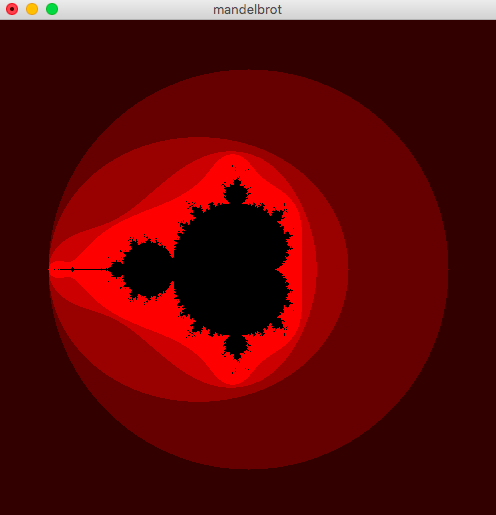
用 cl-glut 画的 Manderlbrot 图
这里有一段只用 cl-glut 库绘制的 manderlbrot 集的代码, 如下:
(ql:quickload "cl-glut")

(defparameter *width* 500)

(defparameter *height* 500)

(defparameter *magnification* 100.0)

(defun get-latice-points (width height reduction)

  (apply #'append (loop for x from (* -1 (/ width 2)) below (1+ (/ width 2))

                        collect (loop for y from (* -1 (/ height 2)) below (1+ (/ height 2))

                                 collect (complex (/ x reduction) (/ y reduction))))))

(defun calc-mandelbrot (c)

  (labels ((f (z c n)

    (cond ((= n 27) `(,c -1))

          ((< 2 (abs z)) `(,c ,n))

          (t (f (+ c (expt z 2)) c (1+ n))))))

    (f 0 c 0)))

(defun get-mandelbrot ()

  (mapcar #'calc-mandelbrot (get-latice-points  *width* *height* *magnification*)))

(defun set-mandelbrot-vertexes (latice-points)

  (mapcar #'(lambda (x)

	      (let ((latice-point (car x))

	       	    (n (cadr x)))

		(cond ((= n -1) (%gl:color-3f 0 0 0))

		      (t (%gl:color-3f (* n 0.2) 0 0)))

		(gl:vertex (* *magnification* (realpart latice-point)) (* *magnification* (imagpart latice-point)) 0)))

	  latice-points))

(defclass my-window (glut:window)

  ()

  (:default-initargs :title "mandelbrot" :width *width* :height *height*

		     :mode '(:single :rgb :depth)))

(defmethod glut:display-window :before ((w my-window))

  (gl:clear-color 1 1 1 0)

  (gl:matrix-mode :projection)

  (gl:load-identity)

  (gl:ortho 0 *width* *height* 0 -1 1))

(defmethod glut:display ((window my-window))

  (gl:clear :color-buffer-bit)

  (%gl:color-3f 0 0 0)

  (gl:push-matrix)

  (gl:translate (/ *width* 2) (/ *height* 2) 0)

  (gl:begin :points)

  (set-mandelbrot-vertexes *mandelbrot*)

  (gl:end)

  (gl:pop-matrix)

  (gl:flush))

(defparameter *mandelbrot* (get-mandelbrot))

(defun draw-mandelbrot ()

  (glut:display-window (make-instance 'my-window)))
加载命令:
sbcl --load mandelbrot.lisp
然后执行:
* (draw-mandelbrot)
运行截图:
立方体绘制代码
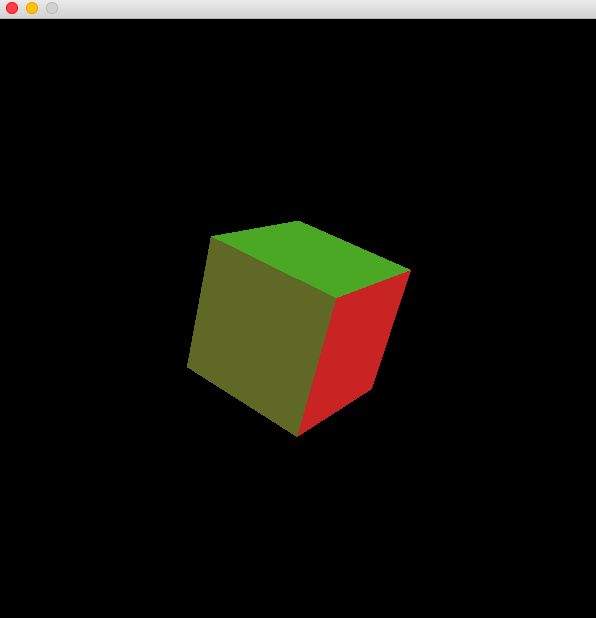
具体就是绘制一个立方体, 代码如下:
(require 'cl-opengl)

(require 'cl-glu)

(require 'lispbuilder-sdl)

(defconstant +window-width+  600)

(defconstant +window-height+ 600)

(defconstant +cube-vertices+

  #(#(0 0 0)

    #(0 1 0)

    #(1 1 0)

    #(1 0 0)

    #(0 0 1)

    #(0 1 1)

    #(1 1 1)

    #(1 0 1)))

(defconstant +cube-faces+

  '((#(4 7 6 5) #(0 0 1))

    (#(5 6 2 1) #(0 1 0))

    (#(1 2 3 0) #(0 0 -1))

    (#(0 3 7 4) #(0 -1 0))

    (#(4 5 1 0) #(-1 0 0))

    (#(3 2 6 7) #(1 0 0))))

(defun draw-figure (verts faces)

  (labels ((set-normal (n)

             (gl:normal (aref n 0) (aref n 1) (aref n 2)))

           (set-vertex (index)

             (let ((v (aref verts index)))

               (gl:vertex (aref v 0) (aref v 1) (aref v 2))))

           (draw-face (vertex-indices normal)

             (set-normal normal)

             (gl:begin :quads)

             (map 'nil #'set-vertex vertex-indices)

             (gl:end)))

    (map 'nil #'(lambda (x) (draw-face (first x) (second x))) faces)))

(defun draw-frame (rotx roty rotz)

  (gl:matrix-mode :modelview)

  (gl:push-matrix)

  (gl:translate 0.5 0.5 0.5)

  (gl:rotate rotx 1 0 0)

  (gl:rotate roty 0 1 0)

  (gl:rotate rotz 0 0 1)

  (gl:translate -0.5 -0.5 -0.5)

  (draw-figure +cube-vertices+ +cube-faces+)

  (gl:pop-matrix))

(defun start ()

  (let ((rotx 0)

        (roty 0)

        (rotz 0))

    (sdl:with-init ()

      (sdl:window +window-width+ +window-height+

                  :opengl t

                  :opengl-attributes '((:sdl-gl-depth-size   16)

                                       (:sdl-gl-doublebuffer 1)))

      (setf (sdl:frame-rate) 10)

      (gl:viewport 0 0 +window-width+ +window-height+)

      (gl:matrix-mode :projection)

      (gl:load-identity)

      (glu:perspective 50 (/ +window-height+ +window-width+) 1.0 10.0)

      (glu:look-at -2 2 4

                    0.5 0.5 0.5

                    0 1 0)

      (gl:matrix-mode :modelview)

      (gl:load-identity)

      (gl:clear-color 0 0 0 0)

      (gl:shade-model :flat)

      (gl:cull-face :back)

      (gl:polygon-mode :front :fill)

      (gl:draw-buffer :back)

      (gl:material :front :ambient-and-diffuse #(0.7 0.7 0.7 0.4))

      (gl:light :light0 :position #(0 0 1 0))

      (gl:light :light0 :diffuse #(1 0 0 0))

      (gl:light :light1 :position #(-1 2 -0.5 0))

      (gl:light :light1 :diffuse #(0 1 0 0))

      (gl:enable :cull-face :depth-test

                 :lighting :light0 :light1)

      (gl:clear :color-buffer :depth-buffer)

      (draw-frame rotx roty rotz)

      (sdl:update-display)

      (sdl:with-events ()

        (:quit-event () t)

        (:video-expose-event () (sdl:update-display))

        (:idle

          (setq rotx (mod (+ rotx 2.5) 360.0))

          (setq roty (mod (+ roty 0.7) 360.0))

          (setq rotz (mod (+ rotz 4.4) 360.0))

          (gl:clear :color-buffer :depth-buffer)

          (draw-frame rotx roty rotz)

          (sdl:update-display))))))
运行截图如下:
这是一个非常好的开始, 以后就可以在这个基础上用 Common Lisp 来调试 OpenGL 程序了.
参考
Using OpenGL with Common Lisp
Common Lisp 3D/2D Graphics Engine for OpenGL
Common Lisp library for creative coding
MAC 下用 Common Lisp 调试 OpenGL 程序的更多相关文章
- 在Mac下运行ASP.NET Core应用程序
在Mac下运行ASP.NET Core应用程序 通过参照.NET Core相关官方文档,在我的Mac电脑上用Visual Studio Code创建了我的第一个ASP.NET应用. 开发环境搭建 首先 ...
- Mac下运行ASP.NET Core应用程序
Mac下运行ASP.NET Core应用程序 在Mac下运行ASP.NET Core应用程序 通过参照.NET Core相关官方文档,在我的Mac电脑上用Visual Studio Code创建了我的 ...
- MAC使用IDA PRO远程调试LINUX程序
1 背景 在学习Linux系统上的一些漏洞知识的时候,往往需要进行“实地测试”,但是在Linux系统上进行调试并不太方便,因为LINUX自带的GDB调试工具真的不太人性化,即使有GDBTUI之类的“伪 ...
- 解决小米、红米及其他 Android 手机无法在 Mac 下进行真机调试的问题(转)
转自:http://ju.outofmemory.cn/entry/103522 Begin iOS 2014-08-19 271 阅读 手机 Android 小米 mac 调试 在 Mac OSX ...
- .NET Core初体验 - 在Mac下运行第一个Web示例程序
要说最近两天程序猿之间最喜欢吹水的事是什么?那绝壁是甲骨文要放弃Java!简直做梦都要笑醒!由于公司的产品线全面转向Java,最近几个月也一直在苦学Java技术.已经默默决定了,如果消息证实是真的,我 ...
- linux下如何用GDB调试c++程序
转:http://blog.csdn.net/wfdtxz/article/details/7368357 GDB 是GNU开源组织发布的一个强大的UNIX下的程序调试工具.或许,各位比较喜欢那种图形 ...
- 【VS开发】【OpenGL开发】OpenGL---Windows下配置与第一个OpenGL程序
面记录一下Windows下配置OpenGL与我的第一个OpenGL程序. 第一步:选择一个编译环境 现在Windows系统的主流编译环境有Visual Studio,Broland C++ Bu ...
- mac下删除不需要的应用程序
一般的应用程序删除: 1)可以在 前往--应用程序 中直接删除 2)直接在启动台中按住出现X直接删除. 问题: mac下不出现在应用程序中,启动台中按住也不出现X,也不可以直接拖到废纸篓中删除的应用如 ...
- 在ubuntu下使用eclipse来调试ARM程序
该程序为外部Makefile project,导入到eclipse中来进行编译,之后使用Jlink来进行调试. 这个是因为你在编译的时候没有加-g这个标志,导致没有生成调试文件. 让你指定一个源文件. ...
随机推荐
- whu 1538 - B - Stones II 01背包
题目链接: http://acm.whu.edu.cn/land/problem/detail?problem_id=1538 Problem 1538 - B - Stones II Time Li ...
- 第三次作业---excel导入数据库及显示(2)
发现第一次做的功能有点复杂,不能理解.而且第一次的想法是在页面上上传文件,连接并导入到数据库,并在页面上显示.后来才看到要求是直接在本地将数据导入数据库就行了,然后显示.所以才出现了一堆看不懂也解决不 ...
- C#简单窗体应用程序(一)
使用C#创建控制台应用程序的基本步骤: (1)创建项目: (2)用户界面设计: (3)属性设置: (4)编写程序代码: (5)保存.调试.运行: 例题:创建一个Windows窗体应用程序,在窗体中添加 ...
- 怎样实现SDO服务
SDO是CANopen协议中最复杂的一部分,带有应答机制,有多种传输方式,并且完整的SDO功能节点需提供1个SDO server和多个SDO client,因此SDO的实现异常困难,协议多种传输方式的 ...
- PHP 更改session存储方式为Redis
前言: 服务器默认的session存放方式是file.当客户端发送请求带有PHPSESSID时是顺序的去比对session存储文件,如果有5000个session文件,那就有可能需要比对4998次那么 ...
- modify headers插件的使用
Modity headers是firefox浏览器的一个插件,作用是改变http请求的IP地址 (一)在firefox中添加该插件 步骤一:打开firefox浏览器,打开地址: https://add ...
- .NET 切面编程 PostSharp
目录 概念 实现方式 .Net平台的切面实现 PostSharp示例 概念 Aspect-Oriented Programming(AOP):想想OOP是不是有些熟悉,AOP翻译过来的意思就是面向切面 ...
- python自动化之正则
import re phoneNumRegex=re.compile(r'\d\d\d-\d\d\d-\d\d\d\d') mo=phoneNumRegex.search('My number is ...
- P3165 [CQOI2014]排序机械臂
题目描述 为了把工厂中高低不等的物品按从低到高排好序,工程师发明了一种排序机械臂.它遵循一个简单的排序规则,第一次操作找到高度最低的物品的位置 P1P_1P1 ,并把左起第一个物品至 P1P_1P1 ...
- 【BZOJ4140】共点圆加强版(二进制分组)
[BZOJ4140]共点圆加强版(二进制分组) 题面 BZOJ 题解 我卡精度卡了一天.... 之前不强制在线的做法是\(CDQ\)分治,维护一个凸壳就好了. 现在改成二进制分组,每次重建凸壳就好了. ...