
【python3】酷狗音乐及评论回复下载
新年快乐,上班第一天分享一个python源码,功能比较简单,就是实现酷狗音乐的音乐文件(包含付费音乐)和所有评论回复的下载。
以 米津玄師 - Lemon 为例, 以下为效果图:
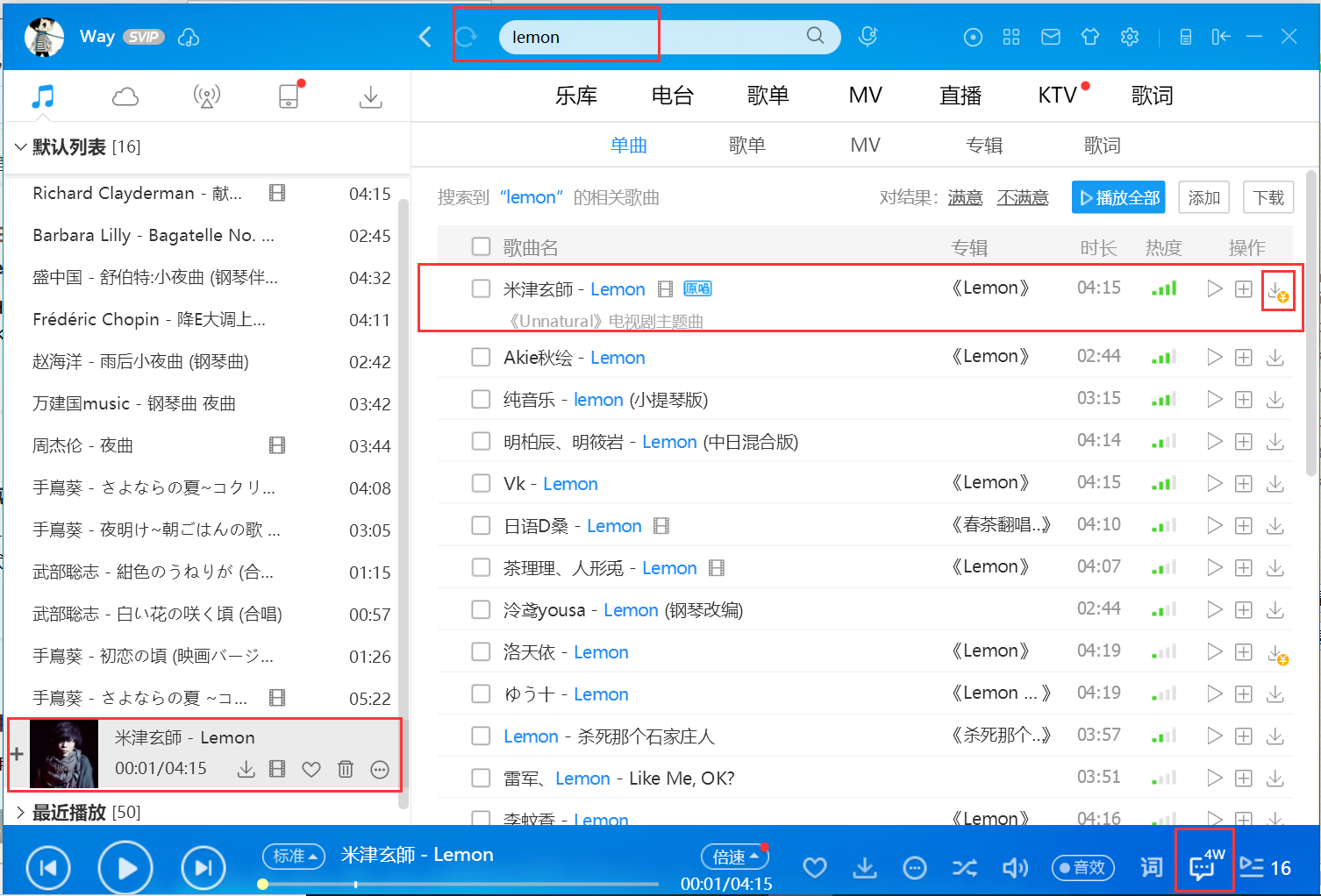
1、根据关键词搜索指定音乐,发现是下载是付费的
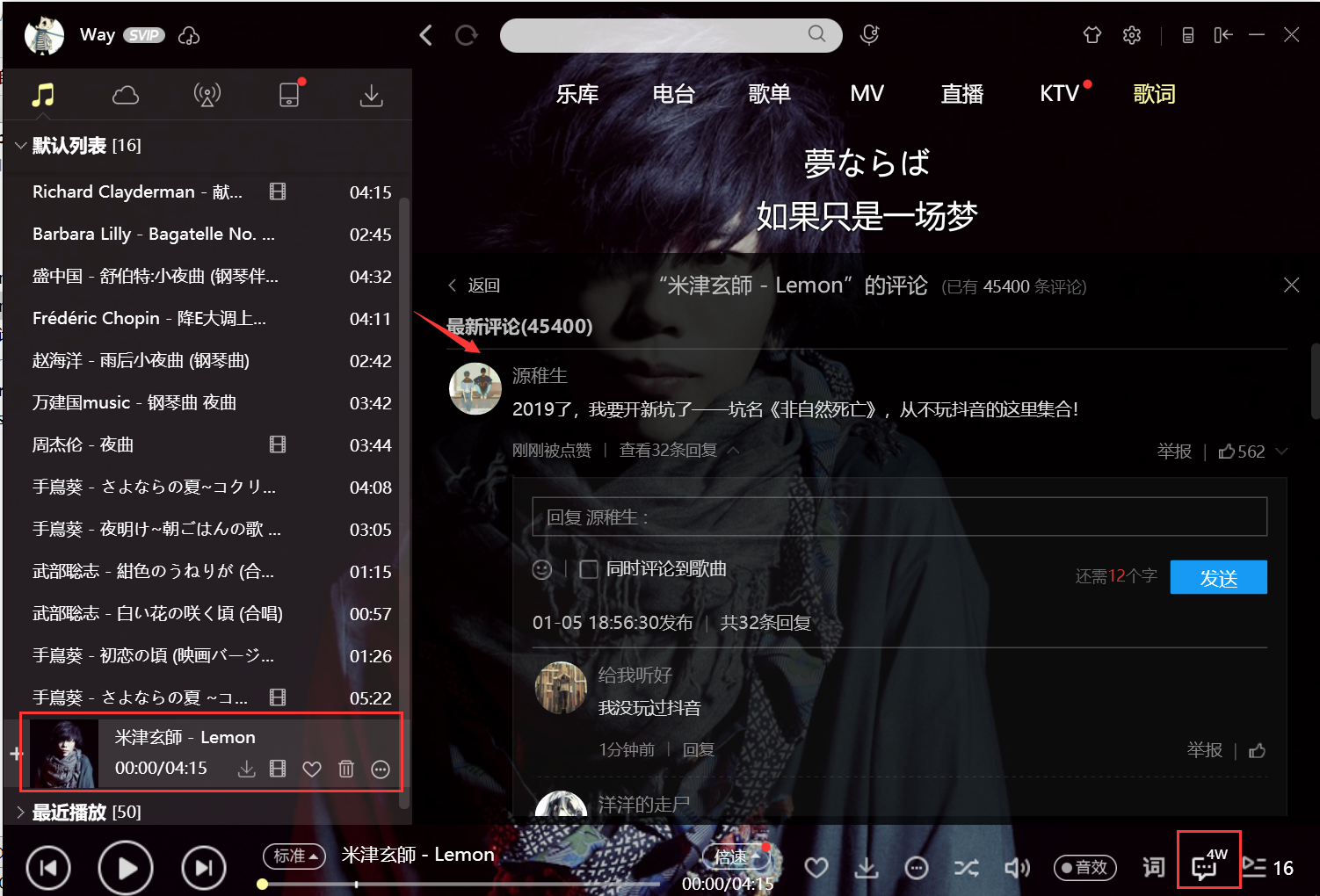
2、点击进入评论,可以看到有很多的评论,评论底下也有很多的回复
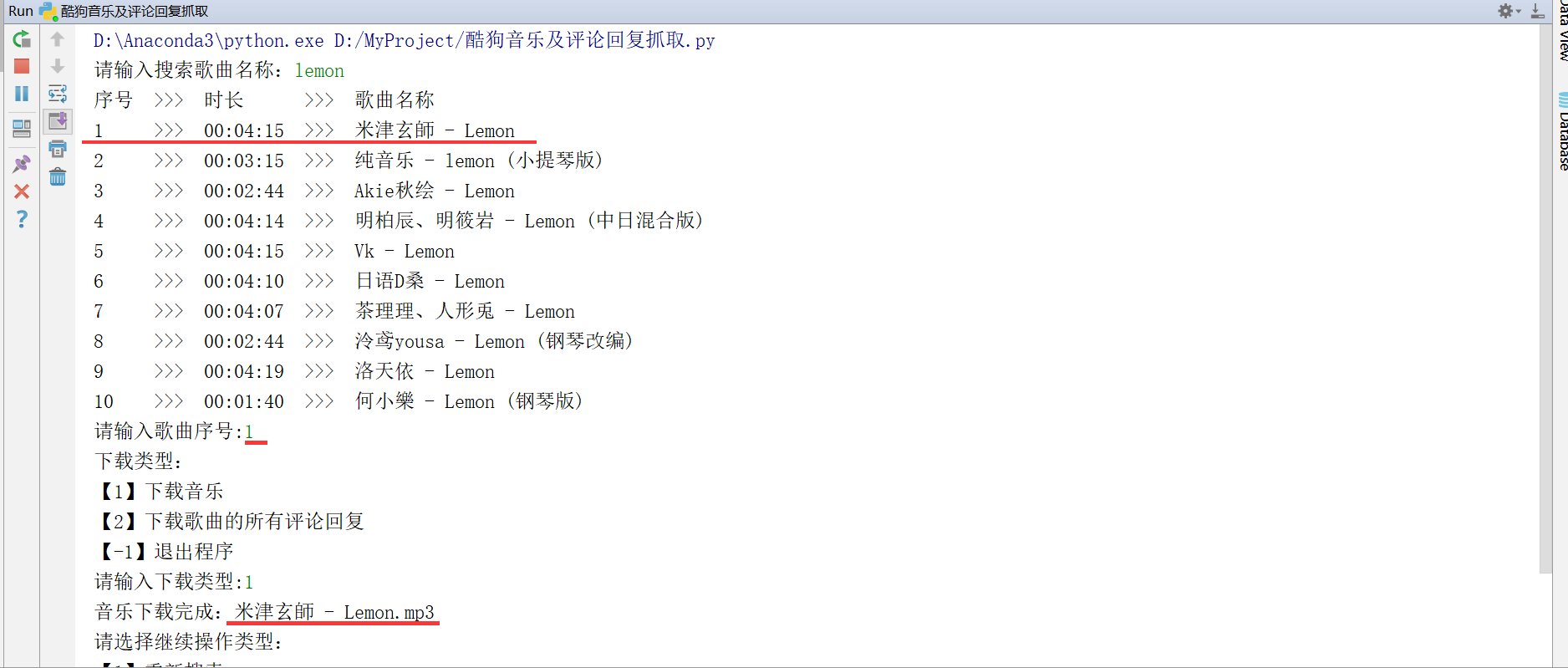
3、执行代码下载音乐、评论回复
3.1、输入关键词搜索音乐,根据歌曲名称和时长,选择目标歌曲,根据提示下载音乐文件
3.2、下载评论回复
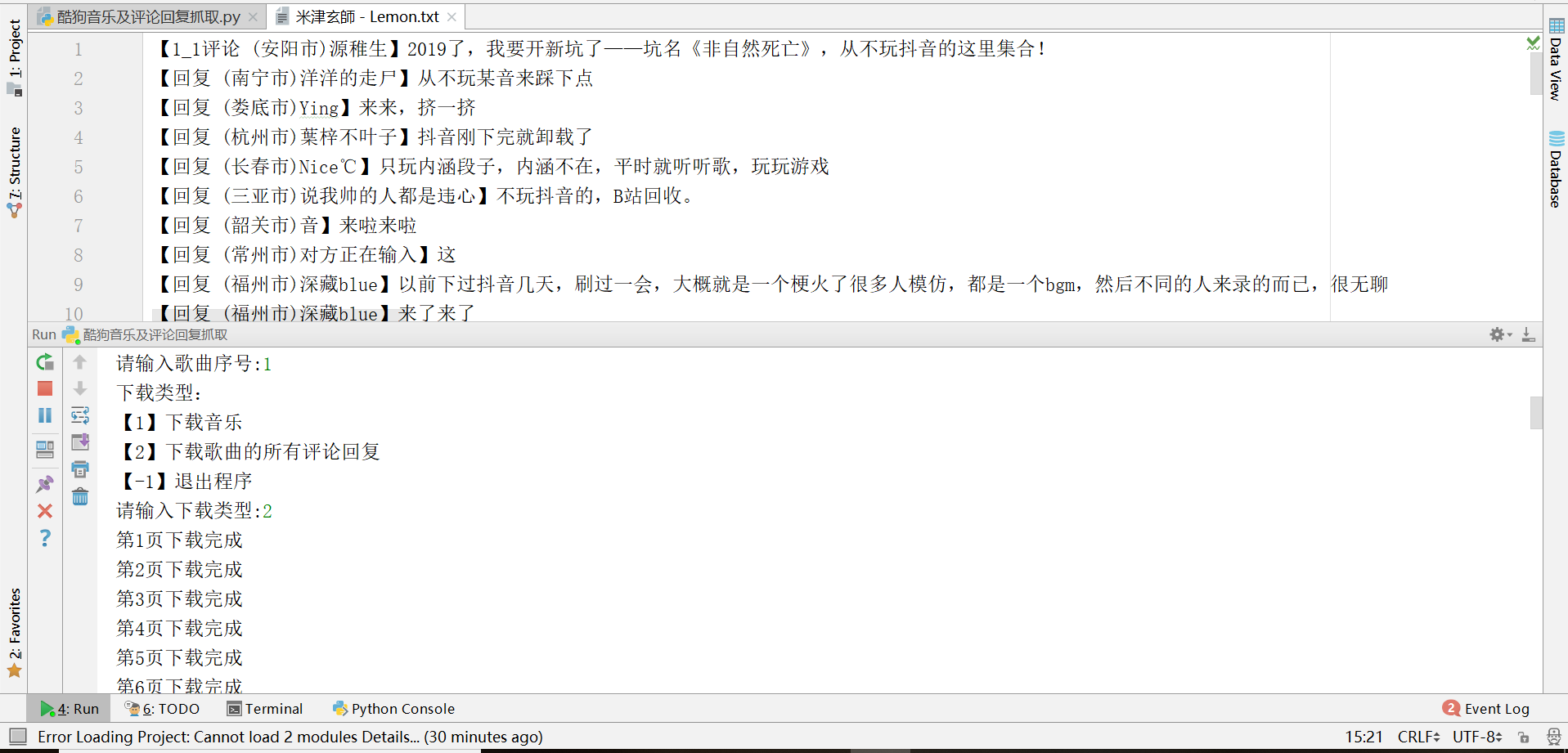
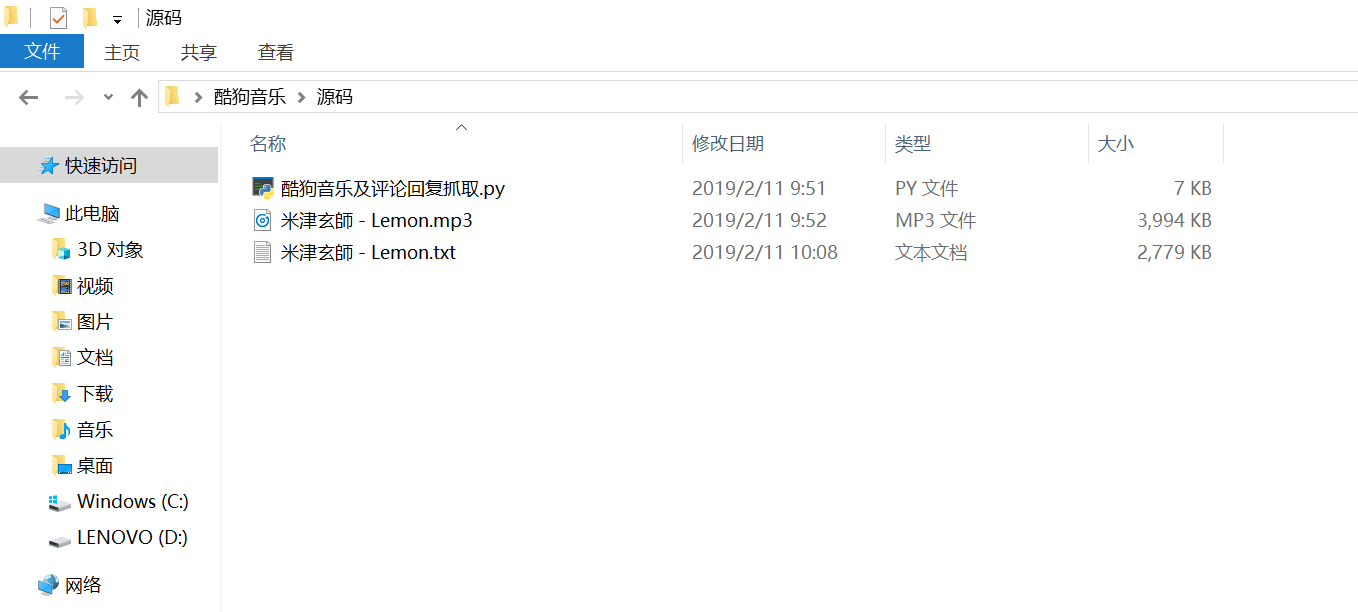
3.3、下载结果,评论回复较多,作为例子只下载了一部分
最后附上源码:
import requests
import json

# 写到文档
def write(path, text):
    with open(path, 'a', encoding='utf-8') as f:
        f.write(text+'\n')

# 时间转换
def get_time(duration):
    second = duration % 60
    minuter = int(duration / 60)
    hour = int(minuter / 60)
    minuter = int(minuter % 60) if hour > 0 else minuter
    time = []
    for i in [hour, minuter, second]:
        i = str(i) '+str(i)
        time.append(i)
    return ':'.join(time)

# 下载音乐
def down(filehash):
    hash_url = "http://www.kugou.com/yy/index.php?r=play/getdata&hash={0}".format(filehash)
    hash_content = requests.get(hash_url).text
    dt = json.loads(hash_content)
    audio_name = dt['data']['audio_name']
    audio_url = dt['data']['play_url']
    with open(audio_name + ".mp3", "wb")as fp:
        fp.write(requests.get(audio_url).content)
    print("音乐下载完成:{0}".format(audio_name + ".mp3"))

# 下载所有回复
def get_reply(path, special_child_id, tid, pagesize=10, pageindex=1):
    url = ('http://comment.service.kugou.com/index.php?'
           'r=commentsv2/getReplyWithLike'
           '&code=fc4be23b4e972707f36b8a828a93ba8a'
           '&p={0}'
           '&pagesize={1}'
           '&ver=1.01'
           '&clientver=8323'
           '&kugouid=998708111'
           '&clienttoken=8048d52b7884b9e9e606d0a06a6a5ec7b2ad556931dcedc14d9cd3247bf3ee4d'
           '&appid=1001'
           '&childrenid={2}'
           '&tid={3}'.format(pageindex, pagesize, special_child_id, tid))
    response = requests.get(url)
    response = json.loads(response.text)
    if response.get('list'):
        for comment in response['list']: # 回复
            content = comment.get('content')
            user_name = comment.get('user_name')
            extdata = comment.get('extdata').replace('null', '\'\'')
            city = eval(extdata).get('city')
            city = '(' + city + ')' if city else ''
            content = '【回复 {1}{0}】{2}'.format(user_name, city, content)
            write(path, content)

    if response.get('list'): # 列表有值,请求下一页
        get_reply(path, special_child_id, tid, pagesize, pageindex + 1)

# 下载所有评论、回复
def get_comment(path, filehash, pagesize=10, pageindex=1):
    url = ('http://comment.service.kugou.com/index.php?'
            '&r=commentsv2/getCommentWithLike'
            '&code=fc4be23b4e972707f36b8a828a93ba8a'
            '&extdata={0}'
            '&pagesize={1}'
            '&ver=1.01'
            '&clientver=8323'
            '&kugouid=998708111'
            '&clienttoken=8048d52b7884b9e9e606d0a06a6a5ec7b2ad556931dcedc14d9cd3247bf3ee4d'
            '&appid=1001'
            '&p={2}'.format(filehash, pagesize, pageindex)
            )
    response = requests.get(url)
    response = json.loads(response.text)
    if response['message'] == 'success':
        for index, comment in enumerate(response['list'],1): # 评论
            content = comment.get('content')
            user_name = comment.get('user_name')
            extdata = comment.get('extdata').replace('null','\'\'')
            city = eval(extdata).get('city')
            city = '('+ city +')' if city else ''
            content = '【{0}_{1}评论 {4}{3}】{2}'.format(pageindex, index, content, user_name, city)
            write(path, content)
            tid = comment.get('id')
            special_child_id = comment.get('special_child_id')
            get_reply(path, special_child_id, tid) #回复
        print("第{0}页下载完成".format(pageindex))

    if response.get('list'): # 列表有值,请求下一页
        get_comment(path, filehash, pagesize, pageindex + 1)

# 搜索歌曲
def search(keyword, pagesize=10):
    search_url = (
    'http://songsearch.kugou.com/song_search_v2?callback=jQuery112407470964083509348_1534929985284&keyword={0}&'
    'page=1&pagesize={1}&userid=-1&clientver=&platform=WebFilter&tag=em&filter=2&iscorrection=1&privilege_filte'
    'r=0'.format(keyword, pagesize))
    response = requests.get(search_url).text
    js = json.loads(response[response.index('(') + 1:-2])
    data = js['data']['lists']
    songs = [['序号', '时长' + ' ' * 4, '歌曲名称']]
    print('  >>>  '.join(songs[0]))
    for index, song in enumerate(data, 1):
        filename = song.get('FileName')
        filename = filename.replace('<em>', '').replace('</em>', '') if filename else ''
        filehash = song.get('FileHash')
        duration = song.get('Duration', 0)
        duration = get_time(duration)
        index = str(index) + (4 - len(str(index))) * ' '
        item = [index, duration, filename, filehash]
        songs.append(item)
        print('  >>>  '.join(item[:-1]))
    return songs

if __name__ == '__main__':
    keyword = input("请输入搜索歌曲名称:")
    songs = search(keyword)

    while True:

        index = 0
        while True:
            index = input("请输入歌曲序号:")

            if index.isdigit() and int(index) < len(songs):
                break
            else:
                print("请输入有效的歌曲序号, 再进行下载选择!")

        type = 0
        while True:
            type = input("下载类型:\n【1】下载音乐\n【2】下载歌曲的所有评论回复\n【-1】退出程序\n请输入下载类型:")
            ', '-1']:
                break
            else:
                print("请输入有效的下载类型, 再进行下载选择!")

        song = songs[int(index)]
        filename = song[-2]
        filehash = song[-1]
        ':
            down(filehash)
        ':
            get_comment(filename+'.txt', filehash)
        elif type == '-1':
            exit()

        next = input("请选择继续操作类型:\n【1】重新搜索\n【2】继续下载\n【-1】退出程序\n请输入:")
        ':
            keyword = input("请输入搜索歌曲名称:")
            songs = search(keyword)
        ':
            continue
        elif next == '-1':
            exit()
【python3】酷狗音乐及评论回复下载的更多相关文章
- 【Python3爬虫】下载酷狗音乐上的歌曲
经过测试,可以下载要付费下载的歌曲(n_n) 准备工作:Python3.5+Pycharm 使用到的库:requests,re,json,time,fakeuseragent 步骤: 打开酷狗音乐的官 ...
- Python爬虫下载酷狗音乐
目录 1.Python下载酷狗音乐 1.1.前期准备 1.2.分析 1.2.1.第一步 1.2.2.第二步 1.2.3.第三步 1.2.4.第四步 1.3.代码实现 1.4.运行结果 1.Python ...
- Python 应用爬虫下载酷狗音乐
应用爬虫下载酷狗音乐 首先我们需要进入到这个界面 想要爬取这些歌曲链接,然而这个是一个假的网站,虽然单机右键进行检查能看到这些歌曲的链接,可进行爬取时,却爬取不到这些信息. 这个时候我们就应该换一种思 ...
- htmlunit+fastjson抓取酷狗音乐 qq音乐链接及下载
上次学了jsoup之后,发现一些动态生成的网页内容是无法抓取的,于是又学习了htmlunit,下面是抓取酷狗音乐与qq音乐链接的例子: 酷狗音乐: import java.io.BufferedInp ...
- python使用beautifulsoup4爬取酷狗音乐
声明:本文仅为技术交流,请勿用于它处. 小编经常在网上听一些音乐但是有一些网站好多音乐都是付费下载的正好我会点爬虫技术,空闲时间写了一份,截止4月底没有问题的,会下载到当前目录,只要按照bs4库就好, ...
- Python爬虫:通过做项目,小编了解了酷狗音乐的加密过程
1.前言 小编在这里讲一下,下面的内容仅供学习参考,切莫用于商业活动,一经被相关人员发现,本小编概不负责!读者切记切记. 2.获取音乐播放列表 其实,这就是小编要讲的重点,因为就是这部分用到了加密. ...
- 仿酷狗音乐播放器开发日志十九——CTreeNodeUI的bug修复二(附源码)
转载请说明原出处,谢谢 今天本来打算把仿酷狗播放列表的子控件拖动插入功能做一下,但是仔细使用播放列表控件时发现了几个逻辑错误,由于我的播放 列表控件是基于CTreeViewUI和CTreeNodeUI ...
- 在线音乐播放器-----酷狗音乐api接口抓取
首先身为一个在线音乐播放器,需要前端和数据库的搭配使用. 在数据库方面,我们没有办法制作,首先是版权问题,再加上数据量.所以我们需要借用其他网络播放器的数据库. 但是这些在线播放器,如百度,酷狗,酷我 ...
- 酷狗音乐PC端怎么使用听歌识曲功能?
生活中很多时候会听到一些美妙的音乐,耳熟或者动听却不知道它的名字.就像第一眼看到你心动的那个她却不知她叫什么.移动端有酷狗音乐的听歌识曲.现在PC端也有了相同的功能,每当我们看到一部精彩影视剧听到美妙 ...
随机推荐
- leveldb源码分析--Key结构
[注]本文参考了sparkliang的专栏的Leveldb源码分析--3并进行了一定的重组和排版 经过上一篇文章的分析我们队leveldb的插入流程有了一定的认识,而该文设计最多的又是Batch的概念 ...
- voltdb数据库持久性,扩展集群
之前在git上下载的voltdb,以及在官网下载的社区版voltdb均不支持持久性事务,和扩展集群,今天下载了企业试用版voltdb,安装过程不再赘述,记录一下我的使用过程 持久性测试 以前的 vol ...
- 审计系统---堡垒机项目之用户交互+session日志写入数据库[完整版]
2018-06-20 时隔一个多月,忘记了之前的所有操作,重拾起来还是听不容易的,想过放弃,但还是想坚持一下,加油. 世界杯今天葡萄牙1:0战胜摩洛哥,C 罗的一个头球拯救了时间,目前有4个射球,居2 ...
- Windows Server 2008搭建域控制器
前言 1.为什么要建域 工作组的分散管理模式不适合大型的网络环境下工作,域模式就是针对大型的网络管理需求设计的,就是共享用户账号,计算机账号和安全策略的计算机集合.域中集中存储用户账号的计算机就是域控 ...
- Log Structured Merge Trees (LSM)
1 概念 LSM = Log Structured Merge Trees 来源于google的bigtable论文. 2 解决问题 传统的数据库如MySql采用B+树存放数据,B ...
- C++使用初始化列表提高效率(转):
转自:http://www.cnblogs.com/graphics/archive/2010/07/04/1770900.html 何谓初始化列表 与其他函数不同,构造函数除了有名字,参数列表和函数 ...
- 2018 徐州赛区网赛 G. Trace
题目链接在这里 题意是:按时间先后有许多左下角固定为(0,0),右上角为(xi,yi)的矩形浪潮,每次浪潮会留下痕迹,但是后来的浪潮又会冲刷掉自己区域的老痕,留下新痕迹,问最后留下的痕迹长度为多少? ...
- Alpha 冲刺报告(6/10)
Alpha 冲刺报告(6/10) 队名:洛基小队 峻雄(组长) 已完成:实现角色的移动. 明日计划:关于角色的属性设计. 剩余任务:角色的属性脚本 困难:角色的属性以及具体的编码 ---------- ...
- BZOJ5329:[SDOI2018]战略游戏(圆方树,虚树)
Description 省选临近,放飞自我的小Q无心刷题,于是怂恿小C和他一起颓废,玩起了一款战略游戏. 这款战略游戏的地图由n个城市以及m条连接这些城市的双向道路构成,并且从任意一个城市出发总能沿着 ...
- luogu P2709 小B的询问
嘟嘟嘟 莫队板子. 记住:删除是先删除再移动,添加是先移动在添加! #include<cstdio> #include<iostream> #include<cmath& ...