
DELPHI XE5 UP2 运行IOS 遇到 Wrapper init failed: (null)问题的解决办法
一、问题表现:
在MAC OSX(10.9.2)上安装了比较新的XCODE5.1 和COMMAND LINE TOOLS
在DELPHI XE5 UP2上放了一个按钮,输出到MAC OSX上,出现:
Wrapper init failed: (null)
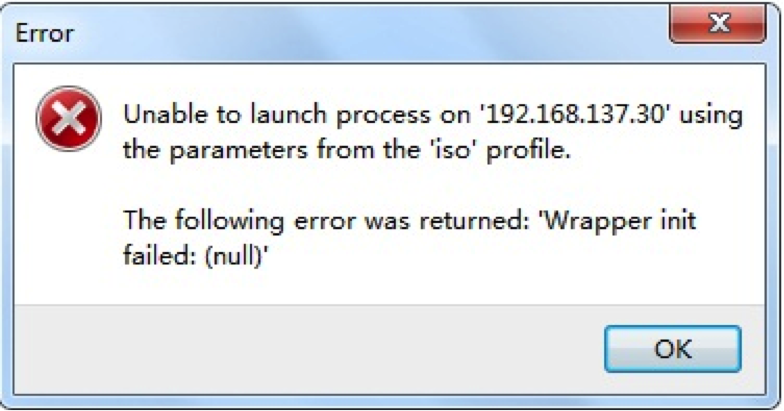
查看了很多大侠的博客。
二、问题的其他表现在Embarcadero的论坛上找到:
原文位置:https://forums.embarcadero.com/thread.jspa?threadID=101749&tstart=0
|
What does this mean and how can I correct it? I started getting this error today and I've even tried going to a backup that used to work, and when that didn't work I tried creating a new Hello World app and that didn't work either. This is a on a Mac-In-Cloud machine that up until today was working. The target is iOS simulator, iPhone. This is using Delphi XE5 Update1 on Windows7. The SDK is iPhoneOS 7.0.3. Gary Error Unable to launch process on 'LA204.macincloud.com' using the parameters from the 'MacinCloud' profile. The following error was returned: 'Wrapper init failed: (null)' |
三、解决方案:推荐是安装Hotfix 6 或者升级到XE6
错误的描述是:
[Xcode 5.1] iOS Simulator fails with wrapper init failed (null) error
Steps to Reproduce:
2. PAServer is started and connection succeeds from the profile.
3. Xcode update was done prior to this problem occuring, but App store shows the Xcode is installed and does run.
4. Up until this update of Xcode the simulator worked fine.
When I go to [tools] [options] SDK Manager and select iOS [Update local file cache] I get error
Directory does not exist: /Applications/Xcode.app/Contents/Developer/Platforms/iPhoneOS.platform/Developer/SDKs/iPhoneOS7.0.sdk/usr/include/
I have reinstalled PAServer but that did not help.
附 Hotfix 6 for RAD Studio, Delphi, and C++Builder XE5 Update 2的说明:
Available to registered users of Delphi XE5, C++Builder XE5, RAD Studio XE5, and Embarcadero All-Access XE
This Hotfix resolves issues with iOS apps when using iOS SDK 7.1 and Xcode 5.1.
Updated on April 17, 2014 to address the issue on Mountain Lion as well.
原文位置: http://qc.embarcadero.com/wc/qcmain.aspx/qcmain.aspx?d=123133
DELPHI XE5 UP2 运行IOS 遇到 Wrapper init failed: (null)问题的解决办法的更多相关文章
- 关于delphi软件运行出现Invalid floating point operation的错误的解决办法
关于delphi软件运行出现Invalid floating point operation的错误的解决办法 关于delphi软件运行出现Invalid floating point operat ...
- 运行js提示库没有注册错误8002801d的解决办法
运行js提示库没有注册错误8002801d的解决办法这个错误主要是因为服务器上的windows scripts版本较低,请按下面的链接下载较高版本windows scripts 5.6并在服务器上进行 ...
- 嵌入式X86运行linux及QtEmbedded+触摸屏(X86PC104+Xlinux+QtE+触摸屏解决办法)
嵌入式X86运行linux及QtEmbedded+触摸屏(X86PC104+Xlinux+QtE+触摸屏解决办法) QQ:5724308 邮箱:sankye@163.com
- centos7.5离线安装Docker及容器运行报OCI runtime create failed 问题定位与解决
前言 接上篇 <记一次centos挂载ceph存储的坑> 服务器重做了centos7.5版本的操作系统,剩下就是安装docker,考虑yum安装耗时较长,我一般都是直接安装二进制版本doc ...
- ios上架报错90080,90087,90209,90125 解决办法
ERROR ITMS-90087: "Unsupported Architectures. The executable for yht.temp_caseinsensitive_renam ...
- mac上运行appium提示错误Encountered internal error running command 解决办法
[debug] [iOS] App is not installed. Will try to install. [MJSONWP] Encountered internal error runnin ...
- Android每次运行项目时重新启动一个新的模拟器的解决办法
具体解决办法 1.打开任务管理器,结束adb进程 2.此时android console下面会出现错误信息 3.切换到dos下面运行: adb start-server 4.重新运行android项目 ...
- eclipse运行spark程序时日志颜色为黑色的解决办法
自从开始学习spark计算框架以来,我们老师教的是local模式下用eclipse运行spark程序,然后我在运行spark程序时,发现控制台的日志颜色总是显示为黑色,哇,作为程序猿总有一种强迫症,发 ...
- hadoop集群运行jps命令以后Datanode节点未启动的解决办法
出现该问题的原因:在第一次格式化dfs后,启动并使用了hadoop,后来又重新执行了格式化命令(hdfs namenode -format),这时namenode的clusterID会重新生成,而da ...
随机推荐
- php中的list方法
list 栗子一: <?php $info = array('coffee', 'brown', 'caffeine'); // 列出所有变量 list($drink, $color, $pow ...
- oracle记录错误存储过程
CREATE OR REPLACE PROCEDURE SP_ERROR_LOGS_PRO(v_pro_name VARCHAR2, v_step_name VARCHAR2, v_date VARC ...
- java成神之——集合框架之队列,栈,集合并发
集合 队列和双端队列 PriorityQueue Deque BlockingQueue Queue 栈 集合并发 线程锁 线程安全集合 结语 集合 队列和双端队列 PriorityQueue 此队列 ...
- List<T>直接充当Combox控件DataSource并扩展自定义记录的方法
一般认为List只有转换为DataTable后才能充当CombBox的数据源,其实不然: List<SYS_COMMANDS> comdList = _menuMan.Load(c =&g ...
- 深度剖析collections模块
namedtuple OrderedDict deque tuple defaultdict Counter ChainMap
- Swift中用正规表达式判断String是否是手机号码
func isTelNumber(num:NSString)->Bool { var mobile = "^1(3[0-9]|5[0-35-9]|8[025-9])\\d{8}$&qu ...
- EXT.net 窗体传值
ext.net 窗体传值 EXT.net 窗体传值 子窗体代码 protected void btnClose_Click(object sender,EventArges e) { PageCont ...
- wireshark怎么抓包、wireshark抓包详细图文教程(转)
wireshark怎么抓包.wireshark抓包详细图文教程 wireshark是非常流行的网络封包分析软件,功能十分强大.可以截取各种网络封包,显示网络封包的详细信息.使用wireshark的人必 ...
- 数论Keynote
[同余] 1.整数a,b对模m同余的充分与必要条件是m|(a-b),即a=b+mt,t是整数. 2.性质丁.若a1=b1(mod m),a2=b2(mod m),则(a1+a2)=(b1+b2)(mo ...
- js如何解析后台传过来的json字符串
1.js如何解析后台传过来的json字符串? 注意:js是无法直接接收和使用json或者Php的数据,用的话会出现undefined,所以要转换一下. 方式一: var str = '{"r ...