
自定义数据类型写入SequenceFile并读出
开头对这边博客的内容做个概述,首先是定义了一个DoubleArrayWritable的类,用于存放矩阵的列向量,然后将其作为value写入SequenceFile中,key就是对应的矩阵的列号,最后(key,value)从SequenceFile中读出,与另一矩阵做乘法。完全通过IDEA在本地调试程序,并未提交集群。一般来说是将hadoop-core-1.2.1.jar和lib目录下的commons-cli-1.2.jar两个包加入到工程的classpath中就可以了,不过仅仅添加这两个包,调试的时候会提示找不到某些类的定义,所以索性将hadoop-core-1.2.1.jar和lib目录下的所有jar包均添加到工程的classpath中,这样完全不必提交到集群就可以在本地调试程序。
1)首先是定义DoubleArrayWritable类,这个类继承与ArrayWritable。
 import org.apache.hadoop.io.IntWritable;

 import org.apache.hadoop.io.ArrayWritable;

 public class IntArrayWritable extends ArrayWritable {

     public IntArrayWritable(){

         super(IntWritable.class);

     }

 }
因为要读取SequenceFile中的(key,value)传给map,所以需要以4-6的形式显示定义构造函数。
2)然后是将DoubleArrayWritable类型的对象作为value写入SequenceFile,使用SequenceFile.writer
/**

 * Created with IntelliJ IDEA.

 * User: hadoop

 * Date: 16-3-4

 * Time: 上午10:36

 * To change this template use File | Settings | File Templates.

 */

import org.apache.hadoop.conf.Configuration;

import org.apache.hadoop.fs.FileSystem;

import org.apache.hadoop.fs.Path;

import java.io.IOException;

import java.net.URI;

import org.apache.hadoop.io.IntWritable;

import org.apache.hadoop.io.SequenceFile;

import org.apache.hadoop.io.ArrayWritable;

public class SequenceFileWriterDemo {

    public static void main(String[] args) throws IOException {

        String uri="/home/hadoop/2016Test/SeqTest/10IntArray";

        Configuration conf=new Configuration();

        FileSystem fs=FileSystem.get(URI.create(uri),conf);

        Path path=new Path(uri);

        IntWritable key=new IntWritable();

        IntArrayWritable value=new IntArrayWritable();//定义IntArrayWritable类型的alue值。

        value.set(new IntWritable[]{new IntWritable(1),new IntWritable(2),new IntWritable(3),

                new IntWritable(4)});

        SequenceFile.Writer writer=null;

        writer=SequenceFile.createWriter(fs,conf,path,key.getClass(),value.getClass());

        int i=0;

        while(i<10){

               key.set(i++);

               //value.set(intArray);

               writer.append(key,value);

            }

        writer.close();//一定要加上这句,否则写入SequenceFile会失败,结果是一个空文件。

        System.out.println("done!");

    }

}

 class IntArrayWritable extends ArrayWritable {

    public IntArrayWritable(){

        super(IntWritable.class);

    }

}
这就完成了一个10行4列的矩阵写入SequenceFile文件在,其中key是矩阵行号,value是IntArrayWritable类型的变量。
3)将生成的SequenceFile上传到集群,然后查看其内容,使用命令(需要将IntArrayWritable类打包并将其路径加入到hadoop_env.sh中HADOOP_CLASSPATH中)如下:
hadoop fs -text /testData/10IntArray
结果如下:
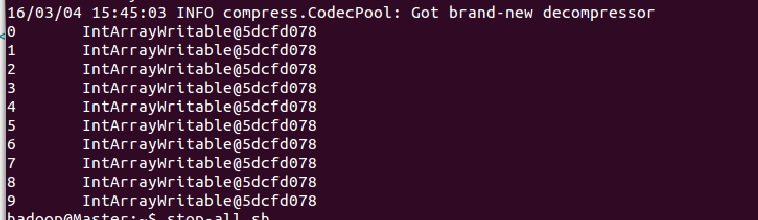
好像哪里不对?应该是[1,2,3,4]数组呀。其实是对的,写入SequenceFile中时就是将”活对象“持久化存储的过程,也就是序列化,所以当我们以文本的方式(-text)打开文件时,就看到了IntArrayWritable...的形式。如果想要看数组也可以,反序列化就好了。
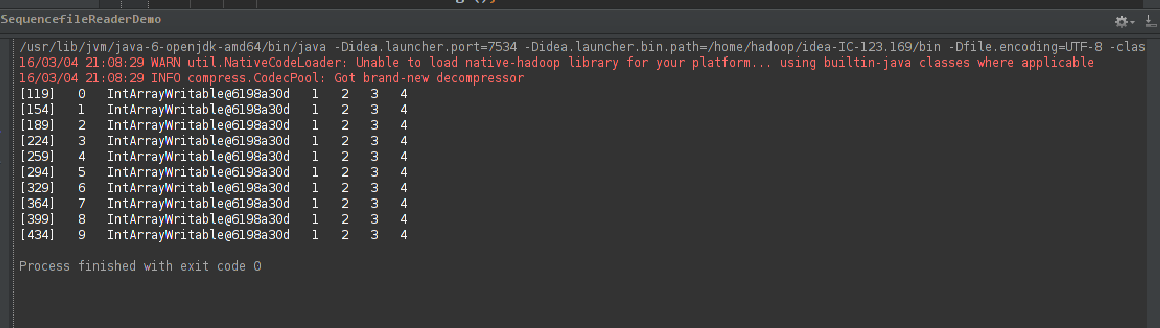
4)使用SequenceFile.reader读取上述SequenceFile文件的内容,我要看到数组~~~,代码如下:
/**

 * Created with IntelliJ IDEA.

 * User: hadoop

 * Date: 16-3-4

 * Time: 下午5:41

 * To change this template use File | Settings | File Templates.

 */

import org.apache.hadoop.conf.Configuration;

import org.apache.hadoop.fs.FileSystem;

import org.apache.hadoop.fs.Path;

import org.apache.hadoop.io.SequenceFile;

//import org.apache.hadoop.mapreduce.lib.input.*;

import org.apache.hadoop.io.*;

import org.apache.hadoop.util.ReflectionUtils;

import java.io.IOException;

import java.net.URI;

public class SequencefileReaderDemo {

    public static void main(String[] args) throws IOException {

        String uri="/home/hadoop/2016Test/SeqTest/10IntArray";

        Configuration conf=new Configuration();

        FileSystem fs =FileSystem.get(URI.create(uri),conf);

        Path path=new Path(uri);

        SequenceFile.Reader reader=null;

        try {

            reader=new SequenceFile.Reader(fs,path,conf);

            Writable key =(Writable)ReflectionUtils.newInstance(reader.getKeyClass(),conf);

            IntArrayWritable value=(IntArrayWritable)ReflectionUtils.newInstance(reader.getValueClass(),conf);

            long position=reader.getPosition();

            String[] sValue=null;

            while(reader.next(key,value)){

                String syncSeen=reader.syncSeen()?"*":"";

                sValue=value.toStrings();

                System.out.printf("[%s%s]\t%s\t%s\t",position,syncSeen,key,value);

                for (String s:sValue){

                    System.out.printf("%s\t", s);

                }

                System.out.println();

                position=reader.getPosition();

            }

        }

        finally {

                IOUtils.closeStream(reader);

        }

    }

}
运行结果如下:
5)最后,利用上述生成的SequenceFile文件作为左矩阵,写一个MR程序计算矩阵的乘法,代码如下:
 /**

  * Created with IntelliJ IDEA.

  * User: hadoop

  * Date: 16-3-4

  * Time: 上午10:34

  * To change this template use File | Settings | File Templates.

  */

 import org.apache.hadoop.conf.Configuration;

 import org.apache.hadoop.fs.FileSystem;

 import org.apache.hadoop.fs.Path;

 import org.apache.hadoop.mapreduce.Job;

 import org.apache.hadoop.mapreduce.Mapper;

 import org.apache.hadoop.mapreduce.Reducer;

 import org.apache.hadoop.io.IntWritable;

 import org.apache.hadoop.mapreduce.lib.input.*;

 import org.apache.hadoop.mapreduce.lib.output.FileOutputFormat;

 import org.apache.hadoop.mapreduce.lib.output.SequenceFileOutputFormat;

 import java.io.IOException;

 import java.lang.reflect.Array;

 import java.net.URI;

 public class MRTest {

     public static class MyMapper extends Mapper<IntWritable,IntArrayWritable,IntWritable,IntArrayWritable>{

         public static  int[][] rightMatrix=new int[][]{{10,10,10,10,10},{10,10,10,10,10},{10,10,10,10,10},{10,10,10,10,10}};

         public IntWritable key=new IntWritable();

         public IntArrayWritable value=new IntArrayWritable();

         //public IntWritable[] valueInput=null;

         public Object valueObject=null;

         public IntWritable[] arraySum=new IntWritable[rightMatrix[0].length];

         public int sum=0;

         public void map(IntWritable key,IntArrayWritable value,Context context) throws IOException, InterruptedException {

             valueObject=value.toArray();//value.toArray的返回值是一个Object类型的对象,但是Object内部值是数组呀

                                         //使用Array.get(valueObject,3)可以得到数组中第4个元素,然后将其转化为string,再使用

                                         //Integer.parseInt(str)将其转化为整型值.

             for (int i=0;i<rightMatrix[0].length;++i){

                 sum=0;

                 for (int j=0;j<rightMatrix.length;++j){

                     sum+=(Integer.parseInt(((Array.get(valueObject,j)).toString())))*rightMatrix[j][i];

                 }

                 arraySum[i]=new IntWritable(sum);

             }

             value.set(arraySum);

             context.write(key,value);

         }

     }

     public static void main(String[] args) throws IOException, ClassNotFoundException, InterruptedException {

         String uri="/home/hadoop/2016Test/SeqTest/10IntArray";

         String outUri="/home/hadoop/2016Test/SeqTest/output";

         Configuration conf=new Configuration();

         FileSystem fs=FileSystem.get(URI.create(uri), conf);

         fs.delete(new Path(outUri),true);//输出目录存在的话就将其删除。

         Job job=new Job(conf,"SeqMatrix");

         job.setJarByClass(MRTest.class);

         job.setMapperClass(MyMapper.class);

         job.setInputFormatClass(SequenceFileInputFormat.class);

         job.setOutputFormatClass(SequenceFileOutputFormat.class);

         job.setOutputKeyClass(IntWritable.class);

         job.setOutputValueClass(IntArrayWritable.class);

         FileInputFormat.setInputPaths(job,new Path(uri));

         FileOutputFormat.setOutputPath(job,new Path(outUri));

         System.exit(job.waitForCompletion(true)?0:1);

     }

 }
其中,使用Array.get(object,index)从包含数组的Object对象内部获得数组值的方法参考了:http://www.blogjava.net/pengpenglin/archive/2008/09/04/226968.html
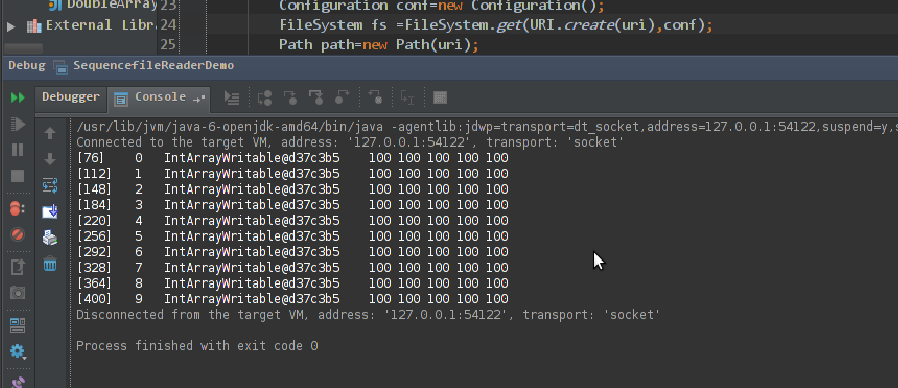
最后的计算结果如下:
自定义数据类型写入SequenceFile并读出的更多相关文章
- Oracle自定义数据类型 1
原文 oracle 自定义类型 type / create type 一 Oracle中的类型 类型有很多种,主要可以分为以下几类: 1.字符串类型.如:char.nchar.varchar2.nva ...
- 通过SQL Server自定义数据类型实现导入数据
写在前面 在看同事写的代码时看到了SQL Server中可以自定义数据类型,而且定义的是DataTable类型的数据类型. 后我想起了以前我们导入数据时要么是循环insert写入,要么是SqlBulk ...
- 如何在Qt中使用自定义数据类型
这里我们使用下面这个struct来做说明(这里不管是struct还是class都一样): struct Player { int number; QString firstName; QString ...
- hadoop的自定义数据类型和与关系型数据库交互
最近有一个需求就是在建模的时候,有少部分数据是postgres的,只能读取postgres里面的数据到hadoop里面进行建模测试,而不能导出数据到hdfs上去. 读取postgres里面的数据库有两 ...
- OSG 自定义数据类型 关键帧动画
OSG 自定义数据类型 关键帧动画 转自:http://blog.csdn.net/zhuyingqingfen/article/details/12651017 /* 1.创建一个AnimManag ...
- Oracle存储过程-自定义数据类型,集合,遍历取值
摘要 Oracle存储过程,自定义数据类型,集合,遍历取值 目录[-] 0.前言 1.Packages 2.Packages bodies 3.输出结果 0.前言 在Oracle的存储过程中,可能会遇 ...
- Hadoop-MapReduce之自定义数据类型
以下是自定义的一个数据类型,有两个属性,一个是名称,一个是开始点(可以理解为单词和单词的位置) MR程序就不写了,请看WordCount程序. package cn.genekang.hadoop.m ...
- Sql Server 自定义数据类型
SQLServer 提供了 25 种基本数据类型: ·Binary [(n)] 二进制数据 既可以是固定长度的(Binary),也可以是变长度的.其中,n 的取值范围是从 1 到 8000.其存储窨 ...
- 初识Haskell 五:自定义数据类型和类型类
对Discrete Mathematics Using a Computer的第一章Introduction to Haskell进行总结.环境Windows 自定义数据类型 data type de ...
随机推荐
- 【BZOJ1419】 Red is good [期望DP]
Red is good Time Limit: 10 Sec Memory Limit: 64 MB[Submit][Status][Discuss] Description 桌面上有R张红牌和B张 ...
- 谈谈openstack部署规模问题
理论上,单个openstack已设计成可水平扩展的系统,只要数据库足够快,消息总线足够多资源等,一个openstack系统可管理上千台物理服务器是没有问题的. 但是单个openstack规模大了之后, ...
- MySQL-based databases CVE-2016-6664 本地提权
@date: 2016/11/10 @author: dlive 0x00 前言 这个漏洞可以结合CVE-2016-6663使用提升权限到root 0x01 漏洞原文 # http://legalha ...
- SpringMvc基础知识(二) springmvc和mybatis整合
1 springmvc和mybatis整合 1.1 需求 使用springmvc和mybatis完成商品列表查询. 1.2 整合思路 springmvc+mybaits的系统架构: 第一步:整合dao ...
- Oracle rman 命令总结
--登录rman rman target / rman target sys/passwork rman target sys/passwork nocatalog (控制文件方式) rm ...
- CSS变形
css3 变形/变换 相关属性 transform transform-origin transform-style:flat/preserve-3d perspective: 长度单位 perspe ...
- canvas的基础使用。
目录: 创建canvas. 绘制直线.多边形和七巧板. 绘制弧和圆. (有些图过于宽,被挤压了.可以去相册[canvas用到的图.]看原图.) 创建canvas. HTML5的新标签<canva ...
- 1.docker镜像
1.docker的安装 安装 wget -qO- https://get.docker.com/ | sh 启动docker后台服务 sudo service docker start 测试运行hel ...
- PHPExcel 长数字串显示为科学计数 与 其他错误
一.解决 PHPExcel 长数字串显示为科学计数 在excel中如果在一个默认的格中输入或复制超长数字字符串,它会显示为科学计算法,例如身份证号码,解决方法是把表格设置文本格式或在输入前加一个单引号 ...
- require.js模块化管理和加载js(按需加载)简单实例教学
一.为什么要用require.js? 最早的时候,所有Javascript代码都写在一个文件里面,只要加载这一个文件就够了.后来,代码越来越多,一个文件不够了,必须分成多个文件,依次加载.下面的网页代 ...