
ProgressBar(进度条)、SeekBar(拖动条)与星级评分条(RatingBar)
1.ProgressBar(进度条)
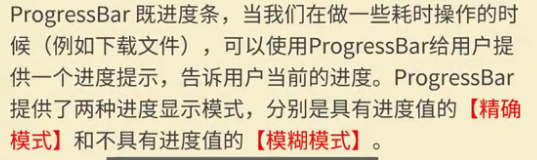
(1)介绍
(2)常用属性
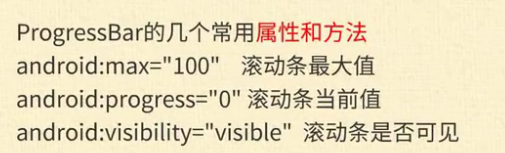
(3)xml代码
<ProgressBar

        android:id="@+id/progressBar2"

        style="?android:attr/progressBarStyleHorizontal"

        android:layout_width="match_parent"

        android:layout_height="48dp"

        android:max="100"

        android:progress="90" />
2.Seeker(拖动条)
(1)介绍

(2)属性介绍

(3)xml布局文件
    <ImageView

        android:id="@+id/imageView"

        android:layout_width="match_parent"

        android:layout_height="wrap_content"

        app:srcCompat="@mipmap/img1" />

    <SeekBar

        android:id="@+id/seekBar"

        android:layout_width="match_parent"

        android:layout_height="wrap_content" />
3.RatingBar(星级评分条)
(1)介绍

(2)属性

(3)xml布局
<TextView

        android:id="@+id/textView"

        android:layout_width="match_parent"

        android:layout_height="wrap_content"

        android:text="店铺评分" />

    <RatingBar

        android:id="@+id/ratingBar"

        android:layout_width="wrap_content"

        android:layout_height="wrap_content"

        android:numStars="5" />

    <Button

        android:id="@+id/button"

        android:layout_gravity="center"

        android:layout_width="wrap_content"

        android:layout_height="wrap_content"

        android:text="提交" />
4.java后台
package com.lucky.test24;

import android.support.v7.app.AppCompatActivity;

import android.os.Bundle;

import android.view.View;

import android.widget.Button;

import android.widget.EditText;

import android.widget.ImageView;

import android.widget.ProgressBar;

import android.widget.RatingBar;

import android.widget.SeekBar;

import android.widget.Toast;

public class MainActivity extends AppCompatActivity {

    ImageView imageView;

    SeekBar seekBar;

    ProgressBar progressBar;

    EditText editText;

    RatingBar ratingBar;

    Button button;

    @Override

    protected void onCreate(Bundle savedInstanceState) {

        super.onCreate(savedInstanceState);

        setContentView(R.layout.activity_main);

        imageView=findViewById(R.id.imageView);

        seekBar=findViewById(R.id.seekBar);

        progressBar=findViewById(R.id.progressBar2);

        editText=findViewById(R.id.editText);

        ratingBar=findViewById(R.id.ratingBar);

        button=findViewById(R.id.button);

        seekBar.setOnSeekBarChangeListener(new SeekBar.OnSeekBarChangeListener() {

            //状态发生改变时,触发的方法

            @Override

            public void onProgressChanged(SeekBar seekBar, int progress, boolean fromUser) {

                progressBar.setProgress(progress);  //设置进度条的进度

                imageView.setAlpha(progress);     //设置图片的亮度

            }

            //刚开始拖动时触发的方法

            @Override

            public void onStartTrackingTouch(SeekBar seekBar) {

            }

            //拖动结束后触发的方法

            @Override

            public void onStopTrackingTouch(SeekBar seekBar) {

            }

        });

        button.setOnClickListener(new View.OnClickListener() {

            @Override

            public void onClick(View v) {

                String str1="";

                String str2="";

                str1=str1+ratingBar.getRating(); //获取用户评分

                str2="您的评价为:"+editText.getText().toString()+"\n您的评分为:"+str1;

                Toast.makeText(MainActivity.this,str2,Toast.LENGTH_SHORT).show();

            }

        });

    }

}
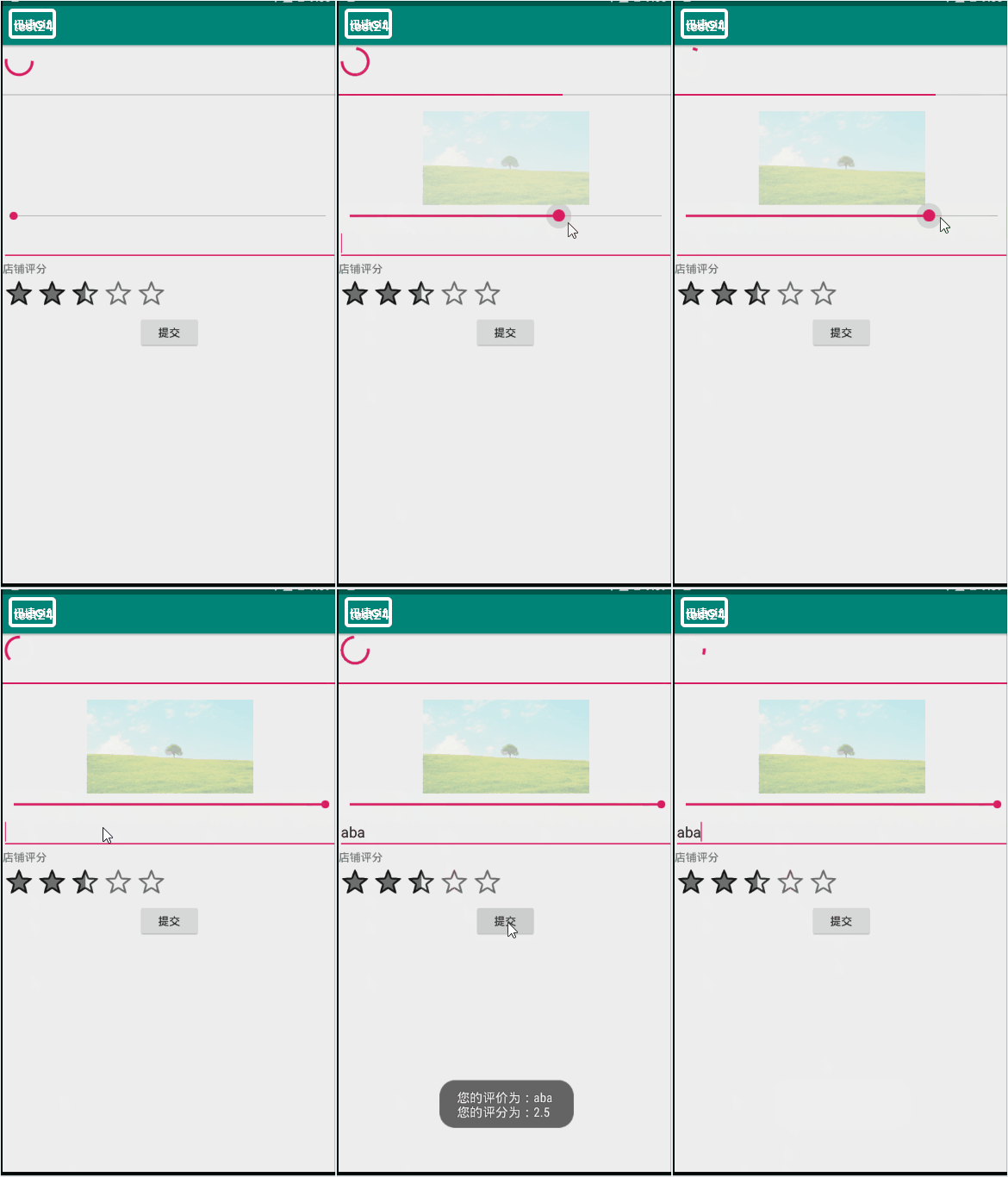
5.效果图
ProgressBar(进度条)、SeekBar(拖动条)与星级评分条(RatingBar)的更多相关文章
- Android基础控件RatingBar星级评分条的使用
1.简介 RatingBar继承ProgressBar,除了ProgressBar的属性外还有特有属性: android:isIndicator:是否用作指示,用户无法更改,默认false andro ...
- Android中点击按钮获取星级评分条的评分
场景 效果 注: 博客: https://blog.csdn.net/badao_liumang_qizhi 关注公众号 霸道的程序猿 获取编程相关电子书.教程推送与免费下载. 实现 将布局改为Lin ...
- Android零基础入门第53节:拖动条SeekBar和星级评分条RatingBar
原文:Android零基础入门第53节:拖动条SeekBar和星级评分条RatingBar 前面两期都在学习ProgressBar的使用,关于自定义ProgressBar的内容后期会继续学习的,本期先 ...
- 星级评分进度条(RatingBar)
星级评分进度条(RatingBar):(主要用于评价等方面) 常用的xml属性; android:isIndicator:RatingBar是否是一个指示器(用户无法进行更改) android:num ...
- 二、Android应用的界面编程(六)ProgressBar及其子类[SeekBar、RatingBar]er
通常用于向用户显示某个耗时操作完成的百分比.Android支持几种风格的进度条,通过style属性可以为ProgressBar指定风格.该属性支持如下几个属性值. # @android:style/W ...
- Android 自学之星级评分条RatingBar
星级评分条(RatingBar)与拖动条十分相似,他们还有共同的父类AbsSeekBar.实际上星级评分条和拖动条的用法和功能都十分的接近:他们都允许用户通过拖动来改变进度.RatingBar与See ...
- Android View 之进度条+拖动条+星级评论条....
PS:将来的你会感谢现在奋斗的自己.... 学习内容: 1.进度条 2.拖动条 3.星级评论条 1.进度条... 进图条这东西想必大家是很熟悉的...为了使用户不会觉得应用程序死掉了,因此 ...
- android中SeekBar拖动进度条的使用及事件监听
下面和大家分享一下android中SeekBar拖动进度条的使用,以及事件监听.拖动进度条的事件监听需要实现SeekBar.OnSeekBarChangeListener接口,调用SeekBar的se ...
- Android 拖动条/滑动条控件、星级评分控件
ProgressBar有2个子控件: SeekBar 拖动条控件 RatingBar 星级评分控件 1.拖动条控件 <SeekBar android:layout_width=" ...
随机推荐
- 分布式全文检索系统SolrCloud简介
前言 本文简单描述SolrCloud的特性,基本结构和入门,基于Solr4.5版本. Lucene是一个Java语言编写的利用倒排原理实现的文本检索类库.Solr是以Lucene为基础实现的文本检索应 ...
- 面试题:hibernate 有用
1. Hibernate的工作流程? 答案: 1.通过Configuration对象读取并解析配置文件 2.读取并解析映射信息,创建SessionFactory对象 3.打开session 4.创建事 ...
- Linux ekho
一.简介 Ekho(余音)是一个免费.开源的中文语音合成软件.它目前支持粤语.普通话(国语).诏安客语.藏语.雅言(中国古代通用语)和韩语(试验中),英文则通过Festival间接实现.Ekho支持L ...
- pyinstaller生成exe可执行程序
1安装 略 2执行 pyinstaller –F test.py 报错: Pyinstaller: cx_Oracle.InterfaceError: Unable to acquire Oracle ...
- IE浏览器和Firefox浏览器兼容性问题及解决办法
IE浏览器和Firefox浏览器兼容性问题及解决办法 为了方便大家阅读代码,以下以 IE 代替 Internet Explorer,以 MF/FF 代替 Mozzila Firefox : 1.//w ...
- WordCountPro
github项目地址:https://github.com/Hoyifei/SQ-T-Homework-WordCount-Advanced PSP表格 PSP2.1 PSP阶段 预估耗时 (分钟 ...
- (转)15个非常棒的jQuery无限滚动插件【瀑布流效果】
原文地址:http://www.cnblogs.com/lyw0301/archive/2013/06/19/3145084.html 现在,最热门的网站分页趋势之一是jQuery的无限滚动(也即瀑布 ...
- 什么是Condition Number(条件数)?
In the field of numerical analysis, the condition number of a function with respect to an argument m ...
- MongoDB整理笔记のDump & Restore
备份 [root@localhost bin]# ./mongodump -d my_mongodb connected to: 127.0.0.1 DATABASE: my_mongodb t ...
- 享元(Flyweight)模式
享元(Flyweight)模式:运用共享技术有效的支持大量细粒度的对象. /* * 抽象享元(Flyweight)角色:此角色是所有的具体享元类的超类,为这些类规定出需要实现的公共接口. 那些需要外蕴 ...