
ios -生成推广海报
#import "ViewController.h"

#import "Masonry.h"

@interface ViewController ()

@end

@implementation ViewController

- (void)viewDidLoad {

    [super viewDidLoad];

    //一般的view生成图片方法

    UIView *subview = [[UIView alloc]initWithFrame:CGRectMake(, , CGRectGetWidth(self.view.frame) -  * , CGRectGetHeight(self.view.frame) -  * )];

    [self.view addSubview:subview];

//    [self onUIImageSubViewWithView:subview];

//

//    UIGraphicsBeginImageContext(subview.bounds.size);

//    self.view.backgroundColor = [UIColor whiteColor];

//    [self.view.layer renderInContext:UIGraphicsGetCurrentContext()];

//    UIImage *viewImage = UIGraphicsGetImageFromCurrentImageContext();

//

    UIImageView *ig=[[UIImageView alloc]initWithFrame:CGRectMake(, , CGRectGetWidth(subview.frame), CGRectGetHeight(subview.frame) )];

    ig.backgroundColor = [UIColor yellowColor];

    ig.image = [self onUIImageSubViewWithView:subview];

    [subview addSubview:ig];

}

//view 需要生成的图片

- (UIImage *)onUIImageSubViewWithView:(UIView *)view

{

    //view容器

    UIView *subview = [[UIView alloc]initWithFrame:CGRectMake(, , CGRectGetWidth(view.frame), CGRectGetWidth(view.frame) * 5.5 /)];

    subview.backgroundColor = [UIColor greenColor];

    [view addSubview:subview];

    //主图

    UIImageView *mainimgv = [[UIImageView alloc]initWithFrame:CGRectMake(, , CGRectGetWidth(subview.frame), CGRectGetWidth(subview.frame))];

    mainimgv.backgroundColor = [UIColor purpleColor];

    [subview addSubview:mainimgv];

    mainimgv.image = [UIImage imageNamed:@"1.png"];

    //小图标

    UIImageView *xiaoimgv = [[UIImageView alloc]initWithFrame:CGRectMake(, , CGRectGetWidth(view.frame) / , CGRectGetWidth(view.frame) / )];

    xiaoimgv.backgroundColor = [UIColor purpleColor];

    [subview addSubview:xiaoimgv];

    [xiaoimgv mas_makeConstraints:^(MASConstraintMaker *make) {

        make.top.equalTo(mainimgv.mas_bottom).mas_offset();

        make.left.equalTo(subview).mas_offset();

        make.size.mas_offset(CGSizeMake(CGRectGetWidth(view.frame) / , CGRectGetWidth(view.frame) / ));

    }];

    //简介

    UILabel *nametxt = [[UILabel alloc]initWithFrame:CGRectMake(, , , )];

    nametxt.text = @"      阿斯顿发大发大发是的发送到发送到发送到附近阿萨德放假啊收到了飞机阿斯顿发卡就是大幅拉升的减肥啦圣诞节费拉达斯放假啊了";

    nametxt.numberOfLines = ;

    [subview addSubview:nametxt];

    [nametxt mas_makeConstraints:^(MASConstraintMaker *make) {

        make.top.equalTo(mainimgv.mas_bottom).mas_offset();

        make.left.equalTo(subview).mas_offset();

        make.width.mas_offset(CGRectGetWidth(mainimgv.frame) / );

    }];

    //小itemview

    UIView *xiaosubview = [[UIView alloc]initWithFrame:CGRectMake(, , , )];

    xiaosubview.layer.masksToBounds = YES;

    [subview addSubview:xiaosubview];

    xiaosubview.layer.borderColor = [UIColor redColor].CGColor;

    xiaosubview.layer.borderWidth = 0.5;

    [xiaosubview mas_makeConstraints:^(MASConstraintMaker *make) {

        make.top.equalTo(nametxt.mas_bottom).mas_offset();

        make.left.equalTo(subview).mas_offset();

        make.size.mas_offset(CGSizeMake(, ));

    }];

    xiaosubview.layer.cornerRadius = CGRectGetHeight(xiaosubview.frame) / ;

    //xiao uilatxt

    UILabel *xiaouilatxt = [[UILabel alloc]initWithFrame:CGRectMake(, , , )];

    xiaouilatxt.backgroundColor = [UIColor redColor];

    xiaouilatxt.textColor = [UIColor whiteColor];

    xiaouilatxt.font = [UIFont systemFontOfSize:];

    [xiaosubview addSubview:xiaouilatxt];

    xiaouilatxt.text = @"券";

    xiaouilatxt.textAlignment = NSTextAlignmentCenter;

    [xiaouilatxt mas_makeConstraints:^(MASConstraintMaker *make) {

        make.top.equalTo(xiaosubview).mas_offset();

        make.left.equalTo(xiaosubview).mas_offset();

        make.bottom.equalTo(xiaosubview).mas_offset();

        make.width.mas_offset(CGRectGetWidth(xiaosubview.frame) / );

    }];

    //xiao 优惠券

    UILabel *xiaoquantxt = [[UILabel alloc]initWithFrame:CGRectMake(, , , )];

    xiaoquantxt.text = @"¥50";

    xiaoquantxt.font = [UIFont systemFontOfSize:];

    xiaoquantxt.textColor = [UIColor redColor];

    [xiaosubview addSubview:xiaoquantxt];

    xiaoquantxt.textAlignment = NSTextAlignmentCenter;

    [xiaoquantxt mas_makeConstraints:^(MASConstraintMaker *make) {

        make.top.equalTo(xiaosubview).mas_offset();

        make.left.equalTo(xiaouilatxt.mas_right).mas_offset();

        make.bottom.equalTo(xiaosubview).mas_offset();

        make.width.mas_offset(CGRectGetWidth(xiaosubview.frame) *  / );

    }];

    //优惠价

    UILabel *pricetxt = [[UILabel alloc]initWithFrame:CGRectMake(, , , )];

    pricetxt.text = @"¥50.0";

    pricetxt.font = [UIFont systemFontOfSize:];

    pricetxt.textColor = [UIColor redColor];

    [subview addSubview:pricetxt];

    [pricetxt mas_makeConstraints:^(MASConstraintMaker *make) {

        make.top.equalTo(xiaosubview.mas_bottom).mas_offset();

        make.left.equalTo(subview).mas_offset();

        make.bottom.equalTo(subview).mas_offset(-);

    }];

    //原价

    UILabel *oldpricetxt = [[UILabel alloc]initWithFrame:CGRectMake(, , , )];

    oldpricetxt.text = @"¥150.0";

    oldpricetxt.font = [UIFont systemFontOfSize:];

    oldpricetxt.textColor = [UIColor grayColor];

    [subview addSubview:oldpricetxt];

    [oldpricetxt mas_makeConstraints:^(MASConstraintMaker *make) {

        make.top.equalTo(xiaosubview.mas_bottom).mas_offset();

        make.left.equalTo(pricetxt.mas_right).mas_offset();

        make.bottom.equalTo(subview).mas_offset(-);

    }];

    //链接二维码

    CGFloat qrH = CGRectGetHeight(subview.frame) - CGRectGetHeight(mainimgv.frame) -  * ;

    UIImageView *qrimgv = [[UIImageView alloc]initWithFrame:CGRectMake(, , , )];

    qrimgv.backgroundColor = [UIColor yellowColor];

    [subview addSubview:qrimgv];

    [qrimgv mas_makeConstraints:^(MASConstraintMaker *make) {

        make.top.equalTo(mainimgv.mas_bottom).mas_offset();

        make.right.equalTo(subview).mas_offset(-);

        make.size.mas_offset(CGSizeMake(qrH, qrH));

    }];

    //生成图片

    return [self makeImageWithView:subview withSize:CGSizeMake(subview.frame.size.width, subview.frame.size.height)];

}

//这个方法生成的图片不太清晰  不过把这个方法修改一下  就可以了

#pragma mark 生成image

- (UIImage *)makeImageWithView:(UIView *)view withSize:(CGSize)size

{

    // 下面方法,第一个参数表示区域大小。第二个参数表示是否是非透明的。如果需要显示半透明效果,需要传NO,否则传YES。第三个参数就是屏幕密度了,关键就是第三个参数 [UIScreen mainScreen].scale。

    UIGraphicsBeginImageContextWithOptions(size, NO, 0.0);

    [view.layer renderInContext:UIGraphicsGetCurrentContext()];

    UIImage *image = UIGraphicsGetImageFromCurrentImageContext();

    UIGraphicsEndImageContext();

    return image;

}
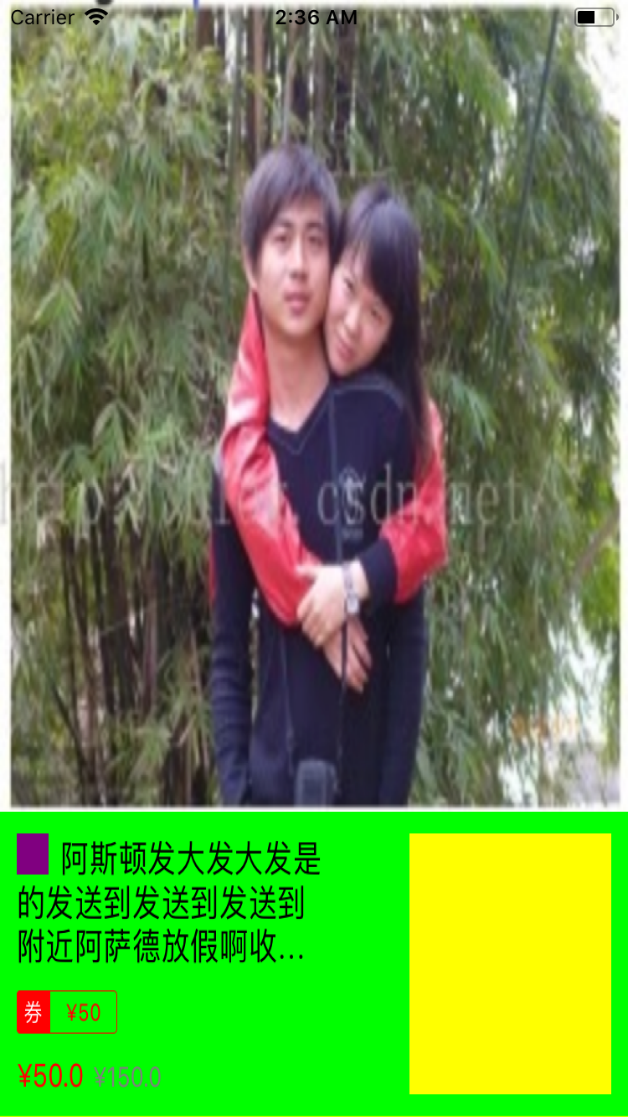
@end
ios -生成推广海报的更多相关文章
- C# 实现生成带二维码的专属微信公众号推广海报
原文:C# 实现生成带二维码的专属微信公众号推广海报 很多微信公众号中需要生成推广海报的功能,粉丝获得专属海报后可以分享到朋友圈或发给朋友,为公众号代言邀请好友即可获取奖励的.海报自带渠道二维码,粉丝 ...
- 重学 Java 设计模式:实战模版模式「模拟爬虫各类电商商品,生成营销推广海报场景」
作者:小傅哥 博客:https://bugstack.cn - 原创系列专题文章 沉淀.分享.成长,让自己和他人都能有所收获! 一.前言 黎明前的坚守,的住吗? 有人举过这样一个例子,先给你张北大的录 ...
- Vue生成分享海报(含二维码)
本文已同步到专业技术网站 www.sufaith.com, 该网站专注于前后端开发技术与经验分享, 包含Web开发.Nodejs.Python.Linux.IT资讯等板块. 功能需求: 海报有1张背景 ...
- ios 生成问题
上午的时候遇到ios打包的时候出现问题,生成没有问题,但是安装到手机的时候出现问题,错误如下 The certificate used to sign "AppName" has ...
- iOS生成静态库方法
在iOS的开发过程中,我们常常用到第三方的库.比如支付.地图.广告等. 那么,如何制作自己的库文件呢? 如何将自己写的功能类编译成库文件,分发给其他人来使用呢并做成通用库里? iOS开发一年多来没有制 ...
- 手把手教iOS生成.a包及常见的问题
我的例子是打包MJRefresh 环境OS10.11.4, XCode Version 7.3.1 (7D1014) 生成.a如下: 创建新工程: 把下载的 MJRefresh-master加到你的 ...
- IOS 生成设备唯一标识
前言 iOS设备5.0以上放弃使用[[UIDevice currentDevice] uniqueIdentifier]来获得设备唯一ID iOS设备私有方法禁止用户获取和使用IMEI 需求 需要一个 ...
- iOS生成Bundle包及使用
什么是Bundle文件? 简单理解,就是资源文件包.我们将许多图片.XIB.文本文件组织在一起,打包成一个Bundle文件.方便在其他项目中引用包内的资源. Bundle文件的特点? Bundle是静 ...
- ios生成自签名证书,实现web下载安装app
抄自http://beyondvincent.com/blog/2014/03/17/five-tips-for-using-self-signed-ssl-certificates-with-ios ...
随机推荐
- 怎样在点击li时添加样式,移除兄弟样式
<style type="text/css"> .add{ color:#ff0} </style> <div> <ul> < ...
- ES6/ES2015核心内容(下)
import export 这两个家伙对应的就是es6自己的module功能. 我们之前写的Javascript一直都没有模块化的体系,无法将一个庞大的js工程拆分成一个个功能相对独立但相互依赖的小工 ...
- Node.js 使用爬虫批量下载网络图片到本地
图片网站往往广告众多,用Node.js写个爬虫下载图片,代码不长,省事不少,比手动一张张保存简直是天与地的区别.以前用Java也做过远程图片下载,但Node.js的下载速度更让人咂舌,这也是非阻塞式变 ...
- Bat 替换文件中的字符串
echo off setlocal enabledelayedexpansion set "file=Config\__Config\server_config_common.xml&quo ...
- leetcode268:Missing Number
描写叙述 Given an array containing n distinct numbers taken from 0, 1, 2, -, n, find the one that is mis ...
- WifiStateMachine学习笔记
WifiStateMachine 1. 初始化 传入接口名称wlanInterface 新建一个WiFi类型的NetworkInfo 发一个ssid为null的广播 电池 NetworkManagem ...
- 【Python】八大排序算法的比较
排序是数据处理比较核心的操作,八大排序算法分别是:直接插入排序.希尔排序.简单选择排序.堆排序.冒泡排序.快速排序.归并排序.基数排序 以下是排序图解: 直接插入排序 思想 直接插入排序是一种最简单的 ...
- 由于删除DBF文件报错 —— ORA-01033: ORACLE initialization or shutdown in progress
由于移动或删除DBF文件报错:ORA-01033: ORACLE initialization or shutdown in progress 原因:一般该类故障通常是由于移动文件而影响了数据库日 ...
- 《DirectX 9.0 3D游戏开发编程基础》 第二章 绘制流水线 读书笔记
模型的表示 场景:物品或模型的集合 任何物品都可以用三角形网络逼近表示.我们经常用以下术语描述三角形网络:多边形(polygons).图元(primitives).网络几何单元(mesh geomet ...
- Flume入门样例
Flume 作为 cloudera 开发的实时日志收集系统,受到了业界的认可与广泛应用.Flume 初始的发行版本目前被统称为 Flume OG(original generation),属于 clo ...