
C++ GUI Qt4编程(13)-6.2preferencedialog
1. 主要介绍了QStackedLayout、QListWidget、QDialogButtonBox的简单用法。
2. QStackedLayout:
要使某个特定的子窗口部件可见,可以用setCurrentIndex()函数调用页号来实现。
使用indexOf()可以获取子窗口部件的页号。
3. 创建此对话框的简单步骤:
1) 建立一个QListWidget和一个QStackedWidget,并添加到QGridLayout布局中。
2) 在QListWidget中用addItem(),添加新的项目(或者说是新列表?)。
3) 在QStackedWidget中,新建QWisget类的分页,并用自窗口部件和布局来填充分页。
4) 在QGridLayout中添加QDialogButtonBox按钮。
5) 将列表窗口部件的currentRowChanged(int)信号和分组窗口部件的setCurrentIndex(int)
槽连接起来。实现单击列表,在分组窗口中显示对应的信息。
6) 把列表框的currentRow属性值设为0。
4. 使用QTabWidget会比此方法更简单。
5. preferencedialog.cpp
 /**/

 #include "preferencedialog.h"

 #include <QListWidget>

 #include <QStackedLayout>

 #include <QGridLayout>

 #include <QLabel>

 #include <QVBoxLayout>

 #include <QPushButton>

 #include <QDialogButtonBox>

 PreferenceDialog::PreferenceDialog(QWidget *parent)

     : QWidget(parent)

 {

     createAppearancePage();

     createWebBrowserPage();

     createMailAndNewsPage();

     createAdvancedPage();

     buttonBox = new QDialogButtonBox(QDialogButtonBox::Ok |

                                  QDialogButtonBox::Cancel);

     listWidget = new QListWidget;

     listWidget->addItem(tr("Appearance"));

     listWidget->addItem(tr("Web Browse"));

     listWidget->addItem(tr("Mail & News"));

     listWidget->addItem(tr("Advanced"));

     stackedLayout = new QStackedLayout;

     stackedLayout->addWidget(appearancePage);

     stackedLayout->addWidget(webBrowserPage);

     stackedLayout->addWidget(mailAndNewsPage);

     stackedLayout->addWidget(advancedPage);

     connect(listWidget, SIGNAL(currentRowChanged(int)),

             stackedLayout, SLOT(setCurrentIndex(int)));

     QGridLayout *mainLayout = new QGridLayout;

     mainLayout->addWidget(listWidget, , );

     mainLayout->addLayout(stackedLayout, , );

     mainLayout->addWidget(buttonBox, , , , );

     setLayout(mainLayout);

     listWidget->setCurrentRow();        /*设置起始页*/

 }

 void PreferenceDialog::createAppearancePage()

 {

     appearancePage = new QWidget;

     QLabel *appearanceLabel = new QLabel(tr("appearance"));

     QVBoxLayout *layout = new QVBoxLayout;

     layout->addWidget(appearanceLabel);

     appearancePage->setLayout(layout);

 }

 void PreferenceDialog::createWebBrowserPage()

 {

     webBrowserPage = new QWidget;

     QPushButton *webBrowserButton = new QPushButton(tr("web browser"));

     QVBoxLayout *layout = new QVBoxLayout;

     layout->addWidget(webBrowserButton);

     webBrowserPage->setLayout(layout);

 }

 void PreferenceDialog::createMailAndNewsPage()

 {

     mailAndNewsPage = new QWidget;

     QLabel *mailAndNewsLabel = new QLabel(tr("mail & news"));

     QVBoxLayout *layout = new QVBoxLayout;

     layout->addWidget(mailAndNewsLabel);

     mailAndNewsPage->setLayout(layout);

 }

 void PreferenceDialog::createAdvancedPage()

 {

     advancedPage = new QWidget;

     QPushButton *advancedButton = new QPushButton(tr("advanced"));

     QVBoxLayout *layout = new QVBoxLayout;

     layout->addWidget(advancedButton);

     advancedPage->setLayout(layout);

 }
6. preferencedialog.h
 /**/

 #ifndef PREFERENCEDIALOG_H

 #define PREFERENCEDIALOG_H

 #include <QWidget>

 class QListWidget;

 class QStackedLayout;

 class QDialogButtonBox;

 class PreferenceDialog : public QWidget

 {

     Q_OBJECT

 public:

     PreferenceDialog(QWidget *parent = );

 private:

     QListWidget *listWidget;

     QStackedLayout *stackedLayout;

     QWidget *appearancePage;

     QWidget *webBrowserPage;

     QWidget *mailAndNewsPage;

     QWidget *advancedPage;

     QDialogButtonBox *buttonBox;

     void createAppearancePage();

     void createWebBrowserPage();

     void createMailAndNewsPage();

     void createAdvancedPage();

 };

 #endif    /*PREFERENCEDIALOG_H*/
7. main.cpp
 /**/

 #include <QApplication>

 #include "preferencedialog.h"

 int main(int argc, char *argv[])

 {

     QApplication app(argc, argv);

     PreferenceDialog dialog;

     dialog.show();

     return app.exec();

 }
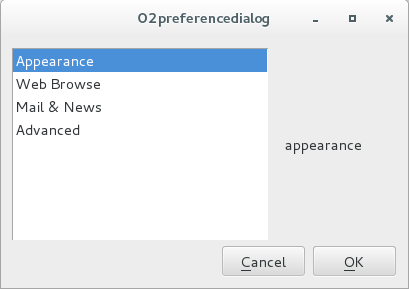
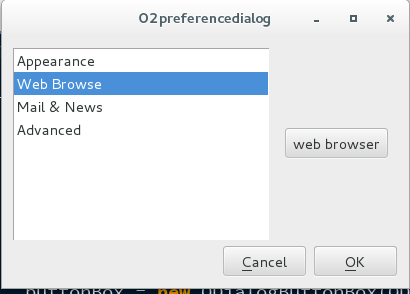
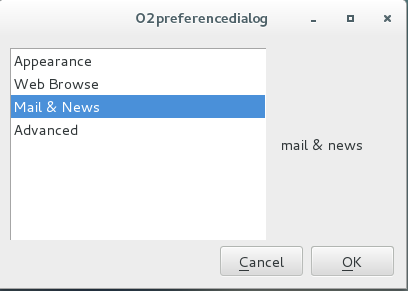
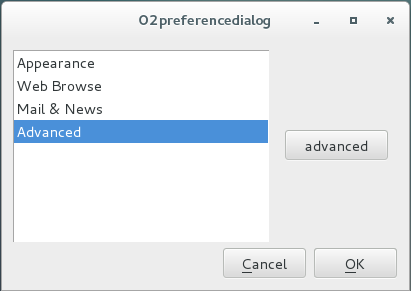
8. 效果
C++ GUI Qt4编程(13)-6.2preferencedialog的更多相关文章
- C++ GUI Qt4编程(10)-3.4spreadsheet
1. C++ GUI Qt4编程第三章,增加spreadsheet. 2. spreadsheet.h /**/ #ifndef SPREADSHEET_H #define SPREADSHEET_H ...
- C++ GUI Qt4编程(09)-3.3spreadsheet-toolbar
1. C++ GUI Qt4编程第三章,增加工具栏.状态栏和快捷键. 2. mainwindow.h /**/ #ifndef MAINWINDOW_H #define MAINWINDOW_H #i ...
- C++ GUI Qt4编程(08)-3.2spreadsheet-resource
1. C++ GUI Qt4编程第三章,图片使用资源机制法. 2. 步骤: 2-1. 在resource文件夹下,新建images文件,存放图片. 2-2. 新建spreadsheet.qrc文件,并 ...
- C++ GUI Qt4编程(07)-3.1menu
1. C++ GUI Qt4编程第三章,添加menu菜单. 2. mainwindow.h #ifndef MAINWINDOW_H #define MAINWINDOW_H #include < ...
- C++ GUI Qt4编程(03)-1.3layout
1. 根据C++ GUI Qt4编程(第二版)整理2. 系统:centos7: Qt版本:5.5.13. 程序:layout.cpp #include <QApplication> #i ...
- C++ GUI Qt4编程(02)-1.2quit
1. 根据C++ GUI Qt4编程(第二版)整理2. 系统:centos7: Qt版本:5.5.13. 程序:quit.cpp #include <QApplication> #inc ...
- C++ GUI Qt4编程(01)-1.1Hello Qt
1. 根据C++ GUI Qt4编程(第二版)整理2. 系统:centos7: Qt版本:5.5.13. 程序:hello.cpp #include <QApplication> #in ...
- C++ GUI Qt4编程-创建自定义窗口部件
C++ GUI Qt4编程-创建自定义窗口部件 Qtqt4 通过Qt窗口部件进行子类化或者直接对QWidget进行子类化,就可以创建自定义窗口部件,下面示范两种方式,并且也会说明如何把自定义窗口部 ...
- C++ GUI Qt4 编程 (第二版)
[加拿大]JasminBlanchette [英]MarkSummerfield . 电子工业 2008. 前几天的问题多是因为版本不兼容的问题. QT本身Q4 Q5就有版本问题,然后集成到VS08 ...
随机推荐
- python日期,时间函数
获取当前格式化时间: now_time = time.strftime("%Y-%m-%d %H:%M:%S",time.localtime()) 获取当前时间戳: now_tim ...
- 正确理解WPF中的TemplatedParent (转贴)
http://blog.csdn.net/idebian/article/details/8761388 (注:Logical Tree中文称为逻辑树,Visual Tree中文称为可视化树或者视觉树 ...
- poj2513 Fence Repair(小根堆)
Description Farmer John wants to repair a small length of the fence around the pasture. He measures ...
- div高度自适应窗口高度布局
给body和html都设置height:100%:然后子元素用百分比设置高度
- Java集合类总结 (五)
集合框架 为了避免进行不必要的随机访问操作,Java引入了一种标签接口RandomAccess, 这个接口没有任何方法,只是一个标签,用来标记一个集合是否应该进行随机访问操作: if (c insta ...
- 国外物联网平台(7):FogHorn
国外物联网平台(7) ——FogHorn 马智 引言: 据外媒在本月20日报道,硅谷初创公司FogHorn正在与谷歌合作以简化工业物联网应用的部署.本文对FogHorn的技术.产品.应用和生态进行了分 ...
- 求整数数组(长度为n),出现大于2/n次数的数字
条件:时间复杂度是O(n),空间复杂度是O(1) 方法1:标记法 , , , , , , , , , , , , , }; int len = arr.Length; int[] c = new in ...
- 异常上报功能Bugly简介
目的:为了能够快速定位到线上版本bug位置,经过比较之后,决定使用腾讯家的Bugly. 1.注册产品 官方文档使用指南 1.1 登录 - 使用 QQ 登录Bugly官网 没有账号就注册,要实名就实名, ...
- kali linux之sqlmap
一款开源的命令行自动SQL注入工具,它能够对多种主流数据库进行扫描支持,基于Python环境. 检测动态页面中get/post参数,cookie,http头 数据榨取/文件系统访问 操作系统命令执行 ...
- 简单的 socket 代码
TCP 编程 客户端代码 将键盘输入的字符发送到服务端,并将从服务端接收到的字符输出到终端 #!/usr/python3 import socket def socket_client(): s = ...