
Google SketchUp Cookbook: (Chapter 3) Intersection Edges: Cutting and Trimming
软件环境
SketchUp Pro 2018
参考书籍
Google SketchUp Cookbook
Trimming an Object
使用 Intersect with Model 裁剪物体。
Cutting All Intersected Objects
一次性裁剪多个物体。
Using Groups or Components to Create Cutting Objects
下图中,有两种样式的裁剪:
a) 实体模型
b) 壳状模型
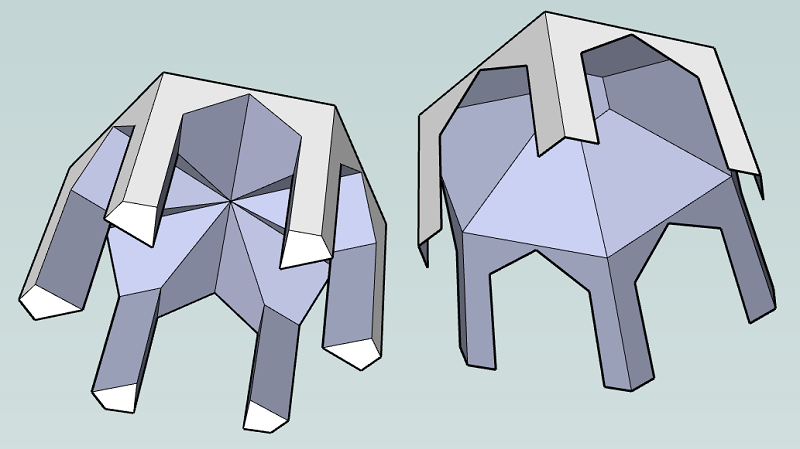
实体模型:裁剪后,保留了裁剪物体的部分表面,与被裁剪物体结合在一起
壳状模型:裁剪后,将裁剪物体完全删除掉了
Intersecting with Groups and Components, Without Exploding
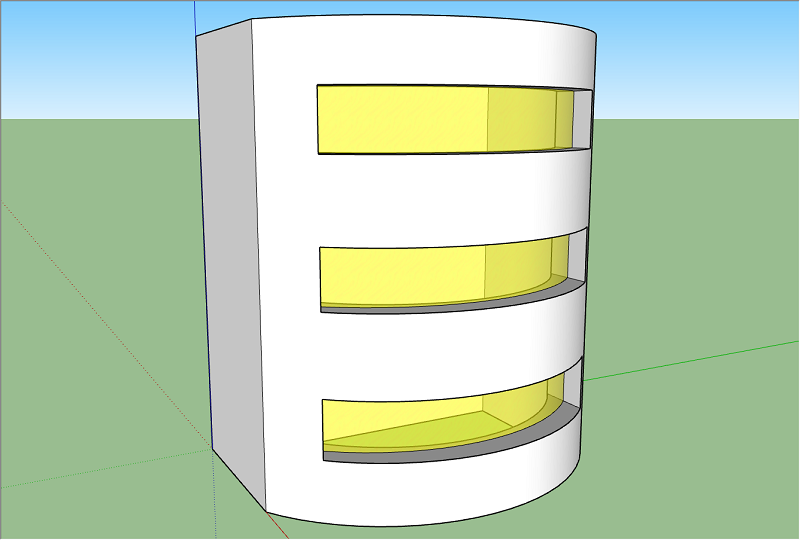
上图是 Building with Glass Windows,Building 处于 Exploded 状态(既不是 Group,也不是 Component),Glass Window 是组件(Component)
在 Building 上生成 Intersection edges:选中 Building 所有几何元素 -> 右键菜单 -> Intersect Faces -> with Model
在 Glass Window 上生成 Intersection edges:选中并编辑 Glass Window 组件 -> 选中 Glass Window 所有几何元素 -> 右键菜单 -> Intersect Faces -> with Model
Intersecting with Both Intact and Exploded Components
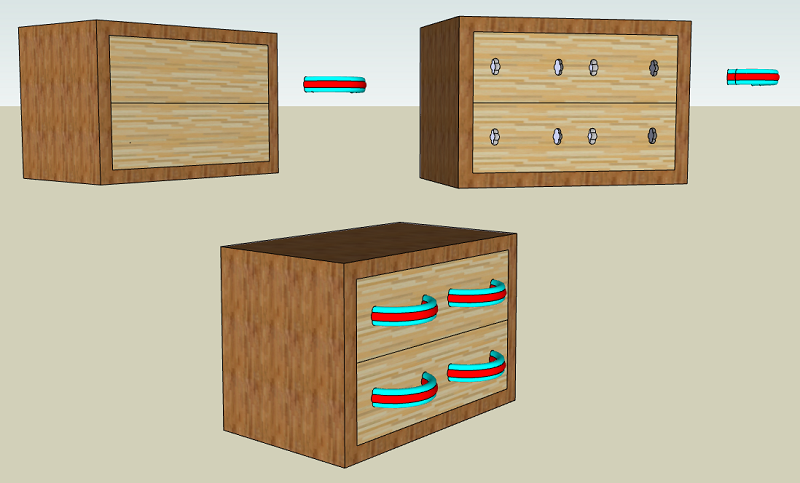
这个例子是说,有一个双层抽屉,抽屉上有4个把手,把手创建为组件,先用把手作为裁剪物体去裁剪抽屉正面,在抽屉正面钻出用于安装把手的小洞。
同时把手组件上保留有 Intersection edges,最后将把手组件放回抽屉正面。
Intersecting Only Selected Objects
这个容易理解,仅在选中的物体上生成 intersection edges。
这里有一个快速选择几何元素的技巧,根据材质选择:
a) 先选择一个面
b) 右键菜单 -> Select -> All with same Material
Intersecting Within a Group or Component
Intersect Faces -> with Context
当你需要在一个组或组件内部产生 intersection edges ,并且不受模型其余部分的影响时,请使用 Intersect Faces with Context
Using Intersect to Trim Components with Themselves
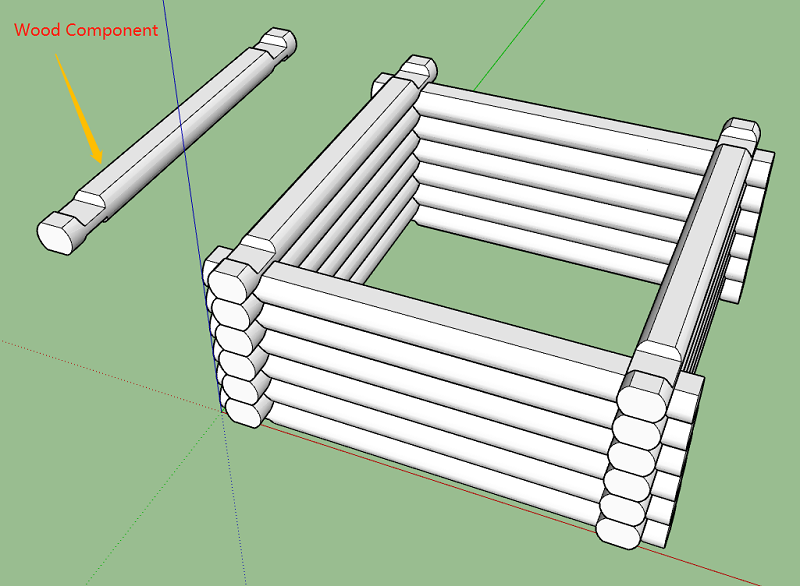
组件与组件之间相交,用圆木堆砌小围栏,见下图效果。
Google SketchUp Cookbook: (Chapter 3) Intersection Edges: Cutting and Trimming的更多相关文章
- Google SketchUp Cookbook: (Chapter 5) Roofs: Constraints and Inferences
软件环境 SketchUp Pro 2018 参考书籍 Google SketchUp Cookbook Creating an Overhanging Roof 屋顶上有一个缝隙需要填充,有两种方法 ...
- Google SketchUp Cookbook: (Chapter 4) Advanced Intersect and Follow Me Techniques
软件环境 SketchUp Pro 2018 参考书籍 Google SketchUp Cookbook Intersect 工具经常与 Follow Me 工具一起使用,以创建复杂的 3D 物体. ...
- Google SketchUp Cookbook: (Chapter 2) Following Paths with Follow Me
软件环境 SketchUp Pro 2018 参考书籍 Google SketchUp Cookbook Follow Me工具 Follow Me工具,将2D图形沿着一条路径挤出生成3D物体. 使用 ...
- Google SketchUp Cookbook: (Chapter 1) Making Multiple Copies
软件环境 SketchUp Pro 2018 参考书籍 Google SketchUp Cookbook http://shop.oreilly.com/product/9780596155100.d ...
- How to export a model from SolidWorks to Google SketchUp
How to export a model from SolidWorks to Google SketchUp While Google SketchUp is not a professional ...
- [转载] google mock cookbook
原文: https://code.google.com/p/googlemock/wiki/CookBook Creating Mock Classes Mocking Private or Prot ...
- (转) [it-ebooks]电子书列表
[it-ebooks]电子书列表 [2014]: Learning Objective-C by Developing iPhone Games || Leverage Xcode and Obj ...
- Sketchup+ArcGIS三维建模与管理
一.软件安装及其说明 1.需要安装的软件及其安装: 这份报告主要涉及到的有三个需要安装的软件ArcGIS9.3(或9.2) .Sketchup6.0和SketchUp6 ESRI 插件. ArcGIS ...
- 谷歌 google
google Google是搜索引擎名,也是一家美国上市公司名称.Google公司于1998年9月7日以私有股份公司的形式创立,以设计并管理一个互联网的搜索引擎.Google公司的总部称作“Googl ...
随机推荐
- 【等价转换】—— min/max 的转换与互相转换
0. min 与 max 的转换 {max(X,Y)=X+Y−min(X,Y)min(X,Y)=X+Y−max(X,Y)min(X,Y)+max(X,Y)=X+Y" role="p ...
- python学习1---列表、矩阵、数组
1.列表与数组区别 numpy数组的所有元素类型是相同的,而列表的元素类型是任意的. 2.numpy数组与矩阵区别 矩阵必须是二维的,数组可以是多维的,matrix是array的一个分支. matri ...
- Python全栈之路----常用模块----shutil模块
高级的 文件.文件包.压缩包 处理模块 参考Python之路[第四篇]:模块 #src是原文件名,fdst是新文件名 shutil.copyfileobj(fsrc, fdst[, len ...
- 阿里云 oss 图片上传解决方案 vue (web直传)
我们通过aliyun-oss-web这个npm去解决 该文章主要介绍如何获取 imgSignature 和 imgPolicy 这两个参数 首先下载 web直传的案例 : http://files.c ...
- window.location各属性的值
window.location各属性的值 window.location.href "https://i.cnblogs.com/EditPosts.aspx?opt= ...
- yaf twig配置
1.安装 TWIG composer require twig/twig2.COMPOSER自动加载的引用修改 BOOTSTRAP.PHP 增加 public function _initAutolo ...
- Linux下tomcat运行时jvm内存分配
tomcat运行时jvm内存分配 ⑴开发环境下在myeclipse中配置-Xms256m -Xmx512m -XX:NewSize=64m -XX:MaxNewSize=128m -XX:PermSi ...
- SQL语句删除和添加外键、主键的方法
--删除外键 语法:alter table 表名 drop constraint 外键约束名 如: alter table Stu_PkFk_Sc drop constraint FK_s alter ...
- RESTful Levels & HATEOAS
什么是RESTful REST这个词,是Roy Thomas Fielding在他2000年的博士论文中提出的.翻译过来就是"表现层状态转化.” REST是一种软件架构风格.设计风格,而不是 ...
- [C]奇数求和
/* 用递归算法实现,输入整数n(n>0), 求1+3+5+7….+(2*n-1) 的和 */ #include<stdio.h> int add(int n); int main( ...