
Google SketchUp Cookbook: (Chapter 2) Following Paths with Follow Me
软件环境
SketchUp Pro 2018
参考书籍
Google SketchUp Cookbook
Follow Me工具
Follow Me工具,将2D图形沿着一条路径挤出生成3D物体。
使用Follow Me工具,需要确定:
a) Follow Me Path
b) Follow Me Face
Extruding a Follow Me Face to Cut Volume Along a Path
沿一条路径切割物体

Using Follow Me to Add Volume Along a Path
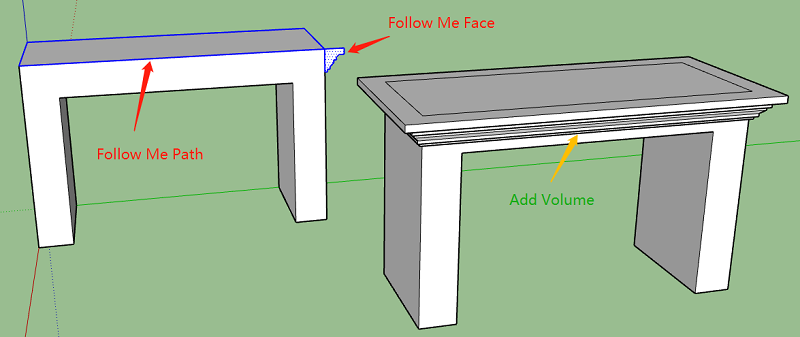
Keeping Original Objects Intact During Follow Me
问题:使用Follow Me工具时,如何保持原物体不被修改。
方法:将Follow Me Face创建为 Group 或 Compoent
使用细节上注意:
a) 先选中 Follow Me Path,再激活 Follow Me 工具
b) 在Follow Me Face组上面右键选择 Edit Group
c) 最后单击 Follow Me Face
Creating Objects in the Round
创建圆形的物体,使用圆作为 Follow Me Path。
将圆形路径放在Follow Me Face下方一点点,以免与最终生成的物体相交。
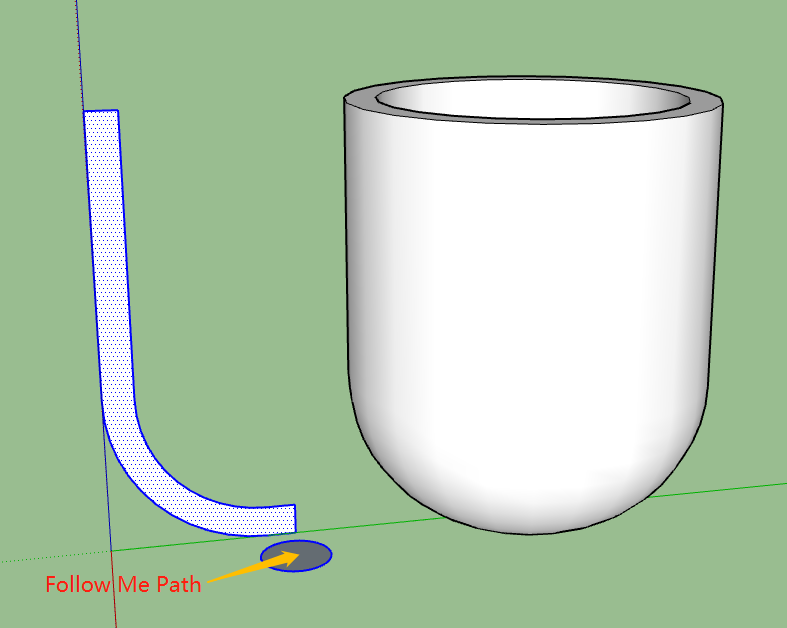
Creating Spheres
创建圆形路径与圆形2D图形,两个圆形相互垂直,圆心重合。
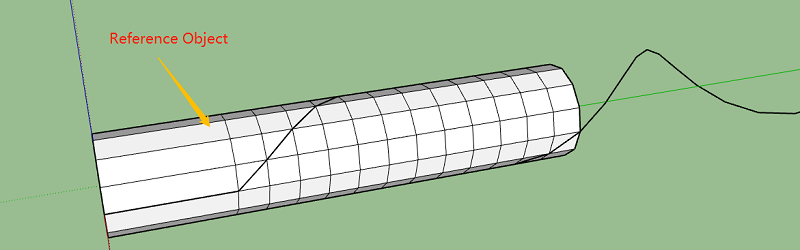
Using a Follow Me Path in 3D
这里的关键点,在于如何创建 3D Path,有一种方法是先创建参考3D物体,并且将参考物体创建为组,然后根据参考物体绘制出 3D Path。
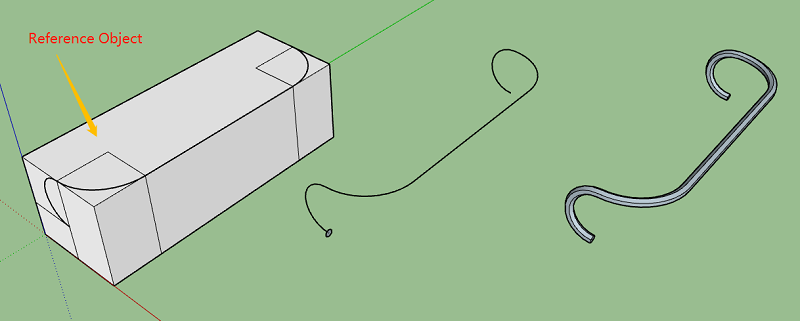
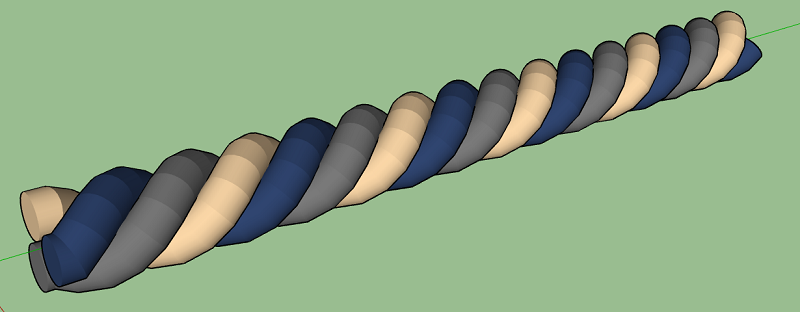
创建一条绳子
Google SketchUp Cookbook: (Chapter 2) Following Paths with Follow Me的更多相关文章
- Google SketchUp Cookbook: (Chapter 4) Advanced Intersect and Follow Me Techniques
软件环境 SketchUp Pro 2018 参考书籍 Google SketchUp Cookbook Intersect 工具经常与 Follow Me 工具一起使用,以创建复杂的 3D 物体. ...
- Google SketchUp Cookbook: (Chapter 5) Roofs: Constraints and Inferences
软件环境 SketchUp Pro 2018 参考书籍 Google SketchUp Cookbook Creating an Overhanging Roof 屋顶上有一个缝隙需要填充,有两种方法 ...
- Google SketchUp Cookbook: (Chapter 3) Intersection Edges: Cutting and Trimming
软件环境 SketchUp Pro 2018 参考书籍 Google SketchUp Cookbook Trimming an Object 使用 Intersect with Model 裁剪物体 ...
- Google SketchUp Cookbook: (Chapter 1) Making Multiple Copies
软件环境 SketchUp Pro 2018 参考书籍 Google SketchUp Cookbook http://shop.oreilly.com/product/9780596155100.d ...
- How to export a model from SolidWorks to Google SketchUp
How to export a model from SolidWorks to Google SketchUp While Google SketchUp is not a professional ...
- [转载] google mock cookbook
原文: https://code.google.com/p/googlemock/wiki/CookBook Creating Mock Classes Mocking Private or Prot ...
- (转) [it-ebooks]电子书列表
[it-ebooks]电子书列表 [2014]: Learning Objective-C by Developing iPhone Games || Leverage Xcode and Obj ...
- Sketchup+ArcGIS三维建模与管理
一.软件安装及其说明 1.需要安装的软件及其安装: 这份报告主要涉及到的有三个需要安装的软件ArcGIS9.3(或9.2) .Sketchup6.0和SketchUp6 ESRI 插件. ArcGIS ...
- 谷歌 google
google Google是搜索引擎名,也是一家美国上市公司名称.Google公司于1998年9月7日以私有股份公司的形式创立,以设计并管理一个互联网的搜索引擎.Google公司的总部称作“Googl ...
随机推荐
- java如何快速创建List
几个快速添加list的方法 1. 使用Collections.addAll()方法,前提还是需要手动 new ArrayList ArrayList<String> s = new Arr ...
- Kubernetes移除node节点
1.kubectl delete node {{节点名称}} 2.删除node节点上由kubelet自动生成的kubelet.kubeconfig配置文件,和ssl密钥证书kubelet.key,ku ...
- 关于下拉列表HtmlDownlistFor的使用
1.定义下拉列表需要的数据 public static List<SelectListItem> GetProList() { List<SelectListItem> i ...
- AutomaticReferenceCounting.html#runtime-support
https://clang.llvm.org/docs/AutomaticReferenceCounting.html#runtime-support Runtime support This sec ...
- 线性求第k大
快排变种. 快排每次只进行部分排序,进入左边或者右边或者当前mid就是答案. 据说期望值是O(n) 然后STL中的 nth_element也是用这个思想. #include <cstdio> ...
- mysql 外键和子查询,视图
1.mysql 外键约束 建表时生成外键 foreing key ('sid') references' student'('id'); 建表后添加外键 alter table' course ...
- go接口
// 接口例子package main import "fmt" type Human struct { Name string Age int Sex string Phone ...
- 日常遇错之Unable to save settings: Failed to save settings. Please restart PyCharm
将工程的.ideas目录删掉,重启pycharm即可.
- spring AOP知识点总结以及日志的输出
AOP的作用就是在基于OCP在不改变原有系统核心业务代码的基础上动态添加一些扩展功能.通常应用于日志的处理,事务处理,权限处理,缓存处理等等 首先,使用AOP需要添加的依赖有:spring-conte ...
- Codeforces 1105B:Zuhair and Strings(字符串水题)
time limit per test: 1 second memory limit per test: 256 megabytes input: standard input output: sta ...