
MEF简单示例
原文地址: http://www.cnblogs.com/xiaokang088/archive/2012/02/21/2361631.html
MEF 的精髓在于插件式开发,方便扩展。
例如,应用程序的日志输出到文本,后来想改为输出到数据库,按照传统的办法,需要替换项目,删除原有的引用,增加新的引用;如果使用MEF,直接用新的dll替换原来的dll,即可搞定,这就是MEF的魅力。
下面就用简单的例子来实现上述的需求。
1. 建立一个解决方案,然后增加如下的几个项目
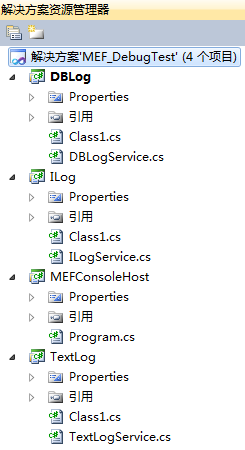
DBlog 输出日志到数据库的实现
TextLog 输出日志到文本的实现
ILog 输出日志的接口,调用方和实现者的中间桥梁
MEFConsoleHost 控制台应用程序,模拟实用场合
MEFWPFHost WPF 应用程序,模拟实用场合
2. 先定义接口ILog,非常简单,就一个方法

using System;

using System.Collections.Generic;

using System.Linq;

using System.Text;

namespace ILog

{

    public interface ILogService

    {

        void Log(string content);

    }

}
3. 输出到文本的实现TextLog

首先添加引用:引用刚才添加的接口Ilog 和System.ComponentModel.Composition
然后增加类TextLogService.cs,继承接口,并实现方法。
注意 类和方法都Public。
最后定义导出[Export(typeof(ILog.ILogService))]
这个是最主要的,和普通的类库区别也在这里
using System;

using System.Collections.Generic;

using System.Linq;

using System.Text;

using System.Diagnostics;

using System.ComponentModel.Composition;

namespace TextLog

{

    [Export(typeof(ILog.ILogService))]

    public class TextLogService : ILog.ILogService

    {

        public void Log(string content)

        {

            Console.WriteLine("TextLog:" + content);

            System.Diagnostics.TextWriterTraceListener TraceListener = new System.Diagnostics.TextWriterTraceListener(@"d:/debug.txt");

            System.Diagnostics.Debug.Listeners.Add(TraceListener);

            System.Diagnostics.Debug.Write(System.DateTime.Now.ToString()+"   ");

            Debug.Write("TextLog:" + content);

            Debug.WriteLine("~~");

            TraceListener.Flush();

        }

    }

}
4. 输出到数据库的实现DBLog,实现方法同上例,输出日志的时候区分一下。
using System;

using System.Collections.Generic;

using System.Linq;

using System.Text;

using System.Diagnostics;

using System.ComponentModel.Composition;

namespace DBLog

{

    [Export(typeof(ILog.ILogService))]

    public class DBLogService: ILog.ILogService

    {

        public void Log(string content)

        {

            Console.WriteLine("DBLog:" + content);

            System.Diagnostics.TextWriterTraceListener TraceListener = new System.Diagnostics.TextWriterTraceListener(@"d:/debug.txt");

            System.Diagnostics.Debug.Listeners.Add(TraceListener);

            System.Diagnostics.Debug.Write(System.DateTime.Now.ToString()+"   ");

            Debug.Write("DBLog:" + content);

            Debug.WriteLine("");

            TraceListener.Flush();

        }

    }

}
5. 调用方MEFConsoleHost, 这个也需要增加两个引用,
ILog 和System.ComponentModel.Composition
主程序代码如下:
using System;

using System.Collections.Generic;

using System.Linq;

using System.Text;

using System.ComponentModel.Composition;

using System.ComponentModel.Composition.Hosting;

namespace MEFConsoleHost

{

    class Program

    {

        [Import(typeof(ILog.ILogService))]

        public ILog.ILogService CurrentLogService { get; set; }

        static void Main(string[] args)

        {

            Program pro = new Program();

            pro.run();

        }

        private void run()

        {

            //var catalog = new DirectoryCatalog(AppDomain.CurrentDomain.BaseDirectory,"DbLog.dll");

            var catalog = new DirectoryCatalog(AppDomain.CurrentDomain.BaseDirectory, "TextLog.dll");

            var container = new CompositionContainer(catalog);

            container.ComposeParts(this);

            CurrentLogService.Log("*MEF Log Test Pass*");

            Console.Read();

        }

    }

}
注意两个地方
a. 导入声明
[Import(typeof(ILogService))]
public ILogService CurrentLogService { get; set; }
用接口来定义实例,然后增加导入声明,和导出的相互对应
b. 建立Catalog和Container
var catalog = new DirectoryCatalog(AppDomain.CurrentDomain.BaseDirectory, "TextLog.dll");
var container = new CompositionContainer(catalog);
container.ComposeParts(this);
6. 把所有项目的输出都指定到同一个目录,也就说让dll和exe在同一目录,运行控制台程序,输出
TextLog: MEF Log Test Pass
7.如果我们要输出到数据库,把上面的catalog那一句改成
var catalog = new DirectoryCatalog(AppDomain.CurrentDomain.BaseDirectory,"DBLog.dll");
如果不想这么麻烦,这个目录里面只放DBLog.dll 或者TextLog.dll ,然后把上面那句改为:
var catalog = new DirectoryCatalog(AppDomain.CurrentDomain.BaseDirectory);
照样可以用。
如果两个都在,还这么搞,那不行的,因为就定义了一个实例,同目录有两个dll。
MEF简单示例的更多相关文章
- Linux下的C Socket编程 -- server端的简单示例
Linux下的C Socket编程(三) server端的简单示例 经过前面的client端的学习,我们已经知道了如何创建socket,所以接下来就是去绑定他到具体的一个端口上面去. 绑定socket ...
- C# 构建XML(简单示例)
C# 构建XML的简单示例: var pars = new Dictionary<string, string> { {"url","https://www. ...
- 根据juery CSS点击一个标签弹出一个遮罩层的简单示例
<!DOCTYPE html> <html xmlns="http://www.w3.org/1999/xhtml"> <head> <m ...
- ACEXML解析XML文件——简单示例程序
掌握了ACMXML库解析XML文件的方法后,下面来实现一个比较完整的程序. 定义基本结构 xml文件格式如下 <?xml version="1.0"?> <roo ...
- demo工程的清单文件及activity中api代码简单示例
第一步注册一个账户,并创建一个应用.获取app ID与 app Key. 第二步下载sdk 第三步新建工程,修改清单文件,导入相关的sdk文件及调用相应的api搞定. 3.1 修改清单文件,主要是加入 ...
- spring-servlet.xml简单示例
spring-servlet.xml简单示例 某个项目中的spring-servlet.xml 记下来以后研究用 <!-- springMVC简单配置 --> <?xml versi ...
- SignalR 简单示例
一.什么是 SignalR ASP.NET SignalR is a library for ASP.NET developers that simplifies the process of add ...
- Web API 简单示例
一.RESTful和Web API Representational State Transfer (REST) is a software architecture style consisting ...
- XML引入多scheme文件约束简单示例
XML引入多scheme文件约束简单示例,用company.xsd和department.xsd来约束company.xml: company.xsd <?xml version="1 ...
随机推荐
- HDU 5944 暴力
Fxx and string Time Limit: 2000/1000 MS (Java/Others) Memory Limit: 131072/65536 K (Java/Others)T ...
- Mysql 下 Insert、Update、Delete、Order By、Group By注入
Insert: 语法:INSERT INTO table_name (列1, 列2,...) VALUES (值1, 值2,....) 报错注入: insert into test(id,name,p ...
- Spring MVC 通过@Value注解读取.properties配置内容
第一步:在applicationContext.xml配置: <bean id="configProperties" class="org.springframew ...
- C专家编程学习 1
1.C语言的基本数据类型直接与底层硬件相对应. 2#define 是可能出现问题 1 2 3 4 5 #define a(y) a_ex(y) a(x)被扩展为 a_ex(x) #define a ...
- php使用redis存储
一.Redis扩展模块 # wget https://codeload.github.com/phpredis/phpredis/zip/develop -O phpredis.zip # unzip ...
- knockoutjs foreach array绑定 表格 下拉框绑定
转载http://desert3.iteye.com/blog/1480471 knockoutjs foreach array绑定 表格 下拉框绑定 博客分类: Javascript 动态表格使 ...
- 【转】iOS静态库 【.a 和framework】【超详细】
原文网址:https://my.oschina.net/kaqijiang/blog/649632 一.什么是库? 库是共享程序代码的方式. 库从本质上来说是一种可执行代码的二进制格式,可以被载入内存 ...
- (转)The 9 Deep Learning Papers You Need To Know About (Understanding CNNs Part 3)
Adit Deshpande CS Undergrad at UCLA ('19) Blog About The 9 Deep Learning Papers You Need To Know Abo ...
- 论文笔记之:Multiple Object Recognition With Visual Attention
Multiple Object Recognition With Visual Attention Google DeepMind ICRL 2015 本文提出了一种基于 attention 的用 ...
- lucene 索引流程整理笔记
索引的原文档(Document). 为了方便说明索引创建过程,这里特意用两个文件为例: 文件一:Students should be allowed to go out with their frie ...