
MEF简单示例
原文地址: http://www.cnblogs.com/xiaokang088/archive/2012/02/21/2361631.html
MEF 的精髓在于插件式开发,方便扩展。
例如,应用程序的日志输出到文本,后来想改为输出到数据库,按照传统的办法,需要替换项目,删除原有的引用,增加新的引用;如果使用MEF,直接用新的dll替换原来的dll,即可搞定,这就是MEF的魅力。
下面就用简单的例子来实现上述的需求。
1. 建立一个解决方案,然后增加如下的几个项目
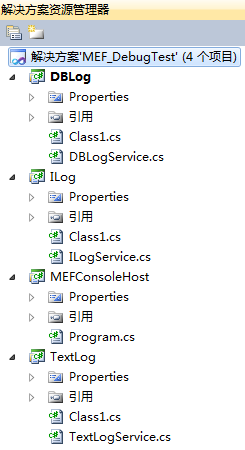
DBlog 输出日志到数据库的实现
TextLog 输出日志到文本的实现
ILog 输出日志的接口,调用方和实现者的中间桥梁
MEFConsoleHost 控制台应用程序,模拟实用场合
MEFWPFHost WPF 应用程序,模拟实用场合
2. 先定义接口ILog,非常简单,就一个方法

using System;

using System.Collections.Generic;

using System.Linq;

using System.Text;

namespace ILog

{

    public interface ILogService

    {

        void Log(string content);

    }

}
3. 输出到文本的实现TextLog

首先添加引用:引用刚才添加的接口Ilog 和System.ComponentModel.Composition
然后增加类TextLogService.cs,继承接口,并实现方法。
注意 类和方法都Public。
最后定义导出[Export(typeof(ILog.ILogService))]
这个是最主要的,和普通的类库区别也在这里
using System;

using System.Collections.Generic;

using System.Linq;

using System.Text;

using System.Diagnostics;

using System.ComponentModel.Composition;

namespace TextLog

{

    [Export(typeof(ILog.ILogService))]

    public class TextLogService : ILog.ILogService

    {

        public void Log(string content)

        {

            Console.WriteLine("TextLog:" + content);

            System.Diagnostics.TextWriterTraceListener TraceListener = new System.Diagnostics.TextWriterTraceListener(@"d:/debug.txt");

            System.Diagnostics.Debug.Listeners.Add(TraceListener);

            System.Diagnostics.Debug.Write(System.DateTime.Now.ToString()+"   ");

            Debug.Write("TextLog:" + content);

            Debug.WriteLine("~~");

            TraceListener.Flush();

        }

    }

}
4. 输出到数据库的实现DBLog,实现方法同上例,输出日志的时候区分一下。
using System;

using System.Collections.Generic;

using System.Linq;

using System.Text;

using System.Diagnostics;

using System.ComponentModel.Composition;

namespace DBLog

{

    [Export(typeof(ILog.ILogService))]

    public class DBLogService: ILog.ILogService

    {

        public void Log(string content)

        {

            Console.WriteLine("DBLog:" + content);

            System.Diagnostics.TextWriterTraceListener TraceListener = new System.Diagnostics.TextWriterTraceListener(@"d:/debug.txt");

            System.Diagnostics.Debug.Listeners.Add(TraceListener);

            System.Diagnostics.Debug.Write(System.DateTime.Now.ToString()+"   ");

            Debug.Write("DBLog:" + content);

            Debug.WriteLine("");

            TraceListener.Flush();

        }

    }

}
5. 调用方MEFConsoleHost, 这个也需要增加两个引用,
ILog 和System.ComponentModel.Composition
主程序代码如下:
using System;

using System.Collections.Generic;

using System.Linq;

using System.Text;

using System.ComponentModel.Composition;

using System.ComponentModel.Composition.Hosting;

namespace MEFConsoleHost

{

    class Program

    {

        [Import(typeof(ILog.ILogService))]

        public ILog.ILogService CurrentLogService { get; set; }

        static void Main(string[] args)

        {

            Program pro = new Program();

            pro.run();

        }

        private void run()

        {

            //var catalog = new DirectoryCatalog(AppDomain.CurrentDomain.BaseDirectory,"DbLog.dll");

            var catalog = new DirectoryCatalog(AppDomain.CurrentDomain.BaseDirectory, "TextLog.dll");

            var container = new CompositionContainer(catalog);

            container.ComposeParts(this);

            CurrentLogService.Log("*MEF Log Test Pass*");

            Console.Read();

        }

    }

}
注意两个地方
a. 导入声明
[Import(typeof(ILogService))]
public ILogService CurrentLogService { get; set; }
用接口来定义实例,然后增加导入声明,和导出的相互对应
b. 建立Catalog和Container
var catalog = new DirectoryCatalog(AppDomain.CurrentDomain.BaseDirectory, "TextLog.dll");
var container = new CompositionContainer(catalog);
container.ComposeParts(this);
6. 把所有项目的输出都指定到同一个目录,也就说让dll和exe在同一目录,运行控制台程序,输出
TextLog: MEF Log Test Pass
7.如果我们要输出到数据库,把上面的catalog那一句改成
var catalog = new DirectoryCatalog(AppDomain.CurrentDomain.BaseDirectory,"DBLog.dll");
如果不想这么麻烦,这个目录里面只放DBLog.dll 或者TextLog.dll ,然后把上面那句改为:
var catalog = new DirectoryCatalog(AppDomain.CurrentDomain.BaseDirectory);
照样可以用。
如果两个都在,还这么搞,那不行的,因为就定义了一个实例,同目录有两个dll。
MEF简单示例的更多相关文章
- Linux下的C Socket编程 -- server端的简单示例
Linux下的C Socket编程(三) server端的简单示例 经过前面的client端的学习,我们已经知道了如何创建socket,所以接下来就是去绑定他到具体的一个端口上面去. 绑定socket ...
- C# 构建XML(简单示例)
C# 构建XML的简单示例: var pars = new Dictionary<string, string> { {"url","https://www. ...
- 根据juery CSS点击一个标签弹出一个遮罩层的简单示例
<!DOCTYPE html> <html xmlns="http://www.w3.org/1999/xhtml"> <head> <m ...
- ACEXML解析XML文件——简单示例程序
掌握了ACMXML库解析XML文件的方法后,下面来实现一个比较完整的程序. 定义基本结构 xml文件格式如下 <?xml version="1.0"?> <roo ...
- demo工程的清单文件及activity中api代码简单示例
第一步注册一个账户,并创建一个应用.获取app ID与 app Key. 第二步下载sdk 第三步新建工程,修改清单文件,导入相关的sdk文件及调用相应的api搞定. 3.1 修改清单文件,主要是加入 ...
- spring-servlet.xml简单示例
spring-servlet.xml简单示例 某个项目中的spring-servlet.xml 记下来以后研究用 <!-- springMVC简单配置 --> <?xml versi ...
- SignalR 简单示例
一.什么是 SignalR ASP.NET SignalR is a library for ASP.NET developers that simplifies the process of add ...
- Web API 简单示例
一.RESTful和Web API Representational State Transfer (REST) is a software architecture style consisting ...
- XML引入多scheme文件约束简单示例
XML引入多scheme文件约束简单示例,用company.xsd和department.xsd来约束company.xml: company.xsd <?xml version="1 ...
随机推荐
- 增加mvc:resources后访问不了注解配置的controller的问题
刚开始没有配置mvc:resourcescontroller能够正确访问,但是由于web.xml使用/拦截了所有的请求,所以静态资源访问不上增加mvc:resources之后,静态资源是能访问上了,但 ...
- SQL Server用户自定义函数
用户自定义函数不能用于执行一系列改变数据库状态的操作,但它可以像系统 函数一样在查询或存储过程等的程序段中使用,也可以像存储过程一样通过EXECUTE 命令来执行.在 SQL Server 中根据函数 ...
- kinect在ros上的初步测试---17
摘要: 原创博客:转载请表明出处:http://www.cnblogs.com/zxouxuewei/ 1.在使用本贴前必须先按照我的上一个博文正确在ubuntu上安装kinect驱动:http:// ...
- Objective-c——UI基础开发第七天(自定义UITableView)
一.梗概: 1.自定义:headerView,footerVie,Cell等 2.双模型(遵循单一原则,类或模型实现的功能尽量单一) 3.计算文本的方法(针对不同文本内容而设置的宽高等) 4.设置fo ...
- Hive不支持非相等的join
由于 hive 与传统关系型数据库面对的业务场景及底层技术架构都有着很大差异,因此,传统数据库领域的一些技能放到 Hive 中可能已不再适用.关于 hive 的优化与原理.应用的文章,前面也陆陆续续的 ...
- php文件复制
<?php $dirname="shangchuan"; copydir($dirname."/uploads", $dirname."/hel ...
- 解决dede搜索页面只能显示10条信息解决方案
解决dede搜索页面只能显示10条信息解决方案,感觉显示的信息太少,这时就要想办法去解决一下.看看有什么好办法来解决一下这个问题. dede搜索页模板中,默认只能显示10条记录. 打开dede搜索页模 ...
- 【NOIP2012】国王游戏
这一次高精度完美地过辣好开心OvO,还get到了非常方便的高精度除小于10000的方法,这个是我自己脑出来的OvO 看来下午高精度傻逼得值qvq 原题: 恰逢 H 国国庆,国王邀请 n 位大臣来玩一个 ...
- 【转载】使用LFM(Latent factor model)隐语义模型进行Top-N推荐
最近在拜读项亮博士的<推荐系统实践>,系统的学习一下推荐系统的相关知识.今天学习了其中的隐语义模型在Top-N推荐中的应用,在此做一个总结. 隐语义模型LFM和LSI,LDA,Topic ...
- python程序的调试方法
[转自:http://blog.csdn.net/luckeryin/article/details/4477233] 本文讨论在没有方便的IDE工具可用的情况下,使用pdb调试python程序 ...