
android学习笔记15——Galley
Gallery==>画廊视图
Gallery和Spinnery父类相同——AbsSpinner,表明Garrey和Spinner都是一个列表框。
两者之间的区别是:Spinner显示的是一个垂直列表框,Gallery显示的是一个水平列表框;
Spinner的作用是供用户选择,而Gallery则允许用户通过拖动来查看上一个、下一个列表项。
Garrey常用XML属性:
| android:animationDuration | setAnimationDuration(int) | 设置列表项切换时的动画帧持续时间 |
| android:gravity | setGravity(int) | 设置对其方式 |
| android:spacing | setSpacing(int) | 设置Gallery内列表项之间的间距 |
| android: unselectedAlpha | setUnselectedAlpha(float) | 设置没有选中的列表项的透明度 |
注意:
Gallery用法类似Spinner,使用Adapter提供数据源,Adapter的getView()所返回的View将作为Gallery列表的列表项;
通过OnItemSelectedListener监听器监听选择项的改变。
实例一
布局文件==》

<LinearLayout xmlns:android="http://schemas.android.com/apk/res/android"

    xmlns:tools="http://schemas.android.com/tools"

    android:orientation="vertical"

    android:layout_width="match_parent"

    android:layout_height="match_parent"

    tools:context=".MainActivity" >

    <ImageSwitcher

        android:id="@+id/switcher"

        android:layout_width="320dp"

        android:layout_height="320dp" />

    <Gallery

        android:id="@+id/gallery"

        android:layout_width="match_parent"

        android:layout_height="wrap_content"

        android:spacing="3pt"

        android:unselectedAlpha="0.6" />

</LinearLayout>

代码实现==》

package com.example.mygrallery;

import android.os.Bundle;

import android.annotation.SuppressLint;

import android.app.Activity;

import android.app.ActionBar.LayoutParams;

import android.content.res.TypedArray;

import android.view.Menu;

import android.view.View;

import android.view.ViewGroup;

import android.view.animation.AnimationUtils;

import android.widget.AdapterView;

import android.widget.AdapterView.OnItemSelectedListener;

import android.widget.BaseAdapter;

import android.widget.Gallery;

import android.widget.ImageSwitcher;

import android.widget.ImageView;

import android.widget.ViewSwitcher.ViewFactory;

@SuppressWarnings("deprecation")

@SuppressLint("InlinedApi")

public class MainActivity extends Activity

{

	private int[] ImageIds = new int[]

	{ R.drawable.one, R.drawable.tw, R.drawable.th, R.drawable.eight, R.drawable.ele,

			R.drawable.five, R.drawable.four, R.drawable.nice, R.drawable.seven, R.drawable.six,

			R.drawable.sl, R.drawable.ss, R.drawable.sw, R.drawable.ten, R.drawable.tw,

			R.drawable.oneowne };

	@Override

	protected void onCreate(Bundle savedInstanceState)

	{

		super.onCreate(savedInstanceState);

		setContentView(R.layout.activity_main);

		final ImageSwitcher switcher = (ImageSwitcher) this.findViewById(R.id.switcher);

		final Gallery gallery = (Gallery) this.findViewById(R.id.gallery);

		switcher.setFactory(new ViewFactory()

		{

			@Override

			public View makeView()

			{

				ImageView img = new ImageView(MainActivity.this);

				img.setBackgroundColor(0xff0000);

				img.setScaleType(ImageView.ScaleType.FIT_CENTER);

				img.setLayoutParams(new ImageSwitcher.LayoutParams(LayoutParams.WRAP_CONTENT,

						LayoutParams.WRAP_CONTENT));

				return img;

			}

		});

		// 设置图片更换的动画效果

		switcher.setInAnimation(AnimationUtils.loadAnimation(this, android.R.anim.fade_in));

		switcher.setOutAnimation(AnimationUtils.loadAnimation(this, android.R.anim.fade_out));

		// 创建DataAdapter对象,为gallery提供数据

		BaseAdapter adapter = new BaseAdapter()

		{

			@Override

			public int getCount()

			{

				// TODO Auto-generated method stub

				return ImageIds.length;

			}

			@Override

			public Object getItem(int position)

			{

				// TODO Auto-generated method stub

				return position;

			}

			@Override

			public long getItemId(int position)

			{

				// TODO Auto-generated method stub

				return position;

			}

			@Override

			public View getView(int position, View convertView, ViewGroup parent)

			{

				ImageView img = new ImageView(MainActivity.this);

				img.setImageResource(ImageIds[position % ImageIds.length]);

				// 设置ImageView的缩放类型

				img.setScaleType(ImageView.ScaleType.FIT_XY);

				img.setLayoutParams(new Gallery.LayoutParams(75, 110));

				// TypedArray arr= obtainStyledAttributes(R.)

				// img.setBackgroundResource(resid);

				return img;

			}

		};

		gallery.setAdapter(adapter);

		gallery.setOnItemSelectedListener(new OnItemSelectedListener()

		{

			@Override

			public void onItemSelected(AdapterView<?> parent, View view, int position, long id)

			{

				// TODO Auto-generated method stub

				switcher.setImageResource(ImageIds[position % ImageIds.length]);

			}

			@Override

			public void onNothingSelected(AdapterView<?> parent)

			{

				// TODO Auto-generated method stub

			}

		});

	}

	@Override

	public boolean onCreateOptionsMenu(Menu menu)

	{

		// Inflate the menu; this adds items to the action bar if it is present.

		getMenuInflater().inflate(R.menu.main, menu);

		return true;

	}

}
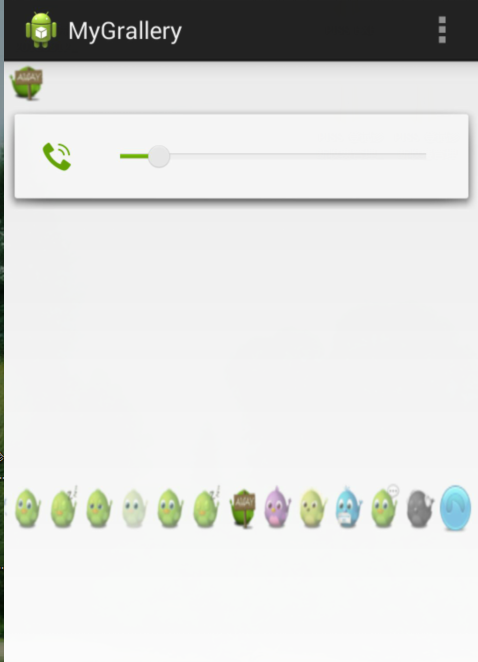
实现效果如下:
android学习笔记15——Galley的更多相关文章
- Android学习笔记之JSON数据解析
转载:Android学习笔记44:JSON数据解析 JSON(JavaScript Object Notation)是一种轻量级的数据交换格式,采用完全独立于语言的文本格式,为Web应用开发提供了一种 ...
- Android学习笔记进阶17之LinearGradient
具体的看一下博文:Android学习笔记进阶15之Shader渲染 package xiaosi.BitmapShader; import android.app.Activity; import a ...
- Android学习笔记进阶16之BitmapShader
<1>简介 具体的看一下博文:Android学习笔记进阶15之Shader渲染 public BitmapShader(Bitmap bitmap,Shader.TileMode ti ...
- Android学习笔记(一)
目录 Android学习笔记(一) 一.JDK.Android SDK 二.部分项目结构 三.字符串引用 四.外层build.gradle详解 五.app->build.gradle详解 六.日 ...
- Android 学习笔记之Volley(七)实现Json数据加载和解析...
学习内容: 1.使用Volley实现异步加载Json数据... Volley的第二大请求就是通过发送请求异步实现Json数据信息的加载,加载Json数据有两种方式,一种是通过获取Json对象,然后 ...
- Android学习笔记进阶之在图片上涂鸦(能清屏)
Android学习笔记进阶之在图片上涂鸦(能清屏) 2013-11-19 10:52 117人阅读 评论(0) 收藏 举报 HandWritingActivity.java package xiaos ...
- android学习笔记36——使用原始XML文件
XML文件 android中使用XML文件,需要开发者手动创建res/xml文件夹. 实例如下: book.xml==> <?xml version="1.0" enc ...
- Ext.Net学习笔记15:Ext.Net GridPanel 汇总(Summary)用法
Ext.Net学习笔记15:Ext.Net GridPanel 汇总(Summary)用法 Summary的用法和Group一样简单,分为两步: 启用Summary功能 在Feature标签内,添加如 ...
- udacity android 学习笔记: lesson 4 part b
udacity android 学习笔记: lesson 4 part b 作者:干货店打杂的 /titer1 /Archimedes 出处:https://code.csdn.net/titer1 ...
随机推荐
- Canvas俄罗斯方块
写在前面 潜水博客园多年,从未写过博客.最近才注册博客,遂将很久前写的俄罗斯方块分享出来.第一次写博客,不喜勿喷... 游戏说明 游戏操作:J向左,L向右,I旋转,K快速下降 游戏基于HTML can ...
- Android 客户端和服务器 json交互
http://www.cnblogs.com/jyan/articles/2544974.html 1.JSON(JavaScript Object Notation) 是一种轻量级的数据交换格式. ...
- JavaWeb学习记录(十五)——浏览器Cookie禁用后的处理
IE禁用Cookie方式:
- Codeforces Round #126 (Div. 2)
A. Cinema 假设当前要的位置为\((x, y)\),如果枚举答案的横坐标,那么每次找离\(y\)最近的纵坐标. 如果占用了位置\((x,y)\),需要要更新第\(x\)行的信息,而占用位置\( ...
- 2016 Hunan Province Programming Contest
2016 Hunan Province Programming Contest A. 2016 题意 \(1 \le a \le n, 1 \le b \le m\) ,其中\(1 \le n,m \ ...
- 【NOIP2010】引水入城
以前一直以为是什么高端DP,看了题解才发现是水题,老是这样看题解才能写出来到赛场上怎么办嘛QAQ 原题: 在一个遥远的国度,一侧是风景秀美的湖泊,另一侧则是漫无边际的沙漠.该国的行政区划十分特殊,刚好 ...
- Softmax回归(使用theano)
# coding:utf8 import numpy as np import cPickle import theano import os import theano.tensor as T cl ...
- 对OCR文字识别软件的扫描选项怎么设置
说到OCR文字识别软件,越来越多的人选择使用ABBYY FineReader识别和转换文档,然而并不是每个人都知道转换质量取决于源图像的质量和所选的扫描选项,今天就给大家普及一下这方面的知识. ABB ...
- MongoDB管理与开发精要 书摘
摘自:<MongoDB管理与开发精要> 性能优化 创建索引 限定返回结果条数 只查询使用到的字段,而不查询所有字段 采用capped collection 采用Server ...
- Excel 导入并导出结果集
1.controler代码: /// <summary> /// 导入预归类意见书 /// </summary> /// <param name="upload ...