
Dapr实战(二) 服务调用
服务调用是什么
在分布式应用程序中的服务之间进行调用会涉及到许多挑战。 例如:
- 维护其他服务的地址。
- 如何安全地调用服务。
- 在发生短暂的 暂时性错误 时如何处理重试。
- 分布式应用程序调用链路追踪。
服务调用构建块通过使用 Dapr 挎斗作为服务的 反向代理 来解决这些难题。
工作原理
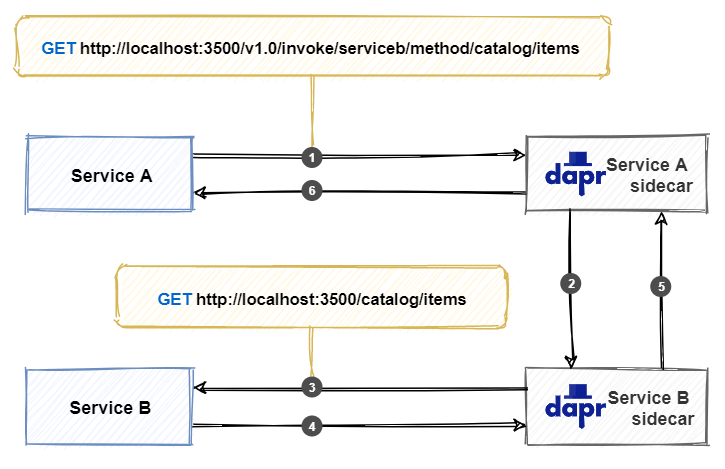
由于调用经过Sidecar,Dapr 可以注入一些有其他行为:
- 失败时自动重试调用。
- 通过相互 (mTLS) 身份验证(包括自动证书滚动更新),在服务之间进行调用。
- 使用访问控制策略控制客户端可以执行的操作。
- 捕获服务间所有调用的跟踪和指标,以提供分布式调用链路追踪与诊断。
任何应用程序都可以通过使用 Dapr 中内置的本机 Invoke API 来调用 Dapr Sidecar。 可以通过 HTTP 或 gRPC 调用 API。 使用以下 URL 调用 HTTP API:
http://localhost:<dapr-port>/v1.0/invoke/<application-id>/method/<method-name>
<dapr-port>Dapr 正在侦听的 HTTP 端口。<application-id>要调用的服务的应用程序 ID。<method-name>要在远程服务上调用的方法的名称。
项目演示
我们使用.NET5创建两个WebAPI项目:BackEnd和FrontEnd,通过FrontEnd调用BackEnd
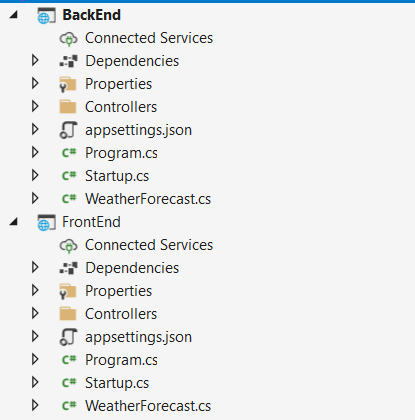
指定BackEnd默认启动端口5000
        public static IHostBuilder CreateHostBuilder(string[] args) =>

            Host.CreateDefaultBuilder(args)

                .ConfigureWebHostDefaults(webBuilder =>

                {

                    webBuilder.UseStartup<Startup>().UseUrls("http://*:5000");

                });
通过Dapr CLI启动BackEnd,指定sidecar端口为3511,默认为3500,指定app-port是5000,与BackEnd默认端口保持一致
dapr run --dapr-http-port 3511 --app-port 5000 --app-id backend dotnet .\BackEnd\bin\Debug\net5.0\BackEnd.dll
C:\demo\test\DaprBackEnd>dapr run --dapr-http-port 3511 --app-port 5000 --app-id backend dotnet  .\BackEnd\bin\Debug\net5.0\BackEnd.dll

Starting Dapr with id backend. HTTP Port: 3511. gRPC Port: 30204

time="2021-09-23T14:14:08.3785429+08:00" level=info msg="starting Dapr Runtime -- version 1.4.0 -- commit ed969edc72b3934fffb481f079b736f3588e373a" app_id=backend instance=chesterchen-lap scope=dapr.runtime type=log ver=1.4.0

time="2021-09-23T14:14:08.3831089+08:00" level=info msg="log level set to: info" app_id=backend instance=chesterchen-lap scope=dapr.runtime type=log ver=1.4.0

time="2021-09-23T14:14:08.3831089+08:00" level=info msg="metrics server started on :30205/" app_id=backend instance=chesterchen-lap scope=dapr.metrics type=log ver=1.4.0

time="2021-09-23T14:14:08.3861203+08:00" level=info msg="standalone mode configured" app_id=backend instance=chesterchen-lap scope=dapr.runtime type=log ver=1.4.0

time="2021-09-23T14:14:08.3861203+08:00" level=info msg="app id: backend" app_id=backend instance=chesterchen-lap scope=dapr.runtime type=log ver=1.4.0

time="2021-09-23T14:14:08.3871107+08:00" level=info msg="mTLS is disabled. Skipping certificate request and tls validation" app_id=backend instance=chesterchen-lap scope=dapr.runtime type=log ver=1.4.0

time="2021-09-23T14:14:08.4115681+08:00" level=info msg="local service entry announced: backend -> 10.32.193.9:30209" app_id=backend instance=chesterchen-lap scope=dapr.contrib type=log ver=1.4.0

time="2021-09-23T14:14:08.4115681+08:00" level=info msg="Initialized name resolution to mdns" app_id=backend instance=chesterchen-lap scope=dapr.runtime type=log ver=1.4.0

time="2021-09-23T14:14:08.4127024+08:00" level=info msg="loading components" app_id=backend instance=chesterchen-lap scope=dapr.runtime type=log ver=1.4.0

time="2021-09-23T14:14:08.4160224+08:00" level=info msg="component loaded. name: pubsub, type: pubsub.redis/v1" app_id=backend instance=chesterchen-lap scope=dapr.runtime type=log ver=1.4.0

time="2021-09-23T14:14:08.4160224+08:00" level=info msg="waiting for all outstanding components to be processed" app_id=backend instance=chesterchen-lap scope=dapr.runtime type=log ver=1.4.0

time="2021-09-23T14:14:08.4187042+08:00" level=info msg="component loaded. name: statestore, type: state.redis/v1" app_id=backend instance=chesterchen-lap scope=dapr.runtime type=log ver=1.4.0

time="2021-09-23T14:14:08.4187042+08:00" level=info msg="all outstanding components processed" app_id=backend instance=chesterchen-lap scope=dapr.runtime type=log ver=1.4.0

time="2021-09-23T14:14:08.4192486+08:00" level=info msg="enabled gRPC tracing middleware" app_id=backend instance=chesterchen-lap scope=dapr.runtime.grpc.api type=log ver=1.4.0

time="2021-09-23T14:14:08.4192486+08:00" level=info msg="enabled gRPC metrics middleware" app_id=backend instance=chesterchen-lap scope=dapr.runtime.grpc.api type=log ver=1.4.0

time="2021-09-23T14:14:08.4192486+08:00" level=info msg="API gRPC server is running on port 30204" app_id=backend instance=chesterchen-lap scope=dapr.runtime type=log ver=1.4.0

time="2021-09-23T14:14:08.4197888+08:00" level=info msg="enabled metrics http middleware" app_id=backend instance=chesterchen-lap scope=dapr.runtime.http type=log ver=1.4.0

time="2021-09-23T14:14:08.4197888+08:00" level=info msg="enabled tracing http middleware" app_id=backend instance=chesterchen-lap scope=dapr.runtime.http type=log ver=1.4.0

time="2021-09-23T14:14:08.4202954+08:00" level=info msg="http server is running on port 3511" app_id=backend instance=chesterchen-lap scope=dapr.runtime type=log ver=1.4.0

time="2021-09-23T14:14:08.420335+08:00" level=info msg="The request body size parameter is: 4" app_id=backend instance=chesterchen-lap scope=dapr.runtime type=log ver=1.4.0

time="2021-09-23T14:14:08.420335+08:00" level=info msg="enabled gRPC tracing middleware" app_id=backend instance=chesterchen-lap scope=dapr.runtime.grpc.internal type=log ver=1.4.0

time="2021-09-23T14:14:08.4225403+08:00" level=info msg="enabled gRPC metrics middleware" app_id=backend instance=chesterchen-lap scope=dapr.runtime.grpc.internal type=log ver=1.4.0

time="2021-09-23T14:14:08.4230868+08:00" level=info msg="internal gRPC server is running on port 30209" app_id=backend instance=chesterchen-lap scope=dapr.runtime type=log ver=1.4.0

time="2021-09-23T14:14:08.4230868+08:00" level=info msg="application protocol: http. waiting on port 5000.  This will block until the app is listening on that port." app_id=backend instance=chesterchen-lap scope=dapr.runtime type=log ver=1.4.0

== APP == info: Microsoft.Hosting.Lifetime[0]

== APP ==       Now listening on: http://[::]:5000

== APP == info: Microsoft.Hosting.Lifetime[0]

== APP ==       Application started. Press Ctrl+C to shut down.

== APP == info: Microsoft.Hosting.Lifetime[0]

== APP ==       Hosting environment: Production

== APP == info: Microsoft.Hosting.Lifetime[0]

== APP ==       Content root path: C:\demo\test\DaprBackEnd

time="2021-09-23T14:14:08.7252681+08:00" level=info msg="application discovered on port 5000" app_id=backend instance=chesterchen-lap scope=dapr.runtime type=log ver=1.4.0

== APP == info: Microsoft.AspNetCore.Hosting.Diagnostics[1]

== APP ==       Request starting HTTP/1.1 GET http://127.0.0.1:5000/dapr/config application/json -

== APP == info: Microsoft.AspNetCore.Hosting.Diagnostics[2]

== APP ==       Request finished HTTP/1.1 GET http://127.0.0.1:5000/dapr/config application/json - - 404 0 - 17.3850ms

time="2021-09-23T14:14:08.7693649+08:00" level=info msg="application configuration loaded" app_id=backend instance=chesterchen-lap scope=dapr.runtime type=log ver=1.4.0

time="2021-09-23T14:14:08.7699003+08:00" level=info msg="actor runtime started. actor idle timeout: 1h0m0s. actor scan interval: 30s" app_id=backend instance=chesterchen-lap scope=dapr.runtime.actor type=log ver=1.4.0

== APP == info: Microsoft.AspNetCore.Hosting.Diagnostics[1]

== APP ==       Request starting HTTP/1.1 GET http://127.0.0.1:5000/dapr/subscribe application/json -

== APP == info: Microsoft.AspNetCore.Hosting.Diagnostics[2]

time="2021-09-23T14:14:08.7736383+08:00" level=info msg="dapr initialized. Status: Running. Init Elapsed 387.518ms" app_id=backend instance=chesterchen-lap scope=dapr.runtime type=log ver=1.4.0

== APP ==       Request finished HTTP/1.1 GET http://127.0.0.1:5000/dapr/subscribe application/json - - 404 0 - 0.1789ms

time="2021-09-23T14:14:08.7888444+08:00" level=info msg="placement tables updated, version: 0" app_id=backend instance=chesterchen-lap scope=dapr.runtime.actor.internal.placement type=log ver=1.4.0

Updating metadata for app command: dotnet .\BackEnd\bin\Debug\net5.0\BackEnd.dll

You're up and running! Both Dapr and your app logs will appear here.
现在修改FrontEnd里Demo,指定启动端口5001
        public static IHostBuilder CreateHostBuilder(string[] args) =>

            Host.CreateDefaultBuilder(args)

                .ConfigureWebHostDefaults(webBuilder =>

                {

                    webBuilder.UseStartup<Startup>().UseUrls("http://*:5001");

                });
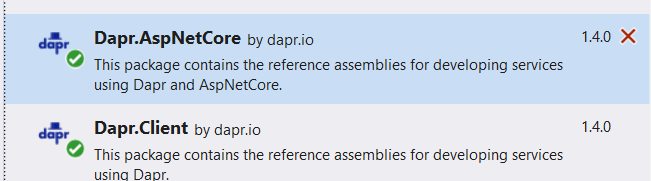
引入Nuget包 Dapr.Client,新建DaprController
1.使用 HttpClient调用HTTP服务
using Dapr.Client;

using Microsoft.AspNetCore.Mvc;

using Microsoft.Extensions.Logging;

using System.Collections.Generic;

using System.Net.Http;

using System.Threading.Tasks;

namespace FrontEnd.Controllers

{

    [ApiController]

    [Route("[controller]")]

    public class DaprController : ControllerBase

    {

        private readonly ILogger<DaprController> _logger;

        public DaprController(ILogger<DaprController> logger)

        {

            _logger = logger;

        }

        // 通过HttpClient调用BackEnd

        [HttpGet]

        public async Task<ActionResult> GetAsync()

        {

            using var httpClient = DaprClient.CreateInvokeHttpClient();

            var result = await httpClient.GetAsync("http://backend/WeatherForecast");

            var resultContent = string.Format("result is {0} {1}", result.StatusCode, await result.Content.ReadAsStringAsync());

            return Ok(resultContent);

        }

    }

}
GetAsync API中通过DaprClient.CreateInvokeHttpClient()新建了HttpClient,通过GetAsync方法调用了backend服务中的WeatherForecastAPI。
Sidecar使用可插接式名称解析组件来解析服务BackEnd的地址。在自承载模式下,Dapr 使用 mdn来查找它。 在 Kubernetes 模式下运行时,Kubernetes DNS 服务将确定地址。
2.使用 DaprClient调用HTTP服务
        // 通过DaprClient调用BackEnd

        [HttpGet("get2")]

        public async Task<ActionResult> Get2Async()

        {

            using var daprClient = new DaprClientBuilder().Build();

            var result = await daprClient.InvokeMethodAsync<IEnumerable<WeatherForecast>>(HttpMethod.Get, "backend", "WeatherForecast");

            return Ok(result);

        }
DaprController中新增API Get2Async
3.使用注入方式调用 DaprClient
首先引入Nuget包Dapr.AspNetCore,然后在Startup.cs注入Dapr
        public void ConfigureServices(IServiceCollection services)

        {

            services.AddControllers().AddDapr();

        }
新建DaprDIController
using Dapr.Client;

using Microsoft.AspNetCore.Mvc;

using Microsoft.Extensions.Logging;

using System.Collections.Generic;

using System.Net.Http;

using System.Threading.Tasks;

namespace FrontEnd.Controllers

{

    [Route("[controller]")]

    [ApiController]

    public class DaprDIController : ControllerBase

    {

        private readonly ILogger<DaprDIController> _logger;

        private readonly DaprClient _daprClient;

        public DaprDIController(ILogger<DaprDIController> logger, DaprClient daprClient)

        {

            _logger = logger;

            _daprClient = daprClient;

        }

        [HttpGet()]

        public async Task<ActionResult> GetAsync()

        {

            var result = await _daprClient.InvokeMethodAsync<IEnumerable<WeatherForecast>>(HttpMethod.Get, "backend", "WeatherForecast");

            return Ok(result);

        }

    }

}
以上代码通过注入方式注入DaprClient
4.使用DaprClient同样可以调用GRPC
await daprClient.InvokeMethodGrpcAsync<Order, OrderConfirmation>("orderservice", "submitOrder", order);
与HTTP调用方式一致,不再为GRPC新建server
通过Dapr CLI启动FrontEnd,指定sidecar端口为3501,默认为3500,指定app-port是5001,与FrontEnd默认端口保持一致
dapr run --dapr-http-port 3501 --app-port 5001 --app-id frontend dotnet .\FrontEnd\bin\Debug\net5.0\FrontEnd.dll
C:\demo\test\DaprBackEnd>dapr run --dapr-http-port 3501 --app-port 5001  --app-id frontend dotnet  .\FrontEnd\bin\Debug\net5.0\FrontEnd.dll

Starting Dapr with id frontend. HTTP Port: 3501. gRPC Port: 1045

time="2021-09-23T14:15:24.5222236+08:00" level=info msg="starting Dapr Runtime -- version 1.4.0 -- commit ed969edc72b3934fffb481f079b736f3588e373a" app_id=frontend instance=chesterchen-lap scope=dapr.runtime type=log ver=1.4.0

time="2021-09-23T14:15:24.5269659+08:00" level=info msg="log level set to: info" app_id=frontend instance=chesterchen-lap scope=dapr.runtime type=log ver=1.4.0

time="2021-09-23T14:15:24.5269659+08:00" level=info msg="metrics server started on :1046/" app_id=frontend instance=chesterchen-lap scope=dapr.metrics type=log ver=1.4.0

time="2021-09-23T14:15:24.5302603+08:00" level=info msg="standalone mode configured" app_id=frontend instance=chesterchen-lap scope=dapr.runtime type=log ver=1.4.0

time="2021-09-23T14:15:24.5302904+08:00" level=info msg="app id: frontend" app_id=frontend instance=chesterchen-lap scope=dapr.runtime type=log ver=1.4.0

time="2021-09-23T14:15:24.5302904+08:00" level=info msg="mTLS is disabled. Skipping certificate request and tls validation" app_id=frontend instance=chesterchen-lap scope=dapr.runtime type=log ver=1.4.0

time="2021-09-23T14:15:24.559128+08:00" level=info msg="local service entry announced: frontend -> 10.32.193.9:1051" app_id=frontend instance=chesterchen-lap scope=dapr.contrib type=log ver=1.4.0

time="2021-09-23T14:15:24.559128+08:00" level=info msg="Initialized name resolution to mdns" app_id=frontend instance=chesterchen-lap scope=dapr.runtime type=log ver=1.4.0

time="2021-09-23T14:15:24.560108+08:00" level=info msg="loading components" app_id=frontend instance=chesterchen-lap scope=dapr.runtime type=log ver=1.4.0

time="2021-09-23T14:15:24.5641089+08:00" level=info msg="component loaded. name: pubsub, type: pubsub.redis/v1" app_id=frontend instance=chesterchen-lap scope=dapr.runtime type=log ver=1.4.0

time="2021-09-23T14:15:24.5641089+08:00" level=info msg="waiting for all outstanding components to be processed" app_id=frontend instance=chesterchen-lap scope=dapr.runtime type=log ver=1.4.0

time="2021-09-23T14:15:24.5671082+08:00" level=info msg="component loaded. name: statestore, type: state.redis/v1" app_id=frontend instance=chesterchen-lap scope=dapr.runtime type=log ver=1.4.0

time="2021-09-23T14:15:24.5671082+08:00" level=info msg="all outstanding components processed" app_id=frontend instance=chesterchen-lap scope=dapr.runtime type=log ver=1.4.0

time="2021-09-23T14:15:24.5671082+08:00" level=info msg="enabled gRPC tracing middleware" app_id=frontend instance=chesterchen-lap scope=dapr.runtime.grpc.api type=log ver=1.4.0

time="2021-09-23T14:15:24.5671082+08:00" level=info msg="enabled gRPC metrics middleware" app_id=frontend instance=chesterchen-lap scope=dapr.runtime.grpc.api type=log ver=1.4.0

time="2021-09-23T14:15:24.5671082+08:00" level=info msg="API gRPC server is running on port 1045" app_id=frontend instance=chesterchen-lap scope=dapr.runtime type=log ver=1.4.0

time="2021-09-23T14:15:24.5684039+08:00" level=info msg="enabled metrics http middleware" app_id=frontend instance=chesterchen-lap scope=dapr.runtime.http type=log ver=1.4.0

time="2021-09-23T14:15:24.5700491+08:00" level=info msg="enabled tracing http middleware" app_id=frontend instance=chesterchen-lap scope=dapr.runtime.http type=log ver=1.4.0

time="2021-09-23T14:15:24.5700491+08:00" level=info msg="http server is running on port 3501" app_id=frontend instance=chesterchen-lap scope=dapr.runtime type=log ver=1.4.0

time="2021-09-23T14:15:24.5705931+08:00" level=info msg="The request body size parameter is: 4" app_id=frontend instance=chesterchen-lap scope=dapr.runtime type=log ver=1.4.0

time="2021-09-23T14:15:24.5705931+08:00" level=info msg="enabled gRPC tracing middleware" app_id=frontend instance=chesterchen-lap scope=dapr.runtime.grpc.internal type=log ver=1.4.0

time="2021-09-23T14:15:24.5705931+08:00" level=info msg="enabled gRPC metrics middleware" app_id=frontend instance=chesterchen-lap scope=dapr.runtime.grpc.internal type=log ver=1.4.0

time="2021-09-23T14:15:24.5711294+08:00" level=info msg="internal gRPC server is running on port 1051" app_id=frontend instance=chesterchen-lap scope=dapr.runtime type=log ver=1.4.0

time="2021-09-23T14:15:24.5711294+08:00" level=info msg="application protocol: http. waiting on port 5001.  This will block until the app is listening on that port." app_id=frontend instance=chesterchen-lap scope=dapr.runtime type=log ver=1.4.0

== APP == info: Microsoft.Hosting.Lifetime[0]

== APP ==       Now listening on: http://[::]:5001

== APP == info: Microsoft.Hosting.Lifetime[0]

== APP ==       Application started. Press Ctrl+C to shut down.

== APP == info: Microsoft.Hosting.Lifetime[0]

== APP ==       Hosting environment: Production

== APP == info: Microsoft.Hosting.Lifetime[0]

== APP ==       Content root path: C:\demo\test\DaprBackEnd

time="2021-09-23T14:15:24.8729143+08:00" level=info msg="application discovered on port 5001" app_id=frontend instance=chesterchen-lap scope=dapr.runtime type=log ver=1.4.0

== APP == info: Microsoft.AspNetCore.Hosting.Diagnostics[1]

== APP ==       Request starting HTTP/1.1 GET http://127.0.0.1:5001/dapr/config application/json -

== APP == info: Microsoft.AspNetCore.Hosting.Diagnostics[2]

== APP ==       Request finished HTTP/1.1 GET http://127.0.0.1:5001/dapr/config application/json - - 404 0 - 19.0408ms

time="2021-09-23T14:15:24.9188354+08:00" level=info msg="application configuration loaded" app_id=frontend instance=chesterchen-lap scope=dapr.runtime type=log ver=1.4.0

time="2021-09-23T14:15:24.9193692+08:00" level=info msg="actor runtime started. actor idle timeout: 1h0m0s. actor scan interval: 30s" app_id=frontend instance=chesterchen-lap scope=dapr.runtime.actor type=log ver=1.4.0

== APP == info: Microsoft.AspNetCore.Hosting.Diagnostics[1]

== APP ==       Request starting HTTP/1.1 GET http://127.0.0.1:5001/dapr/subscribe application/json -

== APP == info: Microsoft.AspNetCore.Hosting.Diagnostics[2]

== APP ==       Request finished HTTP/1.1 GET http://127.0.0.1:5001/dapr/subscribe application/json - - 404 0 - 0.2000ms

time="2021-09-23T14:15:24.9236093+08:00" level=info msg="dapr initialized. Status: Running. Init Elapsed 393.349ms" app_id=frontend instance=chesterchen-lap scope=dapr.runtime type=log ver=1.4.0

time="2021-09-23T14:15:24.9393948+08:00" level=info msg="placement tables updated, version: 0" app_id=frontend instance=chesterchen-lap scope=dapr.runtime.actor.internal.placement type=log ver=1.4.0

Updating metadata for app command: dotnet .\FrontEnd\bin\Debug\net5.0\FrontEnd.dll

You're up and running! Both Dapr and your app logs will appear here.
测试调用
1.浏览器地址栏输入
http://localhost:3501/v1.0/invoke/frontend/method/dapr
http://localhost:3501/v1.0/invoke/frontend/method/dapr/get2
http://localhost:3501/v1.0/invoke/frontend/method/DaprDI
可以看到正常响应

2.DaprCLI测试调用
打开cmd输入
dapr invoke --app-id frontend --verb "GET" --method dapr
也可以看到调用成功
C:\Users\chesterychen>dapr invoke --app-id frontend --verb "GET" --method dapr

result is OK [{"date":"2021-09-24T14:20:51.2386681+08:00","temperatureC":47,"temperatureF":116,"summary":"Mild"},{"date":"2021-09-25T14:20:51.2386705+08:00","temperatureC":50,"temperatureF":121,"summary":"Mild"},{"date":"2021-09-26T14:20:51.2386707+08:00","temperatureC":34,"temperatureF":93,"summary":"Hot"},{"date":"2021-09-27T14:20:51.2386708+08:00","temperatureC":42,"temperatureF":107,"summary":"Bracing"},{"date":"2021-09-28T14:20:51.2386709+08:00","temperatureC":-19,"temperatureF":-2,"summary":"Warm"}]

App invoked successfully
Dapr实战(二) 服务调用的更多相关文章
- Dapr 客户端 搭配 WebApiClientCore 玩耍服务调用
使用Dapr 客户端 处理服务调用,需要遵循的他的模式,通常代码是这个样子的: var client = DaprClient.CreateInvokeHttpClient(appId: " ...
- Dapr初体验之服务调用
初次理解服务调用 在微服务中,有一个难点就是:如果你想使用各个服务组件,你就得知道不同服务的地址和端口,也就是服务发现. 在传统应用我们是怎么做的?就是在web项目里配置上api地址,如下: 在一个w ...
- Caller 服务调用 - Dapr
前言 上一篇我们讲了使用HttpClient的方式调用,那么如果我们现在需要更换为通过dapr实现服务调用,我们需要做哪些事情呢? Caller.Dapr 入门 如果我们的项目原本使用的是Caller ...
- 3. Caller 服务调用 - dapr
前言 上一篇我们讲了使用HttpClient的方式调用,那么如果我们现在需要更换为通过dapr实现服务调用,我们需要做哪些事情呢? Caller.Dapr 入门 如果我们的项目原本使用的是Caller ...
- SpringCloud实战之初级入门(二)— 服务注册与服务调用
目录 1.环境介绍 2.服务提供 2.1 创建工程 2.2 修改配置文件 2.3 修改启动文件 2.5 亲测注意事项 3.服务调用 3.1 创建工程 3.2 修改配置文件 3.3 修改启动文件 3.4 ...
- YARP实现Dapr服务调用的反向代理
楔子 公司即将新开项目,打算用点时髦的技术,需要探探路.之前没做过微服务项目,没有技术栈方面的积(负)累(债), 干脆就上微软的分布式运行时Dapr......嗯......用来服务发现,然后等测试用 ...
- 小D课堂 - 新版本微服务springcloud+Docker教程_4-05 微服务调用方式之feign 实战 订单调用商品服务
笔记 5.微服务调用方式之feign 实战 订单调用商品服务 简介:改造电商项目 订单服务 调用商品服务获取商品信息 Feign: 伪RPC客户端(本质还是用http) ...
- 小D课堂 - 新版本微服务springcloud+Docker教程_4-02 微服务调用方式之ribbon实战 订单调用商品服务
笔记 2.微服务调用方式之ribbon实战 订单调用商品服务 简介:实战电商项目 订单服务 调用商品服务获取商品信息 1.创建order_service项目 2 ...
- Dapr微服务应用开发系列3:服务调用构件块
题记:这篇开始逐一深入介绍各个构件块,从服务调用开始 原理 所谓服务调用,就是通过这个构件块让你方便的通过HTTP或者gRPC协议同步调用其他服务的方法,这些方法也是通过HTTP或者gRPC来暴露的. ...
随机推荐
- cmseasy&内网渗透 Writeup
某CTF内网渗透 题目:www.whalwl.site:8021 目录 cmseasy 内网横向渗透 cmseasy 简单看一下网站架构 Apache/2.4.7 (Ubuntu) PHP/5.5.9 ...
- 零基础学Java之Java学习笔记(四):运算符
算术运算符: 算术运算符是对数值类型的变量进行运算的,在 Java 程序中使用的非常多. 运算符 说明 例子 结果 + 加法-相加运算符两侧的值 9+9 18 - 减法-左操作数减去右操作数 10 ...
- perfdog的基本使用
perfdog的下载安装就不做过多介绍了,直接进入正题,首先介绍下perfdog页面的结构 如下图 1.显示连接的设备 2.选择需要测试的app 3.device tab下显示设备的基本信息,sett ...
- CNVD-2021-14536 锐捷 RG-UAC 统一上网行为管理审计系统信息泄露漏洞
漏洞简介 锐捷 RG-UAC 统一上网行为管理审计系统存在信息泄露,攻击者通过网页源代码可间接获取管理用户账号密码,登录管理后台. 漏洞复现 fofa搜索以下关键字 title="RG-UA ...
- npm常用命令及其node相关工具汇总
它是一个事件驱动异步I/O单进程的服务端JS环境,基于Google的V8引擎,V8引擎执行Javascript的速度非常快,性能非常好. 浏览器是JS的前端运行环境. Node.js是JS的后端运行环 ...
- 理解js运行时的一些概念
帧:一个帧是一个连续的工作单元.当一个js函数被调用时,运行时环境就会在栈中创建一个帧.帧里保存了特殊的函数参数和局部变量.当函数返回时,帧就被从栈中推出.例如: function foo(b) { ...
- mysql版本:'for the right syntax to use near 'identified by 'password' with grant option'
查询mysql具体版本 SELECT @@VERSION 问题分析:mysql版本8.0.13,在给新用户授权时,发生了变化: 1064 - You have an error in your SQL ...
- Qt元对象和属性系统详解
Qt 是一个用标准 C++ 编写的跨平台开发类库,它对标准 C++ 进行了扩展,引入了元对象系统.信号与槽.属性等特性,使应用程序的开发变得更高效. 本节将介绍 Qt 的这些核心特点,对于理解和编写高 ...
- 【maven】私服搭建
转自:https://www.cnblogs.com/likehua/p/4552620.html 一.软件安装 地址:http://www.sonatype.org/nexus/thank-you- ...
- linux(1)------vmvear虚拟机安装linux
1.VMvare14(个人下载,软件付费,自行解决) 2.CentOS下载 https://www.centos.org/download/ 官方网址,后期会跳转本地镜像站 ...