
asp.net web api实现图片点击式图片验证码
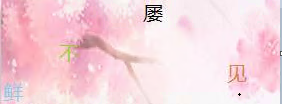
现在验证码的形式越来越丰富,今天要实现的是在点击图片中的文字来进行校验的验证码,如图

这种验证码验证是验证鼠标是否选中了图片中文字的位置,以及选择的顺序,产生验证码的时候可以提供一组底图,然后随机获取一张图片,随机选取几个字,然后把文字的顺序打乱,分别随机放到图片的一个位置上,然后记录文字的位置和顺序,验证的时候验证一下文字的位置和顺序即可
验证码图片的类
    /// <summary>

    /// 二维码图片

    /// </summary>

    public class VerCodePic

    {

        /// <summary>

        /// 图片链接

        /// </summary>

        public string PicURL { get; set; }

        /// <summary>

        /// 第一个字位置

        /// </summary>

        public FontPoint Font1 { get; set; }

        /// <summary>

        /// 第二个字位置

        /// </summary>

        public FontPoint Font2 { get; set; }

        /// <summary>

        /// 第三个字位置

        /// </summary>

        public FontPoint Font3 { get; set; }

        /// <summary>

        /// 第四个字位置

        /// </summary>

        public FontPoint Font4 { get; set; }

    }

    /// <summary>

    /// 文字位置

    /// </summary>

    public class FontPoint

    {

        public int X { get; set; }

        public int Y { get; set; }

    }
生成验证码图片验证码的方法,在这个方法中指定了生成的验证码图片中字体大小为20个像素,因为验证码底图的大小是固定的,所以就把验证码底图按照字体的大小分成了若干个网格位置,指定一个文字在图片中的位置时只需要随机获取其中一个网格即可,如果这个网格中没有指定过文字,那就把文字放到这个网格中。
提前设定网格的方法
  private static ArrayList _FontPoint;

        public static ArrayList FontPoint

        {

            get

            {

                if (_FontPoint==null)

                {

                    _FontPoint = new ArrayList();

                    for (int x=;x<;x++)

                    {

                        for (int y=;y<;y++)

                        {

                            _FontPoint.Add(new Models.FontPoint() { X = x * , Y = y *  });

                        }

                    }

                }

                return _FontPoint;

            }

        }
我选定的验证码底图为280*100的,所以按照上边的方法将图片分成了若干个网格,在下边设定一个文字位置的时候随机选取其中一个位置,而且给每个字都设定了不一样的颜色
 /// <summary>

        /// 根据文字和图片获取验证码图片

        /// </summary>

        /// <param name="content"></param>

        /// <param name="picFileName"></param>

        /// <returns></returns>

        public static VerCodePic GetVerCodePic(string content,string picFileName,int fontSize=)

        {

            ClassLoger.Info("FileHelper.GetVerCodePic","开始生成二维码");

            Bitmap bmp = new Bitmap(picFileName);

            List<int> hlist = new List<int>();

            VerCodePic codepic = new VerCodePic();

            int i = Utils.GetRandom(, SystemSet.FontPoint.Count - );

            codepic.Font1 = SystemSet.FontPoint[i] as FontPoint;

            hlist.Add(i);

            A: int i2 = Utils.GetRandom(, SystemSet.FontPoint.Count - );

            if (hlist.Contains(i2))

                goto A;

            codepic.Font2 = SystemSet.FontPoint[i2] as FontPoint;

            hlist.Add(i2);

            B: int i3 = Utils.GetRandom(, SystemSet.FontPoint.Count - );

            if (hlist.Contains(i3))

                goto B;

            hlist.Add(i3);

            codepic.Font3 = SystemSet.FontPoint[i3] as FontPoint;

            C: int i4 = Utils.GetRandom(, SystemSet.FontPoint.Count - );

            if (hlist.Contains(i4))

                goto C;

            hlist.Add(i4);

            codepic.Font4 = SystemSet.FontPoint[i4] as FontPoint;string fileName = (content + "-" + picFileName+"-"+i+"|"+i2+"|"+i3+"|"+i4).MD5()+Path.GetExtension(picFileName);

            string dir = Path.Combine(SystemSet.ResourcesPath, SystemSet.VerCodePicPath);

            string filePath = Path.Combine(dir, fileName);

            if (File.Exists(filePath))

            {

                codepic.PicURL = string.Format("{0}/{1}/{2}", SystemSet.WebResourcesSite, SystemSet.VerCodePicPath, fileName);

                return codepic;

            }

            if (!Directory.Exists(dir))

            {

                Directory.CreateDirectory(dir);

            }

            Graphics g = Graphics.FromImage(bmp);

            Font font = new Font("微软雅黑", fontSize, GraphicsUnit.Pixel);

            SolidBrush sbrush = new SolidBrush(Color.Black);

            SolidBrush sbrush1 = new SolidBrush(Color.Peru);

            SolidBrush sbrush2 = new SolidBrush(Color.YellowGreen);

            SolidBrush sbrush3 = new SolidBrush(Color.SkyBlue);

            List<char> fontlist = content.ToList();

            ClassLoger.Info("FileHelper.GetVerCodePic", fontlist.Count.ToString());

            g.DrawString(fontlist[].TryToString(), font, sbrush, new PointF(codepic.Font1.X, codepic.Font1.Y));

            g.DrawString(fontlist[].TryToString(), font, sbrush1, new PointF(codepic.Font2.X, codepic.Font2.Y));

            g.DrawString(fontlist[].TryToString(), font, sbrush2, new PointF(codepic.Font3.X, codepic.Font3.Y));

            g.DrawString(fontlist[].TryToString(), font, sbrush3, new PointF(codepic.Font4.X, codepic.Font4.Y));

            bmp.Save(filePath, ImageFormat.Jpeg);

            codepic.PicURL = string.Format("{0}/{1}/{2}",SystemSet.WebResourcesSite, SystemSet.VerCodePicPath, fileName);

            return codepic;

        }
获取图片验证码的api接口,在这个接口中从成语库中随机选取了一个成语,然后随机选取了一个图片,然后调用生成图片验证码的方法,生成了图片验证码,并且把验证码对应的信息缓存在redis中,设定缓存时间,将redis的key作为一个临时令牌随同验证码返回
 /// <summary>

        /// 获取验证码,有效时间10分钟

        /// </summary>

        /// <returns></returns>

        [HttpGet]

        [Route("vercode")]

        public JsonResult<VerCodePicViewModel> VerCodePic()

        {

            JsonResult<VerCodePicViewModel> result = new JsonResult<VerCodePicViewModel>();

            result.code = ;

            result.msg = "OK";

            try

            {

                ClassLoger.Info("VerCodePic","开始获取成语");

                cy_dictBll cybll = new cy_dictBll();

                IList<cy_dict> cylist = cybll.GetAllcy_dict();

                ClassLoger.Info("VerCodePic", cylist.Count.ToString());

                int i = Utils.GetRandom(, cylist.Count-);

                ClassLoger.Info("VerCodePic",i.ToString());

                cy_dict cy = cylist[i];

                ClassLoger.Info("VerCodePic成语:",cy.chengyu);

                VerCodePicViewModel vcvm = new VerCodePicViewModel();

                string sourcePic = FileHelper.GetVerCodePicResource();

                if (sourcePic.IsNull() || !File.Exists(sourcePic))

                {

                    sourcePic = @"E:\WebResources\images\VerCodePicSource\1.jpg";

                }

                ClassLoger.Info("VerCodePic图片",sourcePic);

                VerCodePic codepic = FileHelper.GetVerCodePic(cy.chengyu, sourcePic);

                vcvm.content = cy.chengyu;

                vcvm.MainPic = codepic.PicURL;

                result.Result = vcvm;

                string key = cookieKey();

                RedisBase.Item_Set(key, codepic);

                RedisBase.ExpireEntryAt(key,DateTime.Now.AddMinutes());

                result.ResultMsg = key;

            } catch (Exception ex)

            {

                ClassLoger.Error("AccountController.VerCodePic",ex);

                result.code = -;

                result.msg = "AccountController.VerCodePic发生异常:"+ex.Message;

            }

            return result;

        }
效果如图:
图片验证码校验接口参数结构
public class CheckPicCodeViewModel

    {

        /// <summary>

        /// 客户端令牌

        /// </summary>

        public string token { get; set; }

        public double x1 { get; set; }

        public double x2 { get; set; }

        public double x3 { get; set; }

        public double x4 { get; set; }

        public double y1 { get; set; }

        public double y2 { get; set; }

        public double y3 { get; set; }

        public double y4 { get; set; }

    }
验证码校验接口
/// <summary>

        /// 校验图片验证码是否正确

        /// </summary>

        /// <param name="piccode"></param>

        /// <returns></returns>

        [HttpPost]

        [Route("checkpiccode")]

        public async Task<IHttpActionResult> CheckPicCode([FromBody]CheckPicCodeViewModel piccode)

        {

            JsonResult<bool> result = new JsonResult<bool>();

            result.code = ;

            result.msg = "OK";

            if (piccode == null)

            {

                result.Result = false;

                result.ResultMsg = "参数错误";

                return Ok(result);

            }

            if (string.IsNullOrEmpty(piccode.token) || !RedisBase.ContainsKey(piccode.token))

            {

                result.Result = false;

                result.ResultMsg = "验证码已过期";

                return Ok(result);

            }

            result.Result = await Task.Run<bool>(() => {

                bool flag = false;

                VerCodePic codepic = RedisBase.Item_Get<VerCodePic>(piccode.token);

                if (Math.Abs(codepic.Font1.X - piccode.x1) > 0.5 || Math.Abs(codepic.Font1.Y - piccode.y1) > 0.5

                    || Math.Abs(codepic.Font2.X - piccode.x2) > 0.5 || Math.Abs(codepic.Font2.Y - piccode.y2) > 0.5

                    || Math.Abs(codepic.Font3.X - piccode.x3) > 0.5 || Math.Abs(codepic.Font3.Y - piccode.y3) > 0.5

                    || Math.Abs(codepic.Font4.X - piccode.x4) > 0.5 || Math.Abs(codepic.Font4.Y - piccode.y4) > 0.5)

                {

                    flag = false;

                    result.ResultMsg = "验证码错误";

                }

                else

                {

                    flag = true;

                    result.ResultMsg = "验证码正确";

                }

                return flag;

            });

            return Ok(result);

        }
传入用户选中的位置和顺序,并对其进行验证
项目源码地址:
https://github.com/liemei/asp.netOpenService.git
asp.net web api实现图片点击式图片验证码的更多相关文章
- 对一个前端使用AngularJS后端使用ASP.NET Web API项目的理解(4)
chsakell分享了一个前端使用AngularJS,后端使用ASP.NET Web API的项目. 源码: https://github.com/chsakell/spa-webapi-angula ...
- C#版ASP.NET Web API使用示例
为更好更快速的上手Webapi设计模式的接口开发,本文详细解释了在Web API接口的开发过程中,我们可能会碰到各种各样的问题总结了这篇,希望对大家有所帮助. 1:在接口定义中确定MVC的get或者P ...
- 在一个空ASP.NET Web项目上创建一个ASP.NET Web API 2.0应用
由于ASP.NET Web API具有与ASP.NET MVC类似的编程方式,再加上目前市面上专门介绍ASP.NET Web API 的书籍少之又少(我们看到的相关内容往往是某本介绍ASP.NET M ...
- ASP.NET Core 中文文档 第二章 指南 (09) 使用 Swagger 生成 ASP.NET Web API 在线帮助测试文档
原文:ASP.NET Web API Help Pages using Swagger 作者:Shayne Boyer 翻译:谢炀(kiler) 翻译:许登洋(Seay) 对于开发人员来说,构建一个消 ...
- asp.net web api 的版本升级到 2.2的记录
asp.net web api 的版本 升级到 2.2的记录 asp.net web api 2.2相比1.0提升了不少 而且其中最重要的就是有了在线文档的自动字段注释的功能 再也不用写详细的字段说明 ...
- 使用ASP.NET Web API Help Pages 创建在线接口文档
操作步骤 1.新建Web API项目 2.在项目Areas文件夹下找到以下文件,取消注释图中代码. 3.右键解决方案,属性,如图设置. 4.运行程序,点击右上角API 接口列表: 详情-无参数: 详情 ...
- 初试ASP.NET Web API/MVC API(附Demo)
写在前面 HTTP RESTful 创建Web API 调用Web API 运行截图及Demo下载 ASP.NET Web API是一个框架,可以很容易构建达成了广泛的HTTP服务客户端,包括浏览 ...
- ASP.NET Web API 2 入门
本文参考:http://www.asp.net/web-api/overview/getting-started-with-aspnet-web-api/tutorial-your-first-web ...
- 旅图beta版 asp.net web api 单元测试
旅图 beta版 asp.net web api 单元测试 测试接口:http://120.27.7.115:1010/Help 测试目的 对每个接口单元进行测试,保证每个接口的可靠性. 单元描述 注 ...
随机推荐
- 字符型SQL注入
字符型SQL注入 很早就基于DVWA实现了字符型的SQL注入,但是一直感觉自己没有理解的特别清楚,这次又看了一下网上的一些讲解,试着总结一下.以下是我的一写浅薄见解,请大家批判着看. 基本原理 看 ...
- Swiper使用方法
Swiper使用方法 1.首先加载插件,需要用到的文件有swiper.min.js和swiper.min.css文件. <!DOCTYPE html> <html> <h ...
- spring、spring mvc、mybatis框架整合基本知识
学习了一个多月的框架知识了,这两天很想将它整合一下.网上看了很多整合案例,基本都是基于Eclipse的,但现在外面公司基本都在用Intellij IDEA了,所以结合所学知识,自己做了个总结,有不足之 ...
- HTML5的article和section的区别
内容区块是指将HTML页面按逻辑分割后的单位.对于页面网站来说,导航菜单.文章正文.文章的评论等每一个部分都可称为内容区块. article元素 article元素代表文档.页面或 ...
- Android ViewPager动画切换
使用方法 setPageTransformer 例如: ViewPager.setPageTransformer(true, new ZoomOutPageTransformer()) package ...
- Js调用exe程序方法(通过URL Protocol实现网页调用本地应用程序)
1.使用记事本(或其他文本编辑器)创建一个protocal.reg文件,并写入以下内容 Windows Registry Editor Version 5.00 [HKEY_CLASSES_ROO ...
- grep与正则表达式
grep的作用:文本搜索工具,根据用户指定的"模式"对目标文件逐行进行匹配检查:打印匹配到的行. 模式:正则表达式编写的过滤条件. 正则表达式(REGEXP):由一类特殊字符及文本 ...
- W10上面DOSBOX安装
第一步:下载好MASM.exe.debug.exe.link.exe.将其放在根目录下面.我们以后自己编写的汇编代码也是在此目录下.如图: 第二步:我这里的文件夹名称是Assembly那么这个也就是待 ...
- Mongodb安装启动详解
最近在倒腾node+mongodb,安装mongodb的时候开始遇到很多问题,然后折腾了好几次,直到可以很顺利完成安装 ,所以把安装的过程记录下来. 线上系统基本上都是linux的,所以只安装了lin ...
- JAVA IO中的设计模式
在java语言 I/O库的设计中,使用了两个结构模式,即装饰模式和适配器模式. 在任何一种计算机语言中,输入/输出都是一个很重要的部分.与一般的计算机语言相比,java将输入/输出的功能和 ...